KTC 32 inch Curved Gaming Review: Who It Fits and Who Should Skip It
As an Amazon Associate we earn from qualifying purchases. Links on this page are affiliate links.
This ktc 32 inch curved gaming review focuses on the KTC H32S17. It is a 32-inch curved display with a 2560 x 1440 resolution. The panel uses HVA technology for deep contrast. It runs at 180Hz with 1ms MPRT response time. This combination targets fast-paced gaming. You get a wide viewing angle and smooth motion. The 1500R curve wraps around your field of view. These two specs define the experience: high refresh rate and sharp 1440p clarity. It is built for PC gamers who want immersion without sacrificing speed.
What stands out
- 180Hz refresh rate with 1ms MPRT response time
- 2560 x 1440 resolution on a 32-inch HVA panel
- 1500R curved screen for immersive gameplay
- FreeSync Premium and G-SYNC compatible adaptive sync
- 120% sRGB color gamut with HDR10 support
Who it fits
Good fit for
This monitor suits competitive FPS players who need high refresh rates. The 180Hz rate and 1ms MPRT help reduce motion blur. Gamers who prefer curved screens will appreciate the 1500R design. It also fits users who want vibrant colors, thanks to the 120% sRGB coverage. The included game tools like crosshairs and Black eQualizer aid in spotting enemies. If you play on PC with a compatible GPU, this setup delivers smooth visuals.
Who should skip it
You should skip this if you need a 4K resolution. The 1440p panel may look pixelated on a 32-inch screen at close range. It lacks a built-in USB hub or KVM switch for multi-device setups. The stand only offers tilt adjustment, not height or swivel. If you require a flat screen, this 1500R curve is not for you. Also, avoid it if you need a monitor with a built-in webcam or speakers.
Verdict: The KTC H32S17 delivers strong gaming performance with its 180Hz rate and 1440p resolution. It is a solid choice for curved-screen enthusiasts who prioritize speed and color.
Key specs explained
Panel Type: HVA
HVA panels offer high contrast ratios, making blacks look deeper and more solid. This is useful for gaming in dark scenes or watching movies at night. You will notice better image depth compared to standard IPS panels. The trade-off is slightly slower pixel transitions, but the visual immersion is stronger for most media consumption.
Resolution: 2560 x 1440
This 1440p resolution provides sharp details on a 32-inch screen. It offers more workspace and clearer text than 1080p, while requiring less GPU power than 4K. You get a balanced mix of clarity and performance. It is ideal for gaming and productivity without demanding top-tier hardware to drive it smoothly.
Refresh Rate: 180Hz
A 180Hz refresh rate displays 180 frames per second, making motion appear smoother than standard 60Hz or 144Hz screens. This reduces stutter in fast-paced games. You benefit from quicker visual feedback in shooters or racing titles. It is a significant upgrade for competitive gaming, offering a fluid experience that feels more responsive.
Response Time: 1ms MPRT
MPRT stands for Motion Picture Response Time. It uses backlight strobing to reduce perceived motion blur. This helps you track moving objects clearly in high-speed games. It is different from gray-to-gray response times. You get cleaner visuals during rapid camera pans or character movements, enhancing your situational awareness in action games.
Sync Technology: Adaptive Sync, FreeSync Premium, G-SYNC
These technologies synchronize the monitor's refresh rate with your GPU's frame output. This prevents screen tearing and stuttering. FreeSync Premium and G-SYNC compatibility ensure smooth gameplay across different hardware brands. You get a consistent visual experience without artifacts. This is essential for maintaining immersion and competitive fairness in modern gaming setups.
Design and build quality
According to the listing, the KTC H32S17 measures 27.6 inches in width, 11.8 inches in height, and 23.6 inches in depth. It weighs 13.2 pounds. These dimensions indicate a substantial footprint for your desk. The 32-inch screen size requires adequate space. You should ensure your surface can support this weight without sagging. The listing notes the color is black. This finish is standard for gaming monitors and helps reduce visual distraction during play.
The stand allows tilt adjustment from -5° to 15°. This range lets you angle the screen for comfort. If you need more flexibility, the monitor supports VESA mounting with a 3.9 by 3.9-inch pattern. This option lets you use a third-party arm. You can position the display at eye level or adjust the distance as needed. The listing highlights ergonomic design as a key feature. This suggests the base is built for stability during long sessions.
Connectivity options include HDMI, DisplayPort, USB, an earphone jack, and DC ports. These interfaces provide ample choices for your setup. You can connect multiple devices without swapping cables frequently. The layout is practical for gamers who use peripherals alongside their PC. The physical build focuses on function rather than flashy aesthetics. The materials and dimensions align with a standard gaming monitor profile. You get a stable base for a large, high-refresh display.
Setup and everyday use guide
Setting up the KTC H32S17 involves connecting it to your PC or console via the available HDMI or DisplayPort inputs. The listing notes additional USB, earphone jack, and DC ports for enhanced connectivity options. You can adjust the viewing angle using the tilt function, which ranges from -5° to 15°. If you prefer a different desk height, the monitor supports VESA mounting with a 3.9 x 3.9 inch pattern. This flexibility allows you to position the screen comfortably for long sessions. The 1500R curvature is designed to wrap around your field of view, which can reduce eye strain during extended gaming or work periods. The 2560 x 1440 resolution on a 32-inch panel provides clear detail for both text and visuals. For gaming, the 180Hz refresh rate and 1ms MPRT response time aim to deliver smooth motion. The inclusion of Adaptive Sync, FreeSync Premium, and G-SYNC compatibility helps synchronize the display with your graphics card to minimize screen tearing. You can also utilize the GamePlus features, such as crosshairs for FPS accuracy and Black eQualizer to brighten dark areas. The 120% sRGB color gamut and HDR10 support enhance visual vibrancy for media consumption. This monitor suits users who want a versatile display for gaming, office work, and design tasks. The ergonomic adjustments and mounting options ensure it fits various desk setups. You will need adequate space for its 27.6-inch width and 13.2-pound weight. Overall, the setup is straightforward, and the features support daily use for both productivity and entertainment.
Before You Buy This Monitor
This 32-inch curved display requires a spacious desk. Its width measures 27.6 inches, so ensure you have adequate room. Check your PC’s output ports for HDMI or DisplayPort compatibility. The listing confirms support for both FreeSync Premium and G-SYNC, but verify your GPU supports these adaptive sync technologies to avoid screen tearing. You may need a sturdy VESA mount, as the base only offers tilt adjustment from -5° to 15°. The HVA panel delivers deep blacks, making it suitable for dark gaming environments. However, VA panels can exhibit slower pixel response times in extreme cases. This monitor fits well among other 1440p options if you prioritize immersion over ultra-wide aspect ratios. It is not an ultrawide, so do not expect the same horizontal field of view. Keep the screen clean with a microfiber cloth. Avoid harsh chemicals. Regular maintenance ensures longevity. Consider your typical gaming genres. Fast shooters benefit from the 180Hz refresh rate. Strategy games may not need such high speeds. This model targets competitive players who value smooth motion.
Check before you buy
- Verify GPU supports FreeSync Premium or G-SYNC for adaptive sync
- Ensure desk space accommodates 27.6 inch width
- Confirm HDMI or DisplayPort availability on your source device
- Consider purchasing a VESA mount for better viewing angles
The product at a glance
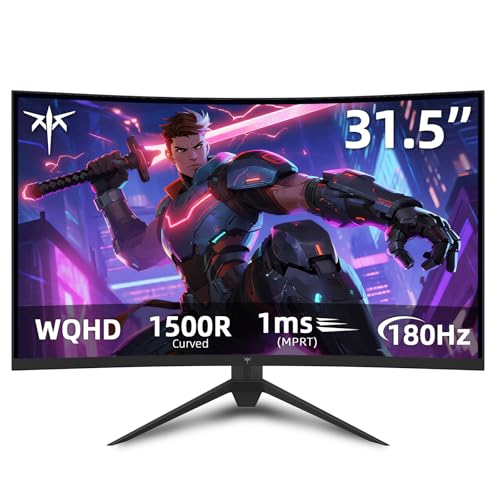
KTC 32-Inch 1440p Curved Gaming Monitor
Best for: high-refresh curved 1440p PC gaming
- Screen Size
- 32"
- Resolution
- 2560 x 1440
- Refresh Rate
- 180Hz
- Panel Type
- HVA
- Response Time
- 1ms MPRT
- Sync Technology
- Adaptive Sync, FreeSync Premium, G-SYNC
View on Amazon: KTC 32-Inch 1440p Curved Gaming Monitor Affiliate link
The KTC 32-Inch Curved 180Hz Gaming Monitor combines a 1500R curved HVA panel with 2560 x 1440 resolution. You get a 180Hz refresh rate, 1ms MPRT response time, and Adaptive Sync support for smooth motion. It suits you if you want high-refresh QHD gaming on an expansive curved display with wide color coverage.
Pros
- 2560 x 1440 resolution on a 1500R curved HVA panel
- 180Hz refresh rate with Adaptive Sync and FreeSync Premium
- 120% sRGB color gamut with HDR10 support
- 1ms MPRT response time for reduced motion blur
Cons
- Ergonomics limited to tilt adjustment between -5° and 15°
- No built-in speakers listed in specifications
Good fit if
- You want a 32-inch 1440p curved screen running at up to 180Hz.
- You use Adaptive Sync or FreeSync Premium for tear-free frames.
Skip if
- You need height, swivel, or pivot adjustments on the stock stand.
- You require integrated speakers rather than an earphone jack.
Verdict: KTC 32-Inch Curved 180Hz Gaming Monitor delivers fast 1440p performance for curved-screen PC players who mount their display or do not need stand height adjustment.
Specifications side by side
| Spec | KTC 32-Inch 1440p Curved Gaming Monitor |
|---|---|
| Screen Size | 32" |
| Resolution | 2560 x 1440 |
| Refresh Rate | 180Hz |
| Panel Type | HVA |
| Response Time | 1ms MPRT |
| Sync Technology | Adaptive Sync, FreeSync Premium, G-SYNC |
| Connectivity | HDMI, DisplayPort, USB |
| Size | 32 Inch |
| Dimensions | 27.6 × 23.6 × 11.8 inches |
| Weight | 13.2 pounds |
| Color | black |
| Model | H32S17 |
Frequently asked questions
Is the KTC 32-inch curved monitor good for PS5 gaming?
Yes, it works well for console gaming. The 1440p resolution and 180Hz refresh rate provide smooth visuals. It supports FreeSync technology to reduce screen tearing. You can connect your PS5 via HDMI for a seamless experience. The curved VA panel enhances immersion in open-world games.
Does this monitor support G-Sync compatibility?
Yes, the listing confirms support for G-SYNC. It also features FreeSync Premium technology. This allows you to use adaptive sync with NVIDIA graphics cards. The 1ms MPRT response time helps minimize ghosting. This combination ensures smoother gameplay in fast-paced titles.
How deep is the curve on this display?
The monitor features a curved design for better immersion. While the exact radius is not listed, the curvature wraps around your field of view. This design helps reduce eye strain during long sessions. The 32-inch size combined with the curve creates a more engaging visual experience for gaming.
What connectivity ports does the KTC H32S17 have?
It includes DisplayPort and HDMI inputs. You can also find USB ports, an earphone jack, and a DC power input. These options allow you to connect various devices. You can plug in peripherals directly into the monitor. This setup simplifies cable management on your desk.
Is the stand adjustable for height and tilt?
The listing notes that you can adjust the viewing angle. It does not explicitly mention height adjustment or swivel capabilities. The base provides a stable foundation for the 32-inch screen. You may need a monitor arm if you require extensive ergonomic adjustments beyond the standard tilt.
Does this monitor have built-in speakers?
The connectivity section lists an earphone jack but does not mention built-in speakers. You will likely need external audio devices. You can connect headphones or a soundbar via the audio output. This keeps the monitor focused on visual performance without adding bulk.
Is the 32-inch size too large for a desk?
The monitor is 27.6 inches wide and weighs 13.2 pounds. This requires a spacious desk to accommodate its footprint. The 32-inch screen size is ideal for immersive gaming. Ensure you have adequate space for comfortable viewing distances. It is best suited for larger workspaces.