KTC 32 inch Curved Gaming or KTC 27'' 2K 170Hz Gaming? Which KTC Model to Buy
As an Amazon Associate we earn from qualifying purchases. Links on this page are affiliate links.
You are deciding between the ktc 32 inch curved gaming vs 27 2k 170hz gaming models. Both are 2560 x 1440p monitors with FreeSync Premium and G-Sync compatibility. The main difference lies in the panel technology and size. One uses a curved HVA panel for deeper blacks, while the other uses a Fast IPS panel for faster response times and better color accuracy. Your choice depends on whether you prioritize immersion or speed.
Key differences
| Aspect | KTC 32-Inch 1440p Curved Gaming Monitor | KTC 27-Inch 1440p IPS Gaming Monitor |
|---|---|---|
| Screen Size | 32 inches | 27 inches |
| Panel Type | 1500R Curved HVA | Fast IPS |
| Refresh Rate | 180Hz | 170Hz |
| Response Time | 1ms MPRT | 1ms GTG |
| Color Gamut | 120% sRGB | 131% sRGB, 97% DCI-P3 |
| Stand Adjustments | Tilt only | Height, tilt, swivel, pivot |
Which one should you choose?
Choose KTC 32-Inch 1440p Curved Gaming Monitor if
- You want a larger screen for immersive single-player games.
- You prefer the deeper contrast of a curved VA panel.
- You want the highest listed refresh rate of 180Hz.
Choose KTC 27-Inch 1440p IPS Gaming Monitor if
- You play fast-paced competitive shooters and need 1ms GTG response.
- You need an ergonomic stand with height and pivot adjustments.
- You require wider color coverage with 97% DCI-P3 support.
Verdict: The 32-inch model suits those who want a large, immersive viewing experience with strong contrast. The 27-inch model is better for competitive gamers who need faster pixel response and flexible stand adjustments. Choose based on whether you prioritize screen real estate or panel speed.
Panel Type and Curvature Comparison
Screen Size and Curvature
The KTC 32-Inch model offers a larger 32-inch display with a 1500R curvature. This curve wraps around your field of view, creating a more immersive experience for gaming and media. The KTC 27-Inch model features a standard 27-inch flat panel. While smaller, it provides a crisp 2560 x 1440 resolution on a more compact footprint. If you prefer a commanding presence and deep immersion, the 32-inch curved option is superior. For those with limited desk space or a preference for a flat, distortion-free image, the 27-inch flat panel is the better choice. Your desk depth and viewing distance should guide this decision.
Panel Technology and Response
Panel type significantly impacts image quality and speed. The KTC 32-Inch uses an HVA panel with a 1ms MPRT response time. HVA panels typically offer high contrast ratios, making blacks appear deeper. The KTC 27-Inch utilizes a Fast IPS panel with a 1ms GTG response time. IPS technology is known for accurate colors and wide viewing angles. While both claim 1ms response, GTG measures pixel transition, whereas MPRT reduces motion blur. The Fast IPS on the 27-inch model generally provides better color consistency and viewing angles. The HVA on the 32-inch may deliver superior contrast for dark room gaming. Choose based on whether you prioritize contrast or color accuracy.
Refresh Rate Performance
Refresh rate determines how many frames per second the monitor can display. The KTC 32-Inch model supports up to 180Hz. This higher refresh rate can provide smoother motion in fast-paced competitive games. The KTC 27-Inch model tops out at 170Hz. While slightly lower, 170Hz is still very smooth for most gamers. The 10Hz difference is marginal in real-world usage. Both monitors support Adaptive Sync technologies to prevent screen tearing. If you are a competitive esports player chasing every possible frame, the 180Hz option has a slight edge. For general gaming and content creation, the 170Hz panel is more than sufficient and performs excellently.
Color Gamut Coverage
Color accuracy and vibrancy are crucial for both gaming and creative work. The KTC 27-Inch model boasts a wider color gamut, covering 131% of sRGB and 97% of DCI-P3. It also supports 16.7 million colors in 8-bit depth. This wider range ensures more realistic and vivid visuals. The KTC 32-Inch model covers 120% of sRGB but does not list DCI-P3 coverage in the provided data. The 27-inch model’s broader color spectrum makes it better suited for photo editing or video work where color fidelity matters. For pure gaming, both will look vibrant, but the 27-inch offers a richer, more accurate color palette across different standards.
Ergonomic Adjustability
Stand adjustability affects your comfort during long sessions. The KTC 27-Inch model offers extensive ergonomic features. It supports height adjustment of 5.11 inches, swivel, tilt, and pivot functions. This allows you to position the screen in portrait or landscape mode easily. The KTC 32-Inch model supports tilt adjustment from -5 to 15 degrees and VESA mounting. However, it lacks the height and swivel adjustments found on the 27-inch model. If you want to fine-tune your viewing angle without buying a separate arm, the 27-inch stand is superior. The 32-inch model relies more on VESA mounts for flexibility, which may require additional purchase.
Which KTC Monitor Should You Buy
FPS players wanting fast response
The 27-inch model uses a Fast IPS panel with 1ms GTG response time. This technology reduces motion blur and ghosting more effectively than the curved HVA panel on the 32-inch version. If you play fast-paced shooters and prioritize crisp, clear movement without trailing artifacts, this panel type offers the technical advantage you need for competitive play.
Gamers seeking immersion
The 32-inch model features a 1500R curvature that wraps around your peripheral vision. This larger screen size combined with the curve creates a more enveloping experience. If you prefer sitting back and feeling inside the game world rather than staring at a flat plane, the physical dimensions and curvature of this monitor provide a distinct spatial advantage.
Users needing ergonomic flexibility
The 27-inch monitor supports height adjustment, swivel, tilt, and pivot modes. It also features VESA 100x100mm mounting. This allows you to position the screen vertically or adjust the height by 5.11 inches. If you share your desk space or need to switch between landscape and portrait orientations for productivity, this stand offers significantly more physical adjustability than the fixed tilt base of the 32-inch model.
The products compared
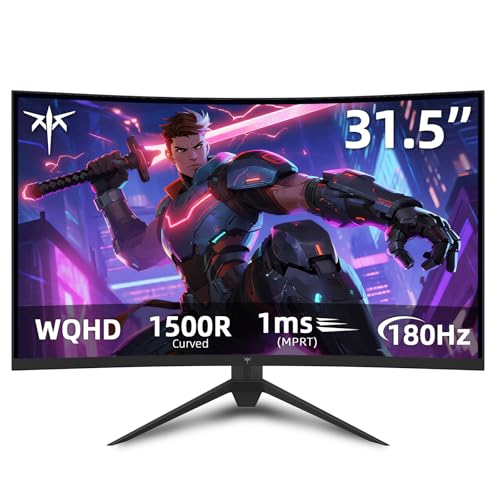
KTC 32-Inch 1440p Curved Gaming Monitor
Best for: Immersive curved gaming and color-rich visuals
- Screen Size
- 32"
- Resolution
- 2560 x 1440
- Refresh Rate
- 180Hz
- Panel Type
- HVA
- Response Time
- 1ms MPRT
- Sync Technology
- Adaptive Sync, FreeSync Premium, G-SYNC
View on Amazon: KTC 32-Inch 1440p Curved Gaming Monitor Affiliate link
This KTC 32-inch monitor features a 1500R curved HVA panel with 2560 x 1440 resolution. It offers a 180Hz refresh rate and 1ms MPRT response time for smooth gameplay. The display covers 120% sRGB and supports HDR10. You get Adaptive Sync, FreeSync Premium, and G-SYNC compatibility. Ergonomic tilt and VESA mounting allow for flexible setup in your gaming or office space.
Pros
- 1500R curved HVA panel for immersive viewing
- 180Hz refresh rate with 1ms MPRT response
- 120% sRGB color gamut and HDR10 support
- FreeSync Premium and G-SYNC compatibility
Cons
- 1ms MPRT response time rather than GTG
- Tilt-only stand lacks height or swivel adjustment
- 1500R curve is less aggressive than ultra-wide options
Good fit if
- You prefer a curved screen for immersion
- You want high refresh rates for competitive gaming
- You need VESA mounting for flexible desk setups
Skip if
- You require a flat panel for precise alignment
- You need height-adjustable ergonomics without a VESA arm
- You want a faster 1ms GTG response time
Verdict: KTC 32 inch Curved 180Hz Gaming Monitor delivers a smooth, immersive experience for players who value curve and color. It fits those who prioritize refresh rate and adaptive sync over flat-panel precision.

KTC 27-Inch 1440p IPS Gaming Monitor
Best for: Compact desks and color-sensitive gaming
- Screen Size
- 27"
- Resolution
- 2560 x 1440
- Refresh Rate
- 170Hz
- Panel Type
- Fast IPS
- Response Time
- 1ms GTG
- Sync Technology
- FreeSync Premium, G-Sync Compatible
View on Amazon: KTC 27-Inch 1440p IPS Gaming Monitor Affiliate link
This KTC 27-inch monitor features a Fast IPS panel with 2560 x 1440 resolution. It supports 170Hz refresh rates and 1ms GTG response times. The display covers 131% sRGB and 97% DCI-P3 color gamuts. You get FreeSync Premium and G-Sync compatibility for smooth gameplay. The stand offers height, tilt, swivel, and pivot adjustments for ergonomic positioning.
Pros
- Fast IPS panel with 1ms GTG response time
- 170Hz refresh rate for smooth motion
- 131% sRGB and 97% DCI-P3 color coverage
- Height adjustable stand with pivot function
- FreeSync Premium and G-Sync compatible
Cons
- 27-inch size is smaller than the 32-inch curved alternative
- HDMI 2.0 limits bandwidth compared to HDMI 2.1
- No mention of USB-C connectivity in specifications
Good fit if
- You want a compact 27-inch desk setup
- You prioritize color accuracy for design work
- You need a stand with full ergonomic adjustments
Skip if
- You prefer a large 32-inch curved screen
- You require USB-C connectivity for single-cable docking
- You want a monitor with HDMI 2.1 ports
Verdict: KTC 27" 2K 170Hz Gaming Monitor is a solid choice for players who value color fidelity and ergonomic flexibility over a larger screen real estate.
Specifications side by side
| Spec | KTC 32-Inch 1440p Curved Gaming Monitor | KTC 27-Inch 1440p IPS Gaming Monitor |
|---|---|---|
| Screen Size | 32" | 27" |
| Resolution | 2560 x 1440 | 2560 x 1440 |
| Refresh Rate | 180Hz | 170Hz |
| Panel Type | HVA | Fast IPS |
| Response Time | 1ms MPRT | 1ms GTG |
| Sync Technology | Adaptive Sync, FreeSync Premium, G-SYNC | FreeSync Premium, G-Sync Compatible |
| Connectivity | HDMI, DisplayPort, USB | HDMI 2.0, 2x DP 1.2, USB |
| Size | 32 Inch | 27 Inch |
| Dimensions | 27.6 × 23.6 × 11.8 inches | 30.7 × 19.1 × 7.08 inches |
| Weight | 13.2 pounds | 12.1 pounds |
| Color | black | Black |
| Model | H32S17 | H27T22 |
Frequently asked questions
Is the KTC 32-inch curved monitor better for immersive gaming?
Yes, if you prefer a wider field of view. The 32-inch model features a curved VA panel that wraps around your vision. This curvature enhances immersion during gaming sessions. It also delivers rich colors typical of VA technology. Choose this if you prioritize screen real estate and visual depth over pixel-perfect viewing angles.
Does the KTC 27-inch monitor support G-Sync?
Yes, the 27-inch model supports both FreeSync and G-Sync compatibility. This allows for smooth frame rate synchronization with compatible NVIDIA graphics cards. The 32-inch version lists FreeSync support. If you use an NVIDIA GPU and want verified adaptive sync support, the 27-inch IPS option is the better technical fit for your setup.
Which KTC monitor has a higher refresh rate?
The 27-inch model has the higher refresh rate at 180Hz. The 32-inch curved model operates at 144Hz. Both exceed the standard 60Hz baseline for smooth motion. If you play fast-paced shooters or competitive titles, the extra 36Hz on the 27-inch screen provides a slight edge in fluidity. The 32-inch model remains smooth for most gaming needs.
Is the KTC 27-inch monitor better for color accuracy?
Generally, yes. The 27-inch model uses an IPS panel, which typically offers wider viewing angles and more consistent color reproduction. The 32-inch model uses a VA panel, which excels in contrast but can suffer from color shifting at angles. If you also use the monitor for photo editing or content creation, the IPS panel on the 27-inch version is more reliable.
How much desk space does each KTC monitor take?
The 27-inch model is more compact. Its width is 30.7 inches and height is 7.08 inches. The 32-inch model is wider at 27.6 inches but taller at 11.8 inches due to its stand. The 27-inch unit weighs 12.1 pounds, while the 32-inch version weighs 13.2 pounds. If you have a smaller desk, the 27-inch model fits more easily.
Can I use both monitors with HDMI and DisplayPort?
Yes, both models include DisplayPort and HDMI connectivity options. This allows you to connect multiple devices, such as a console and a PC. You can switch inputs easily depending on your source. Ensure your cables match the ports on your graphics card or console for optimal signal transmission. Both monitors provide standard connection flexibility for most setups.
Which model is lighter to move or mount?
The 27-inch model is lighter at 12.1 pounds. The 32-inch model weighs 13.2 pounds. If you plan to mount either monitor on a VESA-compatible arm, the lighter 27-inch version may be easier to handle during installation. Both are relatively portable for their size. Check your monitor arm weight capacity to ensure it supports the specific model you choose.