LG 32" Curved 100Hz FHD Review: Specs, Pros and Cons
As an Amazon Associate we earn from qualifying purchases. Links on this page are affiliate links.
This lg 32mr50c b curved monitor 32 inch review focuses on an entry-level display designed for everyday tasks and casual gaming. The LG 32MR50C-B features a 32-inch VA panel with a 1920x1080 resolution. Its defining specifications are a 100Hz refresh rate and AMD FreeSync support. These specs aim to reduce motion blur and stuttering during streaming or light gameplay. The monitor includes a curved screen for comfortable viewing and an ergonomic stand that adjusts tilt. It connects via HDMI and offers features like Black Stabilizer for dark scenes. This setup targets users who need a large, affordable screen for general use.
What stands out
- 100Hz refresh rate reduces motion blur for smoother video and casual games
- AMD FreeSync technology ensures fluid movement in fast-paced titles
- 32-inch curved VA panel with 1920x1080 resolution for immersive viewing
- Black Stabilizer feature brightens dark areas to reveal hidden details
- Ergonomic stand allows tilt adjustment for comfortable reading positions
Who it fits
Good fit for
You should consider this monitor if you need a large screen for office work or casual entertainment. The 100Hz refresh rate and FreeSync support make it suitable for light gaming where smooth motion matters. The curved design and Reader Mode help reduce eye strain during long sessions. It fits well on desks that have space for a 32-inch display. If you primarily watch movies, browse the web, or play older games, this FHD panel provides enough clarity for a comfortable experience without requiring high-end hardware.
Who should skip it
Skip this model if you require high-resolution visuals for professional design work. The 1920x1080 resolution on a 32-inch screen results in a lower pixel density than 1440p or 4K options. This can make text appear less sharp if you sit close to the screen. It also lacks USB-C connectivity, limiting your connection options to HDMI. If you play competitive esports titles, the 100Hz rate may feel slow compared to 144Hz or higher refresh rates. Users needing VESA mount compatibility or height-adjustable stands will not find those features in this specific listing.
Verdict: This monitor offers a large, curved display with smooth motion for casual users. It is a practical choice for basic gaming and media consumption.
LG 32MR50C Key Specs Explained
Resolution: 1920x1080
This Full HD pixel count defines the image sharpness on the 32-inch panel. While clear for office work and streaming, the pixel density is lower than ultrawide displays. You may notice softer edges during detailed tasks compared to higher resolution panels. This resolution suits casual users who prioritize screen real estate over pixel-perfect clarity for professional design work or high-end gaming.
Screen Size: 32-Inch
The 32-inch diagonal measurement provides a large viewing area for multitasking. This size allows you to place multiple windows side by side comfortably. It offers a more immersive experience for media consumption than smaller monitors. When shopping, consider your desk depth, as larger screens require more space to maintain a comfortable viewing distance without straining your neck.
Refresh Rate: 100Hz
A 100Hz refresh rate updates the image 100 times per second. This is faster than the standard 60Hz found on many basic monitors, resulting in smoother motion for video playback and casual gaming. It reduces stuttering during fast-moving scenes. For competitive gamers, higher rates exist, but this rate provides a noticeable upgrade for everyday fluidity and visual comfort.
Sync Technology: AMD FreeSync
AMD FreeSync synchronizes the monitor's refresh rate with the graphics card's frame output. This eliminates screen tearing and reduces stuttering during gameplay. It ensures smoother visuals when frame rates fluctuate. This feature is essential for gamers using AMD GPUs. If you use NVIDIA cards, verify compatibility, as this specific technology is optimized for AMD hardware to prevent visual artifacts.
Design and Build Overview
The monitor arrives in a black finish, according to the listing. The physical dimensions are 27.9 inches in width, 20.2 inches in height, and 9.2 inches in length. The unit weighs 11.3 pounds. This mass suggests a stable base that resists tipping, which is practical for a 32-inch panel. The size requires a desk with sufficient depth to maintain a comfortable viewing distance. You need space for the stand footprint and clearance for the curved screen.
The stand offers tilt adjustment, allowing you to angle the display for your eye level. This ergonomic feature helps reduce neck strain during long sessions. There is no mention of height or swivel adjustment in the published specifications. You must position the monitor correctly from the start. The curved VA panel design wraps your field of view, which can enhance immersion for casual gaming and media consumption.
Controls are managed through an on-screen interface. You can customize the workspace by splitting the display or adjusting basic options with mouse clicks. This method keeps the physical front of the monitor clean. There are no visible buttons or joysticks mentioned in the data. The simplicity of the design suits users who prefer minimal clutter on their desk. The build focuses on functionality rather than complex hardware controls.
Setup And Daily Use Guide
Setting up this display is straightforward. You connect the monitor to your source device using the available HDMI port. The ergonomic stand allows you to adjust the tilt angle. This flexibility lets you position the screen at a comfortable viewing height without needing complex assembly. The physical footprint is substantial, measuring 27.9 inches wide and weighing 11.3 pounds. You should ensure your desk can support this mass. The stand design prioritizes stability over height adjustment or swivel capabilities. For daily use, the 100Hz refresh rate changes how motion appears on screen. Standard 60Hz displays show more motion blur. This higher rate reduces stuttering during video playback and casual gaming. AMD FreeSync further smooths visuals by synchronizing the refresh rate with the graphics card output. This prevents screen tearing in fast-paced scenes. The OnScreen Control feature simplifies interface management. You can customize the workspace by splitting the display or adjusting basic settings through mouse clicks. This removes the need to navigate physical buttons. Reader Mode reduces blue light emission. This feature optimizes conditions for long reading sessions or text-heavy work. Black Stabilizer enhances visibility in dark areas of the image. It brightens shadowed details, which is useful for spotting enemies in low-light game environments. The 1920x1080 resolution provides clear images for general tasks. It is suitable for office work and media consumption. The curved VA panel offers wider viewing angles and deeper blacks compared to standard IPS panels. This curvature helps maintain consistent color and contrast across the screen. You will find this monitor well-suited for users who need a large, clear display for productivity and light entertainment.
Before You Buy This LG Monitor
You need to verify your PC or console has an available HDMI port, as this model does not list DisplayPort or USB-C connectivity. This limits its use with some modern laptops that rely on USB-C video output. You should also check your desk depth. The 27.9-inch width requires ample space, especially if you plan to place it centrally. The included stand allows tilt adjustments but lacks height or swivel controls. You may want to purchase a VESA-compatible monitor arm if you need more ergonomic flexibility for long sessions. This display is an entry-level option for casual gaming and office work. It does not compete with high-refresh-rate ultrawide monitors designed for competitive esports or immersive productivity. If you need higher pixel density or wider aspect ratios, this 1080p panel will feel less sharp. Ensure your graphics card supports AMD FreeSync for the smoothest experience, as the refresh rate relies on this sync technology to reduce tearing during gameplay.
Check before you buy
- Confirm your device has an HDMI port for connection.
- Check desk width for the 27.9-inch monitor footprint.
- Verify your GPU supports AMD FreeSync for smooth play.
- Consider buying a VESA arm for better ergonomics.
The product at a glance
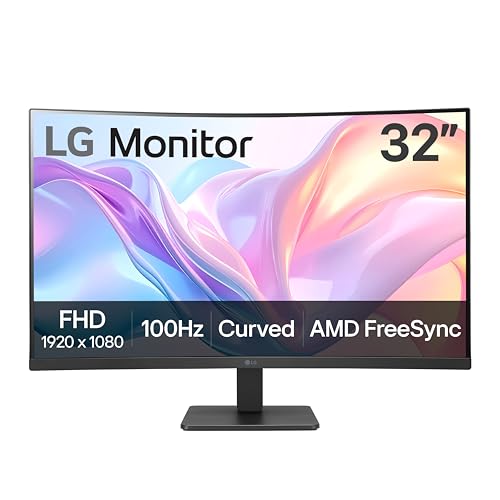
LG 32" Curved 100Hz FHD Monitor
Best for: Casual gaming and general office tasks
- Screen Size
- 32-Inch
- Resolution
- 1920x1080
- Refresh Rate
- 100Hz
- Sync Technology
- AMD FreeSync
- Connectivity
- HDMI
- Dimensions
- 9.2 × 27.9 × 20.2 inches
View on Amazon: LG 32" Curved 100Hz FHD Monitor Affiliate link
This LG 32MR50C-B is a 32-inch curved monitor with Full HD resolution. It features a 100Hz refresh rate and AMD FreeSync for smoother motion. The stand allows tilt adjustment for better ergonomics. You will appreciate the Reader Mode for reduced blue light during long sessions. Black Stabilizer brightens dark game scenes. This setup suits casual gamers and office users who want a large screen without high-end specs.
Pros
- 32-inch curved VA panel for immersive viewing
- 100Hz refresh rate reduces motion blur
- AMD FreeSync prevents screen tearing
- Black Stabilizer enhances visibility in dark scenes
- Tilt-adjustable ergonomic stand
Cons
- Full HD resolution on a 32-inch screen results in lower pixel density
- Only HDMI connectivity available
- No USB-C or DisplayPort listed
Good fit if
- You want a large screen for casual gaming
- You need a budget-friendly curved display
- You prefer tilt-adjustable ergonomics
Skip if
- You require 4K resolution
- You need multiple input ports like DisplayPort
- You want high refresh rates above 100Hz
Verdict: LG 32MR50C 32-inch 100Hz Curved Monitor fits casual gamers and office workers who prioritize screen size over sharpness. It delivers solid motion handling for its price tier.
Specifications side by side
| Spec | LG 32" Curved 100Hz FHD Monitor |
|---|---|
| Screen Size | 32-Inch |
| Resolution | 1920x1080 |
| Refresh Rate | 100Hz |
| Sync Technology | AMD FreeSync |
| Connectivity | HDMI |
| Dimensions | 9.2 × 27.9 × 20.2 inches |
| Weight | 11.3 pounds |
| Color | Black |
| Model | 32MR50C-B.AUSQ |
Frequently asked questions
Is the LG 32MR50C good for casual gaming?
Yes, it is suitable for casual gaming. The 100Hz refresh rate and AMD FreeSync support help deliver solid motion handling. This combination reduces screen tearing and provides smoother visuals for everyday titles. It is not designed for competitive esports but works well for relaxed play sessions.
What is the pixel density on this 32-inch FHD screen?
The pixel density is lower than ultrawide displays due to the 1920x1080 resolution on a 32-inch panel. You may notice softer edges during detailed tasks. It remains clear enough for office work and streaming, but sharpness is not its primary strength compared to higher resolution monitors.
Does this monitor have USB-C connectivity?
No, this model does not list USB-C connectivity. It relies on HDMI ports for video input. You need to verify your PC or console has an available HDMI port. This limits its use with some modern laptops that rely exclusively on USB-C for video output.
How much space does the LG 32MR50C take up?
The physical dimensions are 27.9 inches in width, 20.2 inches in height, and 9.2 inches in length. The unit weighs 11.3 pounds. This mass suggests a stable base that resists tipping, providing a secure footprint on your desk without requiring excessive surface area.
Can I adjust the viewing angle of the screen?
Yes, the ergonomic stand allows you to adjust the tilt angle. This flexibility lets you position the screen at a comfortable viewing height. You can reduce neck strain by angling the display slightly upward or downward to match your seated posture during long work or gaming sessions.
What type of panel does this monitor use?
The LG 32MR50C-B features a VA panel. This technology typically offers good contrast ratios and deep blacks. It is designed for everyday tasks and casual gaming, prioritizing screen size and motion handling over the highest possible sharpness or color accuracy found in professional displays.
Is this monitor suitable for office work?
Yes, it is ideal for general office tasks. The 32-inch size provides ample screen real estate for multitasking. While the Full HD resolution is clear for spreadsheets and documents, the lower pixel density means text may appear slightly softer than on 4K displays. It remains a practical choice for daily productivity.