Looking Beyond the LG 32SR70U-W 32-Inch 4K UHD? 6 Alternatives Worth a Look
As an Amazon Associate we earn from qualifying purchases. Links on this page are affiliate links.
You might be searching for lg 32sr70u w 32 inch 4k UHD alternatives because the LG 32SR70U-W serves a specific niche. This 32-inch 4K UHD IPS monitor combines smart features with productivity tools. It includes built-in webOS 23 for streaming, USB Type-C connectivity, and two HDMI ports. The display covers 95% of the DCI-P3 color gamut and supports Apple AirPlay 2. It also comes with two integrated speakers and a Magic Remote for easy navigation. These specs make it a versatile centerpiece for mixed work and entertainment tasks.
However, you may need different specifications. Some users prefer dedicated ergonomic stands over standard bases. Others might want KVM switches for dual-PC setups or touch capabilities. This list of 6 alternatives shares core traits like 32-inch 4K resolution and IPS panels. Each option overlaps with the original in size and clarity but offers distinct connectivity or stand features. You can choose based on whether you prioritize color accuracy, coding comfort, or mobile flexibility. The selection focuses on practical spec differences rather than brand loyalty.
Our top pick: LG 32-Inch 4K UHD Smart IPS Monitor.
How each alternative compares
BenQ 32" 4K PD3205UA Ergo Monitor
The BenQ PD3205UA replaces the LG’s smart TV features with a focus on professional color accuracy and dual-PC efficiency. It retains the 32-inch 4K IPS panel and USB-C connectivity but adds a KVM switch. This allows you to control two computers with one keyboard and mouse. The BenQ lacks built-in streaming apps like Netflix or webOS. You must connect it to a computer to use it. This monitor suits designers who need precise color reproduction over entertainment features. It gives up the standalone smart functionality for enhanced productivity workflows.
LG 32-Inch UltraFine 4K Ergo IPS Monitor
The LG 32UN880-B is a premium ergonomic option that strips away the smart operating system entirely. It keeps the 32-inch 4K IPS panel and USB-C connection but focuses on stand flexibility. The Ergo stand offers extensive adjustability for creative workstations. You lose the built-in speakers, webOS apps, and AirPlay 2 support found in the 32SR70U-W. This model is heavier and designed for stationary professional use. It is ideal for users who prioritize color accuracy and physical adjustability over entertainment capabilities. It requires an external computer for all functions.
LG 32-Inch 4K IPS Monitor with USB-C
The LG 32UP83AK-W offers a budget-friendly approach to 4K productivity. It maintains the 32-inch size and IPS panel type but lacks the smart TV features of the 32SR70U-W. You get DisplayPort and HDMI inputs alongside USB-C. This model is lighter and designed for casual gaming and office work. It does not include webOS, built-in speakers, or streaming apps. The stand is versatile but simpler than the Ergo models. It suits users who want clear 4K images and reliable connectivity without the complexity or cost of smart features. It is a straightforward display for mixed use.
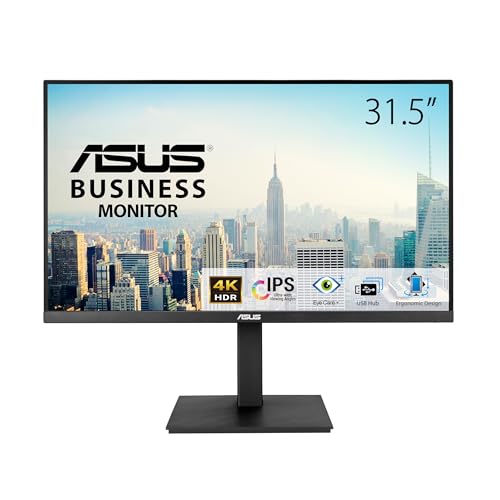
ASUS 32-Inch 4K IPS Ergonomic Monitor
The ASUS VA32UQSB provides solid 4K clarity with a focus on ergonomic flexibility for office work. It uses a 32-inch IPS panel but removes USB-C connectivity entirely. You rely on DisplayPort and HDMI for connections. The monitor lacks built-in speakers and smart operating systems like webOS. It is heavier than the LG 32SR70U-W due to its robust stand. This model is best for users who prioritize panel quality and adjustability over convenience features. It gives up the standalone smart functionality for a more traditional monitor experience. It fits environments where a dedicated computer is always connected.
BenQ RD320UA 32" 4K Programming Monitor
The BenQ RD320UA is designed for developers who spend long hours coding. It features a 32-inch 4K IPS panel and USB-C connectivity. The monitor includes specialized eye-comfort technologies and a glare-free screen. It lacks the streaming apps and smart features of the LG 32SR70U-W. The stand is highly adjustable to support flexible positioning. You lose the built-in speakers and webOS interface. This monitor is ideal for those who need screen flexibility and reduced eye strain. It gives up entertainment capabilities for a focused productivity tool. It suits professional environments where coding efficiency is the priority.
LG 32-Inch 4K Touchscreen Rolling Smart Monitor
The LG 32U889SA-W adds touch control and mobility to the smart monitor concept. It keeps the 32-inch 4K IPS panel and USB-C connectivity. The key difference is the rolling stand and touchscreen interface. You gain the ability to move the monitor easily and interact directly with the screen. It retains webOS and streaming apps. The model is significantly heavier and taller due to the stand structure. It is best for mobile workspaces needing touch and smart features. It offers unique flexibility over the stationary 32SR70U-W. You trade a compact desktop footprint for physical adjustability and touch input.
Quick picks
Our 7 picks

LG 32-Inch 4K UHD Smart IPS Monitor
Best for: mixed work and streaming use
- Screen Size
- 32"
- Resolution
- 3840 x 2160
- Panel Type
- IPS
- Connectivity
- HDMI, USB-A, USB Type-C
- Dimensions
- 4.33 × 32 × 18 inches
- Weight
- 18.8 pounds
View on Amazon: LG 32-Inch 4K UHD Smart IPS Monitor Affiliate link
This 32-inch IPS monitor delivers 4K UHD resolution with a 95% DCI-P3 color gamut. It runs webOS 23, giving you direct access to streaming apps like Netflix and Disney+ without a PC. You get versatile connectivity via HDMI, USB-A, and USB Type-C ports. Apple AirPlay 2 support allows wireless casting from iOS devices. Two built-in speakers handle audio for work or entertainment.
Pros
- 4K UHD resolution on a 32-inch IPS panel
- Built-in webOS 23 for direct streaming app access
- 95% DCI-P3 color gamut for vibrant visuals
- USB Type-C and dual HDMI connectivity
- Apple AirPlay 2 and HomeKit compatibility
Cons
- No height-adjustable stand included
- No built-in webcam for video calls
- No headphone jack on the monitor
Good fit if
- You want a single screen for work and streaming
- You use Apple devices and want AirPlay 2 support
- You prefer a clean, frameless desktop setup
Skip if
- You need a monitor with a height-adjustable stand
- You require a built-in webcam for meetings
- You want a dedicated gaming monitor with high refresh rates
Verdict: LG 32SR70U-W 32" 4K Smart Monitor is a practical choice for users who want a versatile display that handles both productivity tasks and streaming entertainment without needing a separate computer.

BenQ 32" 4K PD3205UA Ergo Monitor
Best for: color-accurate creative work and dual-PC efficiency
- Screen Size
- 32 Inches
- Panel Type
- IPS
- Connectivity
- USB-C
- Resolution
- 4K UHD
- Size
- 32 Inch
- Dimensions
- 18 × 28.1 × 28.8 inches
View on Amazon: BenQ 32" 4K PD3205UA Ergo Monitor Affiliate link
The BenQ PD3205UA is a 32-inch 4K UHD IPS monitor designed for creative professionals. It covers 99% of the sRGB and Rec.709 color spaces with Delta E ≤ 3 accuracy. The built-in Ergo arm allows for height and tilt adjustments. It includes a KVM switch for managing two computers with one keyboard and mouse. Eye-care features like flicker-free technology and low blue light help reduce strain during long work sessions.
Pros
- Covers 99% sRGB and Rec.709 color gamuts
- Delta E ≤ 3 color accuracy rating
- Built-in Ergo arm for height adjustment
- KVM switch for dual PC control
- Flicker-free and low blue light technology
Cons
- Heavier build at 22.3 pounds
- No mention of USB-C video input
- Limited to 99% color coverage
Good fit if
- You need precise color accuracy for design work
- You want to manage two computers with one set of peripherals
- You prefer an integrated ergonomic stand
Skip if
- You require HDR support
- You need a lightweight portable monitor
- You want a budget-friendly option
Verdict: BenQ PD3205UA 32" 4K Ergo Monitor suits designers who need accurate color reproduction and the convenience of a KVM switch for a dual-PC setup.

LG 32-Inch UltraFine 4K Ergo IPS Monitor
Best for: Ergonomic 4K creative workstations
- Screen Size
- 32"
- Resolution
- 3840 x 2160
- Panel Type
- IPS
- Aspect Ratio
- 16:9
- Connectivity
- USB Type-C
- Size
- 32 Inch
View on Amazon: LG 32-Inch UltraFine 4K Ergo IPS Monitor Affiliate link
This 32-inch monitor delivers 4K UHD resolution on an IPS panel with a 1000:1 contrast ratio. It covers 95% of the DCI-P3 color gamut and supports HDR10. The standout feature is the included Ergo stand, which offers height, tilt, pivot, and swivel adjustments. A USB Type-C port provides 60W power delivery. This setup suits users who value color accuracy and flexible positioning for professional work.
Pros
- 32-inch 4K UHD IPS display
- Ergo stand with full adjustability
- 95% DCI-P3 color coverage
- USB Type-C with 60W PD
Cons
- Standard 1000:1 contrast ratio
- No built-in smart operating system
- No HDR certification beyond basic support
Good fit if
- You need a flexible stand for ergonomic setup
- You require accurate color reproduction for creative work
- You want USB-C connectivity for single-cable docking
Skip if
- You need a built-in smart platform like webOS
- You require a high refresh rate for gaming
- You prefer a monitor with a higher contrast ratio
Verdict: LG 32 Inch 4K IPS Ergo Monitor provides a solid 4K IPS panel with excellent stand flexibility. It fits professionals who need color accuracy and ergonomic adjustments without smart features.

LG 32-Inch 4K IPS Monitor with USB-C
Best for: 4K productivity and casual gaming
- Screen Size
- 32"
- Resolution
- 3840 x 2160
- Refresh Rate
- 60Hz
- Panel Type
- IPS
- Connectivity
- HDMI, DisplayPort, USB-C
- Size
- 32 Inch
View on Amazon: LG 32-Inch 4K IPS Monitor with USB-C Affiliate link
This LG monitor offers a 32-inch IPS panel with 4K UHD resolution and a 60Hz refresh rate. It supports HDR10 for improved color and brightness in compatible content. The display includes Dynamic Action Sync and Black Stabilizer for gaming. Connectivity is handled via HDMI, DisplayPort, and a USB-C port that delivers up to 60W of charging power. The stand allows for height, tilt, and pivot adjustments.
Pros
- 4K UHD resolution (3840 x 2160) for high detail
- IPS panel provides consistent viewing angles
- USB-C port supports 4K display and 60W charging
- HDR10 support for enhanced color and brightness
- Ergonomic stand with height, tilt, and pivot options
Cons
- 60Hz refresh rate limits high-speed gaming performance
- No mention of adaptive sync technologies like FreeSync or G-Sync
- Black Stabilizer and Dynamic Action Sync are software features, not hardware specs
Good fit if
- You need a high-resolution display for work or media consumption
- You want USB-C connectivity for a single-cable setup
- You prefer an IPS panel for accurate color reproduction
Skip if
- You require a high refresh rate for competitive gaming
- You need adaptive sync for tear-free gameplay
- You are looking for a monitor with a built-in smart TV interface
Verdict: LG 32-inch 4K IPS Monitor is a solid choice for users prioritizing image clarity and connectivity over high-speed gaming features. It suits those who value a versatile stand and USB-C charging capabilities.
ASUS 32-Inch 4K IPS Ergonomic Monitor
Best for: 4K productivity and creative work
- Screen Size
- 31.5-inch
- Resolution
- 3840 x 2160
- Panel Type
- IPS
- Connectivity
- Dual HDMI, DisplayPort, USB hub
- Size
- 32 Inch
- Dimensions
- 10.4 × 28.1 × 23.4 inches
View on Amazon: ASUS 32-Inch 4K IPS Ergonomic Monitor Affiliate link
The ASUS VA32UQSB is a 32-inch 4K UHD monitor with an IPS panel and HDR-10 support. It includes dual HDMI and DisplayPort inputs alongside a USB hub. The stand offers tilt, swivel, pivot, and height adjustments. TÜV Rheinland certification ensures flicker-free and low blue light performance for comfortable viewing. This model suits users seeking a high-resolution display with ergonomic flexibility.
Pros
- 3840 x 2160 resolution with IPS panel
- Full ergonomic stand with height adjustment
- HDR-10 support for better contrast
- USB hub connectivity included
Cons
- Only HDR-10 support, no high dynamic range standards
- 20.6 pounds weight is heavier than average
- No mention of USB-C power delivery
Good fit if
- You need a 4K display with full ergonomic adjustments
- You require multiple video inputs including DisplayPort
- You want TÜV Rheinland certified eye care features
Skip if
- You require USB-C connectivity with power delivery
- You need a high refresh rate gaming monitor
- You prefer a lightweight portable display
Verdict: The ASUS VA32UQSB 32-Inch 4K IPS Monitor delivers solid 4K clarity and ergonomic flexibility for office or creative work. It fits users who prioritize panel quality and adjustability over advanced gaming features or USB-C convenience.

BenQ RD320UA 32" 4K Programming Monitor
Best for: coding and long work sessions
- Screen Size
- 32"
- Resolution
- 3840x2160
- Connectivity
- 90W USB-C
- Panel Type
- IPS
- Dimensions
- 28 × 23 × 18 inches
- Weight
- 34.2 pounds
View on Amazon: BenQ RD320UA 32" 4K Programming Monitor Affiliate link
The BenQ RD320UA is a 32-inch 4K UHD IPS monitor designed for coding. It features a Nano Matte panel to reduce glare and includes dedicated coding modes for better text clarity. The Ergo Arm stand allows flexible positioning. With 90W USB-C connectivity, it supports single-cable setups. This display targets developers who need eye comfort and screen flexibility during long work sessions.
Pros
- 32-inch 4K UHD IPS panel with Nano Matte finish
- Dedicated coding modes for dark and light themes
- Ergo Arm stand for flexible positioning
- 90W USB-C connectivity
Cons
- No refresh rate specified for gaming
- No mention of built-in speakers
- No mention of height adjustment beyond the arm
Good fit if
- You write code for many hours daily
- You need a flexible Ergo Arm stand
- You want a matte screen to reduce glare
Skip if
- You require a high refresh rate for gaming
- You need built-in speakers
- You prefer a standard tilt-only stand
Verdict: BenQ RD320UA 32" 4K Programming Monitor suits developers who prioritize eye comfort and screen flexibility. It is ideal for those who spend long hours coding and need a glare-free display with an adjustable arm.

LG 32-Inch 4K Touchscreen Rolling Smart Monitor
Best for: Mobile workspaces needing touch and smart features
- Screen Size
- 32"
- Resolution
- 3840x2160
- Panel Type
- IPS
- Connectivity
- HDMI, USB-C
- Dimensions
- 16.5 × 28.6 × 51.7 inches
- Weight
- 46.7 pounds
View on Amazon: LG 32-Inch 4K Touchscreen Rolling Smart Monitor Affiliate link
The LG Smart Monitor Swing combines a 32-inch 4K UHD IPS display with a fully adjustable wheeled stand. It features a touchscreen interface and webOS for standalone use. The monitor includes three USB-C ports with 65W power delivery and two HDMI inputs. This setup suits users who need mobility and touch control without a dedicated PC.
Pros
- 32-inch 4K UHD (3840x2160) IPS touchscreen
- Wheeled base with tilt, swivel, and height adjustments
- Three USB-C ports with 65W power delivery
- Built-in webOS for standalone operation
- 95% DCI-P3 color gamut coverage
Cons
- 350 nits brightness is lower than typical professional monitors
- 46.7-pound weight limits easy portability despite wheels
- No mention of built-in speakers or audio output
Good fit if
- You need a monitor that moves easily between rooms
- You want to control content with your fingers
- You prefer a clean desk with hidden cable management
Skip if
- You require high brightness for bright rooms
- You need a monitor without a touchscreen
- You want a lightweight display for frequent travel
Verdict: LG 32U889SA-W 32" 4K Touchscreen Smart Monitor offers unique mobility and touch control for users who value flexibility over high brightness. It fits those who want a standalone smart display with easy physical adjustments.
Specifications side by side
| Spec | LG 32-Inch 4K UHD Smart IPS Monitor | BenQ 32" 4K PD3205UA Ergo Monitor | LG 32-Inch UltraFine 4K Ergo IPS Monitor | LG 32-Inch 4K IPS Monitor with USB-C | ASUS 32-Inch 4K IPS Ergonomic Monitor | BenQ RD320UA 32" 4K Programming Monitor | LG 32-Inch 4K Touchscreen Rolling Smart Monitor |
|---|---|---|---|---|---|---|---|
| Screen Size | 32" | 32 Inches | 32" | 32" | 31.5-inch | 32" | 32" |
| Resolution | 3840 x 2160 | not stated | 3840 x 2160 | 3840 x 2160 | 3840 x 2160 | 3840x2160 | 3840x2160 |
| Refresh Rate | not stated | not stated | not stated | 60Hz | not stated | not stated | not stated |
| Panel Type | IPS | IPS | IPS | IPS | IPS | not stated | IPS |
| Aspect Ratio | not stated | not stated | 16:9 | not stated | not stated | not stated | not stated |
| Connectivity | HDMI, USB-A, USB Type-C | USB-C | USB Type-C | HDMI, DisplayPort, USB-C | Dual HDMI, DisplayPort, USB hub | 90W USB-C | HDMI, USB-C |
| Size | not stated | 32 Inch | 32 Inch | 32 Inch | 32 Inch | 32.0 | not stated |
| Dimensions | 4.33 × 32 × 18 inches | 18 × 28.1 × 28.8 inches | 16 × 28.1 × 25.2 inches | 9.4 × 28.1 × 23.5 inches | 10.4 × 28.1 × 23.4 inches | 28 × 23 × 18 inches | 16.5 × 28.6 × 51.7 inches |
| Weight | 18.8 pounds | 22.3 pounds | 22.7 pounds | 18.3 pounds | 20.6 pounds | 34.2 pounds | 46.7 pounds |
| Color | White | Black | BLACK | White | BLACK | Metal Grey | White |
| Model | 32SR70U-W.AUS | PD3205UA | 32UN880-B | 32UP83AK-W.AUS | VA32UQSB | RD320UA | 32U889SA-W.AUS |
If you require different connectivity or stand options, you can compare innocn 4k 32 inch smart alternatives.
Frequently asked questions
Which 32-inch 4K monitor offers the best overall value?
The LG 32SR70U-W stands out as the best overall choice. It is a practical option for users who need a versatile display for both productivity and streaming. The monitor features a 32-inch 4K UHD IPS panel and USB-C connectivity. This combination allows you to handle work tasks and entertainment without needing a separate computer.
Is there a 32-inch 4K monitor with a KVM switch?
Yes, the BenQ PD3205UA includes a KVM switch. This feature supports dual-PC efficiency by letting you control two computers with one keyboard and mouse. It retains the 32-inch 4K UHD IPS panel and USB-C connectivity found in similar models. This makes it ideal for designers who need accurate color reproduction and streamlined workflow management.
What is the best ergonomic 32-inch 4K monitor for creative work?
The LG 32UN880-B is the best premium option for ergonomic setups. It provides a solid 4K UHD IPS panel with excellent stand flexibility. This monitor fits professionals who require color accuracy and ergonomic adjustments. It lacks smart features, focusing instead on providing a high-quality display and robust physical adjustability for creative workstations.
Which 32-inch 4K monitor is best for budget-conscious buyers?
The LG 32UP83AK-W serves as the best budget choice. It offers solid image clarity and versatile connectivity options, including DisplayPort, HDMI, and USB-C. This monitor is suitable for users who prioritize productivity and casual gaming over high-speed gaming features. It also includes a versatile stand and USB-C charging capabilities for added convenience.
Does the ASUS VA32UQSB support USB-C connectivity?
No, the ASUS VA32UQSB does not list USB-C in its connectivity options. It provides DisplayPort and HDMI connections instead. This 32-inch 4K UHD IPS monitor delivers solid clarity and ergonomic flexibility for office or creative work. It suits users who prioritize panel quality and adjustability over the convenience of USB-C charging or data transfer.
Which monitor is best for programmers and long coding sessions?
The BenQ RD320UA is designed for developers who prioritize eye comfort. It features a 32-inch 4K UHD IPS panel and USB-C connectivity. This monitor is ideal for those who spend long hours coding and need a glare-free display. It also comes with an adjustable arm, providing screen flexibility for extended work sessions.
Is there a 32-inch 4K monitor with touch and mobility features?
Yes, the LG 32U889SA-W offers unique mobility and touch control. It is a 32-inch 4K UHD IPS smart monitor with a rolling base for easy movement. This model fits users who value flexibility over high brightness. It provides a standalone smart display with easy physical adjustments and HDMI or USB-C connectivity.