LG 34-Inch Curved 1440p Ultrawide Monitor Alternatives: 6 Similar Picks Compared
As an Amazon Associate we earn from qualifying purchases. Links on this page are affiliate links.
You might be looking for lg 34u60zb b 34 inch ultrawide wqhd alternatives if the original does not fit your exact needs. The LG 34U60ZB-B offers a 3440×1440 resolution, 120Hz refresh rate, and an adjustable stand. It is good for multitasking and casual gaming. However, you may want more connectivity, a different panel type, or a higher refresh rate. Some users prefer USB-C ports for simpler desk setups. Others might need faster motion handling for competitive play. The brand preference also varies among buyers.
We selected 6 similar picks because their specifications overlap with the original model. Each alternative shares the 34-inch size and 1440p resolution. This ensures they provide comparable screen real estate for your workflow. You can compare refresh rates, connectivity options, and panel technologies side by side. The list includes options with 144Hz, 165Hz, and USB-C features. You will find picks focused on color accuracy or high contrast. This guide helps you choose based on the specs that matter to you.
Our top pick: LG 34-Inch Curved 1440p Ultrawide Monitor.
How alternatives compare to LG
Samsung 34-Inch ViewFinity S5 Curved Ultrawide
The Samsung ViewFinity S5 shares the 34-inch WQHD resolution and 120Hz refresh rate found in the LG 34U60ZB-B. Both monitors target professionals who need screen real estate for multitasking. The Samsung model positions itself as a budget-friendly option, offering similar core specifications for creative work. You get the same 21:9 aspect ratio for side-by-side app usage. However, the Samsung lacks the specific HDR10 support and LG Switch software features mentioned for the LG model. It also omits the Black Stabilizer feature for gaming visibility. If you prioritize cost over specialized software tools, this Samsung alternative provides a practical workspace without the extra bells and whistles.
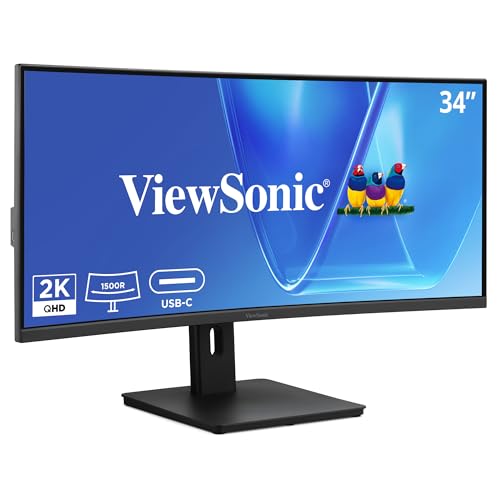
ViewSonic 34-Inch Curved 120Hz VA Ultrawide
The ViewSonic VG3409C matches the 34-inch size, 1440p resolution, and 120Hz refresh rate of the LG 34U60ZB-B. It uses a VA panel, which typically offers higher contrast ratios than standard IPS panels. The key difference is connectivity. The ViewSonic adds USB-C and KVM functionality, allowing you to switch between multiple computers using a single keyboard and mouse. The LG model relies on DisplayPort and HDMI without built-in KVM switching. If your workflow involves managing two different machines, the ViewSonic simplifies your desk setup. The LG remains better for users who prefer dedicated gaming features like Black Stabilizer and do not need USB-C power delivery.
Dell 34-Inch 120Hz USB-C Monitor
The Dell S3425DW offers the same 34-inch WQHD resolution and 120Hz refresh rate as the LG 34U60ZB-B. It also uses a VA panel and includes FreeSync technology. The primary advantage is the inclusion of USB-C connectivity, which simplifies desk setups by potentially reducing cable clutter. The Dell model targets users who value color accuracy and a clean aesthetic, available in Ash White. The LG 34U60ZB-B provides more explicit gaming features, including HDR10 support and Black Stabilizer. The Dell lacks these specific gaming enhancements. If you prioritize a minimalist desk setup with USB-C convenience over dedicated gaming utilities, the Dell is a strong alternative to the LG.
ASUS TUF 34-Inch Curved Ultrawide Monitor
The ASUS TUF VG34VQL1B shares the 34-inch WQHD resolution but upgrades the refresh rate to 165Hz. This is a significant difference for gamers who want smoother motion than the 120Hz provided by the LG 34U60ZB-B. The ASUS model emphasizes ergonomic adjustability and high frame rates. It lacks the specific software features like LG Switch and Black Stabilizer found in the LG monitor. The LG offers a more balanced approach for mixed office and casual gaming use. The ASUS is better suited for users who prioritize speed and physical stand adjustability over software convenience. If your primary focus is competitive gaming performance, the higher refresh rate on the ASUS makes it the superior choice.
LG 34-Inch Curved Ultrawide 144Hz Monitor
The LG 34U640B-B is another 34-inch WQHD ultrawide from the same brand. It increases the refresh rate to 144Hz, offering smoother visuals than the 120Hz LG 34U60ZB-B. It also includes FreeSync technology and USB-C connectivity, which the base model lacks. The 34U640B-B is designed for users who need KVM switching and dual PC setups. The original 34U60ZB-B focuses on essential connectivity with DisplayPort and HDMI, along with specific gaming features like Black Stabilizer. If you require USB-C power delivery and higher refresh rates for multitasking, the 34U640B-B is a more capable option. The original remains suitable for users who do not need USB-C or KVM switching.
CRUA 34" WQHD 120Hz Curved Monitor
The CRUA 34-Inch Curved Monitor matches the 1440p resolution and 120Hz refresh rate of the LG 34U60ZB-B. It includes FreeSync technology and offers four display inputs. The CRUA model highlights a 4000:1 contrast ratio, which may provide deeper blacks for desktop work and media consumption. It comes in a white color option, differing from the black LG. The LG monitor includes specific features like HDR10 support, Black Stabilizer, and Reader Mode. The CRUA lacks these named software enhancements. If you prefer a white aesthetic and high contrast for static content, the CRUA is a viable alternative. The LG remains better for users who need HDR support and gaming-specific visibility tools.
Quick picks
Our 7 picks

LG 34-Inch Curved 1440p Ultrawide Monitor
Best for: mixed office productivity and casual gaming setups
- Screen Size
- 34"
- Resolution
- 3440 x 1440
- Refresh Rate
- 120Hz
- Aspect Ratio
- 21:9
- Response Time
- 5ms
- Connectivity
- DisplayPort, HDMI
View on Amazon: LG 34-Inch Curved 1440p Ultrawide Monitor Affiliate link
This 34-inch curved ultrawide monitor gives you a 3440×1440 WQHD resolution with an 1800R curve and a 21:9 aspect ratio. It features a 120Hz refresh rate, 5ms response time, and 99% sRGB color coverage with HDR10 support. You get tilt and height adjustability plus software screen splitting, making it a balanced display for daily productivity and moderate gaming.
Pros
- 3440×1440 WQHD resolution across a 21:9 ultrawide panel
- 120Hz refresh rate with 5ms response time
- Stand supports both tilt and height adjustment
- LG Switch software enables up to 11 screen-split layouts
Cons
- 120Hz refresh rate is lower than 165Hz and 180Hz gaming monitors on this list
- 5ms response time is slower than dedicated fast-action gaming displays
Good fit if
- You need a 3440×1440 workspace with height and tilt adjustability for office tasks.
- You want desktop software to divide your screen into multiple window layouts.
Skip if
- You prioritize higher refresh rates such as 165Hz or 180Hz for competitive gaming.
- You prefer a deeper 1500R screen curve rather than a gentle 1800R curvature.
Verdict: LG 34-Inch Curved 1440p Ultrawide Monitor delivers a sharp 3440×1440 resolution, 120Hz motion, and an adjustable stand for multitasking professionals who also play games. Its balanced specs fit mixed home-office setups better than specialized high-refresh gaming screens.

Samsung 34-Inch ViewFinity S5 Curved Ultrawide
Best for: Multitasking and creative work
- Screen Size
- 34"
- Resolution
- Ultrawide QHD
- Refresh Rate
- 120Hz
- Aspect Ratio
- 21:9
- Sync Technology
- AMD FreeSync Premium
- Connectivity
- HDMI, DP
View on Amazon: Samsung 34-Inch ViewFinity S5 Curved Ultrawide Affiliate link
The Samsung 34-inch ViewFinity S5 offers a 1440p resolution with a 21:9 aspect ratio. Its 1800R curve provides a panoramic view for multitasking. The 120Hz refresh rate and AMD FreeSync Premium reduce motion blur and tearing. HDR10 support optimizes contrast for accurate colors. Eye Saver Mode minimizes blue light to reduce strain during long work sessions.
Pros
- 1440p resolution with 21:9 aspect ratio
- 120Hz refresh rate with VRR
- 1800R curved display
- HDR10 for improved contrast
- TÜV certified Eye Saver Mode
Cons
- 120Hz refresh rate is lower than 144Hz or 165Hz competitors
- Only includes HDMI and DP ports
- No mention of USB-C connectivity
Good fit if
- You need a large screen for efficient multitasking
- You want a curved display for a panoramic view
- You prioritize color accuracy and eye comfort
Skip if
- You require a higher refresh rate for competitive gaming
- You need USB-C connectivity for single-cable setup
- You prefer a flat panel design
Verdict: Samsung 34" ViewFinity S5 120Hz Ultrawide is a practical ultrawide for professionals who value screen real estate and eye comfort over high refresh rates.
ViewSonic 34-Inch Curved 120Hz VA Ultrawide
Best for: Workstations needing USB-C and KVM features
- Screen Size
- 34"
- Resolution
- 3440 x 1440
- Refresh Rate
- 120Hz
- Aspect Ratio
- 21:9
- Response Time
- 3.5ms
- Connectivity
- USB-C, RJ45, HDMI 2.1, DisplayPort
View on Amazon: ViewSonic 34-Inch Curved 120Hz VA Ultrawide Affiliate link
The ViewSonic VG3409C is a 34-inch VA ultrawide monitor with 1440p resolution and a 1500R curve. It offers 120Hz refresh rate and 1ms MPRT response time. A 96W USB-C port simplifies laptop connections by delivering power and video. The integrated KVM switch and USB hub help organize peripherals. This monitor suits professionals who need a spacious screen for multitasking and document work.
Pros
- 96W USB-C power delivery reduces cable clutter
- Integrated KVM switch for managing multiple systems
- 1500R curved VA panel for immersive viewing
- 120Hz refresh rate with 1ms MPRT response
Cons
- 120Hz refresh rate is lower than 144Hz or 165Hz competitors
- 1500R curve is less aggressive than 1800R or 1500R rivals
- No mention of FreeSync or G-Sync compatibility
Good fit if
- You need a USB-C monitor with high power delivery for a laptop
- You want to manage multiple computers with a single KVM setup
- You prefer a VA panel for higher static contrast in media
Skip if
- You require a high refresh rate of 144Hz or higher for gaming
- You need FreeSync Premium or G-Sync compatibility
- You prefer a flatter screen without a 1500R curve
Verdict: ViewSonic VG3409C 34-Inch 120Hz Ultrawide is a solid workstation monitor for users prioritizing USB-C connectivity and KVM functionality over high refresh rates. It fits professionals who value cable management and multitasking efficiency.

Dell 34-Inch 120Hz USB-C Monitor
Best for: Users wanting USB-C connectivity and color accuracy
- Screen Size
- 34"
- Resolution
- WQHD
- Refresh Rate
- 120Hz
- Response Time
- 0.03ms
- Sync Technology
- AMD FreeSync Premium
- Connectivity
- USB-C
View on Amazon: Dell 34-Inch 120Hz USB-C Monitor Affiliate link
The Dell S3425DW is a 34-inch WQHD ultrawide monitor with a VA panel and 120Hz refresh rate. It features AMD FreeSync Premium and a 0.03ms response time for smooth visuals. The display covers 99% sRGB and 95% DCI-P3 for accurate color. A single USB-C cable provides up to 65W power delivery. This monitor suits users who want a clean setup with strong connectivity and eye comfort features.
Pros
- 99% sRGB and 95% DCI-P3 color coverage
- USB-C connectivity with up to 65W power delivery
- 0.03ms response time with AMD FreeSync Premium
- ComfortView Plus reduces blue light emissions to ≤35%
Cons
- 120Hz refresh rate is lower than the 165Hz and 180Hz options in this list
- No mention of HDR certification beyond HDR readiness
- VA panel may have slower pixel transition times than IPS alternatives
Good fit if
- You want a single USB-C cable for power and video
- You prioritize color accuracy for creative work or media consumption
- You prefer a monitor with built-in eye comfort features
Skip if
- You need a high refresh rate above 120Hz for competitive gaming
- You require a flat screen instead of a curved display
- You need a monitor with a smaller 27-inch footprint
Verdict: Dell S3425DW 34-Inch WQHD 120Hz fits users who value color accuracy and simplified desk setups with USB-C connectivity, though it lacks the high refresh rates found in other gaming-focused picks.

ASUS TUF 34-Inch Curved Ultrawide Monitor
Best for: Gamers needing high refresh rates and ergonomic stands
- Screen Size
- 34-inch
- Resolution
- 3440x1440
- Refresh Rate
- 165Hz
- Response Time
- 1ms
- Sync Technology
- FreeSync Premium
- Connectivity
- DisplayPort 1.4, HDMI 2.0, USB
View on Amazon: ASUS TUF 34-Inch Curved Ultrawide Monitor Affiliate link
The ASUS TUF Gaming VG34VQL1B is a 34-inch curved ultrawide monitor with a 1440p resolution. It features a 165Hz refresh rate and FreeSync Premium for smooth gameplay. The display offers a 1500R curve and 1ms MPRT response time. You get DisplayHDR 400 certification for better contrast. The stand is height adjustable for better ergonomics during long sessions.
Pros
- 165Hz refresh rate for fast motion
- 1ms MPRT response time reduces ghosting
- Height adjustable stand for ergonomic positioning
- DisplayHDR 400 certification for improved contrast
Cons
- 1500R curvature is less immersive than 1800R options
- No G-Sync compatibility listed in specifications
- Response time is MPRT, not native panel speed
Good fit if
- You want a high refresh rate for competitive gaming
- You prefer height adjustable ergonomics for your setup
- You need FreeSync Premium for tear-free visuals
Skip if
- You require G-Sync Ultimate certification
- You want the deepest possible curvature for immersion
- You prefer a flat display design
Verdict: ASUS TUF VG34VQL1B 34-inch 165Hz suits gamers who prioritize high frame rates and ergonomic adjustability over maximum curvature depth. It delivers solid visual performance for those who value smooth motion and customizable viewing angles.

LG 34-Inch Curved Ultrawide 144Hz Monitor
Best for: Dual PC setups with USB-C needs
- Screen Size
- 34-inch
- Resolution
- 3440 x 1440
- Refresh Rate
- 144Hz
- Aspect Ratio
- 21:9
- Response Time
- 5ms
- Sync Technology
- AMD FreeSync Premium
View on Amazon: LG 34-Inch Curved Ultrawide 144Hz Monitor Affiliate link
This 34-inch ultrawide monitor delivers a 3440×1440 resolution with a 144Hz refresh rate and 5ms response time. It features an 1800R curved VA panel, 99% sRGB color coverage, and HDR10 support. The USB-C port provides up to 65W of power delivery, while the built-in KVM switch lets you control two computers with one set of peripherals. It suits users who need high refresh rates for smooth gaming and efficient multitasking workflows.
Pros
- 144Hz refresh rate for smooth motion
- USB-C with 65W power delivery
- Built-in KVM switch for dual PC control
- 99% sRGB color coverage
Cons
- 5ms response time is slower than the 1ms found on some competitors
- 1800R curve is less aggressive than the 1500R curve on similar models
- No mention of HDR certification beyond HDR10 support
Good fit if
- You want a high refresh rate for gaming
- You need to manage two computers with one desk setup
- You prefer USB-C connectivity for simpler cable management
Skip if
- You require a 1ms response time for competitive esports
- You want a deeply curved 1500R display for immersion
- You need certified HDR performance beyond HDR10
Verdict: LG 34U640B-B 34-inch 144Hz Ultrawide is a solid choice for multitaskers who value USB-C convenience and KVM switching. It fits users who prioritize smooth 144Hz visuals and efficient desk setups over ultra-fast response times.

CRUA 34" WQHD 120Hz Curved Monitor
Best for: high-contrast desktop work and DisplayPort gaming
- Screen Size
- 34"
- Resolution
- 3440×1440P
- Refresh Rate
- 120Hz
- Aspect Ratio
- 21:9
- Sync Technology
- FreeSync
- Connectivity
- HDMI 2.0, DP 1.4, 3.5mm audio
View on Amazon: CRUA 34" WQHD 120Hz Curved Monitor Affiliate link
This 34-inch curved ultrawide monitor gives you a 3440x1440 resolution with a 1500R curve and a 21:9 aspect ratio. It features a 120Hz refresh rate over DisplayPort, FreeSync support, and a 4000:1 contrast ratio. With dual HDMI and dual DisplayPort inputs, it suits you if you need a high-contrast widescreen display for productivity and smooth everyday gaming.
Pros
- High 4000:1 contrast ratio
- Four display inputs with two HDMI and two DisplayPort connections
- 1500R curvature with 120% sRGB color gamut coverage
- 120Hz refresh rate via DisplayPort with FreeSync support
Cons
- HDMI connections limit the refresh rate to 100Hz
- Display brightness reaches a maximum of 280 nits
Good fit if
- You connect primarily via DisplayPort to achieve the full 120Hz refresh rate.
- You prioritize high static contrast with a 4000:1 panel.
- You want a 1500R curvature to wrap the 21:9 display around your field of view.
Skip if
- You rely on HDMI cables and require the full 120Hz output.
- You work in bright rooms requiring more than 280 nits of brightness.
- You demand refresh rates above 120Hz for fast-paced competitive gaming.
Verdict: CRUA 34-Inch Curved 120Hz Ultrawide Monitor delivers deep 4000:1 contrast and four display inputs for users building an immersive 1440p workstation with DisplayPort gaming support.
Specifications side by side
| Spec | LG 34-Inch Curved 1440p Ultrawide Monitor | Samsung 34-Inch ViewFinity S5 Curved Ultrawide | ViewSonic 34-Inch Curved 120Hz VA Ultrawide | Dell 34-Inch 120Hz USB-C Monitor | ASUS TUF 34-Inch Curved Ultrawide Monitor | LG 34-Inch Curved Ultrawide 144Hz Monitor | CRUA 34" WQHD 120Hz Curved Monitor |
|---|---|---|---|---|---|---|---|
| Screen Size | 34" | 34" | 34" | 34" | 34-inch | 34-inch | 34" |
| Resolution | 3440 x 1440 | Ultrawide QHD | 3440 x 1440 | WQHD | 3440x1440 | 3440 x 1440 | 3440×1440P |
| Refresh Rate | 120Hz | 120Hz | 120Hz | 120Hz | 165Hz | 144Hz | 120Hz |
| Aspect Ratio | 21:9 | 21:9 | 21:9 | not stated | not stated | 21:9 | 21:9 |
| Response Time | 5ms | not stated | 3.5ms | 0.03ms | 1ms | 5ms | not stated |
| Sync Technology | not stated | AMD FreeSync Premium | not stated | AMD FreeSync Premium | FreeSync Premium | AMD FreeSync Premium | FreeSync |
| Connectivity | DisplayPort, HDMI | HDMI, DP | USB-C, RJ45, HDMI 2.1, DisplayPort | USB-C | DisplayPort 1.4, HDMI 2.0, USB | HDMI, DisplayPort, USB Type-C, USB | HDMI 2.0, DP 1.4, 3.5mm audio |
| Panel Type | not stated | not stated | VA | VA | not stated | not stated | VA |
| Size | not stated | 34 Inch | 14.3" x 31.8" x 4.7" | S3425DW | not stated | not stated | 34Inch-White |
| Dimensions | 9.4 × 31.8 × 18 inches | 11 × 31.9 × 18.2 inches | 11 × 31.8 × 16.9 inches | 8.73 × 31.8 × 16.2 inches | 31.9 × 16.4 × 10.8 inches | 8.7 × 31.9 × 18.3 inches | 4 × 31 × 17 inches |
| Weight | 13.7 pounds | not stated | 18.5 pounds | 20.7 pounds | 19.9 pounds | 17 pounds | not stated |
| Color | Black | Black | Black | Ash White | BLACK | Black | White |
| Model | 34U60ZB-B.AUSQ | LS34H550GANXZA | VS20781 | S3425DW | VG34VQL1B | 34U640B-B.AUS | CR400HD |
Looking beyond this list? See ranein 34 inch 5 burner alternatives.
Frequently asked questions
Which ultrawide monitor offers the highest refresh rate for gaming?
The ASUS TUF VG34VQL1B provides the highest refresh rate at 165Hz. This specification suits gamers who prioritize smooth motion and high frame rates. It also features an ergonomic stand for customizable viewing angles. Other models in this list cap out at 144Hz or 120Hz, making the ASUS choice ideal for competitive play.
Do these monitors support USB-C connectivity for laptops?
Yes, several models include USB-C ports to simplify desk setups. The ViewSonic VG3409C and the Dell S3425DW both feature USB-C connectivity. The LG 34U640B-B also offers USB-C convenience along with KVM switching. These features allow you to connect a laptop with a single cable for data and video.
Which option is best for users who need KVM functionality?
The ViewSonic VG3409C and the LG 34U640B-B are best for KVM needs. Both monitors support KVM switching, allowing you to control multiple computers with one keyboard and mouse. This feature fits professionals who value cable management and multitasking efficiency across different devices without needing extra hardware.
Is there a white color option available for these ultrawides?
The CRUA CR400HD is available in a white color. Most other monitors listed, such as the LG and Samsung models, come in black. The Dell S3425DW offers an Ash White finish. If you prefer a lighter aesthetic for your workspace, the CRUA and Dell options provide suitable alternatives to the standard black designs.
Which monitor has the deepest curvature for immersion?
The CRUA CR400HD and the LG 34U60ZB-B are described as curved monitors. The CRUA model highlights its deep curvature for an immersive experience. The ASUS TUF VG34VQL1B offers solid curvature but prioritizes high refresh rates over maximum depth. Curved screens generally help reduce eye strain by keeping edges closer to your view.
Can I use FreeSync on these displays to reduce tearing?
Yes, FreeSync is available on multiple models in this list. The Dell S3425DW, the LG 34U640B-B, and the CRUA CR400HD all support FreeSync technology. This feature synchronizes the refresh rate with the GPU frame rate to minimize screen tearing. It is useful for both gaming and smooth video playback.
Which monitor is heaviest and requires a sturdy stand?
The Dell S3425DW is the heaviest at 20.7 pounds. The ViewSonic VG3409C follows at 18.5 pounds. These weights suggest you need a sturdy desk or a VESA-compatible mount for stability. Lighter options include the LG 34U60ZB-B at 13.7 pounds and the CRUA CR400HD, which weighs less than the others.