6 Best Alternatives to the LG 34-Inch Curved WQHD IPS (2026)
As an Amazon Associate we earn from qualifying purchases. Links on this page are affiliate links.
The LG 34U650A-B 34-inch Curved Ultrawide offers a balanced mix of productivity features and color accuracy, making it ideal for professionals who value clean desk setups and multitasking efficiency. If you are looking for lg 34u650a b 34 inch ultrawide ips alternatives, you may want a different size, resolution, or feature set. Some users prefer flat panels for specific desk arrangements, while others seek higher pixel density or more compact dimensions. Others might prioritize USB-C connectivity or built-in speakers over curved immersion.
This list includes 6 monitors selected because their specifications overlap with the original LG model. The top picks share similar attributes such as 34-inch screens, 100Hz refresh rates, and IPS panels. We focused on practical differences like resolution, connectivity options, and physical dimensions. Each alternative serves a specific need, whether that is budget constraints, space limitations, or distinct workflow requirements. You can compare these options to find the best fit for your workspace without sacrificing core performance metrics.
Our top pick: LG 34-Inch Curved WQHD IPS Monitor.
How these alternatives compare
CRUA 34-Inch 100Hz Curved IPS Monitor
The CRUA 34-Inch Curved IPS Monitor matches the LG in resolution and refresh rate, offering the same 3440×1440 clarity and 100Hz smoothness. It shares the curved design and IPS panel type, keeping viewing angles wide and colors consistent. The main difference is the build; CRUA weighs only 13 pounds, making it significantly lighter and easier to mount or move than the LG’s 22.3-pound frame. It lacks the LG’s USB-C charging and built-in speakers, so you will need separate audio and power connections. This model suits users who want the same visual experience but prefer a lighter, more budget-friendly option without the premium connectivity features.
Samsung 34-Inch ViewFinity S50GC Flat Ultrawide
The Samsung 34-Inch ViewFinity S50GC Flat Ultrawide keeps the 3440×1440 resolution and 100Hz refresh rate but switches to a flat panel. You lose the immersive 3800R curve of the LG, which may matter less if you sit directly in front of your screen. This model is lighter at 10.8 pounds, reducing desk footprint. It includes FreeSync technology for smoother motion in supported games, a feature not listed for the LG. However, it omits USB-C connectivity and built-in speakers, requiring external peripherals for audio and laptop charging. This choice fits professionals who prioritize eye comfort features and a traditional flat display over curved immersion.
LG 34-Inch UltraWide 1080p IPS Monitor
The LG 34-Inch UltraWide 1080p IPS Monitor retains the brand’s design language and USB-C connectivity but drops the resolution to 2560×1080. You gain convenience with a single cable for display and power, similar to the LG 34U650A-B, but the pixel density is lower. This monitor is best for users who prioritize desk cleanliness and multitasking width over sharp image detail. It shares the 100Hz refresh rate and IPS panel, ensuring smooth motion and wide viewing angles. The white color option offers a different aesthetic compared to the black LG 34U650A-B. If you do not need WQHD clarity for detailed work, this model provides a cleaner setup with comparable connectivity.
Samsung 34-Inch ViewFinity Flat Ultrawide Monitor
The Samsung ViewFinity S50GC Flat Ultrawide Monitor offers the same 3440×1440 resolution and 100Hz refresh rate as the LG but features a flat screen. It weighs just 10.8 pounds, making it much lighter than the LG’s 22.3-pound curved model. This monitor includes FreeSync for reduced screen tearing, a feature absent in the LG’s specifications. It lacks USB-C and built-in speakers, so you must use external devices for audio and laptop charging. This option is ideal for users who want high-resolution multitasking space without the curvature. It is a solid choice for those who prioritize screen real estate and eye comfort features over the immersive design of the original.
ZZA 34-Inch Curved Ultrawide Monitor
The ZZA 34-Inch Curved Ultrawide Monitor provides the same 3440×1440 resolution and 100Hz refresh rate, matching the LG’s visual smoothness. It features a mild 3800R curve, similar to the LG, for a comfortable viewing experience. However, it lacks USB-C connectivity, requiring separate cables for display and power. It includes built-in speakers, which the LG also offers, but omits the advanced audio features and multitasking apps found in the LG model. This monitor is lighter at 15 pounds, making it easier to handle. It suits users who want a curved, high-resolution display for productivity and casual gaming without the premium connectivity or software features of the LG 34U650A-B.
KTC 24-Inch QHD IPS Monitor
The KTC 24-Inch QHD IPS Monitor is a compact alternative that does not offer ultrawide width. It provides 1440p resolution on a 24-inch screen, which is significantly smaller than the 34-inch displays listed here. This model is designed for users who prioritize sharp pixel density and smooth 100Hz performance in a smaller footprint. It lacks the wide aspect ratio needed for extensive multitasking or immersive media consumption. The KTC is ideal for those who do not need the extra horizontal space of an ultrawide monitor. It offers a solid IPS panel for accurate colors and wide viewing angles, but it is not a direct replacement for the screen real estate provided by the LG 34-inch models.
Quick picks
Our 7 picks

LG 34-Inch Curved WQHD IPS Monitor
Best for: multitasking professionals seeking clean desk setups
- Screen Size
- 34"
- Resolution
- 3440 x 1440
- Refresh Rate
- 100Hz
- Panel Type
- IPS
- Aspect Ratio
- 21:9
- Response Time
- 5ms
View on Amazon: LG 34-Inch Curved WQHD IPS Monitor Affiliate link
The LG 34U650A-B is a 34-inch curved IPS ultrawide monitor with a 3440x1440 resolution. It features a 100Hz refresh rate, 5ms response time, and HDR10 support. USB-C connectivity delivers up to 96W of power delivery. Built-in speakers and a Switch app for screen splitting add practical value for multitasking and media consumption.
Pros
- 3440x1440 WQHD IPS panel with 99% sRGB coverage
- USB-C port supports up to 96W laptop charging
- Built-in DepthSound speakers with enhanced bass
- Switch app enables up to 6-way screen splitting
Cons
- 5ms response time is slower than high-end gaming monitors
- 3440x1440 resolution is lower than 4K ultrawide options
- No mention of adaptive sync technologies like FreeSync or G-Sync
Good fit if
- You need a single cable for display, data, and laptop charging
- You want built-in speakers to keep your desk clutter-free
- You prefer a curved screen for comfortable long work sessions
Skip if
- You require 4K resolution for detailed graphic design work
- You need high refresh rates for competitive esports gaming
- You want a flat panel for precise alignment in multi-monitor setups
Verdict: LG 34U650A-B 34-inch Curved Ultrawide offers a balanced mix of productivity features and color accuracy, making it ideal for professionals who value clean desk setups and multitasking efficiency.

CRUA 34-Inch 100Hz Curved IPS Monitor
Best for: multitasking and color-accurate content creation
- Screen Size
- 34"
- Resolution
- 3440 x 1440
- Refresh Rate
- 100Hz
- Panel Type
- IPS
- Aspect Ratio
- 21:9
- Sync Technology
- AMD FreeSync
View on Amazon: CRUA 34-Inch 100Hz Curved IPS Monitor Affiliate link
This CRUA monitor gives you a 34-inch ultrawide display with a 3440×1440 resolution and a 100Hz refresh rate. The IPS panel covers 120% sRGB and 92% DCI-P3 for accurate colors. It features a 3800R curve for comfort and includes built-in speakers. You get two HDMI 2.0 and two DisplayPort 1.4 connections. It suits users who want a spacious, color-accurate screen for work and light gaming.
Pros
- 3440×1440 UWQHD resolution on a 34-inch screen
- 100Hz refresh rate with AMD FreeSync
- 120% sRGB and 92% DCI-P3 color coverage
- Built-in speakers and 3.5mm audio jack
Cons
- Only 350 cd/m² peak brightness
- 1000:1 contrast ratio limits deep blacks
- No mention of USB-C connectivity
Good fit if
- You need extra horizontal space for multitasking
- You want accurate colors for photo or video editing
- You prefer a curved screen for immersion
Skip if
- You require high brightness for bright rooms
- You need USB-C for single-cable docking
- You want a flat panel design
Verdict: CRUA 34 Inch UWQHD IPS Curved Monitor delivers solid color accuracy and a spacious 3440×1440 display for multitaskers and creators who value a curved, immersive workspace.

Samsung 34-Inch ViewFinity S50GC Flat Ultrawide
Best for: multitasking and eye comfort
- Screen Size
- 34"
- Resolution
- Ultra-WQHD
- Refresh Rate
- 100Hz
- Aspect Ratio
- 21:9
- Response Time
- 5ms
- Sync Technology
- AMD FreeSync
View on Amazon: Samsung 34-Inch ViewFinity S50GC Flat Ultrawide Affiliate link
The Samsung ViewFinity S50GC is a 34-inch flat ultrawide monitor with Ultra-WQHD resolution and a 100Hz refresh rate. It includes HDR10 support and AMD FreeSync for smoother visuals. The panel features an ambient light sensor for automatic brightness adjustment and Eye Saver Mode. It offers two HDMI 2.2 ports and one DisplayPort 1.2 input. This model suits users who want a borderless design for multitasking.
Pros
- 34-inch Ultra-WQHD resolution with 21:9 aspect ratio
- 100Hz refresh rate and 5ms response time
- HDR10 support for enhanced color depth
- Built-in ambient light sensor for auto brightness
- Borderless design for seamless multi-monitor setups
Cons
- Flat panel instead of curved display
- Standard 3000:1 static contrast ratio
- No mention of USB-C connectivity
Good fit if
- You need a large screen for seamless multitasking
- You prefer a borderless design for dual monitor setups
- You want automatic brightness adjustment via sensor
Skip if
- You require a curved screen for immersion
- You need USB-C connectivity for single-cable docking
- You want a higher refresh rate for competitive gaming
Verdict: The Samsung 34" ViewFinity S50GC is a flat ultrawide monitor that prioritizes screen real estate and eye comfort features. It fits professionals who value multitasking efficiency and automatic lighting adjustments over immersive curved designs.
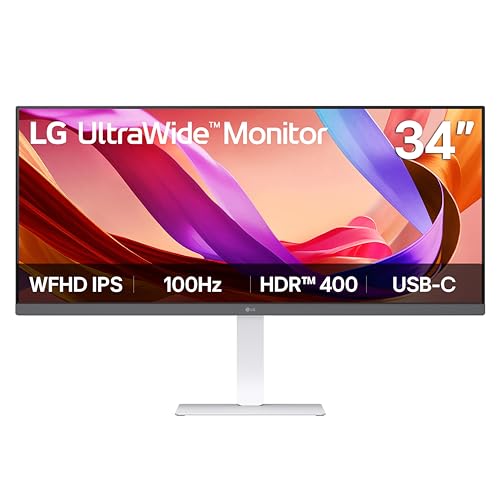
LG 34-Inch UltraWide 1080p IPS Monitor
Best for: multitasking and USB-C connectivity
- Screen Size
- 34"
- Resolution
- 2560 x 1080
- Refresh Rate
- 100Hz
- Panel Type
- IPS
- Aspect Ratio
- 21:9
- Connectivity
- HDMI, DisplayPort, USB Type-C
View on Amazon: LG 34-Inch UltraWide 1080p IPS Monitor Affiliate link
The LG 34U530A-W is a 34-inch ultrawide monitor with a 2560 x 1080 IPS panel. It offers a 100Hz refresh rate and VESA DisplayHDR 400 certification. USB Type-C connectivity supports display output and data transfer. Built-in MaxxAudio speakers provide sound without external hardware. This model suits users who need a wide screen for multitasking and prefer a clean, single-cable setup.
Pros
- 21:9 aspect ratio for expanded horizontal workspace
- USB Type-C for video and data over one cable
- VESA DisplayHDR 400 for improved contrast and brightness
- Built-in MaxxAudio stereo speakers
Cons
- WFHD resolution is lower than the WQHD standard on other list items
- No mention of height-adjustable stand in specifications
- 100Hz refresh rate is modest for competitive gaming
Good fit if
- You prioritize multitasking with multiple open windows
- You want USB Type-C connectivity for laptops
- You need built-in speakers to reduce desk clutter
Skip if
- You require WQHD or 4K resolution for sharp text
- You are a competitive gamer needing high refresh rates
- You need a height-adjustable stand for ergonomic positioning
Verdict: LG 34U530A-W 34-inch WFHD IPS delivers a wide workspace and convenient USB-C connectivity. It fits professionals who value multitasking efficiency over pixel density.

Samsung 34-Inch ViewFinity Flat Ultrawide Monitor
Best for: Flat-panel multitasking and eye comfort
- Screen Size
- 34"
- Refresh Rate
- 100Hz
- Aspect Ratio
- 21:9
- Response Time
- 5ms
- Sync Technology
- AMD FreeSync
- Resolution
- 1440p
View on Amazon: Samsung 34-Inch ViewFinity Flat Ultrawide Monitor Affiliate link
This 34-inch flat monitor delivers Ultra-WQHD resolution with a 21:9 aspect ratio. It features a 100Hz refresh rate and 5ms response time for smoother visuals. HDR10 support expands the color range. An ambient light sensor and Eye Saver Mode help reduce eye strain during long sessions. AMD FreeSync keeps gameplay fluid. It is a practical option for multitasking and general use.
Pros
- 100Hz refresh rate reduces motion blur
- HDR10 displays over a billion colors
- Ambient light sensor adjusts brightness automatically
- AMD FreeSync prevents screen tearing
- Picture-by-Picture mode supports dual inputs
Cons
- Flat panel lacks the immersive curve of competitors
- Base model lacks USB-C connectivity
- No built-in speakers listed in specifications
Good fit if
- You need a large screen for multitasking
- You prefer a flat display for design work
- You want automatic brightness adjustment
Skip if
- You require a curved screen for immersion
- You need USB-C connectivity for docking
- You want built-in audio without external speakers
Verdict: Samsung ViewFinity S50GC 34-Inch Flat is a solid flat-panel choice for users who prioritize screen real estate and eye comfort features over curved immersion or integrated USB-C hubs.

ZZA 34-Inch Curved Ultrawide Monitor
Best for: everyday productivity and casual 100Hz ultrawide gaming
- Screen Size
- 34"
- Resolution
- 3440 x 1440
- Refresh Rate
- 100Hz
- Aspect Ratio
- 21:9
- Connectivity
- HDMI, DisplayPort
- Dimensions
- 8 × 31.5 × 17 inches
View on Amazon: ZZA 34-Inch Curved Ultrawide Monitor Affiliate link
This 34-inch curved ultrawide monitor gives you a 21:9 aspect ratio with a 3440 x 1440 WQHD resolution. It features a gentle 3800R curvature, a 100Hz refresh rate, and 100% sRGB color coverage. Integrated speakers handle audio directly, while HDMI and DisplayPort manage video input. It suits you if you need wide desktop workspace for multitasking and everyday gaming.
Pros
- 3440 x 1440 WQHD resolution on a 21:9 display
- 100Hz refresh rate for smooth visuals
- 100% sRGB color gamut coverage
- Built-in speakers for direct audio playback
Cons
- Gentle 3800R curvature provides less visual immersion than tighter curves
- 100Hz refresh rate falls short of faster 144Hz or 165Hz gaming panels
Good fit if
- You want a 3440 x 1440 ultrawide screen with integrated speakers.
- You need 100% sRGB color reproduction for work and media.
- You prefer a subtle 3800R curve over an aggressive wrap.
Skip if
- You want a high-refresh competitive gaming display above 100Hz.
- You prefer a deep 1500R or 1800R curve for maximum peripheral coverage.
Verdict: ZZA 34-Inch Curved Ultrawide Monitor delivers sharp WQHD resolution, built-in audio, and mild 3800R curvature for productivity workers and casual gamers.

KTC 24-Inch QHD IPS Monitor
Best for: Compact 1440p gaming and office work
- Screen Size
- 24"
- Resolution
- 2560x1440
- Refresh Rate
- 100Hz
- Panel Type
- IPS
- Sync Technology
- Adaptive Sync, FreeSync, G-Sync
- Connectivity
- HDMI 2.0, DP 1.4, USB 2.0
View on Amazon: KTC 24-Inch QHD IPS Monitor Affiliate link
The KTC 24-inch monitor offers a QHD 1440p IPS panel with a 100Hz refresh rate. It includes FreeSync and G-Sync compatibility for smooth visuals. The three-sided borderless design helps with multi-monitor setups. HDR10 support enhances color depth. This compact screen suits users who prioritize resolution and smooth motion on a smaller desk footprint.
Pros
- QHD 1440p IPS panel for sharp images
- 100Hz refresh rate with FreeSync and G-Sync compatibility
- Three-sided borderless design for seamless setups
- HDR10 support for better contrast
Cons
- 24-inch screen is smaller than the 34-inch ultrawide alternatives on this list
- No built-in speakers listed in the specifications
- Limited to HDMI 2.0 and DP 1.4 connectivity
Good fit if
- You need a high-resolution 1440p display for detailed work
- You want a compact monitor to save desk space
- You require FreeSync or G-Sync compatibility for gaming
Skip if
- You need an ultrawide 21:9 aspect ratio for immersive viewing
- You require built-in speakers for audio
- You want a screen larger than 24 inches
Verdict: KTC 24-Inch QHD IPS Monitor is a solid choice for users who prioritize sharp 1440p resolution and smooth 100Hz performance in a compact form factor. It fits those who do not need the width of an ultrawide display.
Specifications side by side
| Spec | LG 34-Inch Curved WQHD IPS Monitor | CRUA 34-Inch 100Hz Curved IPS Monitor | Samsung 34-Inch ViewFinity S50GC Flat Ultrawide | LG 34-Inch UltraWide 1080p IPS Monitor | Samsung 34-Inch ViewFinity Flat Ultrawide Monitor | ZZA 34-Inch Curved Ultrawide Monitor | KTC 24-Inch QHD IPS Monitor |
|---|---|---|---|---|---|---|---|
| Screen Size | 34" | 34" | 34" | 34" | 34" | 34" | 24" |
| Resolution | 3440 x 1440 | 3440 x 1440 | Ultra-WQHD | 2560 x 1080 | not stated | 3440 x 1440 | 2560x1440 |
| Refresh Rate | 100Hz | 100Hz | 100Hz | 100Hz | 100Hz | 100Hz | 100Hz |
| Panel Type | IPS | IPS | not stated | IPS | not stated | not stated | IPS |
| Aspect Ratio | 21:9 | 21:9 | 21:9 | 21:9 | 21:9 | 21:9 | not stated |
| Response Time | 5ms | not stated | 5ms | not stated | 5ms | not stated | not stated |
| Sync Technology | not stated | AMD FreeSync | AMD FreeSync | not stated | AMD FreeSync | not stated | Adaptive Sync, FreeSync, G-Sync |
| Connectivity | HDMI, DisplayPort, USB Type-C | HDMI 2.0, DP 1.4, 3.5mm audio jack | 2 x HDMI 2.2, 1 x DisplayPort 1.2 | HDMI, DisplayPort, USB Type-C | not stated | HDMI, DisplayPort | HDMI 2.0, DP 1.4, USB 2.0 |
| Dimensions | 9.1 × 32.2 × 21.1 inches | 8.64 × 32.2 × 17.5 inches | 8.7 × 32.1 × 18 inches | 9.1 × 32.1 × 21 inches | 8.7 × 32.1 × 18 inches | 8 × 31.5 × 17 inches | 4.53 × 24.4 × 18.7 inches |
| Weight | 22.3 pounds | 13 pounds | 10.8 pounds | 19.4 pounds | 10.8 pounds | 15 pounds | not stated |
| Size | 34 | 34Inch-White | 34- in Flat | not stated | 34- in Flat | 34 inch-1 | 24" QHD 100Hz |
| Color | Black | white | Black | White | Black | black | Black |
| Model | 34U650A-B.AUS | CR340QC | FBASAMLS34C502GAN | 34U530A-W.AUS | LS34C50DGANXZA | Z34A | QHD IPS 100Hz |
For a related comparison, read ranein 34 inch 5 burner alternatives.
Frequently asked questions
Does the CRUA 34-Inch monitor have a curved screen like the LG?
Yes, the CRUA model features a curved design similar to the LG 34U650A-B. Both monitors share a 34-inch screen size and a 100Hz refresh rate. They also both utilize IPS panel technology. This ensures consistent color accuracy and wide viewing angles for multitasking.
Is the Samsung ViewFinity S50GC a flat or curved monitor?
The Samsung ViewFinity S50GC is a flat ultrawide monitor. It differs from the curved LG model by offering a straight screen surface. It still provides a 34-inch display with 1440p resolution and a 100Hz refresh rate. This design prioritizes screen real estate and eye comfort over immersion.
Does the LG 34U530A-W support USB-C connectivity?
Yes, the LG 34U530A-W includes USB-C connectivity. This model offers a 34-inch screen with a 100Hz refresh rate and IPS panel. It uses a 2560 x 1080 resolution. The USB-C port allows for convenient data transfer and video input, fitting professionals who value multitasking efficiency.
What resolution do the LG 34U650A-B and CRUA monitors share?
Both the LG 34U650A-B and the CRUA 34-Inch monitor share a WQHD resolution of 1440p. This 3440×1440 pixel count provides sharp clarity on their 34-inch displays. Both also operate at a 100Hz refresh rate with IPS panels, ensuring smooth performance and accurate colors for productivity.
Is there a 24-inch alternative with similar resolution and refresh rate?
Yes, the KTC 24-Inch QHD IPS Monitor is a compact alternative. It features a 24-inch screen with 1440p resolution and a 100Hz refresh rate. While smaller than the 34-inch ultrawides, it offers sharp QHD clarity and smooth performance in a smaller form factor for office work or gaming.
Does the ZZA 34-Inch monitor include built-in speakers?
Yes, the ZZA 34-Inch Curved Ultrawide Monitor includes built-in audio. It offers a 34-inch display with 1440p resolution and a 100Hz refresh rate. The mild 3800R curvature aids immersion. This model fits productivity workers and casual gamers who need integrated sound without external speakers.
Which monitor offers the lightest weight among the 34-inch options?
The Samsung ViewFinity S50GC is the lightest 34-inch option at 10.8 pounds. It is a flat monitor with 1440p resolution and 100Hz refresh rate. The CRUA model weighs 13 pounds, while the ZZA weighs 15 pounds. The LG 34U650A-B is heavier at 22.3 pounds.