LG 34-Inch Curved WQHD USB-C Alternatives: 6 Similar Picks Compared
As an Amazon Associate we earn from qualifying purchases. Links on this page are affiliate links.
The LG 34WR55QC-B delivers a 34-inch curved WQHD display with USB-C connectivity and a 100Hz refresh rate. If you are searching for lg 34wr55qc b 34 curved ultrawide alternatives, you may need different specifications for your specific setup. This model prioritizes productivity and casual gaming through its immersive curvature and convenient single-cable connection. However, you might prefer a different panel type, higher refresh rate, or alternative brand for your needs.
We selected 6 similar picks that share key specs with the original LG monitor. Each alternative overlaps in screen size, resolution, or connectivity options. You can choose from budget-friendly IPS panels or premium QD-OLED displays depending on your priority. Some options offer higher refresh rates for faster gaming, while others focus on color accuracy for creative work. This list helps you compare features like panel technology, sync support, and port selection. You will find options that match your workflow requirements without compromising on core ultrawide performance metrics.
Our top pick: LG 34-Inch Curved WQHD USB-C Monitor.
How these alternatives compare
LG 34-Inch Curved Ultrawide USB-C Monitor
The LG 34WR55QK-B matches the original in screen size, resolution, and refresh rate. It shares the 34-inch curved WQHD panel and 100Hz speed. You gain additional DisplayPort and HDMI ports alongside the USB-C connection. This monitor weighs slightly more at 15.2 pounds compared to the 12.1-pound original. It targets users who need versatile connectivity for productivity. You lose nothing in visual performance but pay for extra port variety. Pick this if you require multiple video inputs without adapters.
ZZA 34-Inch Curved IPS Ultrawide Monitor
The ZZA Z34A offers a 34-inch curved IPS panel with the same 3440 x 1440 resolution and 100Hz refresh rate. It includes AMD FreeSync support like the LG. This model weighs 13.1 pounds and features a white color option. You get a budget-friendly alternative for multitasking and casual gaming. The IPS panel ensures accurate colors for creative work. You sacrifice the USB-C convenience found on the LG. Choose this if you prioritize cost savings and color accuracy over docking station functionality.
LG 34-Inch IPS Ultrawide Monitor with USB-C
The LG 34-inch IPS Ultrawide uses a 2560 x 1080 resolution, which is lower than the original WQHD. It retains the 100Hz refresh rate and USB-C connectivity. This monitor weighs less and features a white design. You gain a reliable IPS panel for color-accurate office tasks. You lose significant screen real estate and sharpness compared to the 3440 x 1440 display. This model suits users who value USB-C convenience and lower resolution for basic productivity. Pick this if you do not need high pixel density for detailed work.
Philips Evnia 34-Inch Curved Mini LED Monitor
The Philips Evnia 34M2C7600MV jumps to a 165Hz refresh rate, significantly higher than the original 100Hz. It shares the 34-inch WQHD resolution and USB-C connectivity. This model supports both FreeSync and G-SYNC for smoother gaming. It weighs 22.8 pounds, making it much heavier than the LG. You gain superior gaming performance and HDR capabilities. You sacrifice the lighter, more compact form factor of the original. Choose this if you prioritize high-speed gaming and advanced sync technologies over casual use.
Dell 34-Inch 120Hz USB-C Monitor
The Dell S3425DW offers a 120Hz refresh rate, beating the original 100Hz. It shares the WQHD resolution and USB-C connectivity. This monitor uses a VA panel for deeper blacks. It weighs 20.7 pounds and features an ash white color. You gain better color fidelity and moderate gaming speed. You lose the curved design of the original, opting for a flat VA panel. Pick this if you want a balance between professional color accuracy and improved refresh rates for single-user setups.
Alienware 34-Inch Curved QD-OLED Monitor
The Alienware AW3423DWF uses a QD-OLED panel with 3440 x 1440 resolution and 165Hz refresh rate. It matches the original size but offers superior contrast and vibrant colors. This model weighs 20.5 pounds and includes FreeSync support. You gain premium image quality ideal for gamers and creators. You lose the USB-C connectivity and simpler design of the LG. Choose this if you prioritize the best possible visual performance and deep blacks over basic productivity features and connectivity convenience.
Quick picks
Our 7 picks

LG 34-Inch Curved WQHD USB-C Monitor
Best for: productivity and casual gaming with USB-C
- Screen Size
- 34"
- Resolution
- 3440x1440
- Refresh Rate
- 100Hz
- Sync Technology
- AMD FreeSync
- Connectivity
- USB Type-C
- Dimensions
- 10.2 × 31.9 × 22.4 inches
View on Amazon: LG 34-Inch Curved WQHD USB-C Monitor Affiliate link
This LG monitor offers a 34-inch curved WQHD display with a 3440x1440 resolution. It features a 100Hz refresh rate and AMD FreeSync for smooth visuals. The USB Type-C connectivity allows for single-cable power and data transfer. It suits users who want a balanced ultrawide screen for productivity and casual gaming without the premium price of high-refresh models.
Pros
- 3440x1440 WQHD resolution for sharp detail
- USB Type-C connectivity for simplified setup
- 100Hz refresh rate with AMD FreeSync
- 34-inch curved IPS panel for immersive viewing
Cons
- 100Hz refresh rate is lower than 144Hz+ gaming monitors
- VA panel may have slower response times than IPS
- Curved design limits optimal viewing angles for side users
Good fit if
- You need USB-C connectivity for laptop docking
- You prefer a curved screen for media consumption
- You want WQHD resolution for productivity tasks
Skip if
- You require 144Hz or higher for competitive gaming
- You need a flat screen for multi-monitor setups
- You prioritize fast response times for esports
Verdict: LG 34WR55QC-B 34" WQHD USB-C Curved is a solid choice for professionals and casual gamers who value USB-C convenience and immersive curvature over high refresh rates.

LG 34-Inch Curved Ultrawide USB-C Monitor
Best for: productivity and multitasking with USB-C
- Screen Size
- 34"
- Resolution
- 3440 x 1440
- Refresh Rate
- 100Hz
- Aspect Ratio
- 21:9
- Response Time
- 5ms
- Connectivity
- HDMI, DisplayPort, USB Type-C, USB
View on Amazon: LG 34-Inch Curved Ultrawide USB-C Monitor Affiliate link
The LG 34WR55QK-B offers a 34-inch curved WQHD display with a 21:9 aspect ratio. It runs at 100Hz with a 5ms response time. HDR10 support and up to 99% sRGB coverage enhance visuals. USB-C connectivity provides 65W power delivery. The adjustable stand allows height and tilt changes. This monitor suits users needing a wide workspace for multitasking.
Pros
- 3440 x 1440 WQHD resolution on a 21:9 screen
- USB-C port with 65W power delivery
- 99% sRGB color gamut and HDR10 support
- Adjustable stand for height and tilt
Cons
- 100Hz refresh rate is lower than gaming-focused alternatives
- 5ms response time may lag in fast-paced games
- VA panel type not specified, limiting viewing angles compared to IPS
Good fit if
- You need a wide screen for multitasking and office work
- You want USB-C connectivity for laptop charging
- You prefer a curved display for immersive viewing
Skip if
- You require a high refresh rate for competitive gaming
- You need IPS panel technology for better viewing angles
- You prefer a flat screen over a curved design
Verdict: LG 34WR55QK-B 34-inch Curved WQHD Monitor is a solid choice for productivity-focused users who value screen real estate and USB-C convenience. It is less suitable for gamers seeking high refresh rates.
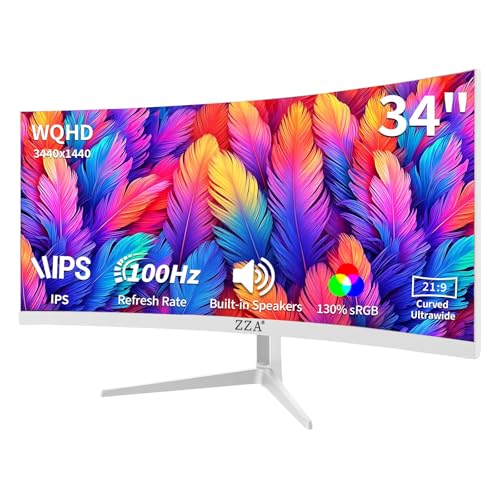
ZZA 34-Inch Curved IPS Ultrawide Monitor
Best for: budget ultrawide multitasking and casual gaming
- Screen Size
- 34"
- Resolution
- 3440x1440
- Refresh Rate
- 100Hz
- Panel Type
- IPS
- Aspect Ratio
- 21:9
- Sync Technology
- AMD FreeSync Premium
View on Amazon: ZZA 34-Inch Curved IPS Ultrawide Monitor Affiliate link
This ZZA monitor offers a 34-inch WQHD (3440x1440) IPS panel with a 3800R curve. It features a 100Hz refresh rate and AMD FreeSync for smooth visuals. The display supports HDR10 and includes built-in speakers. You get dual HDMI 2.0 and dual DisplayPort 1.2 inputs for flexible connectivity. It is a practical choice for users seeking an ultrawide screen without the premium price tag of major brands.
Pros
- IPS panel for accurate colors and wide viewing angles
- 3440x1440 resolution for clear, detailed imagery
- 100Hz refresh rate with AMD FreeSync for smooth motion
- Dual HDMI and dual DisplayPort inputs for versatile connection
Cons
- 100Hz refresh rate is lower than the 120Hz or 165Hz found on competing gaming monitors
- Tilt-only stand limits ergonomic adjustment compared to height-adjustable alternatives
- Maximum brightness of 280 cd/m² is modest for HDR performance
Good fit if
- You want a large ultrawide screen for multitasking at a lower cost
- You prefer IPS color accuracy over VA contrast for general use
- You need multiple display inputs for connecting several devices
Skip if
- You require high refresh rates above 120Hz for competitive gaming
- You need height or pivot adjustment for ergonomic positioning
- You prioritize high-brightness HDR performance for media consumption
Verdict: ZZA 34-inch WQHD Curved IPS Monitor is a solid budget option for users who value color accuracy and connectivity over high refresh rates. It fits well in setups where ultrawide productivity is the priority.

LG 34-Inch IPS Ultrawide Monitor with USB-C
Best for: productivity and color-accurate workflows
- Screen Size
- 34"
- Resolution
- 2560 x 1080
- Refresh Rate
- 100Hz
- Panel Type
- IPS
- Aspect Ratio
- 21:9
- Sync Technology
- FreeSync
View on Amazon: LG 34-Inch IPS Ultrawide Monitor with USB-C Affiliate link
This LG monitor offers a 34-inch 21:9 display with 2560 x 1080 resolution. It uses an IPS panel for wide viewing angles and covers 99% of the sRGB color gamut. The 100Hz refresh rate supports FreeSync for smoother motion. You get USB-C, DisplayPort, and HDMI connectivity. An adjustable stand and built-in stereo speakers add practical value for your desk setup.
Pros
- IPS panel with 99% sRGB coverage
- USB-C connectivity for single-cable setup
- 100Hz refresh rate with FreeSync
- Built-in stereo speakers with deep bass
- Fully adjustable L-shaped stand
Cons
- 2560 x 1080 resolution is lower than the WQHD 3440 x 1440 on other picks
- 100Hz refresh rate is slower than the 120Hz or 165Hz options available
- VESA DisplayHDR 400 is entry-level certification
Good fit if
- You prioritize color accuracy and wide viewing angles for productivity
- You need USB-C connectivity to simplify your desk cables
- You prefer a 100Hz refresh rate for smooth everyday workflows
Skip if
- You require WQHD (3440 x 1440) resolution for sharper text
- You need high refresh rates above 100Hz for competitive gaming
- You want a monitor with advanced HDR performance beyond DisplayHDR 400
Verdict: LG 34" WFHD IPS Monitor delivers solid color accuracy and versatile connectivity for office tasks. It suits users who value IPS panel quality and USB-C convenience over higher resolution or gaming speed. You will get a reliable display for multitasking without the premium cost of WQHD panels.

Philips Evnia 34-Inch Curved Mini LED Monitor
Best for: High refresh rate ultrawide gaming
- Screen Size
- 34-inch
- Resolution
- 3440x1440
- Refresh Rate
- 165Hz
- Aspect Ratio
- 21:9
- Sync Technology
- FreeSync Premium Pro, G-Sync Compatible
- Connectivity
- 2x HDMI 2.1, 1x DP 1.4, USB-C, USB hub
View on Amazon: Philips Evnia 34-Inch Curved Mini LED Monitor Affiliate link
The Philips Evnia 34M2C7600MV is a 34-inch curved ultrawide monitor featuring a 3440x1440 resolution and a 165Hz refresh rate. It uses a VA panel with a 1500R curvature. The display supports FreeSync Premium Pro and G-Sync Compatible modes. It includes a USB-C port with 65W power delivery. This setup suits gamers seeking high refresh rates and HDR1400 brightness in a curved form factor.
Pros
- 165Hz refresh rate for smooth motion
- USB-C port with 65W power delivery
- HDR1400 and 1400 cd/m² brightness
- FreeSync Premium Pro and G-Sync Compatible
- KVM switch and height-adjustable stand
Cons
- VA panel limits viewing angles compared to IPS
- 1500R curvature is less aggressive than typical gaming curves
- No mention of built-in webcam or microphone
Good fit if
- You want a high refresh rate ultrawide for gaming
- You need USB-C connectivity for laptop charging
- You prefer a curved display for immersion
Skip if
- You require an IPS panel for color accuracy
- You need a flat screen for design work
- You prefer a smaller 27-inch footprint
Verdict: The Philips Evnia 34M2C7600MV 34-inch 165Hz delivers strong gaming specs with USB-C convenience. It fits users who prioritize high refresh rates and HDR performance in a curved ultrawide package.

Dell 34-Inch 120Hz USB-C Monitor
Best for: color-accurate work and moderate gaming
- Screen Size
- 34"
- Resolution
- WQHD
- Refresh Rate
- 120Hz
- Response Time
- 0.03ms
- Sync Technology
- AMD FreeSync Premium
- Connectivity
- USB-C
View on Amazon: Dell 34-Inch 120Hz USB-C Monitor Affiliate link
The Dell S3425DW is a 34-inch curved ultrawide monitor with WQHD resolution. It features a VA panel and 120Hz refresh rate with AMD FreeSync Premium. The display offers 99% sRGB and 95% DCI-P3 color coverage. A USB-C port provides up to 65W power delivery. It targets users seeking color accuracy and smooth motion for work and gaming.
Pros
- 120Hz refresh rate with AMD FreeSync Premium
- 99% sRGB and 95% DCI-P3 color coverage
- USB-C connectivity with 65W power delivery
- Reduced blue light emissions for eye comfort
Cons
- VA panel may exhibit slower response times in dark scenes
- No built-in speakers listed in specifications
- Curved design limits optimal viewing angles for multiple users
Good fit if
- You need USB-C connectivity for laptop charging
- You prioritize color accuracy for creative work
- You want a smooth 120Hz gaming experience
Skip if
- You require a flat panel for multi-view setups
- You need a higher 144Hz or 165Hz refresh rate
- You prefer IPS panel technology for wider viewing angles
Verdict: Dell S3425DW 34" WQHD VA Monitor suits professionals and gamers who value color fidelity and USB-C convenience. It delivers solid performance for single-user setups but lacks the speed of higher-end gaming displays.

Alienware 34-Inch Curved QD-OLED Monitor
Best for: Gamers and creators seeking premium QD-OLED contrast
- Screen Size
- 34-inch
- Refresh Rate
- 165Hz
- Panel Type
- QD-OLED
- Aspect Ratio
- 21:9
- Response Time
- 0.1Ms
- Sync Technology
- AMD FreeSync Premium Pro
View on Amazon: Alienware 34-Inch Curved QD-OLED Monitor Affiliate link
The Alienware AW3423DWF is a 34-inch curved QD-OLED ultrawide monitor with a 165Hz refresh rate and 0.1ms response time. It covers 99.3% of the DCI-P3 color gamut and supports AMD FreeSync Premium Pro. This display offers true blacks and high peak luminance for immersive gaming and critical content creation. It includes a height-adjustable stand and customizable RGB lighting. You get a three-year warranty that covers OLED burn-in.
Pros
- QD-OLED panel for infinite contrast and true blacks
- 165Hz refresh rate with 0.1ms response time
- 99.3% DCI-P3 color gamut coverage
- Height-adjustable stand with tilt, swivel, and slant
- Three-year warranty covering OLED burn-in
Cons
- Only 165Hz refresh rate compared to 165Hz+ competitors
- No USB-C connectivity listed in specifications
- 20.5 pounds weight makes it heavier than IPS alternatives
Good fit if
- You want the best possible contrast and color accuracy for gaming
- You need a curved 21:9 display for immersive experiences
- You prioritize OLED reliability with a burn-in warranty
Skip if
- You require USB-C connectivity for docking or charging
- You prefer a flat panel over a curved 1800R design
- You are on a tight budget and need a lower cost option
Verdict: Alienware 34-inch QD-OLED Curved Monitor delivers superior image quality with its QD-OLED panel and 165Hz speed. It is the best choice for gamers and creators who value deep blacks and vibrant colors over basic connectivity features.
Specifications side by side
| Spec | LG 34-Inch Curved WQHD USB-C Monitor | LG 34-Inch Curved Ultrawide USB-C Monitor | ZZA 34-Inch Curved IPS Ultrawide Monitor | LG 34-Inch IPS Ultrawide Monitor with USB-C | Philips Evnia 34-Inch Curved Mini LED Monitor | Dell 34-Inch 120Hz USB-C Monitor | Alienware 34-Inch Curved QD-OLED Monitor |
|---|---|---|---|---|---|---|---|
| Screen Size | 34" | 34" | 34" | 34" | 34-inch | 34" | 34-inch |
| Resolution | 3440x1440 | 3440 x 1440 | 3440x1440 | 2560 x 1080 | 3440x1440 | WQHD | not stated |
| Refresh Rate | 100Hz | 100Hz | 100Hz | 100Hz | 165Hz | 120Hz | 165Hz |
| Panel Type | not stated | not stated | IPS | IPS | not stated | not stated | QD-OLED |
| Aspect Ratio | not stated | 21:9 | 21:9 | 21:9 | 21:9 | not stated | 21:9 |
| Response Time | not stated | 5ms | not stated | not stated | not stated | 0.03ms | 0.1Ms |
| Sync Technology | AMD FreeSync | not stated | AMD FreeSync Premium | FreeSync | FreeSync Premium Pro, G-Sync Compatible | AMD FreeSync Premium | AMD FreeSync Premium Pro |
| Connectivity | USB Type-C | HDMI, DisplayPort, USB Type-C, USB | 2x HDMI 2.0, 2x DisplayPort 1.2 | USB Type-C, DisplayPort, HDMI | 2x HDMI 2.1, 1x DP 1.4, USB-C, USB hub | USB-C | not stated |
| Dimensions | 10.2 × 31.9 × 22.4 inches | 10.2 × 31.9 × 22.4 inches | 3.83 × 32.2 × 14.6 inches | 9.1 × 32.1 × 21 inches | 11.1 × 36.6 × 20.7 inches | 8.73 × 31.8 × 16.2 inches | 32.1 × 12 × 20.7 inches |
| Weight | 12.1 pounds | 15.2 pounds | 13.1 pounds | not stated | 22.8 pounds | 20.7 pounds | 20.5 pounds |
| Size | 34-curved | not stated | 34 INCH-2 | 100Hz-USB Type C/DP/HDMI | 34 Pouces Mini LED | S3425DW | 34.0" OLED |
| Color | black | Black | White | White-Height/Swivel/Tilt | white | Ash White | Black |
| Model | AMZE1LG34WR55QCB | 34WR55QK-B.AUS | Z34A | not stated | 34M2C7600MV | S3425DW | AW3423DWF |
Looking beyond this list? See lg 8 alternatives.
Frequently asked questions
Which alternative offers the highest refresh rate for gaming?
The Philips Evnia 34M2C7600MV provides the highest refresh rate at 165Hz. It also supports both FreeSync and G-SYNC technologies. This makes it suitable for high-speed gaming. The Alienware AW3423DWF also features a 165Hz refresh rate with a QD-OLED panel for superior contrast. Both monitors prioritize speed over the 100Hz standard found in most other options.
Do these ultrawide monitors support USB-C connectivity?
Yes, most listed models include USB-C ports for convenient connectivity. The LG 34WR55QC-B, LG 34WR55QK-B, LG 34" WFHD, Philips Evnia, and Dell S3425DW all feature USB-C. This allows you to connect a single cable for data and power. The ZZA and Alienware models do not list USB-C in their provided specifications.
Which model is best for color-accurate professional work?
The LG 34" WFHD IPS Monitor is noted for solid color accuracy and versatile connectivity. Its IPS panel type ensures reliable color reproduction for office tasks. The Alienware AW3423DWF also offers premium QD-OLED technology for vibrant colors and deep blacks. These two models suit creators who prioritize image quality and color fidelity for their workflows.
Are there options with a resolution higher than WQHD?
No, all listed alternatives use either WQHD (3440 x 1440) or WFHD (2560 x 1080) resolutions. The LG 34WR55QC-B, LG 34WR55QK-B, ZZA, Philips Evnia, and Alienware models all feature the 3440 x 1440 resolution. The LG 34" WFHD and Dell S3425DW use lower resolutions. None of the products offer a resolution higher than WQHD.
Which monitor has the smallest physical footprint or height?
The ZZA Z34A has the lowest height at 14.6 inches. It also weighs the least at 13.1 pounds. The Dell S3425DW is also relatively compact with a height of 16.2 inches. These dimensions make them suitable for desks with limited vertical space. Other models, like the Philips Evnia, are significantly taller at 20.7 inches.
Does the Dell S3425DW use an IPS or VA panel?
The Dell S3425DW uses a VA panel type. This is distinct from the IPS panels found in the LG WFHD and ZZA models. VA panels typically offer higher contrast ratios. The Dell monitor delivers 120Hz refresh rate and WQHD resolution. It suits professionals who value color fidelity and USB-C convenience in a single-user setup.
Which alternative is the best budget-friendly choice?
The ZZA Z34A is identified as the best budget option. It offers a 34-inch curved IPS panel with 100Hz refresh rate. It provides good color accuracy and connectivity for multitasking. This model fits well in setups where ultrawide productivity is the priority. It serves as a solid alternative for users who do not need premium features like USB-C or high refresh rates.