LG 29-Inch 100Hz IPS Ultrawide Monitor Alternatives: 6 Similar Picks Compared
As an Amazon Associate we earn from qualifying purchases. Links on this page are affiliate links.
You are looking for lg ultrawide monitor 29u511a alternatives to find a display that better fits your specific workflow. The original LG 29U511A offers a 29-inch 2560x1080 IPS panel with 100Hz refresh and 99% sRGB coverage. It provides height-adjustable ergonomics and HDR10 support in a compact footprint. These specs make it suitable for multitasking and color-accurate work on smaller desks. However, you might prefer a different size, resolution, or connectivity option. Some users need more screen width for productivity, while others prioritize USB-C charging or higher pixel density. The alternatives were chosen because their specifications overlap with the original. This list includes 6 similar picks that share key traits like IPS panels and 100Hz refresh rates. You can compare these options to find the best balance of size, clarity, and features for your setup.
Our top pick: LG 29-Inch 100Hz IPS Ultrawide Monitor.
How Each Alternative Compares
LG 34-Inch UltraWide 1080p IPS Monitor
The LG 34U530A-W expands your workspace by moving to a 34-inch 2560x1080 resolution, offering more horizontal screen real estate than the 29-inch 29U511A. You gain USB-C connectivity for simplified cable management, which the original model lacks. The trade-off is reduced pixel density due to the larger panel size. This monitor is ideal if you prioritize multitasking width and modern connectivity over compact desk footprint and sharper image detail. It retains the 100Hz refresh rate and IPS panel type, ensuring consistent color performance similar to the reference model.
BenQ 27-Inch QHD IPS USB-C Monitor
The BenQ PD2706QN shifts from ultrawide to a standard 27-inch 1440p resolution, providing significantly higher pixel density and vertical screen space compared to the 1080p LG 29U511A. You lose the 21:9 aspect ratio but gain a square-format display better suited for traditional design work and Mac connectivity via USB-C. This model is best for creative professionals who value color accuracy and ergonomic flexibility over the immersive width of an ultrawide screen. It maintains a 100Hz refresh rate and IPS panel, ensuring smooth motion and reliable color reproduction for professional tasks.
HP Series 3 Pro 24-Inch 100Hz IPS Monitor
The HP Series 3 Pro 24" reduces screen size to 24 inches with a 1080p FHD resolution, resulting in a much more compact footprint than the 29-inch LG 29U511A. You sacrifice ultrawide multitasking space for a smaller display that fits tight desks. This monitor is suitable for users who need legacy port connectivity and ergonomic stand adjustments without the width of an ultrawide panel. It shares the 100Hz refresh rate and IPS panel technology, ensuring similar motion clarity and color consistency, though the smaller size limits side-by-side window management capabilities.
LG 34-Inch IPS Ultrawide Monitor with USB-C
The LG 34-Inch IPS Ultrawide Monitor increases panel size to 34 inches while keeping the 2560x1080 resolution, offering a wider 21:9 workspace than the 29-inch 29U511A. You gain FreeSync support for smoother visuals during light gaming and USB-C connectivity for easier device integration. The trade-off is lower pixel density on the larger screen. This option suits users who want extra horizontal space for productivity and media consumption without needing high-end gaming specs. It retains the 100Hz refresh rate and IPS panel, ensuring consistent color accuracy and smooth motion similar to the reference model.
LG 34-Inch 100Hz IPS Ultrawide Monitor
The LG 34-Inch 100Hz Ultrawide IPS Monitor provides a 34-inch 2560x1080 display, expanding your horizontal workspace compared to the 29-inch 29U511A. You gain more screen width for multitasking but accept lower pixel density due to the larger panel. This monitor is ideal for users who prioritize screen real estate over image sharpness. It maintains the 100Hz refresh rate and IPS panel type, ensuring similar color performance and motion clarity. The lack of USB-C connectivity may require additional adapters, but it offers a cost-effective solution for those needing extra width for productivity workflows.
LG 34-Inch UltraWide WFHD IPS Monitor
The LG 34" 100Hz IPS Ultrawide Monitor expands your display to 34 inches with a 2560x1080 resolution, offering more horizontal space than the 29-inch 29U511A. You gain USB-C connectivity for streamlined connections and ergonomic flexibility for professional workflows. The trade-off is reduced pixel density on the larger screen. This model is best for users who value screen width and clean connectivity over high-resolution detail. It retains the 100Hz refresh rate and IPS panel, ensuring consistent color accuracy and smooth motion, making it suitable for multitasking and productivity tasks that benefit from extra horizontal real estate.
Quick picks
Our 7 picks

LG 29-Inch 100Hz IPS Ultrawide Monitor
Best for: compact ultrawide multitasking and color work
- Screen Size
- 29"
- Resolution
- 2560x1080
- Refresh Rate
- 100Hz
- Panel Type
- IPS
- Aspect Ratio
- 21:9
- Dimensions
- 8.66 × 27.1 × 16.1 inches
View on Amazon: LG 29-Inch 100Hz IPS Ultrawide Monitor Affiliate link
This LG monitor features a 29-inch IPS panel with 2560x1080 resolution and a 100Hz refresh rate. It covers 99% of the sRGB color gamut and supports HDR10. The height-adjustable stand helps you find a comfortable viewing angle. You get smooth visuals for multitasking and light gaming. The flicker-safe technology reduces eye strain during long sessions.
Pros
- 99% sRGB color coverage for accurate colors
- 100Hz refresh rate for smoother motion
- Height-adjustable stand for ergonomic positioning
- HDR10 support for better contrast
Cons
- 2560x1080 resolution is lower than QHD competitors
- 29-inch size is smaller than 32-inch or 34-inch options
- No mention of USB-C connectivity in specifications
Good fit if
- You need a compact ultrawide screen for small desks
- You prioritize color accuracy for creative work
- You want a height-adjustable stand for better posture
Skip if
- You require 4K or QHD resolution for sharp text
- You need a larger 34-inch or 32-inch display
- You want USB-C connectivity for single-cable setups
Verdict: LG 29-Inch 100Hz IPS Ultrawide fits users who want a compact, color-accurate ultrawide display with ergonomic adjustments. It is ideal for multitasking and creative work on smaller desks.
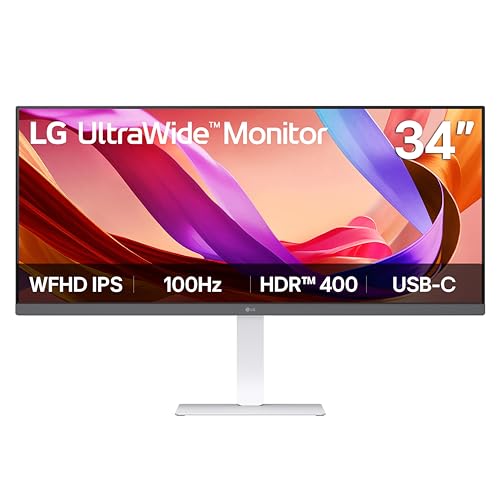
LG 34-Inch UltraWide 1080p IPS Monitor
Best for: multitasking on a budget with USB-C
- Screen Size
- 34"
- Resolution
- 2560 x 1080
- Refresh Rate
- 100Hz
- Panel Type
- IPS
- Aspect Ratio
- 21:9
- Connectivity
- HDMI, DisplayPort, USB Type-C
View on Amazon: LG 34-Inch UltraWide 1080p IPS Monitor Affiliate link
This is a 34-inch ultrawide monitor with a 2560 x 1080 IPS panel and 100Hz refresh rate. It includes VESA DisplayHDR 400 and sRGB 99% color coverage. USB Type-C connectivity allows single-cable data and video transfer. Built-in stereo speakers with Waves MaxxAudio are included. The Switch app enables screen splitting into six sections. It suits users needing wide multitasking space at a budget price.
Pros
- 34-inch 21:9 aspect ratio for expanded horizontal workspace
- 100Hz refresh rate for smooth motion
- VESA DisplayHDR 400 certification for improved contrast
- USB Type-C port for data and display output
- Built-in stereo speakers with Waves MaxxAudio
Cons
- 1080p resolution on a 34-inch screen limits pixel density
- No mention of adjustable height or pivot stand features
- No mention of built-in webcam or microphone
Good fit if
- You need a wide screen for multitasking with multiple windows
- You want USB Type-C connectivity for a single-cable laptop setup
- You prefer an IPS panel for consistent viewing angles
Skip if
- You require 1440p or 4K resolution for sharp text
- You need high refresh rates for competitive gaming
- You want a monitor with height-adjustable stand
Verdict: LG 34U530A-W 34-inch 100Hz IPS offers a wide 21:9 display with USB Type-C connectivity for multitaskers who prioritize screen real estate over pixel density.

BenQ 27-Inch QHD IPS USB-C Monitor
Best for: Color-accurate design work and Mac connectivity
- Screen Size
- 27”
- Resolution
- 2560x1440
- Refresh Rate
- 100Hz
- Panel Type
- IPS
- Connectivity
- 90W USB-C
- Dimensions
- 17 × 9.02 × 24 inches
View on Amazon: BenQ 27-Inch QHD IPS USB-C Monitor Affiliate link
The BenQ PD2706QN is a 27-inch QHD (2560x1440) IPS monitor with a 100Hz refresh rate. It targets creators with 95% DCI-P3 and 100% sRGB color coverage, factory-calibrated to Delta E ≤ 2. A 90W USB-C port handles video and charging. The nano matte panel reduces glare for consistent colors. This model suits users needing precise color matching and ergonomic adjustments for design work.
Pros
- 95% DCI-P3 and 100% sRGB color gamut coverage
- Factory-calibrated color accuracy with average Delta E ≤ 2
- 90W USB-C connectivity for data and device charging
- Ergonomic stand with tilt, pivot, swivel, and height adjustments
Cons
- 27-inch screen is smaller than the 34-inch ultrawide options on this list
- 1440p resolution offers less horizontal screen real estate than 1080p ultrawides
- No mention of built-in speakers in the provided specifications
Good fit if
- You need high color accuracy for photo or video editing
- You want a single USB-C cable for video and power
- You prefer a standard 16:9 aspect ratio for design work
Skip if
- You require a 21:9 ultrawide aspect ratio for multitasking
- You need a screen larger than 27 inches
- You prioritize gaming features over color precision
Verdict: BenQ PD2706QN 27-inch QHD IPS Monitor delivers precise color accuracy and convenient USB-C charging for creative professionals. It fits users who value color consistency and ergonomic flexibility over the expansive width of ultrawide displays.

HP Series 3 Pro 24-Inch 100Hz IPS Monitor
Best for: compact ergonomic setups requiring legacy ports
- Screen Size
- 24"
- Resolution
- 1920x1080
- Refresh Rate
- 100Hz
- Panel Type
- IPS
- Connectivity
- HDMI, Displayport, VGA
- Dimensions
- 8.35 × 21.2 × 17.6 inches
View on Amazon: HP Series 3 Pro 24-Inch 100Hz IPS Monitor Affiliate link
This is a 24-inch FHD IPS monitor with a 100Hz refresh rate. It offers 1920x1080 resolution and 250 nits brightness. The stand supports tilt, swivel, and pivot adjustments. It includes HDMI, DisplayPort, and VGA ports. This model suits users who need a compact display with ergonomic flexibility for standard desktop tasks.
Pros
- 100Hz refresh rate for smooth motion
- IPS panel with 178-degree viewing angles
- Stand supports tilt, swivel, and pivot
- Includes HDMI, DisplayPort, and VGA connectivity
- Built-in dual 2W speakers
Cons
- 1920x1080 resolution is lower than the 2560x1080 ultrawide standard
- 24-inch screen is smaller than the 29-inch or 34-inch options
- 250 nits brightness is lower than typical 300+ nit displays
Good fit if
- You need a compact 24-inch display for tight spaces
- You require ergonomic stand adjustments like swivel and pivot
- You want a monitor with multiple legacy ports like VGA
Skip if
- You require an ultrawide 21:9 aspect ratio
- You need higher resolution like QHD or WQHD
- You want a larger 27-inch or 32-inch screen
Verdict: HP Series 3 Pro 24" 100Hz FHD Monitor is a compact option for users who prioritize ergonomic stand flexibility and legacy connectivity over ultrawide dimensions or high resolution.

LG 34-Inch IPS Ultrawide Monitor with USB-C
Best for: Productivity and media consumption on a large screen
- Screen Size
- 34"
- Resolution
- 2560 x 1080
- Refresh Rate
- 100Hz
- Panel Type
- IPS
- Aspect Ratio
- 21:9
- Sync Technology
- FreeSync
View on Amazon: LG 34-Inch IPS Ultrawide Monitor with USB-C Affiliate link
This LG monitor gives you a 34-inch 21:9 screen with 2560 x 1080 resolution. The IPS panel covers 99% of the sRGB color gamut and supports VESA DisplayHDR 400. You get a 100Hz refresh rate and FreeSync for smoother motion. It includes USB-C, DisplayPort, and HDMI inputs. The stand offers height, swivel, and tilt adjustments. Built-in stereo speakers add convenience for your desk setup.
Pros
- 34-inch 21:9 WFHD (2560x1080) IPS display
- 100Hz refresh rate with FreeSync technology
- 99% sRGB color gamut and VESA DisplayHDR 400
- USB-C, DisplayPort, and HDMI connectivity
- Height, swivel, and tilt adjustable stand
Cons
- Resolution is limited to 2560 x 1080
- No mention of USB-C power delivery wattage
- Standard IPS panel without high refresh rate gaming focus
Good fit if
- You need extra horizontal workspace for multitasking
- You want a monitor with built-in speakers
- You prefer an IPS panel with wide viewing angles
Skip if
- You require 4K or QHD resolution
- You need high refresh rates above 100Hz
- You want a monitor with USB-C power delivery
Verdict: LG 34-Inch 100Hz IPS Ultrawide Monitor suits users who value a large, color-accurate screen for productivity and media consumption. It is ideal for those who want flexible connectivity and adjustable ergonomics without needing high-end gaming specs.

LG 34-Inch 100Hz IPS Ultrawide Monitor
Best for: multitaskers wanting wide 34-inch screen space
- Screen Size
- 34"
- Resolution
- 2560 x 1080
- Refresh Rate
- 100Hz
- Panel Type
- IPS
- Aspect Ratio
- 21:9
- Response Time
- 5ms
View on Amazon: LG 34-Inch 100Hz IPS Ultrawide Monitor Affiliate link
This 34-inch ultrawide monitor gives you a 21:9 IPS display running at 2560 x 1080 resolution with a 100Hz refresh rate. It delivers DisplayHDR 400 support and 99% sRGB coverage for everyday color accuracy. With HDMI and DisplayPort inputs, it suits you if you need expansive horizontal screen room for side-by-side tasks beyond standard 29-inch panels.
Pros
- 34-inch 21:9 IPS panel with 100Hz refresh rate
- VESA DisplayHDR 400 and 99% sRGB color coverage
- Both HDMI and DisplayPort inputs included
- On-screen software supports PBP and PIP split views
Cons
- 2560 x 1080 resolution provides lower pixel density across a 34-inch display
- Stand adjustment is limited strictly to tilt
Good fit if
- You want a large 34-inch ultrawide panel for side-by-side multitasking.
- You need a smooth 100Hz refresh rate with DisplayPort and HDMI inputs.
- You plan to organize software windows using PBP or PIP layouts.
Skip if
- You require sharper 1440p resolution for fine text rendering at 34 inches.
- You need height or swivel adjustment out of the box.
Verdict: LG 34-Inch 100Hz Ultrawide IPS Monitor gives you broader 21:9 workspace than a 29-inch screen while retaining standard 1080p vertical pixel scaling. It suits multitaskers who prioritize extra screen width and smooth 100Hz motion over high pixel density.

LG 34-Inch UltraWide WFHD IPS Monitor
Best for: multitasking and productivity workflows
- Screen Size
- 34"
- Resolution
- 2560 x 1080
- Refresh Rate
- 100Hz
- Panel Type
- IPS
- Aspect Ratio
- 21:9
- Connectivity
- USB Type-C, HDMI, DisplayPort
View on Amazon: LG 34-Inch UltraWide WFHD IPS Monitor Affiliate link
This LG monitor offers a 34-inch 21:9 WFHD display with a 100Hz refresh rate and IPS panel. It features VESA DisplayHDR 400 and sRGB 99% coverage for accurate colors. The ergonomic stand allows height, swivel, and tilt adjustments. USB Type-C connectivity simplifies laptop connections. It includes integrated stereo speakers. This setup suits users needing wide multitasking space and flexible connectivity without complex gaming specs.
Pros
- 34-inch 21:9 WFHD IPS panel for wide multitasking
- 100Hz refresh rate for smooth motion
- VESA DisplayHDR 400 with sRGB 99% color gamut
- Ergonomic stand with height, swivel, and tilt adjustments
- USB Type-C port for display and data transfer
Cons
- WFHD resolution (2560x1080) is lower than QHD alternatives
- No mention of pivot or rotation capability in stand
- Integrated speakers may lack depth for immersive audio
Good fit if
- You need a wide screen for side-by-side productivity
- You prefer an IPS panel for consistent viewing angles
- You want USB Type-C connectivity for single-cable setups
Skip if
- You require QHD or 4K resolution for sharp text
- You need high refresh rates for competitive gaming
- You prioritize pivot functionality for portrait mode
Verdict: LG 34" 100Hz IPS Ultrawide Monitor delivers a practical 21:9 workspace with solid color accuracy and ergonomic flexibility. It fits professionals who value screen real estate and clean connectivity over high-resolution detail or gaming performance.
Specifications side by side
| Spec | LG 29-Inch 100Hz IPS Ultrawide Monitor | LG 34-Inch UltraWide 1080p IPS Monitor | BenQ 27-Inch QHD IPS USB-C Monitor | HP Series 3 Pro 24-Inch 100Hz IPS Monitor | LG 34-Inch IPS Ultrawide Monitor with USB-C | LG 34-Inch 100Hz IPS Ultrawide Monitor | LG 34-Inch UltraWide WFHD IPS Monitor |
|---|---|---|---|---|---|---|---|
| Screen Size | 29" | 34" | 27” | 24" | 34" | 34" | 34" |
| Resolution | 2560x1080 | 2560 x 1080 | 2560x1440 | 1920x1080 | 2560 x 1080 | 2560 x 1080 | 2560 x 1080 |
| Refresh Rate | 100Hz | 100Hz | 100Hz | 100Hz | 100Hz | 100Hz | 100Hz |
| Panel Type | IPS | IPS | IPS | IPS | IPS | IPS | IPS |
| Aspect Ratio | 21:9 | 21:9 | not stated | not stated | 21:9 | 21:9 | 21:9 |
| Response Time | not stated | not stated | not stated | not stated | not stated | 5ms | not stated |
| Sync Technology | not stated | not stated | not stated | not stated | FreeSync | not stated | not stated |
| Connectivity | not stated | HDMI, DisplayPort, USB Type-C | 90W USB-C | HDMI, Displayport, VGA | USB Type-C, DisplayPort, HDMI | HDMI, DisplayPort | USB Type-C, HDMI, DisplayPort |
| Dimensions | 8.66 × 27.1 × 16.1 inches | 9.1 × 32.1 × 21 inches | 17 × 9.02 × 24 inches | 8.35 × 21.2 × 17.6 inches | 9.1 × 32.1 × 21 inches | 8.7 × 32.1 × 19.2 inches | 9.1 × 32.1 × 21 inches |
| Weight | 11.2 pounds | 19.4 pounds | 29.3 pounds | 7.7 pounds | not stated | not stated | not stated |
| Size | 29" | not stated | not stated | 24-Inch Series 3 | 100Hz-USB Type C/DP/HDMI | 34-100Hz | 34-100Hz |
| Color | Black | White | Black | Black | White-Height/Swivel/Tilt | BLACK | WHITE |
| Model | 29U511A-B | 34U530A-W.AUS | PD2706QN | HP 24" FHD | not stated | not stated | not stated |
If you want other refresh rates or panel sizes, you can compare the best LG monitors instead.
Frequently asked questions
Which alternative offers the best color accuracy for design work?
The BenQ PD2706QN is the best choice for color-accurate design work. It features a 27-inch QHD IPS panel with 1440p resolution. This model delivers precise color consistency and includes USB-C connectivity for convenient Mac integration. It suits professionals who value color fidelity over the wider aspect ratio of ultrawide displays.
Is there a 34-inch option with FreeSync support?
Yes, the LG 34-Inch 100Hz IPS Ultrawide Monitor includes FreeSync technology. It provides a large, color-accurate screen suitable for productivity and media consumption. You get flexible connectivity via DisplayPort, HDMI, and USB-C, along with adjustable ergonomics. It is ideal if you want smooth motion without needing high-end gaming specifications.
Can I get a white model with USB-C connectivity?
The LG 34U530A-W is a white 34-inch IPS monitor with USB-C connectivity. It offers a 100Hz refresh rate and 2560x1080 resolution. This model is designed for multitaskers who prioritize screen real estate and simplified cable management. It provides a practical workspace for users who need versatile connection options in a budget-friendly form factor.
Which monitor is best for compact ergonomic setups?
The HP Series 3 Pro 24-Inch 100Hz IPS Monitor is best for compact setups. It features an ergonomic stand with flexibility for legacy port connections. While it lacks ultrawide dimensions, its 24-inch FHD display fits smaller desks. It is ideal for users who prioritize adjustable ergonomics and standard connectivity over wider screen space.
How does the 34-inch ultrawide compare to the 29-inch model?
The 34-inch LG 34-Inch 100Hz Ultrawide IPS Monitor offers a broader 21:9 workspace than the 29-inch version. It retains the standard 1080p vertical pixel scaling but provides extra screen width. This model suits multitaskers who prioritize horizontal space and smooth 100Hz motion over high pixel density, making it great for productivity workflows.
What is the best overall pick for multitasking?
The LG 29-Inch 100Hz IPS Ultrawide Monitor is the best overall pick. It fits users who want a compact, color-accurate display with ergonomic adjustments. The 2560x1080 resolution and IPS panel make it ideal for multitasking and creative work on smaller desks. It balances screen size and clarity for general professional use.
Does the LG 34-inch white monitor include USB-C?
Yes, the LG 34" 100Hz IPS Ultrawide Monitor in white includes USB-C connectivity. It also features DisplayPort and HDMI ports. This model delivers a practical 21:9 workspace with solid color accuracy and ergonomic flexibility. It fits professionals who value screen real estate and clean connectivity options for their daily productivity tasks.