Philips Computer Monitors Philips 34" Curved USB-C Review (2026): A Spec-Based Look
As an Amazon Associate we earn from qualifying purchases. Links on this page are affiliate links.
This philips computer monitors philips 34 curved USB c review focuses on the Philips 34E1C5600HE. It is a 34-inch ultrawide monitor with a 21:9 aspect ratio. The panel delivers 3440 x 1440 QHD resolution and refreshes at 100Hz. You get a curved VA display with 1500R radius. It also includes a built-in 5MP webcam with Windows Hello support. A single USB-C cable handles video, data, and up to 65W power delivery. This setup simplifies your desk while maintaining high visual fidelity for work and media.
What stands out
- 3440 x 1440 resolution across a 34-inch 21:9 screen
- 100Hz refresh rate for smoother motion
- USB-C connectivity with 65W power delivery
- Built-in 5MP webcam with Windows Hello facial recognition
Who it fits
Good fit for
This monitor suits remote workers who want a clean desk setup. The USB-C port with 65W charging lets you connect a laptop with one cable. The 100Hz refresh rate helps with general productivity and casual gaming. The built-in webcam and noise-canceling mic remove the need for extra peripherals. You will appreciate the 21:9 screen real estate for multitasking across multiple windows or spreadsheets.
Who should skip it
You should look elsewhere if you need a high refresh rate for competitive gaming. This panel runs at 100Hz, which is lower than many dedicated gaming monitors. It also lacks Thunderbolt 4 support, so you cannot daisy-chain devices with high bandwidth. If you require a flat screen for precise alignment, the 1500R curve may not suit your preference. The webcam is fixed, so you cannot adjust its angle independently.
Verdict: The Philips 34E1C5600HE offers a balanced mix of ultrawide productivity and convenient USB-C connectivity. It is a solid choice for users who value a simplified, single-cable desk setup.
Key specs explained for this monitor
Resolution 3440 x 1440
This QHD resolution provides more horizontal screen real estate than standard 16:9 displays. You get sharp text and detailed images without the heavy GPU load of 4K. It is ideal for multitasking with multiple windows open. If you need crisp clarity for spreadsheets or code, this resolution offers a balanced mix of detail and performance.
Screen Size 34 inches
A 34-inch panel offers a large viewing area that fills your peripheral vision. This size fits well on most desks while providing ample space for productivity. It is larger than standard 27-inch monitors but not as massive as 49-inch dual setups. You benefit from a immersive workspace that reduces the need to switch between monitors frequently.
Aspect Ratio 21:9
This ultrawide format is nearly double the width of a standard monitor. It allows you to view two full-size documents side by side without overlap. Gamers benefit from a wider field of view in supported titles. If you work with timelines in video editing or wide spreadsheets, this ratio eliminates the need for vertical scrolling.
Refresh Rate 100Hz
A 100Hz refresh rate updates the image 100 times per second. This is significantly smoother than the standard 60Hz found in many office monitors. You will notice less motion blur when scrolling web pages or moving windows. It provides a fluid experience for general use and light gaming, bridging the gap between productivity and entertainment.
Connectivity USB-C
USB-C allows you to connect your laptop with a single cable for video, data, and power. This monitor supports up to 65W of power delivery, charging your notebook while you work. You reduce cable clutter on your desk significantly. If you use a modern laptop, this connection simplifies your setup and ensures consistent display output.
Design and build overview
The Philips 34E1C5600HE measures 31.8 inches wide, 15 inches high, and 4.4 inches deep. The listing describes the finish as black. These dimensions suggest a substantial footprint for your desk. You will need adequate horizontal space for the 34-inch ultrawide panel. The depth is modest, keeping the unit from protruding too far into your workspace.
The monitor features a curved VA panel with a 1500R radius. This curvature wraps around your field of view slightly. According to the listing, this design helps alleviate eye strain during long work sessions. It also aims to improve color accuracy compared to flat panels. The curve adds a layer of immersion for both productivity tasks and media consumption.
Integration is a key part of the build. The unit includes a built-in 5MP webcam with Windows Hello sensors. A noise-canceling microphone and speakers are also part of the chassis. This all-in-one approach reduces cable clutter on your desk. You can connect your laptop via a single USB-C cable that supports up to 65W of power delivery. This setup simplifies your workspace by combining video, data, and power into one connection point.
Setup and everyday use guide
You can connect this monitor to your laptop or desktop using the single USB-C cable. This port handles video signals, high-speed data transfer, and power delivery up to 65W. You only need one cable to charge your notebook while viewing high-resolution content. This simplifies your desk setup significantly. The monitor includes a built-in 5MP webcam and a noise-canceling microphone. You can use these for remote work without needing external peripherals. The webcam supports Windows Hello facial recognition. This allows you to log into your Windows devices in less than two seconds. The listing also notes built-in speakers. You have audio output without needing external headphones or a soundbar. The 1500R curved VA panel is designed to reduce eye strain during long work sessions. You get a wider field of view with the 21:9 aspect ratio. This layout supports efficient productivity by allowing multiple windows side by side. The display covers 123.24 percent of the sRGB color gamut. This ensures true-to-life images for both work and play. The 100Hz refresh rate provides smooth motion for general use. You do not need complex calibration for standard tasks. The integrated sensors and microphone work directly through the USB-C connection. You plug in the cable, and the device powers on. The setup process is straightforward for users who prefer a clean desk. You avoid cable clutter while maintaining full functionality for video calls and data transfer.
Before you buy this monitor
You need a laptop or desktop with a USB-C port that supports DisplayPort Alt Mode and Power Delivery. Verify your device can deliver at least 65W to charge efficiently while driving the 3440 x 1440 panel. If your computer lacks USB-C, you will need a compatible adapter or a different cable setup for video and power. The built-in Windows Hello webcam requires a Windows operating system for facial recognition login. Keep the VA panel clean with a microfiber cloth; avoid harsh chemicals that could damage the coating. This model sits alongside other ultrawide options by offering integrated peripherals. Unlike basic displays, it reduces desk clutter by combining video, data, and power into one connection. Check your workspace height against the 15-inch profile to ensure comfortable viewing angles. Ensure your desk can support the 31.8-inch width without crowding your workflow.
Check before you buy
- Confirm your device has USB-C with DisplayPort Alt Mode support.
- Check if your laptop delivers 65W Power Delivery via USB-C.
- Verify your operating system is Windows for Hello facial recognition.
- Measure your desk space for the 31.8-inch width and 15-inch height.
The product at a glance
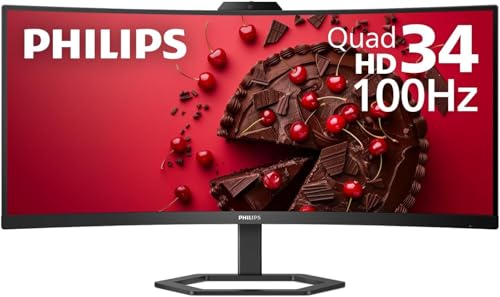
Philips 34" Curved USB-C Monitor
Best for: Remote work and productivity with integrated webcam
- Screen Size
- 34"
- Resolution
- 3440 x 1440
- Refresh Rate
- 100Hz
- Aspect Ratio
- 21:9
- Connectivity
- USB-C
- Dimensions
- 4.4 × 31.8 × 15 inches
View on Amazon: Philips 34" Curved USB-C Monitor Affiliate link
This 34-inch ultrawide monitor features a 3440 x 1440 resolution and a 21:9 aspect ratio. The 1500R curved VA panel supports 100Hz refresh rates and covers 99.25% of the NTSC color gamut. It includes a built-in 5MP webcam with Windows Hello support and a noise-canceling microphone. A single USB-C cable delivers up to 65W of power delivery alongside data and video signals.
Pros
- 3440 x 1440 QHD resolution for expanded horizontal workspace
- USB-C connectivity with 65W power delivery for single-cable setup
- Built-in 5MP webcam with Windows Hello facial recognition
- 1500R curved VA panel for improved immersion and eye comfort
Cons
- 100Hz refresh rate limits suitability for high-end competitive gaming
- No Thunderbolt certification for the USB-C connection
- Webcam and microphone are integrated, reducing flexibility for setup
Good fit if
- You need a single-cable solution to charge your laptop while working
- You require a built-in webcam and microphone for remote meetings
- You prefer a curved display for better peripheral visibility
Skip if
- You require a 144Hz or higher refresh rate for fast-paced gaming
- You need Thunderbolt 3 or 4 connectivity for maximum data speeds
- You prefer a flat panel over a curved screen design
Verdict: Philips 34" Curved USB-C Monitor suits professionals who want a streamlined desk setup with integrated video and audio tools. It delivers solid color accuracy and productivity-focused resolution for daily tasks and moderate media consumption.
Specifications side by side
| Spec | Philips 34" Curved USB-C Monitor |
|---|---|
| Screen Size | 34" |
| Resolution | 3440 x 1440 |
| Refresh Rate | 100Hz |
| Aspect Ratio | 21:9 |
| Connectivity | USB-C |
| Dimensions | 4.4 × 31.8 × 15 inches |
| Weight | 26.2 pounds |
| Size | 34" |
| Color | Black |
| Model | 34E1C5600HE |
Frequently asked questions
Does the Philips 34 curved monitor have a built-in webcam?
Yes, this model includes an integrated webcam for video calls. It is designed for remote work and productivity, allowing you to keep your desk setup streamlined. You do not need an external camera for standard meetings. The monitor also handles audio tools, making it a complete solution for professional communication without adding extra hardware to your workspace.
Is the 100Hz refresh rate good for gaming?
The 100Hz refresh rate offers smoother motion than standard 60Hz panels. While it is not a high-end gaming display, it provides a noticeable improvement for casual play. The 34-inch ultrawide format with a 21:9 aspect ratio enhances immersion in supported games. It suits moderate media consumption and general use rather than competitive esports.
What is the aspect ratio of this ultrawide display?
The display features a 21:9 aspect ratio. This provides significantly more horizontal screen real estate than standard 16:9 monitors. You can view multiple windows side by side without overlapping. The 3440 x 1440 resolution ensures sharp text and detailed images. This layout is ideal for multitasking and productivity workflows that benefit from extra width.
Can this monitor charge my laptop through USB-C?
Yes, the single USB-C cable handles power delivery up to 65W. You can charge your notebook while viewing content on the screen. This reduces cable clutter by combining video, data, and power into one connection. Ensure your device supports DisplayPort Alt Mode and sufficient power delivery to utilize this feature effectively.
How much desk space does the Philips 34 inch monitor take?
The monitor measures 31.8 inches wide, 15 inches high, and 4.4 inches deep. These dimensions indicate a substantial footprint on your desk. You need adequate horizontal space to accommodate the 34-inch ultrawide panel comfortably. The black finish blends with most setups, but the physical size requires planning for your workspace layout.
Is the panel curved or flat?
This monitor uses a curved VA display. The curvature enhances immersion by wrapping the view around your peripheral vision. It is particularly useful for the 21:9 ultrawide format. The VA panel type typically offers good contrast ratios for media consumption. The curve helps reduce eye strain during long sessions of work or entertainment.