Resolution Explained: What It Means for Ultrawide Monitors
As an Amazon Associate we earn from qualifying purchases. Links on this page are affiliate links.
Ultrawide Resolution Explained Guide
Resolution defined the total number of pixels on a screen. It determines image clarity and detail. Higher pixel counts mean sharper visuals. You see this spec as width by height. The first number is horizontal pixels. The second is vertical pixels. For ultrawide monitors, the aspect ratio is typically 21:9 or 32:9. This creates a wider field of view. Understanding resolution explained helps you choose the right display for your tasks. Lower resolutions like 1080p or 2560 x 1080 offer less detail. These are common in entry-level gaming monitors. 1440p refers to 2560 x 1440 pixels. This is a standard for many gaming displays. It balances clarity and performance. The 3440 x 1440 resolution is a popular ultrawide standard. It provides more horizontal space than standard 16:9 screens. This is ideal for productivity and immersive gaming. 5120 x 1440 is a dual 1440p setup. It offers high detail across a very wide area. This requires powerful graphics hardware to drive. 4K UHD means 3840 x 2160 pixels. While not strictly ultrawide, some ultrawide models use this vertical resolution with a wider aspect. It delivers exceptional sharpness. 5K2K resolution, often 5120 x 2880, is rare in ultrawide formats but exists in some high-end models. It provides extreme clarity for professional work. Pixel density matters. A higher resolution on the same physical size creates sharper text and images. You need to check your GPU capabilities. Higher resolutions demand more processing power. Choose based on your usage. Gamers often prefer 1440p or 3440 x 1440 for better frame rates. Professionals may prefer 5120 x 1440 for screen real estate. Always verify the exact pixel count. Listings sometimes use shorthand. Clear resolution data ensures you get the clarity you expect.
Ultrawide Resolution Options Compared
5120 x 1440
This resolution offers a 32:9 aspect ratio, effectively combining two 1440p displays side by side. You get immense horizontal screen space for multitasking or immersive gaming. The Samsung Odyssey G9 49-inch uses this format to replace dual monitors. It provides a wide field of view without the complexity of managing two separate screens. However, the large physical size requires significant desk space. Games must support this ultra-wide format to avoid black bars or stretched images. It suits users who want maximum visibility and have a large setup.
3440 x 1440
This is QHD ultrawide, the most common ultrawide resolution. It offers 21:9 aspect ratio with 1440p vertical pixels. The Alienware 34-inch QD-OLED monitor uses this format. You get a wider field of view than standard 16:9 displays. It is ideal for gaming and productivity. The pixel density is higher than 1080p ultrawide options. It suits users who want a balance of sharpness and screen width. Most games support this resolution natively. It is a practical choice for most setups. It provides more horizontal space without the extreme width of 32:9 displays.
5K2K
5K2K typically refers to 5120 x 2880 pixels in a 16:9 aspect ratio. It offers higher vertical resolution than standard 4K. The LG 45-inch 5K2K OLED monitor combines this with OLED technology for deep blacks. You get exceptional clarity and speed for gaming or professional work. The high pixel density ensures sharp text and detailed graphics. However, it requires a powerful graphics card to drive the resolution at high refresh rates. It suits users who want the best visual fidelity in a standard aspect ratio. The large footprint demands ample desk space.
4K UHD
Standard 4K UHD provides 3840 x 2160 pixels in a 16:9 aspect ratio. It is not ultrawide but offers high pixel density for sharp text and detailed images. The Dell S3225QS 32-inch monitor delivers this clarity for creative work. You benefit from crisp visuals and accurate colors for photo editing or video production. The trade-off is less horizontal space compared to ultrawide displays. It fits users who prioritize image fidelity and color accuracy over a wide field of view. It is ideal for tasks where detail matters more than screen width.
2560 x 1080
This is Full HD ultrawide, often called WFHD. It maintains the 16:9 pixel count but stretches it horizontally. The LG 34-inch 1080p IPS monitor uses this resolution. You get a wider field of view for multitasking at a lower cost. The trade-off is lower pixel density, which can make text appear less sharp. It suits budget-conscious users who prioritize screen real estate over image sharpness. It is ideal for office work, coding, or general browsing. Gamers may notice pixelation in fast-paced titles. It is a practical choice for those who need width without the price of higher resolutions.
1080p
Standard 1080p provides 1920 x 1080 pixels in a 16:9 aspect ratio. It is not ultrawide but offers high refresh rates for gaming. The Sceptre 24-inch 180Hz monitor uses this resolution. You get smooth motion and fast response times. The trade-off is lower image clarity compared to higher resolutions. It suits gamers who prioritize speed over detail. It is ideal for competitive gaming where frame rate matters. It is also a budget-friendly option for basic tasks. You sacrifice screen real estate and sharpness for performance and cost. It fits users who value responsiveness above all else.
Who Needs This Resolution Guide
Who needs it
You should prioritize this guide if your work involves heavy multitasking or data analysis. The 5120 x 1440 resolution provides massive horizontal space, allowing you to view multiple windows side by side without stacking them. This setup replaces dual monitors and reduces the need to alt-tab constantly. Gamers seeking immersion also benefit from higher pixel counts. The 3440 x 1440 standard offers a sharp balance for most ultrawide displays. If you play strategy games or enjoy expansive landscapes, the extra clarity enhances the experience. Professionals who need precise detail in editing or coding will appreciate the 4K UHD or 5K2K options. These resolutions deliver dense pixel grids that render text and graphics with exceptional sharpness. You need this clarity to reduce eye strain during long sessions. If your workflow relies on seeing fine details, investing in higher resolution is essential for your productivity and comfort.
Who can skip it
You can ignore detailed resolution comparisons if you primarily use your monitor for basic web browsing or media consumption. Standard 1080p or 1440p panels are sufficient for these tasks. The difference in clarity is often negligible on smaller screens or when sitting at a typical distance. Gamers with lower-end graphics cards should skip high-resolution models. Driving 4K or 5K2K visuals requires significant processing power. If your hardware cannot maintain smooth frame rates, a lower resolution ensures better performance. Prioritize refresh rates and response times instead. A 144Hz panel with 1080p will feel much smoother than a 60Hz 4K display for fast-paced games. Budget-conscious buyers should focus on panel type and connectivity. A good IPS panel with multiple ports offers more value than chasing pixel count. Your experience depends more on color accuracy and input lag than sheer resolution for everyday use.
Resolution Glossary
Pixel Density
Pixels per inch. Higher values mean sharper images. Ultrawide screens often have lower density than standard monitors of the same resolution.
Aspect Ratio
Width to height proportion. Common ultrawide ratios include 21:9 and 32:9. This shape affects how much horizontal space you have.
Refresh Rate
How often the screen updates. Measured in Hertz. Higher rates reduce motion blur. Gaming monitors often offer 144Hz or higher.
Panel Type
The display technology. IPS offers good color. VA provides contrast. OLED delivers perfect blacks. TN is fast but has poor viewing angles.
Sync Technology
Matches frame rate to refresh rate. Prevents screen tearing. AMD FreeSync and NVIDIA G-Sync are common standards. Check monitor compatibility with your GPU.
Connectivity
Ports for input. HDMI and DisplayPort are standard. USB-C may carry video and power. Ensure your cable supports the desired resolution and rate.
Screen Size
Diagonal measurement in inches. Larger screens spread pixels over more area. This can impact sharpness if resolution stays the same.
Quick picks
| # | Product | Best for | Price |
|---|---|---|---|
| 1 | Alienware 34-Inch Curved QD-OLED Monitor | OLED contrast and color accuracy in 21:9 | Check price of Alienware 34-Inch Curved QD-OLED Monitor on Amazon |
| 2 | Sceptre 24-Inch Curved 180Hz Gaming Monitor | Compact gaming setups needing high refresh rates | Check price of Sceptre 24-Inch Curved 180Hz Gaming Monitor on Amazon |
| 3 | Samsung Odyssey G9 49-Inch 144Hz Curved Monitor | immersive dual-monitor replacement gaming | Check price of Samsung Odyssey G9 49-Inch 144Hz Curved Monitor on Amazon |
| 4 | Dell 32-Inch 4K 120Hz Monitor | 4K color accuracy and comfort | Check price of Dell 32-Inch 4K 120Hz Monitor on Amazon |
| 5 | LG 45-Inch 5K2K Curved OLED Gaming Monitor | immersive ultrawide gaming with high resolution | Check price of LG 45-Inch 5K2K Curved OLED Gaming Monitor on Amazon |
| 6 | LG 34-Inch UltraWide 1080p IPS Monitor | multitasking on a budget with wide screens | Check price of LG 34-Inch UltraWide 1080p IPS Monitor on Amazon |
Our 6 picks

Alienware 34-Inch Curved QD-OLED Monitor
Best for: OLED contrast and color accuracy in 21:9
- Resolution
- 3440 x 1440 (what this guide is about)
- Screen Size
- 34-inch
- Refresh Rate
- 165Hz
- Panel Type
- QD-OLED
- Aspect Ratio
- 21:9
- Response Time
- 0.1Ms
View on Amazon: Alienware 34-Inch Curved QD-OLED Monitor Affiliate link
This 34-inch ultrawide monitor uses a QD-OLED panel to deliver 3440 x 1440 resolution. The quantum dot layer enhances color gamut and peak luminance compared to standard WOLED displays. It supports a 165Hz refresh rate and 0.1ms response time for smooth gameplay. AMD FreeSync Premium Pro ensures tear-free visuals. The included stand offers height, tilt, and swivel adjustments for ergonomic viewing.
Pros
- QD-OLED panel with 99.3% DCI-P3 color coverage
- 165Hz refresh rate and 0.1ms response time
- Height-adjustable stand with tilt, swivel, and slant
- Creator Mode for sRGB or DCI-P3 color spaces
Cons
- 3440 x 1440 resolution is lower than 4K or 5K2K options
- 20.5-pound weight makes it less portable than smaller models
- Curved 1800R panel may not suit flat-desk preferences
Good fit if
- You want high contrast and deep blacks from OLED technology
- You prioritize color accuracy for content creation or gaming
- You prefer a curved screen for immersion
Skip if
- You need 4K UHD or 5K2K resolution for sharp text
- You prefer a flat panel over a curved design
- You want a monitor under 34 inches for a small desk
Verdict: Alienware 34-inch QD-OLED Monitor fits gamers and creators who value rich colors and fast response times over maximum pixel density. It is ideal for those who want OLED contrast in a 21:9 format.

Sceptre 24-Inch Curved 180Hz Gaming Monitor
Best for: Compact gaming setups needing high refresh rates
- Resolution
- 1080p (what this guide is about)
- Screen Size
- 24"
- Refresh Rate
- up to 180Hz
- Response Time
- 1ms BR
- Connectivity
- DisplayPort x2, HDMI x2, Audio Out
- Size
- 24 Inch
View on Amazon: Sceptre 24-Inch Curved 180Hz Gaming Monitor Affiliate link
This 24-inch monitor delivers a 1080p resolution on a curved 1500R panel. It supports an overclocked 180Hz refresh rate with a 1ms blur reduction response time. The display covers 100% of the sRGB color gamut and includes blue-light shift technology. You get two HDMI and two DisplayPort connections for versatile setup. Built-in speakers are included for immediate audio output without extra gear.
Pros
- 100% sRGB color gamut for accurate visuals
- 180Hz refresh rate with 1ms blur reduction
- Dual HDMI and dual DisplayPort connectivity
- Blue-Light Shift technology to reduce eye strain
- Built-in speakers for convenient audio
Cons
- 1080p resolution is low for ultrawide comparisons
- 24-inch screen size is small for multitasking
- No mention of USB-C or height adjustment
Good fit if
- You need a high-refresh-rate display for competitive gaming
- You want a compact monitor for limited desk space
- You prefer built-in speakers to reduce cable clutter
Skip if
- You require ultrawide aspect ratios for productivity
- You need high-resolution 4K or 5K2K clarity
- You want a large screen for immersive viewing
Verdict: Sceptre 24-inch 1080p 180Hz Monitor is a budget-friendly option for gamers prioritizing speed over resolution. It suits those who value high refresh rates and compact form factors more than screen real estate.

Samsung Odyssey G9 49-Inch 144Hz Curved Monitor
Best for: immersive dual-monitor replacement gaming
- Resolution
- 5120 x 1440 (what this guide is about)
- Screen Size
- 49"
- Refresh Rate
- 144Hz
- Aspect Ratio
- 32:9
- Response Time
- 1ms
- Sync Technology
- AMD FreeSync Premium Pro
View on Amazon: Samsung Odyssey G9 49-Inch 144Hz Curved Monitor Affiliate link
This 49-inch monitor offers a 32:9 aspect ratio with 5120 x 1440 resolution. It features a 144Hz refresh rate and 1ms response time for smooth gameplay. The 1000R curve wraps around your view, acting like two side-by-side screens. You get DisplayHDR 600 for better contrast. It supports AMD FreeSync Premium Pro to reduce screen tearing. This large panel suits those who want an immersive, single-screen setup.
Pros
- 5120 x 1440 DQHD resolution for high detail
- 144Hz refresh rate with 1ms response time
- 1000R curved screen for immersion
- AMD FreeSync Premium Pro sync technology
Cons
- 49-inch size requires significant desk space
- 34.4-pound weight needs a sturdy stand
- 1000R curve may not suit all desk depths
Good fit if
- You want a single ultra-wide screen instead of dual monitors
- You play fast-paced games requiring high refresh rates
- You have a large desk to accommodate the 45.2-inch width
Skip if
- You prefer a standard 16:9 aspect ratio
- You have limited desk space for a 49-inch panel
- You need a lighter monitor for frequent moving
Verdict: Samsung 49-inch Odyssey G9 DQHD fits gamers who want a massive, immersive display that replaces dual monitors. It is ideal for those with ample desk space who prioritize high refresh rates and wide viewing angles.

Dell 32-Inch 4K 120Hz Monitor
Best for: 4K color accuracy and comfort
- Resolution
- 4K UHD (what this guide is about)
- Screen Size
- 31.5in
- Refresh Rate
- 120Hz
- Response Time
- 0.03ms
- Sync Technology
- AMD FreeSync Premium
- Connectivity
- HDMI, DisplayPort
View on Amazon: Dell 32-Inch 4K 120Hz Monitor Affiliate link
This is a 32-inch VA panel monitor with 4K UHD resolution. It offers a 120Hz refresh rate and AMD FreeSync Premium for smooth visuals. The display covers 99% sRGB and 95% DCI-P3 color spaces. It includes Improved ComfortView Plus to reduce blue light. The unit features an ultra-thin bezel and ash white finish. It suits users seeking high pixel density and color accuracy for work or media consumption.
Pros
- 4K UHD resolution for sharp detail
- 120Hz refresh rate with 0.03ms response time
- 99% sRGB and 95% DCI-P3 color coverage
- VA panel with 1500:1 contrast ratio
Cons
- Only HDMI connectivity listed, lacking USB-C
- 19.3 pounds weight requires sturdy support
- VA panel may have slower pixel transitions than IPS
Good fit if
- You need high resolution for detailed work
- You want wide color gamut for media
- You prefer a minimalist ash white design
Skip if
- You require USB-C connectivity
- You need a lighter portable display
- You prefer IPS panel response times
Verdict: Dell S3225QS 32-inch 4K UHD Monitor delivers sharp 4K visuals and wide color coverage for creative tasks. It fits users who prioritize image fidelity and comfort features over connectivity options.

LG 45-Inch 5K2K Curved OLED Gaming Monitor
Best for: immersive ultrawide gaming with high resolution
- Resolution
- 5K2K (what this guide is about)
- Screen Size
- 45"
- Refresh Rate
- 165Hz, 330Hz
- Panel Type
- OLED
- Aspect Ratio
- 21:9
- Response Time
- 0.03ms (GtG)
View on Amazon: LG 45-Inch 5K2K Curved OLED Gaming Monitor Affiliate link
This 45-inch curved OLED monitor delivers 5120 x 2160 resolution for sharp text and vivid visuals. It features a 165Hz refresh rate and 0.03ms response time for smooth gameplay. The Dual Mode allows switching to 330Hz at lower resolution for competitive titles. With DisplayPort 2.1 and HDMI 2.1, it supports high-bandwidth connections. This screen suits gamers seeking immersive ultrawide clarity and speed.
Pros
- 5120 x 2160 resolution on a 45-inch curved OLED panel
- 165Hz native refresh rate with Dual Mode up to 330Hz
- 0.03ms response time minimizes ghosting
- DisplayPort 2.1 and HDMI 2.1 connectivity
Cons
- Large 45-inch size requires significant desk space
- Heavy 30.9-pound build needs a sturdy stand
- Dual Mode reduces resolution for higher refresh rates
Good fit if
- You want high-resolution ultrawide gaming with OLED contrast
- You need flexible refresh rates for different game genres
- You have a large desk setup for a 45-inch screen
Skip if
- You prefer smaller monitors under 40 inches
- You need native 5K2K at high refresh rates without resolution changes
- You have limited desk space for large displays
Verdict: LG 45-inch 5K2K OLED Gaming Monitor offers exceptional clarity and speed for immersive ultrawide gaming. It fits players who prioritize visual fidelity and have the desk space for its large footprint.
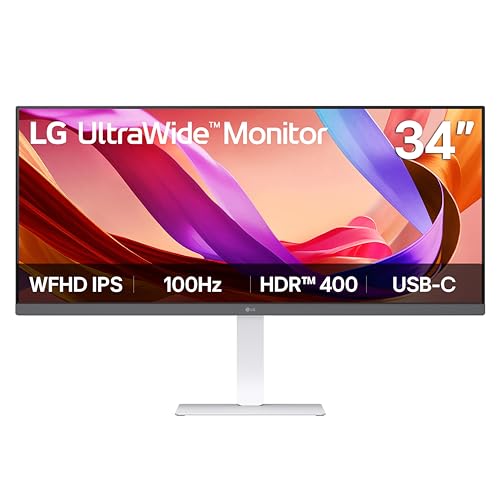
LG 34-Inch UltraWide 1080p IPS Monitor
Best for: multitasking on a budget with wide screens
- Resolution
- 2560 x 1080 (what this guide is about)
- Screen Size
- 34"
- Refresh Rate
- 100Hz
- Panel Type
- IPS
- Aspect Ratio
- 21:9
- Connectivity
- HDMI, DisplayPort, USB Type-C
View on Amazon: LG 34-Inch UltraWide 1080p IPS Monitor Affiliate link
This LG monitor offers a 34-inch 21:9 display with 2560 x 1080 resolution. The IPS panel provides wide viewing angles and 99% sRGB color coverage. A 100Hz refresh rate ensures smooth motion for general use. USB Type-C connectivity simplifies laptop connections. It includes built-in speakers and a Switch app for screen management. This setup suits users who need horizontal screen space for multitasking without the cost of higher resolutions.
Pros
- 2560 x 1080 WFHD resolution on a 34-inch screen
- IPS panel with 99% sRGB color coverage
- 100Hz refresh rate for smooth visuals
- USB Type-C connectivity for single-cable setup
- Built-in Waves MaxxAudio stereo speakers
Cons
- Lower 2560 x 1080 resolution compared to 1440p or 4K options
- No mention of a built-in webcam
- No mention of adjustable height stand
Good fit if
- You want a wide screen for multitasking at a lower resolution
- You prefer IPS panels for consistent viewing angles
- You need USB Type-C connectivity for your laptop
Skip if
- You require 4K UHD or 5K2K clarity
- You need high refresh rates for competitive gaming
- You prefer a 16:9 aspect ratio
Verdict: LG 34U530A 34-inch WFHD IPS Monitor delivers a wide, color-accurate workspace for multitaskers who prioritize screen real estate over pixel density. It fits users who value USB-C convenience and IPS viewing angles over high-resolution sharpness.
Specifications side by side
| Spec | Alienware 34-Inch Curved QD-OLED Monitor | Sceptre 24-Inch Curved 180Hz Gaming Monitor | Samsung Odyssey G9 49-Inch 144Hz Curved Monitor | Dell 32-Inch 4K 120Hz Monitor | LG 45-Inch 5K2K Curved OLED Gaming Monitor | LG 34-Inch UltraWide 1080p IPS Monitor |
|---|---|---|---|---|---|---|
| Screen Size | 34-inch | 24" | 49" | 31.5in | 45" | 34" |
| Resolution | not stated | 1080p | DQHD | 3840x2160 | 5120 x 2160 | 2560 x 1080 |
| Refresh Rate | 165Hz | up to 180Hz | 144Hz | 120Hz | 165Hz, 330Hz | 100Hz |
| Panel Type | QD-OLED | not stated | not stated | not stated | OLED | IPS |
| Aspect Ratio | 21:9 | not stated | 32:9 | not stated | 21:9 | 21:9 |
| Response Time | 0.1Ms | 1ms BR | 1ms | 0.03ms | 0.03ms (GtG) | not stated |
| Sync Technology | AMD FreeSync Premium Pro | not stated | AMD FreeSync Premium Pro | AMD FreeSync Premium | FreeSync Premium Pro, G-SYNC Compatible | not stated |
| Connectivity | not stated | DisplayPort x2, HDMI x2, Audio Out | not stated | HDMI, DisplayPort | DisplayPort 2.1, HDMI 2.1, USB Type-C | HDMI, DisplayPort, USB Type-C |
| Size | 34.0" OLED | 24 Inch | 144Hz Refresh Rate | S3225QS | 45 Inch | not stated |
| Dimensions | 32.1 × 12 × 20.7 inches | 7.6 × 21.6 × 16.3 inches | 16.6 × 45.2 × 22.4 inches | 8.73 × 28.1 × 17.6 inches | 13.5 × 39 × 26.2 inches | 9.1 × 32.1 × 21 inches |
| Weight | 20.5 pounds | not stated | 34.4 pounds | 19.3 pounds | 30.9 pounds | 19.4 pounds |
| Color | Black | Machine Black | Aluminum Silver | Ash White | Black | White |
| Model | AW3423DWF | C248B-FW180T | LS49FG910ENXZA | S3225QS | 45GX950A-B.AUS | 34U530A-W.AUS |
Frequently asked questions
Is 3440 x 1440 the standard ultrawide resolution?
Yes, 3440 x 1440 is the most common ultrawide resolution, often called 1440p or QHD. It offers a 21:9 aspect ratio. The Alienware 34-inch QD-OLED monitor uses this resolution. You get sharp visuals without the heavy GPU demand of higher resolutions. It balances clarity and performance well.
Does 4K UHD work well on ultrawide screens?
4K UHD is 3840 x 2160, which is not ultrawide. Standard ultrawide resolutions are wider, like 5120 x 1440 or 3440 x 1440. The Dell 32-inch 4K monitor uses standard 16:9 proportions. If you want true ultrawide immersion, 4K UHD does not provide the extra horizontal space you likely want.
What is 5K2K resolution and which monitor uses it?
5K2K is a high-resolution ultrawide format, typically 5120 x 2880. It provides exceptional clarity on large screens. The LG 45-inch 5K2K OLED Gaming Monitor uses this resolution. You get much higher pixel density than standard 1440p ultrawides. This format is ideal for immersive gaming and detailed creative work.
Is 1080p resolution good for a 34-inch monitor?
1080p on a 34-inch screen results in low pixel density. Text and images may look pixelated. The LG 34-inch UltraWide 1080p IPS Monitor offers this setup. It prioritizes screen real estate over sharpness. You should only choose this if budget is tight and you do not need high image fidelity.
How does 5120 x 1440 compare to dual monitors?
5120 x 1440 is a 32:9 aspect ratio. It effectively replaces two 1440p monitors side by side. The Samsung Odyssey G9 49-inch uses this resolution. You get a seamless, immersive field of view without bezel interruptions. This setup is ideal for gamers and multitaskers who want one massive display.
What resolution does the Alienware 34-inch QD-OLED use?
The Alienware 34-inch QD-OLED uses 3440 x 1440 resolution. This is a 21:9 aspect ratio. It provides sharp 1440p clarity in an ultrawide format. You get rich colors and fast response times from the QD-OLED panel. This resolution balances image quality and gaming performance effectively.