6 Best Alternatives to the Samsung 27-Inch 100Hz IPS Business (2026)
As an Amazon Associate we earn from qualifying purchases. Links on this page are affiliate links.
The Samsung 27-Inch 100Hz IPS Business Monitor offers a clean, borderless design with ergonomic flexibility. You get accurate colors from its IPS panel and a refresh rate that reduces motion blur. However, you might need different specifications for your setup. Some users prefer higher resolutions like 1440p for sharper text. Others want faster refresh rates for gaming or specific connectivity options. This list covers seven samsung 27 inch 100hz ips business alternatives that share core traits like the 27-inch size and IPS technology. Each option varies in refresh rate, resolution, or stand features. We selected these models because their published specifications overlap with the original. This ensures you find a direct substitute that fits your workflow. Whether you need daisy-chaining capabilities or a white aesthetic, these monitors provide practical upgrades. You can compare their specs to decide which best suits your desk. The following rankings highlight the most suitable replacements based on performance and design.
Comparing key specs and features
Acer 27-Inch 100Hz IPS Monitor
The Acer 27-inch 100Hz IPS Monitor shares the same panel type and refresh rate as the Samsung model. Both offer 27-inch displays with IPS technology for consistent color viewing angles. The Acer includes FreeSync support, which the Samsung also provides for smoother motion. Connectivity differs slightly, as the Acer lists HDMI and VGA inputs. The Samsung emphasizes height-adjustable stands and borderless aesthetics. You should choose the Acer if you require VGA compatibility for older hardware. It maintains a clean look suitable for office environments. The Acer is slightly heavier at 11.9 pounds compared to the Samsung's 8.82 pounds. Both are practical choices for standard business setups.
SANSUI 27-Inch 1440p 180Hz Fast IPS Monitor
This SANSUI monitor upgrades significantly from the Samsung in resolution and speed. It features a 1440p display, offering much sharper detail than the Samsung's standard 1080p panel. The refresh rate jumps to 180Hz, providing smoother motion for gaming or fast-paced work. It uses a Fast IPS panel, which typically responds faster than standard IPS. The Samsung relies on a 100Hz refresh rate. Connectivity includes DisplayPort and HDMI on the SANSUI. You should pick this SANSUI model if you need higher pixel density and faster refresh rates. It is heavier and wider, reflecting a more robust build. The ergonomic stand on the SANSUI offers full physical adjustments, similar to the Samsung's height-adjustable design.
SANSUI 27-Inch 1440p IPS Gaming Monitor
This SANSUI model also delivers 1440p resolution and high refresh rates, differing from the Samsung's 100Hz 1080p setup. It shares the 27-inch size and IPS panel type. The refresh rate is listed as 180Hz in attributes, offering smoother visuals. It lacks the explicit height-adjustment features mentioned for the Samsung, focusing instead on screen performance. Connectivity includes DisplayPort and HDMI. You should select this monitor if you prioritize resolution and speed over ergonomic stand flexibility. The pixel density is higher, making text and images crisper. It is suitable for users who game or edit video. The design is black and flat. It sacrifices the borderless aesthetic and adjustable stand of the Samsung for superior display metrics.
Amzfast 27-Inch 1440p 200Hz White Gaming Monitor
The Amzfast 27-inch 1440p 200Hz monitor offers a major upgrade in resolution and speed compared to the Samsung. It uses a Fast IPS panel, providing 1440p clarity and 200Hz refresh rates. The Samsung is limited to 100Hz and likely 1080p resolution. The Amzfast is white, offering a different aesthetic choice. It targets competitive gaming with high frame rates. You should choose this if you need high refresh rates and sharp visuals. It does not list ergonomic stand features like height adjustment. Connectivity is not detailed beyond HDMI bandwidth limits. The Samsung is better for office ergonomics. This Amzfast model is heavier and wider. It is ideal for users who want gaming performance in a 27-inch form factor.
ViewSonic 27-Inch 120Hz IPS Monitor
The ViewSonic 27-inch 120Hz IPS Monitor offers a slight refresh rate increase to 120Hz over the Samsung's 100Hz. Both are 27-inch IPS panels. The ViewSonic supports DisplayPort daisy-chaining, allowing you to connect multiple monitors easily. This feature is not mentioned for the Samsung. The ViewSonic is lighter at 8.8 pounds. It is designed for office multitasking and professional use. You should pick this ViewSonic if you need daisy-chaining for a multi-monitor setup. The Samsung offers height adjustment. The ViewSonic focuses on connectivity and smooth motion. It is a practical choice for professionals who value display linking capabilities. The borderless design is not specified for the ViewSonic. It shares the black color option.
KTC 27-Inch 240Hz 1080p Monitor
The KTC 27-inch 240Hz monitor offers the highest refresh rate on this list, far exceeding the Samsung's 100Hz. It uses a Fast IPS panel. However, it is limited to 1080p resolution, matching the Samsung's likely resolution but with lower pixel density on the same 27-inch screen. The Samsung is better for text clarity and office work. The KTC is for competitive esports. You should choose the KTC only if you prioritize speed over sharpness. The Samsung offers better ergonomics with height adjustment. The KTC is heavier and has a different stand design. It lacks the borderless aesthetic. This monitor is for gamers who value frame rates above all else. It is not suitable for users needing high-resolution text.
Quick picks
Our 7 picks

Samsung 27-Inch 100Hz IPS Business Monitor
Best for: office setups needing color accuracy and ergonomics
- Screen Size
- 27”
- Refresh Rate
- 100Hz
- Panel Type
- IPS
- Size
- 27 Inch
- Dimensions
- 8.62 × 24.1 × 21.2 inches
- Weight
- 8.82 pounds
View on Amazon: Samsung 27-Inch 100Hz IPS Business Monitor Affiliate link
This 27-inch monitor uses an IPS panel for consistent colors at wide viewing angles. It runs at 100Hz, which reduces motion blur for smoother visuals during work or light gaming. The stand offers height adjustment and screen pivoting for better ergonomics. Blue light reduction and flicker-free technology help reduce eye strain. It features a borderless design to fit neatly into multi-monitor setups.
Pros
- IPS panel ensures accurate colors across the screen
- 100Hz refresh rate reduces lag and motion blur
- Height-adjustable stand allows for ergonomic pivoting
- Blue light reduction and flicker-free technology
Cons
- 100Hz refresh rate is lower than 144Hz or 240Hz competitors
- Full HD resolution is less sharp than WQHD options
- No USB-C connectivity mentioned in specifications
Good fit if
- You need a monitor with a borderless design for multi-screen setups
- You prioritize color consistency and wide viewing angles
- You want ergonomic adjustments like height and pivot
Skip if
- You require high refresh rates for competitive gaming
- You need higher resolution than 1080p for detailed work
- You want built-in speakers or USB-C connectivity
Verdict: Samsung S40GD 27-Inch 100Hz IPS Monitor is a solid choice for office workers who value color accuracy and ergonomic flexibility over high refresh rates. It suits users who prefer a clean, borderless look for their desk setup.
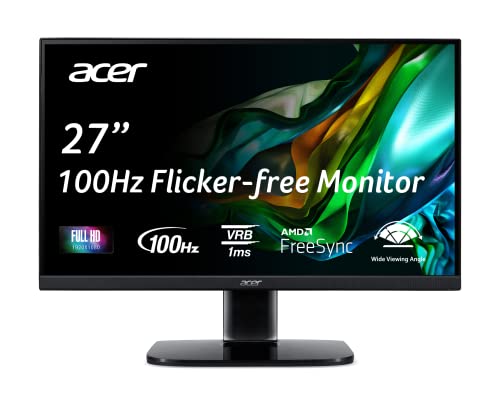
Acer 27-Inch 100Hz IPS Monitor
Best for: borderless office setups with HDMI
- Screen Size
- 27"
- Resolution
- 1920 x 1080
- Refresh Rate
- 100Hz
- Panel Type
- IPS
- Response Time
- 1ms VRB
- Sync Technology
- AMD FreeSync
View on Amazon: Acer 27-Inch 100Hz IPS Monitor Affiliate link
The Acer KB272 EBI is a 27-inch Full HD monitor with a 100Hz refresh rate and IPS panel. It uses AMD FreeSync to reduce screen tearing and features a 1ms VRB response time. The zero-frame design offers a clean look for office or home use. You get HDMI and VGA connectivity along with VESA mounting support. This model suits users who need a reliable, borderless display for general tasks.
Pros
- 27-inch IPS panel with 1920 x 1080 resolution
- 100Hz refresh rate via HDMI connection
- AMD FreeSync technology for smoother visuals
- Zero-frame borderless design
- VESA 100 x 100mm mounting compatible
Cons
- Only includes HDMI 1.4 and VGA ports
- Limited tilt adjustment range of -5° to 15°
- Brightness capped at 250 nits
Good fit if
- You need a borderless monitor for multi-screen setups
- You want a 100Hz refresh rate for office work
- You require VESA mounting flexibility
Skip if
- You need high brightness for bright rooms
- You require modern digital connections like DisplayPort
- You want height or swivel adjustments
Verdict: The Acer KB272 EBI 27-inch 100Hz IPS Monitor fits users who prioritize a clean, borderless look and basic gaming features like FreeSync. It is a practical option for office environments where HDMI and VGA inputs are standard.

SANSUI 27-Inch 1440p 180Hz Fast IPS Monitor
Best for: high-refresh 1440p desktop setups and gaming
- Screen Size
- 27"
- Resolution
- 2560 x 1440
- Refresh Rate
- 200Hz
- Panel Type
- Fast IPS
- Response Time
- OD 1ms
- Sync Technology
- AMD FreeSync, Adaptive Sync
View on Amazon: SANSUI 27-Inch 1440p 180Hz Fast IPS Monitor Affiliate link
This SANSUI display pairs a 27-inch 2560x1440 Fast IPS panel with a 200Hz refresh rate over DisplayPort. It delivers 400 nits brightness, 95% DCI-P3 color coverage, and full stand ergonomics including height adjustment, tilt, swivel, and pivot. You get sharper resolution and higher refresh rates than basic 1080p business displays, making it suitable for detailed work and fast motion.
Pros
- 2560x1440 resolution at up to 200Hz refresh rate over DisplayPort
- Ergonomic stand supports height, swivel, tilt, and 90-degree pivot adjustment
- 400 nits peak brightness with 95% DCI-P3 color coverage
- Four display inputs including two DisplayPort 1.4 and two HDMI 2.0 ports
Cons
- HDMI 2.0 connections are limited to a maximum of 144Hz
- Replacement and money-back warranty coverage lasts only 30 days
- No built-in speakers included in the hardware specifications
Good fit if
- You want 1440p resolution and high refresh rates above standard 100Hz panels.
- You require a fully adjustable stand that includes pivot and height adjustment.
- You connect your system via DisplayPort to utilize the full 200Hz output.
Skip if
- You rely solely on HDMI and need refresh rates higher than 144Hz.
- You require integrated speakers instead of using the 3.5mm audio jack.
Verdict: SANSUI 27-Inch 1440p 200Hz Fast IPS Monitor suits users upgrading from standard 1080p office displays who want sharper 1440p screen space, high-speed refresh rates, and full physical stand ergonomics.
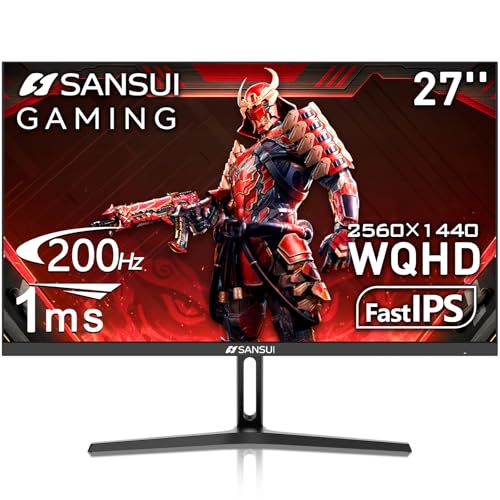
SANSUI 27-Inch 1440p IPS Gaming Monitor
Best for: High refresh rate 1440p gaming and work
- Screen Size
- 27 Inch
- Resolution
- 2560 x 1440
- Refresh Rate
- 180Hz
- Panel Type
- Fast IPS
- Response Time
- 1ms
- Sync Technology
- Adaptive Sync
View on Amazon: SANSUI 27-Inch 1440p IPS Gaming Monitor Affiliate link
This 27-inch monitor delivers a 2560 x 1440 resolution on an IPS panel. It supports a 200Hz refresh rate with a 1ms response time. You get two HDMI 2.0 and two DisplayPort 1.2 inputs. The display covers 120% of the sRGB color gamut. It includes eye care features like low blue light. This setup suits users who want high refresh rates and sharp visuals for gaming or work.
Pros
- 2560 x 1440 WQHD resolution
- 200Hz refresh rate with Adaptive Sync
- 1ms response time on IPS panel
- 120% sRGB color gamut coverage
Cons
- No built-in speakers
- Only tilt adjustment (-5° to 15°)
- HDMI 2.0 limits refresh rate to 144Hz
Good fit if
- You want a 1440p screen with high refresh rates
- You need multiple display ports for dual setups
- You prefer IPS panels for better viewing angles
Skip if
- You require built-in audio for casual use
- You need height or swivel stand adjustments
- You only need Full HD resolution
Verdict: SANSUI 27" WQHD 200Hz IPS Monitor offers sharp 1440p visuals and smooth 200Hz performance. It fits buyers who prioritize refresh rates and color accuracy over ergonomic stand features.

Amzfast 27-Inch 1440p 200Hz White Gaming Monitor
Best for: Competitive PC gaming at 1440p
- Screen Size
- 27"
- Resolution
- 2560x1440
- Refresh Rate
- 200Hz
- Panel Type
- Fast IPS
- Response Time
- 1ms MPRT
- Sync Technology
- Adaptive Sync, G-Sync, FreeSync
View on Amazon: Amzfast 27-Inch 1440p 200Hz White Gaming Monitor Affiliate link
The Amzfast 27" monitor delivers 2560x1440 resolution and a 200Hz refresh rate on a Fast IPS panel. It connects via two HDMI 2.0 and two DisplayPort 1.4 inputs. The display covers 130% sRGB and 95% DCI-P3 color gamuts. AI features include crosshairs and night vision. It suits competitive gamers who want high frame rates and color accuracy without the bulk of larger screens.
Pros
- 200Hz refresh rate over DisplayPort
- WQHD 2560x1440 resolution
- 130% sRGB and 95% DCI-P3 coverage
- Dual HDMI 2.0 and dual DP 1.4 ports
Cons
- HDMI ports limited to 144Hz
- 1ms MPRT response time, not GTG
- HDR400 is entry-level certification
Good fit if
- You want 1440p clarity at high refresh rates
- You need multiple display connections for PC and console
- You prefer a white desk aesthetic
Skip if
- You require native 200Hz over HDMI
- You need professional-grade HDR brightness
- You prefer a black monitor finish
Verdict: Amzfast 27" WQHD 200Hz Fast IPS offers high refresh rates and color depth for competitive play, though HDMI bandwidth limits frame rates on consoles.

ViewSonic 27-Inch 120Hz IPS Monitor
Best for: multi-monitor daisy chaining and everyday office multitasking
- Screen Size
- 27 Inch
- Resolution
- 1920 x 1080
- Refresh Rate
- 120Hz
- Panel Type
- IPS
- Response Time
- 1ms
- Connectivity
- HDMI, DisplayPort, VGA
View on Amazon: ViewSonic 27-Inch 120Hz IPS Monitor Affiliate link
This ViewSonic display gives you a 27-inch 1080p IPS panel with a 120Hz refresh rate. It delivers wide viewing angles and smoother motion than standard 100Hz office screens. Built-in DisplayPort-out connectivity lets you daisy chain multiple monitors using a single cable between screens. It suits your workspace if you want fluid productivity and a clean multi-monitor setup.
Pros
- 120Hz refresh rate provides smoother motion than standard 100Hz panels
- DisplayPort output enables multi-monitor daisy chaining
- SuperClear IPS panel maintains color consistency across wide viewing angles
- Hardware eye care includes Flicker-Free technology and a Blue Light Filter
Cons
- 1080p resolution yields lower pixel density on a 27-inch panel than 1440p models
- 120Hz refresh rate is lower than the 144Hz to 240Hz options on the list
Good fit if
- You want to daisy chain multiple monitors through DisplayPort
- You prefer a 120Hz refresh rate for smoother everyday scrolling
- You share your screen and need wide IPS viewing angles
Skip if
- You need 1440p resolution for fine text clarity on a 27-inch display
- You require refresh rates of 144Hz or higher for fast-paced gaming
Verdict: ViewSonic 27-Inch 120Hz IPS Monitor fits professionals who need smooth 120Hz output and DisplayPort daisy-chain capabilities for multi-display desks.

KTC 27-Inch 240Hz 1080p Monitor
Best for: Competitive esports gamers seeking high refresh rates
- Screen Size
- 27"
- Resolution
- 1080p
- Refresh Rate
- 240Hz
- Panel Type
- Fast IPS
- Response Time
- 1ms MPRT
- Sync Technology
- Adaptive Sync
View on Amazon: KTC 27-Inch 240Hz 1080p Monitor Affiliate link
The KTC H27F7 is a 27-inch Fast IPS monitor with a 1080p resolution and a 240Hz refresh rate. It offers a 1ms response time and Adaptive Sync for smooth visuals. The panel covers 131% of the sRGB gamut and reaches 350 cd/m² brightness. You get an ergonomic stand with tilt, pivot, and height adjustment. This setup suits gamers who prioritize high speed over pixel density.
Pros
- 240Hz refresh rate for smooth motion
- Fast IPS panel with 1ms response time
- 131% sRGB color gamut coverage
- Ergonomic stand with 130mm height adjustment
- Adaptive Sync support for tear-free gaming
Cons
- 1080p resolution on a 27-inch screen results in lower pixel density
- Only one DisplayPort 1.4 input
- Limited to HDMI x 2 and USB 2.0 connectivity
Good fit if
- You want the highest possible refresh rate for competitive gaming
- You prefer Fast IPS color accuracy and viewing angles
- You need an ergonomic stand with pivot and height adjustment
Skip if
- You require 1440p or 4K resolution for sharper text
- You need multiple DisplayPort inputs for multi-PC setups
- You prioritize color depth over raw speed
Verdict: KTC 27-Inch 240Hz Fast IPS Monitor delivers top-tier speed for competitive players who accept the pixel density trade-off of 1080p on a 27-inch screen.
Specifications side by side
| Spec | Samsung 27-Inch 100Hz IPS Business Monitor | Acer 27-Inch 100Hz IPS Monitor | SANSUI 27-Inch 1440p 180Hz Fast IPS Monitor | SANSUI 27-Inch 1440p IPS Gaming Monitor | Amzfast 27-Inch 1440p 200Hz White Gaming Monitor | ViewSonic 27-Inch 120Hz IPS Monitor | KTC 27-Inch 240Hz 1080p Monitor |
|---|---|---|---|---|---|---|---|
| Screen Size | 27” | 27" | 27" | 27 Inch | 27" | 27 Inch | 27" |
| Resolution | not stated | 1920 x 1080 | 2560 x 1440 | 2560 x 1440 | 2560x1440 | 1920 x 1080 | 1080p |
| Refresh Rate | 100Hz | 100Hz | 200Hz | 180Hz | 200Hz | 120Hz | 240Hz |
| Panel Type | IPS | IPS | Fast IPS | Fast IPS | Fast IPS | IPS | Fast IPS |
| Response Time | not stated | 1ms VRB | OD 1ms | 1ms | 1ms MPRT | 1ms | 1ms MPRT |
| Sync Technology | not stated | AMD FreeSync | AMD FreeSync, Adaptive Sync | Adaptive Sync | Adaptive Sync, G-Sync, FreeSync | not stated | Adaptive Sync |
| Connectivity | not stated | HDMI 1.4, VGA | 2 x Display Port 1.4, 2 x HDMI 2.0 | HDMI 2.0 x2, DP 1.2 x2, Audio Jack | 2x HDMI 2.0, 2x DP 1.4, 3.5mm audio | HDMI, DisplayPort, VGA | 2x HDMI, 1x DP 1.4, USB 2.0 |
| Size | 27 Inch | 27 Inch | 27 Inch | 27 Inch | 27 Inch | 27 Inch | 27 Inch |
| Dimensions | 8.62 × 24.1 × 21.2 inches | 7.9 × 24.5 × 18 inches | 5.63 × 27 × 19.3 inches | 24.1 × 7.65 × 18.4 inches | 24.1 × 8.66 × 18.4 inches | 8.3 × 24.1 × 17 inches | 7.67 × 24.3 × 21 inches |
| Weight | 8.82 pounds | 11.9 pounds | 11.2 pounds | not stated | not stated | 8.8 pounds | 10.4 pounds |
| Color | Black | Black | Black | Black | White | Black | Black |
| Model | LS27D402GANXGO | UM.HK2AA.E02 | ES-G27F6Q | ES-G27F2Q | AMZG27F6Q | VA2756a-MHD | H27F7 |
Looking beyond this list? See samsung galaxy book4 business alternatives.
Frequently asked questions
Is there a 27-inch 100Hz IPS monitor with a borderless design?
Yes, the Acer 27-inch 100Hz IPS Monitor features a borderless look suitable for multi-display setups. It uses an IPS panel and includes FreeSync technology to reduce screen tearing. The model UM.HK2AA.E02 connects via HDMI and VGA inputs, making it a practical choice for standard office environments.
What is the highest refresh rate available for 27-inch monitors in this list?
The KTC 27-inch 240Hz Fast IPS Monitor offers the highest refresh rate at 240Hz. It targets competitive esports gamers who prioritize speed over pixel density. The model H27F7 uses a 1080p resolution, which is a trade-off for achieving such high frame rates on a 27-inch screen.
Which monitor supports DisplayPort daisy chaining for multiple screens?
The ViewSonic 27-inch 120Hz IPS Monitor supports DisplayPort daisy chaining. This feature allows you to connect multiple displays efficiently for multitasking. The model VA2756a-MHD provides smooth 120Hz output, fitting professionals who need reliable connectivity and consistent color performance from an IPS panel.
Are there 27-inch monitors with 1440p resolution and high refresh rates?
Yes, several models offer 1440p resolution with refresh rates above 100Hz. The SANSUI 27-inch 1440p 180Hz Fast IPS Monitor provides sharp visuals and high-speed performance. Another option is the Amzfast 27-inch 1440p 200Hz monitor, which delivers color depth and speed for competitive PC gaming.
Does the Acer monitor include FreeSync technology?
Yes, the Acer 27-inch 100Hz IPS Monitor includes FreeSync support. This technology helps synchronize the refresh rate with the frame rate to reduce stuttering. It is a practical feature for users who want basic gaming capabilities alongside standard office tasks on a clean, borderless display.
Which white monitor is suitable for 1440p gaming?
The Amzfast 27-inch 1440p 200Hz White Gaming Monitor is a suitable option. It features a Fast IPS panel for color accuracy and high refresh rates. The model AMZG27F6Q is designed for competitive play, though HDMI bandwidth may limit frame rates on consoles compared to PC connections.
What is the difference between the two SANSUI 27-inch monitors?
Both are 27-inch 1440p IPS monitors with high refresh rates. The SANSUI ES-G27F6Q is rated at 180Hz and includes full physical stand ergonomics. The SANSUI ES-G27F2Q is also a 27-inch WQHD IPS model but prioritizes refresh rates and color accuracy over ergonomic stand features, offering similar visual performance.