Samsung 27-Inch Odyssey 4K 144Hz Alternatives: 6 Similar Picks Compared
As an Amazon Associate we earn from qualifying purchases. Links on this page are affiliate links.
The Samsung 27-Inch Odyssey 4K 144Hz Monitor offers Fast IPS clarity and smooth 144Hz gameplay. You might look for samsung 27 odyssey 4k UHD alternatives if you need a different resolution, size, or feature set. Some users prefer OLED contrast or higher refresh rates that this model does not provide. Others may want a smaller footprint or different connectivity options. This list compares 6 similar picks to help you find the right match.
We selected these monitors because their specifications overlap with the original. Each option shares key traits like 27-inch screens and IPS panels, but varies in refresh rate, resolution, or panel technology. For example, some models offer 240Hz speeds for competitive play, while others focus on color accuracy for creative work. You can compare their exact specs to see which fits your needs. We focus only on published data to keep things practical and clear. This approach helps you make an informed choice without guessing.
How Alternatives Compare to Samsung
LG 27-Inch QHD 144Hz IPS Monitor
This LG monitor keeps the 27-inch size and 144Hz refresh rate but drops to QHD resolution. You trade 4K pixel density for verified G-SYNC compatibility and a highly adjustable stand. The IPS panel maintains good color accuracy, similar to the Samsung, but the lower resolution reduces text sharpness. If you prioritize sync certification and ergonomic flexibility over maximum clarity, this is a solid choice. It lacks the HDR400 rating of the Odyssey, so contrast performance may differ. The build is slightly heavier, which might matter for VESA mount setups. It suits gamers who value proven sync technology and adjustability more than 4K detail.
LG 27-Inch UltraGear Dual-Mode 4K Gaming Monitor
The LG 27G850A-B steps up to a 240Hz refresh rate while keeping 4K resolution. This offers significantly smoother motion for competitive titles compared to the Samsung’s 144Hz. It also features HDR 600, providing brighter highlights and better contrast than the Odyssey’s HDR400. The Fast IPS panel ensures fast response times similar to the Samsung. You pay for this performance with a higher price point and potentially more aggressive power usage. The stand may be less adjustable than premium competitors. If you want the highest possible frame rates in 4K without switching to OLED, this model delivers superior speed and brightness. It is ideal for serious gamers seeking top-tier specs.
CUNPU 27" 4K 160Hz Gaming Monitor
This CUNPU monitor offers 4K resolution and a 160Hz refresh rate, slightly higher than the Samsung. It uses a Fast IPS panel for similar color performance and viewing angles. The main difference is the budget positioning, which often means fewer ergonomic adjustments and simpler connectivity options. It lacks the Dynamic Black Equalizer feature found in the Odyssey. The build quality may feel less robust, with a lighter weight and simpler stand. Sync technology supports both FreeSync and G-SYNC, matching the Samsung’s versatility. If you need high resolution and speed but want to save money, this is a practical alternative. It suits users who prioritize specs over premium features and build materials.
XUNDEFINED 27 Inch 4K Dual-Mode Monitor
The XUNDEFINED monitor provides 4K resolution and 144Hz refresh rates, matching the Samsung’s core specs. It features an IPS panel for consistent colors and wide viewing angles. The key difference is the dual-mode capability, allowing you to switch to a lower resolution for higher frame rates in esports titles. This flexibility is not available on the Odyssey. It supports G-SYNC for tear-free gaming. The stand may offer fewer adjustments than the Samsung’s fully ergonomic design. Connectivity includes DisplayPort and HDMI, similar to the competition. If you want 4K clarity for single-player games and high speed for competitive play, this monitor adapts to both. It is a versatile choice for mixed gaming habits.
LG 27GS93QE 27" QHD OLED
This LG OLED monitor switches to QHD resolution and 240Hz refresh rate. You gain instant response times and perfect blacks due to the OLED panel, which the IPS panel cannot match. However, you lose 4K clarity and pixel density. The 240Hz rate offers smoother motion than the Samsung’s 144Hz. HDR performance is superior on OLED, with deeper contrast and brighter highlights. The weight is lighter, which helps with mounting. If you prioritize contrast and speed over resolution, this is the best option. It is ideal for competitive gamers who value image quality and refresh rate more than 4K sharpness. The trade-off is significant for those who need text clarity.
KOORUI 27" 4K 160Hz Dual Mode
The KOORUI monitor offers 4K resolution with a dual-mode feature, allowing switching to FHD for 320Hz refresh rates. This provides much higher speed than the Samsung’s 144Hz in lower resolutions. The IPS panel ensures good color accuracy and viewing angles. It supports both FreeSync and G-SYNC for sync compatibility. The stand may be less adjustable than the Odyssey’s ergonomic design. Connectivity includes DisplayPort and HDMI. If you want 4K for immersive games and high speed for competitive titles, this monitor covers both scenarios. It is a flexible choice for users who switch between game types frequently. The build is functional but may lack the premium feel of the Samsung.
Quick picks
Our 7 picks

Samsung 27-Inch Odyssey 4K 144Hz Monitor
Best for: 4K gaming with smooth refresh rates
- Screen Size
- 27"
- Resolution
- 4K UHD
- Refresh Rate
- 144Hz
- Panel Type
- Fast IPS
- Response Time
- 1ms (GtG)
- Sync Technology
- G-Sync Compatible, FreeSync Premium
View on Amazon: Samsung 27-Inch Odyssey 4K 144Hz Monitor Affiliate link
This 27-inch Samsung monitor features a 4K UHD Fast IPS panel with a 144Hz refresh rate and 1ms response time. It supports G-Sync Compatible and FreeSync Premium for smooth gameplay. The Dynamic Black Equalizer enhances visibility in dark scenes, while the adjustable stand allows for ergonomic customization. It is a solid option for gamers seeking high resolution and fast performance.
Pros
- 4K UHD resolution on a 27-inch Fast IPS panel
- 144Hz refresh rate with 1ms (GtG) response time
- G-Sync Compatible and FreeSync Premium support
- Dynamic Black Equalizer for improved shadow detail
- Fully adjustable stand with swivel, tilt, and height adjustment
Cons
- DisplayHDR 400 rating offers limited HDR performance
- 15.7 pounds weight makes it less portable than smaller monitors
- No mention of USB-C connectivity or built-in speakers
Good fit if
- You want 4K clarity with a 144Hz refresh rate
- You need G-Sync or FreeSync compatibility
- You prefer an adjustable stand for ergonomic positioning
Skip if
- You require high-end HDR with deeper blacks
- You need a monitor under 15 pounds
- You want USB-C connectivity for single-cable setups
Verdict: Samsung 27" Odyssey 4K 144Hz Monitor delivers crisp 4K visuals and smooth 144Hz gameplay for competitive gamers who value color accuracy and sync technologies.

LG 27-Inch QHD 144Hz IPS Monitor
Best for: Gamers wanting verified G-SYNC and ergonomic adjustability
- Screen Size
- 27-Inch
- Resolution
- 2560 x 1440
- Refresh Rate
- 144Hz
- Panel Type
- IPS
- Response Time
- 1ms (GtG)
- Sync Technology
- NVIDIA G-SYNC, FreeSync Premium
View on Amazon: LG 27-Inch QHD 144Hz IPS Monitor Affiliate link
This 27-inch monitor uses an IPS panel with a 2560 x 1440 resolution. It refreshes at 144Hz with a 1ms response time. You get both NVIDIA G-SYNC and FreeSync Premium support. The stand allows tilt, height, and pivot adjustments. It suits gamers who want smooth motion and accurate colors without the bulk of a 4K display.
Pros
- IPS panel covers 99% of sRGB for vivid colors
- Officially NVIDIA G-SYNC Compatible certified
- FreeSync Premium technology eliminates screen tearing
- 1ms (GtG) response time for fast action
- Adjustable stand with height, tilt, and pivot options
Cons
- 1440p resolution is lower than the 4K competitors on this list
- Only includes HDMI and DisplayPort connectivity
- No mention of USB-C or built-in speakers in the data
Good fit if
- You prefer a sharper image than 1080p but want higher refresh rates than 4K allows
- You use an NVIDIA graphics card and want verified G-SYNC compatibility
- You need an ergonomic stand with height and pivot adjustments
Skip if
- You require 4K UHD resolution for detailed text or media
- You want a monitor with a higher 160Hz or 180Hz refresh rate
- You need built-in speakers or USB-C connectivity
Verdict: LG 27-Inch 144Hz QHD IPS Monitor delivers verified sync compatibility and a versatile stand for competitive gamers who prioritize speed and color accuracy over 4K resolution.
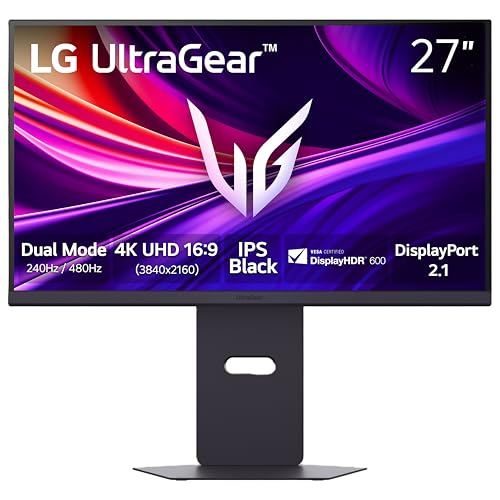
LG 27-Inch UltraGear Dual-Mode 4K Gaming Monitor
Best for: 4K gaming at high refresh rates
- Screen Size
- 27"
- Resolution
- 3840 x 2160
- Refresh Rate
- 240Hz, 480Hz
- Panel Type
- Nano IPS Black
- Response Time
- 1ms GtG
- Sync Technology
- NVIDIA G-Sync, FreeSync Premium Pro
View on Amazon: LG 27-Inch UltraGear Dual-Mode 4K Gaming Monitor Affiliate link
This 27-inch monitor uses Nano IPS Black panel technology to deliver 4K UHD resolution at up to 240Hz. You can switch to Full HD for 480Hz refresh rates in dual-mode. It features 1ms response time, VESA DisplayHDR 600, and DisplayPort 2.1 connectivity. This model suits you if you need high refresh rates at 4K with strong color coverage and HDR brightness.
Pros
- Nano IPS Black panel with 99% DCI-P3 color coverage
- Dual Mode supports 240Hz at 4K or 480Hz at Full HD
- VESA DisplayHDR 600 certification with 600 nits peak brightness
- DisplayPort 2.1 and HDMI 2.1 ports for high bandwidth
Cons
- Heavier build at 20.7 pounds compared to lighter alternatives
- Larger footprint with 24.2-inch width requires more desk space
- Only one DisplayPort 2.1 port limits multi-monitor daisy chaining
Good fit if
- You want 4K resolution with refresh rates above 144Hz
- You play fast-paced shooters and want 480Hz in Full HD
- You need HDR 600 brightness for better visual contrast
Skip if
- You prefer a lighter monitor under 15 pounds
- You only need 144Hz at 4K and want a lower cost
- You require multiple DisplayPort 2.1 inputs for daisy chaining
Verdict: LG 27G850A-B 4K 240Hz Gaming Monitor delivers high-speed 4K gaming with 240Hz refresh rates and HDR 600 brightness. It fits you if you prioritize speed and color accuracy in a 27-inch form factor.

CUNPU 27" 4K 160Hz Gaming Monitor
Best for: 4K gaming and color-critical creative work
- Screen Size
- 27"
- Refresh Rate
- 160Hz
- Panel Type
- Fast IPS
- Response Time
- 1ms
- Sync Technology
- G-Sync Compatible, FreeSync
- Connectivity
- HDMI 2.1, DP 1.4
View on Amazon: CUNPU 27" 4K 160Hz Gaming Monitor Affiliate link
The CUNPU 27" monitor pairs 4K UHD resolution with a 160Hz refresh rate on a Fast IPS panel. It offers a 1ms response time and covers 99% of the DCI-P3 color gamut with factory calibration. Connectivity includes HDMI 2.1 and DisplayPort 1.4 for next-gen hardware. This display suits users who need high pixel density and smooth motion for gaming and color-critical creative work.
Pros
- 4K UHD resolution with 163 PPI pixel density
- 160Hz refresh rate on a Fast IPS panel
- 99% DCI-P3 color coverage with Delta E ≤ 2
- HDMI 2.1 and DP 1.4 connectivity ports
- 1ms response time for fluid motion
Cons
- HDR400 rating limits high dynamic range performance
- G-Sync Compatible rather than native G-Sync certification
- No mention of built-in speakers in specifications
Good fit if
- You want 4K sharpness combined with high refresh rates
- You need wide color gamut for creative editing
- You use next-gen GPUs requiring HDMI 2.1 bandwidth
Skip if
- You require native G-Sync certification for guaranteed compatibility
- You need HDR1000 or higher peak brightness levels
- You prefer a smaller 24-inch form factor
Verdict: CUNPU 27" 4K 160Hz Fast IPS delivers high-resolution gaming and color accuracy for users who prioritize pixel density and smooth motion over premium HDR performance.

XUNDEFINED 27 Inch 4K Dual-Mode Monitor
Best for: Dual-resolution gaming and color-critical work
- Screen Size
- 27 inch
- Resolution
- 4K UHD, FHD
- Refresh Rate
- 144Hz, 288Hz
- Panel Type
- IPS
- Response Time
- 1ms MPRT
- Sync Technology
- Adaptive-Sync, G-SYNC Compatible
View on Amazon: XUNDEFINED 27 Inch 4K Dual-Mode Monitor Affiliate link
This 27-inch monitor offers 4K UHD resolution at 144Hz or FHD at 288Hz using a Fast IPS panel. It supports G-SYNC compatibility and includes Picture-in-Picture for multitasking. The stand adjusts for height, tilt, swivel, and rotation. You get 100% sRGB color coverage and ergonomic connectivity options. It suits gamers and creators who need high clarity and flexibility.
Pros
- Dual-mode resolution switching between 4K 144Hz and FHD 288Hz
- 100% sRGB color coverage for accurate visuals
- Ergonomic stand with full motion adjustability
- G-SYNC compatible Adaptive-Sync technology
Cons
- Brand is listed as XUNDEFINED
- Response time is specified as 1ms MPRT only
- No mention of HDR support in specifications
Good fit if
- You want 4K clarity with high refresh rates
- You need a monitor with an adjustable stand
- You use G-SYNC compatible graphics cards
Skip if
- You require verified HDR performance
- You prefer established monitor brands
- You need native 4K at 240Hz or higher
Verdict: XUNDEFINED 27" 4K 144Hz Dual-Mode Monitor provides a flexible dual-resolution option for gamers and professionals. It fits users who value high color accuracy and ergonomic adjustability over brand prestige.

LG 27GS93QE 27" QHD OLED
Best for: Competitive gaming with OLED speed
- Screen Size
- 27-inch
- Resolution
- QHD 1440p
- Refresh Rate
- 240Hz
- Panel Type
- OLED
- Response Time
- 0.03ms (GtG)
- Sync Technology
- FreeSync Premium Pro, G-SYNC
View on Amazon: LG 27GS93QE 27" QHD OLED Affiliate link
This 27-inch monitor uses an OLED panel for QHD 1440p resolution and a 240Hz refresh rate. It features a 0.03ms response time and VESA DisplayHDR True Black 400 certification. The screen covers 98.5% of the DCI-P3 color spectrum. It supports both NVIDIA G-SYNC Compatible and AMD FreeSync Premium Pro. You get HDMI 2.1 and DisplayPort 1.4 connectivity. This pick suits you if you want the fastest response times and perfect black levels.
Pros
- 240Hz refresh rate for smooth motion
- 0.03ms GtG response time
- 98.5% DCI-P3 color coverage
- VESA DisplayHDR True Black 400 certified
Cons
- QHD 1440p resolution instead of 4K
- 14.8 pounds weight is heavier than IPS alternatives
- 2-year warranty is shorter than typical 3-year standards
Good fit if
- You prioritize OLED contrast and response speed over pixel density
- You play competitive shooters requiring 240Hz refresh rates
- You want HDR content with deep black levels
Skip if
- You require 4K UHD resolution for sharp text
- You need a lighter monitor under 12 pounds
- You prefer IPS panels for wider viewing angles
Verdict: LG 27GS93QE 27-inch OLED Gaming Monitor delivers top-tier speed and contrast for competitive gamers who do not need 4K clarity.

KOORUI 27" 4K 160Hz Dual Mode
Best for: Gamers wanting 4K and esports flexibility
- Screen Size
- 27"
- Resolution
- 4K UHD, FHD
- Refresh Rate
- 160Hz, 320Hz
- Panel Type
- Fast IPS
- Response Time
- 1ms
- Sync Technology
- FreeSync Premium, G-SYNC Compatible
View on Amazon: KOORUI 27" 4K 160Hz Dual Mode Affiliate link
This KOORUI monitor offers a unique dual-mode design. You can switch between 4K UHD at 160Hz for immersive visuals or FHD at 320Hz for competitive esports. It uses a Fast IPS panel with 1ms response time and covers 95% of the DCI-P3 color gamut. The stand allows height, tilt, and pivot adjustments. It supports FreeSync Premium and G-SYNC Compatible technologies for smooth gameplay.
Pros
- Dual mode: 4K 160Hz or FHD 320Hz
- Fast IPS panel with 1ms response time
- 95% DCI-P3 color coverage
- Height, tilt, and pivot adjustable stand
Cons
- Requires switching modes rather than simultaneous high res and high refresh
- No HDR certification listed in specifications
- No mention of USB hub connectivity
Good fit if
- You want 4K clarity for single-player games
- You need high refresh rates for FPS titles
- You prefer a versatile single display setup
Skip if
- You require native 4K at high refresh rates simultaneously
- You need certified HDR performance
- You prefer OLED panel technology
Verdict: KOORUI 27" Dual Mode 4K Gaming Monitor suits players who value versatility over simultaneous peak performance. It delivers strong 4K visuals and competitive FHD speeds in one package.
Specifications side by side
| Spec | Samsung 27-Inch Odyssey 4K 144Hz Monitor | LG 27-Inch QHD 144Hz IPS Monitor | LG 27-Inch UltraGear Dual-Mode 4K Gaming Monitor | CUNPU 27" 4K 160Hz Gaming Monitor | XUNDEFINED 27 Inch 4K Dual-Mode Monitor | LG 27GS93QE 27" QHD OLED | KOORUI 27" 4K 160Hz Dual Mode |
|---|---|---|---|---|---|---|---|
| Screen Size | 27" | 27-Inch | 27" | 27" | 27 inch | 27-inch | 27" |
| Resolution | 4K UHD | 2560 x 1440 | 3840 x 2160 | not stated | 4K UHD, FHD | QHD 1440p | 4K UHD, FHD |
| Refresh Rate | 144Hz | 144Hz | 240Hz, 480Hz | 160Hz | 144Hz, 288Hz | 240Hz | 160Hz, 320Hz |
| Panel Type | Fast IPS | IPS | Nano IPS Black | Fast IPS | IPS | OLED | Fast IPS |
| Response Time | 1ms (GtG) | 1ms (GtG) | 1ms GtG | 1ms | 1ms MPRT | 0.03ms (GtG) | 1ms |
| Sync Technology | G-Sync Compatible, FreeSync Premium | NVIDIA G-SYNC, FreeSync Premium | NVIDIA G-Sync, FreeSync Premium Pro | G-Sync Compatible, FreeSync | Adaptive-Sync, G-SYNC Compatible | FreeSync Premium Pro, G-SYNC | FreeSync Premium, G-SYNC Compatible |
| Connectivity | not stated | HDMI, DisplayPort | DisplayPort 2.1, HDMI 2.1, USB 3.2 Gen1 | HDMI 2.1, DP 1.4 | HDMI 2.1, DP 1.4 | HDMI 2.1, DisplayPort 1.4 | HDMI 2.1, DisplayPort 1.4 |
| Size | 27 Inch | 27 Inch | 27 Inch | 27 Inch | 27 Inch | 27 Inch | 27" Dual Mode (4K 160Hz / FHD 320Hz) |
| Dimensions | 10.4 × 21.8 × 24.1 inches | 8.2 × 29.2 × 20.6 inches | 9.81 × 24.2 × 22.9 inches | 7.55 × 24.1 × 21 inches | 8.66 × 24.1 × 21.1 inches | 10.2 × 23.8 × 22.6 inches | 8.99 × 24 × 20 inches |
| Weight | 15.7 pounds | 20.3 pounds | 20.7 pounds | not stated | not stated | 14.8 pounds | 16.3 pounds |
| Color | Black | Black | Black | Black | Black | Green/Red | Black |
| Model | 4K | 27GL83A-B | 27G850A-B.AUS | S027/32/34ES | XG27UHF144 | 27GS93QE-B.AUS | G2741L |
If you need a larger display for productivity, you can compare samsung 32 movingstyle essential 4k alternatives.
Frequently asked questions
Which monitor offers the highest refresh rate for 4K gaming?
The LG 27G850A-B supports a 240Hz refresh rate in 4K resolution. This model uses an IPS panel to maintain color accuracy while delivering high-speed performance. It is the top choice if you prioritize speed and smooth motion in a 27-inch form factor.
Are there options that switch between 4K and FHD modes?
Yes, the KOORUI G2741L and XUNDEFINED XG27UHF144 offer dual-mode capabilities. The KOORUI allows you to switch between 4K at 160Hz and FHD at 320Hz. The XUNDEFINED model provides flexible resolution switching for both gaming and professional work without changing hardware.
Is there a 4K monitor with a lower price point?
The CUNPU S027/32/34ES is positioned as a budget-friendly 4K option. It features a Fast IPS panel with 160Hz refresh rates in the title, though attributes list 120Hz. It supports both FreeSync and G-SYNC for smooth gameplay and color-critical creative work.
Which alternative uses OLED technology for better contrast?
The LG 27GS93QE is the only OLED option on this list. It delivers 240Hz refresh rates at QHD resolution. This panel type provides top-tier speed and contrast, making it ideal for competitive gamers who prefer sharp motion over 4K pixel density.
Do these monitors support both FreeSync and G-SYNC?
Most listed monitors support both FreeSync and G-SYNC technologies. The Samsung Odyssey, LG 27GL83A-B, LG 27G850A-B, CUNPU, and KOORUI models include both. The XUNDEFINED model specifically lists G-SYNC compatibility, ensuring broad sync support for various graphics cards.
Which monitor is best for color-accurate creative work?
The CUNPU 27" 4K 160Hz and XUNDEFINED 27" 4K 144Hz are highlighted for color-critical tasks. Both use IPS panels to ensure accurate color reproduction. The XUNDEFINED model also offers ergonomic adjustability, which is useful for long editing sessions alongside high-resolution gaming.
What is the weight difference between the OLED and IPS models?
The LG 27GS93QE OLED monitor weighs 14.8 pounds. In comparison, the Samsung Odyssey weighs 15.7 pounds, and the LG 27GL83A-B weighs 20.3 pounds. The OLED panel is the lightest option, while the QHD IPS models tend to be heavier due to their stand designs.