Samsung 37-Inch ViewFinity S8 4K Alternatives: 6 Similar Picks Compared
As an Amazon Associate we earn from qualifying purchases. Links on this page are affiliate links.
The Samsung 37-Inch ViewFinity S8 4K Monitor offers a spacious 37-inch 4K UHD display with USB-C connectivity and a built-in KVM switch. You might look for samsung 37 viewfinity s8 alternatives if you need a smaller footprint, a higher refresh rate, or a different price point. This original model prioritizes screen real estate and multi-device efficiency over compactness or gaming speed.
The 6 picks on this list share core specifications with the Samsung, such as 4K UHD resolution and USB-C ports. We selected these monitors because their specs overlap with the original, ensuring they can handle similar productivity tasks. Some options offer IPS panels for better color accuracy, while others provide higher refresh rates for smoother motion. You will find choices ranging from 27-inch standard displays to portable 19-inch and 15.6-inch screens. Each alternative maintains the high resolution you expect, even if the size or panel technology differs. This approach helps you find a monitor that fits your specific desk space and workflow requirements without sacrificing image clarity.
How the alternatives compare
Dell 27-Inch 4K 120Hz USB-C Monitor
The Dell 27-Inch S2725QC offers a more compact 27-inch footprint compared to the Samsung’s 37-inch panel. It matches the 4K UHD resolution but adds a 120Hz refresh rate and FreeSync support, which the Samsung does not specify. You gain fluid motion for gaming or fast-paced work. The Dell uses an IPS panel for consistent viewing angles. Connectivity includes USB-C, similar to the Samsung. You trade the Samsung’s larger screen real estate and KVM switch for higher refresh rates and a smaller physical size. This model suits users who prioritize speed and color accuracy over maximum display area.
ASUS ProArt 27-Inch 4K USB-C Monitor
The ASUS ProArt PA279CV provides a standard 27-inch 4K UHD display, significantly smaller than the Samsung 37-inch model. It features USB-C connectivity for single-cable docking, similar to the Samsung. However, it lacks the Samsung’s built-in KVM switch and LAN port. The ProArt focuses on professional color accuracy rather than high refresh rates or large workspace expansion. You get a cleaner, more traditional monitor profile. This option is ideal for editors who need precise color reproduction and a compact desk footprint. You give up the expansive screen size and multitasking features of the Samsung for a device optimized for color-critical creative workflows.
VisionOwl 19-Inch 4K 144Hz Portable Monitor
The VisionOwl 19-Inch 4K 144Hz Portable Monitor is a drastic departure from the Samsung’s fixed 37-inch design. It offers a 4K UHD resolution in a highly portable 19-inch form factor. The 144Hz refresh rate is much higher than typical productivity monitors. Connectivity includes HDMI and USB-C, but it lacks the Samsung’s built-in LAN and KVM switch. You trade the large, stationary workspace for mobility. This monitor is best for users who need a high-performance secondary screen for gaming or creative work on the go. It does not replace the Samsung’s role as a primary desktop display but complements it with portability and speed.
LG 27-Inch 4K UHD USB-C Monitor
The LG 27-inch 4K USB-C Monitor matches the Samsung’s 4K UHD resolution and USB-C connectivity. It uses an IPS panel for accurate colors, similar to professional standards. However, it is smaller at 27 inches and lacks the Samsung’s KVM switch and LAN port. You get a more standard monitor profile without the ergonomic height adjustments or multitasking features of the Samsung. This model suits users who prioritize color accuracy and cable management over a large screen. It is a solid choice for productivity and media consumption but does not offer the expanded workspace or multi-device control of the Samsung ViewFinity.
ASUS 27-Inch 4K USB-C Monitor
The ASUS VA27UCPS is a 27-inch 4K UHD monitor with USB-C, DisplayPort, and HDMI connectivity. It is smaller than the Samsung 37-inch display and lacks the built-in KVM switch and LAN port. The ASUS focuses on ergonomic flexibility and clean desk setups for office work. You trade the Samsung’s large screen and multitasking features for a standard business monitor profile. This model is ideal for professionals who need sharp text and convenient connectivity without the complexity of a KVM. It suits users who prioritize a compact, efficient workspace over the expansive viewing area and advanced switching capabilities of the Samsung ViewFinity S8.
Yxk 15.6-Inch 4K 60Hz Portable Monitor
The Yxk 15.6-Inch 4K Portable Monitor is a compact 4K UHD display with HDMI and USB-C connectivity. It is much smaller than the Samsung 37-inch model and lacks the Samsung’s KVM switch, LAN port, and ergonomic stand. The 60Hz refresh rate is standard for productivity. You gain extreme portability and a lightweight design. This monitor is best for travelers and mobile professionals who need a high-resolution secondary screen. It does not offer the large workspace or advanced connectivity features of the Samsung. You choose this option if you prioritize mobility and color accuracy over the expansive, stationary setup provided by the Samsung ViewFinity.
Quick picks
Our 7 picks

Samsung 37-Inch ViewFinity S8 4K Monitor
Best for: productivity and multi-device workflows
- Screen Size
- 37"
- Resolution
- 4K UHD
- Connectivity
- USB-C, Ethernet LAN
- Dimensions
- 9.84 × 32.4 × 25.5 inches
- Weight
- 19.6 pounds
View on Amazon: Samsung 37-Inch ViewFinity S8 4K Monitor Affiliate link
The Samsung 37-inch ViewFinity S8 offers 4K UHD resolution on a larger panel than standard 27-inch options. It includes USB-C with 90W charging and a built-in LAN port. The display supports HDR10 and features a KVM switch for multitasking. You get an ergonomic stand with height adjustment. This monitor suits users needing extra screen real estate and strong connectivity for productivity.
Pros
- 37-inch 4K UHD panel for expanded workspace
- USB-C port with 90W power delivery
- Built-in LAN port for Ethernet connectivity
- KVM switch for multi-device management
- Height-adjustable ergonomic stand
Cons
- Larger physical footprint requires more desk space
- Heavier build at 19.6 pounds
- No mention of high refresh rate gaming specs
Good fit if
- You need a larger canvas than 27 inches for productivity
- You want USB-C charging and LAN in one connection
- You use multiple computers and need a KVM switch
Skip if
- You have a small desk with limited depth
- You prioritize high refresh rates for competitive gaming
- You need a portable or lightweight monitor
Verdict: Samsung 37-Inch ViewFinity S8 4K Monitor is ideal for professionals who value a spacious 4K display and robust connectivity options over compact size.

Dell 27-Inch 4K 120Hz USB-C Monitor
Best for: Users needing 4K resolution and 120Hz refresh rate
- Screen Size
- 27"
- Resolution
- 3840x2160
- Refresh Rate
- 120Hz
- Panel Type
- IPS
- Response Time
- 4ms
- Sync Technology
- AMD FreeSync Premium
View on Amazon: Dell 27-Inch 4K 120Hz USB-C Monitor Affiliate link
The Dell 27-Inch S2725QC is a 4K UHD IPS monitor with a 120Hz refresh rate. It features AMD FreeSync Premium and a 4ms response time for smooth visuals. The panel covers 99% sRGB for accurate colors. A single USB-C cable provides up to 65W of power delivery. This display suits users who need high resolution and fluid motion in a compact 27-inch form factor.
Pros
- 120Hz refresh rate with AMD FreeSync Premium
- 4K UHD IPS panel with 99% sRGB coverage
- USB-C connectivity with 65W power delivery
- Low blue light with ComfortView Plus
Cons
- 4ms response time is slower than gaming-focused models
- No mention of built-in speakers or audio output
- No mention of height adjustment or pivot capabilities
Good fit if
- You want 4K resolution with a 120Hz refresh rate
- You need USB-C connectivity for a single-cable setup
- You prioritize color accuracy with 99% sRGB coverage
Skip if
- You require a higher refresh rate than 120Hz
- You need a larger screen size than 27 inches
- You require built-in speakers for audio output
Verdict: Dell 27-Inch S2725QC 4K 120Hz Monitor delivers balanced 4K performance with 120Hz fluidity, making it a solid choice for users who need color accuracy and USB-C convenience in a standard 27-inch size.

ASUS ProArt 27-Inch 4K USB-C Monitor
Best for: professional color work and laptop docking
- Screen Size
- 27"
- Resolution
- 4K UHD
- Panel Type
- IPS
- Response Time
- 5.0 ms
- Connectivity
- USB-C, DisplayPort, HDMI, USB 3.1
- Size
- 27 Inch
View on Amazon: ASUS ProArt 27-Inch 4K USB-C Monitor Affiliate link
The ASUS ProArt PA279CV is a 27-inch 4K UHD IPS monitor designed for professional color work. It covers 100% sRGB and 100% Rec. 709 with factory calibration ensuring Delta E < 2 accuracy. You get USB-C connectivity with 65W power delivery, DisplayPort, and HDMI. The panel offers a 5ms response time and 178-degree viewing angles. This setup suits creators needing precise color reproduction and reliable hardware.
Pros
- 100% sRGB and Rec. 709 color gamut coverage
- Factory calibrated with Delta E < 2 accuracy
- USB-C port with 65W power delivery
- IPS panel with 178-degree viewing angles
Cons
- 5ms response time is slower than gaming monitors
- No mention of HDR support or brightness peaks
- Fixed stand height without visible tilt/swivel specs
Good fit if
- You need accurate color for photo or video editing
- You want to connect a laptop via a single USB-C cable
- You prefer a 27-inch 4K display for professional work
Skip if
- You require high refresh rates for competitive gaming
- You need built-in HDR performance for media consumption
- You want a larger than 27-inch screen size
Verdict: ASUS ProArt PA279CV 27 Inch 4K USB-C Monitor delivers professional color accuracy for editors who prioritize precision over speed. It fits users who need a clean, single-cable connection for their workflow.
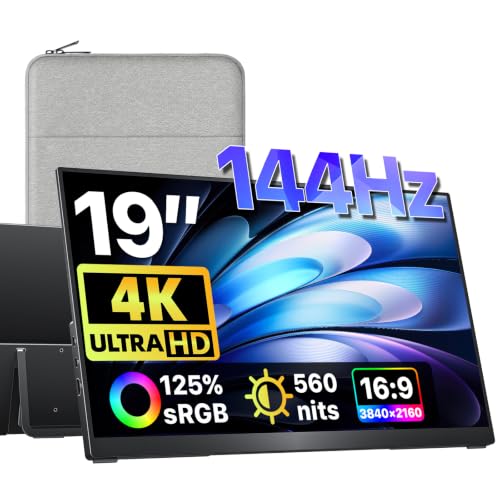
VisionOwl 19-Inch 4K 144Hz Portable Monitor
Best for: Portable gaming and creative work
- Screen Size
- 19"
- Resolution
- 3840x2160
- Refresh Rate
- 144Hz
- Connectivity
- USB-C, HDMI
- Dimensions
- 0.47 × 16.9 × 10.2 inches
- Weight
- 2.36 pounds
View on Amazon: VisionOwl 19-Inch 4K 144Hz Portable Monitor Affiliate link
The VisionOwl 19-inch portable monitor delivers 4K UHD resolution at 144Hz. It features 560 nits of brightness and covers 125% of the sRGB color gamut. The metal build includes a built-in kickstand and VESA mount points. You get dual USB-C ports and HDMI connectivity. This screen suits gamers and professionals needing a high-refresh secondary display for travel or desk setups.
Pros
- 144Hz refresh rate for smooth motion
- 560 nits peak brightness
- 125% sRGB color gamut
- Integrated adjustable kickstand
- VESA 75x75mm mountable
Cons
- 19-inch size is smaller than standard desktop monitors
- Brightness drops to 60% on single USB-C connection
- Requires power adapter for full brightness performance
Good fit if
- You need a high-refresh portable screen for gaming
- You want accurate colors for creative work
- You prefer a metal build with VESA mounting
Skip if
- You require a large primary desktop display
- You need full brightness without a power adapter
- You prefer a larger 27-inch or 37-inch format
Verdict: VisionOwl 19-Inch 4K 144Hz Portable Monitor fits users who need a compact, high-performance secondary screen for gaming or color-critical tasks on the go.

LG 27-Inch 4K UHD USB-C Monitor
Best for: Productivity and media with accurate colors
- Screen Size
- 27-inch
- Resolution
- 3840 x 2160
- Refresh Rate
- 60Hz
- Panel Type
- IPS
- Connectivity
- USB Type-C, DisplayPort, HDMI
- Dimensions
- 9.4 × 24.2 × 22.4 inches
View on Amazon: LG 27-Inch 4K UHD USB-C Monitor Affiliate link
The LG 27UP850K-W is a 27-inch 4K UHD IPS monitor with DisplayHDR 400 support. It covers 95% of the DCI-P3 color gamut for accurate visuals. You get USB-C connectivity with 90W power delivery, plus HDMI and DisplayPort inputs. Built-in stereo speakers and gaming features like Black Stabilizer are included. This pick suits users who want high resolution, color accuracy, and convenient single-cable connectivity for work or media.
Pros
- 4K UHD (3840 x 2160) IPS panel
- 95% DCI-P3 color gamut coverage
- USB-C with 90W power delivery
- DisplayHDR 400 certification
- Built-in stereo speakers with Waves MaxxAudio
Cons
- Only 60Hz refresh rate
- No mention of FreeSync or G-Sync compatibility
- No built-in webcam
Good fit if
- You need a 4K display with accurate colors for creative work
- You want to connect a laptop via a single USB-C cable
- You prefer a monitor with built-in speakers
Skip if
- You require a high refresh rate for competitive gaming
- You need a larger than 27-inch screen
- You do not want built-in speakers
Verdict: LG 27-inch 4K USB-C Monitor offers strong color accuracy and convenient connectivity for productivity and media consumption. It is a solid choice for users prioritizing image quality and cable management over high refresh rates.

ASUS 27-Inch 4K USB-C Monitor
Best for: Office work with USB-C laptops
- Screen Size
- 27 Inch
- Resolution
- 3840 x 2160
- Panel Type
- IPS
- Connectivity
- USB-C, HDMI, DisplayPort, USB hub
- Dimensions
- 24.2 × 8.8 × 20.6 inches
- Weight
- 15.2 pounds
View on Amazon: ASUS 27-Inch 4K USB-C Monitor Affiliate link
This ASUS business monitor features a 27-inch IPS panel with 4K UHD resolution. It includes a USB-C port that delivers 65W of power delivery. The stand offers tilt, swivel, pivot, and height adjustments. You get a USB hub and standard HDMI and DisplayPort connections. It is designed for office work and professional tasks where color accuracy and ergonomic flexibility matter.
Pros
- 27-inch 4K UHD (3840 x 2160) IPS panel
- USB-C port with 65W power delivery
- Full ergonomic stand with height and pivot adjustment
- Built-in USB hub and dual HDMI/DP inputs
Cons
- No refresh rate listed beyond standard 60Hz
- No mention of HDR certification beyond HDR-10 support
- Speakers listed in title but not detailed in features
Good fit if
- You need a single-cable USB-C setup for your laptop
- You require height and pivot adjustments for your desk
- You want a 4K display for text-heavy work
Skip if
- You need a high refresh rate for gaming
- You prefer a larger 32-inch or ultrawide screen
- You want a monitor with built-in smart features
Verdict: ASUS VA27UCPS 27-inch 4K Business Monitor is a solid choice for professionals who need ergonomic flexibility and convenient USB-C connectivity. It suits users who prioritize sharp text and clean desk setups over gaming performance.

Yxk 15.6-Inch 4K 60Hz Portable Monitor
Best for: portable 4K secondary displays
- Screen Size
- 15.6 Inch
- Resolution
- 3840x2160
- Refresh Rate
- 60Hz
- Connectivity
- USB-C, mini HDMI
- Dimensions
- 16 × 2.3 × 10 inches
View on Amazon: Yxk 15.6-Inch 4K 60Hz Portable Monitor Affiliate link
This 15.6-inch portable display delivers 4K UHD resolution at 60Hz with 100% Adobe RGB color coverage. It connects via dual USB-C and mini HDMI ports, supporting video and power through a single cable. The ultra-slim design weighs 1.8 lbs, making it easy to carry for travel or secondary setups. It suits professionals and gamers who need sharp visuals on the go.
Pros
- 4K UHD resolution for sharp, detailed images
- 100% Adobe RGB wide color gamut
- Dual USB-C 3.1 and mini HDMI connectivity
- Ultra-slim 0.3-inch thickness and 1.8 lbs weight
Cons
- 15.6-inch screen is smaller than standard desktop monitors
- 60Hz refresh rate limits high-speed gaming performance
- Mini HDMI port requires adapters for standard HDMI cables
Good fit if
- You need a lightweight second screen for travel
- You require high color accuracy for content creation
- You want a compact 4K display for small spaces
Skip if
- You require a large primary desktop monitor
- You need high refresh rates for competitive gaming
- You prefer standard HDMI connections without adapters
Verdict: Yxk 15.6-Inch 4K Portable Monitor is a compact, high-resolution solution for travelers and mobile professionals who prioritize portability and color accuracy over large screen real estate.
Specifications side by side
| Spec | Samsung 37-Inch ViewFinity S8 4K Monitor | Dell 27-Inch 4K 120Hz USB-C Monitor | ASUS ProArt 27-Inch 4K USB-C Monitor | VisionOwl 19-Inch 4K 144Hz Portable Monitor | LG 27-Inch 4K UHD USB-C Monitor | ASUS 27-Inch 4K USB-C Monitor | Yxk 15.6-Inch 4K 60Hz Portable Monitor |
|---|---|---|---|---|---|---|---|
| Screen Size | 37" | 27" | 27" | 19" | 27-inch | 27 Inch | 15.6 Inch |
| Resolution | 4K UHD | 3840x2160 | 4K UHD | 3840x2160 | 3840 x 2160 | 3840 x 2160 | 3840x2160 |
| Refresh Rate | not stated | 120Hz | not stated | 144Hz | 60Hz | not stated | 60Hz |
| Panel Type | not stated | IPS | IPS | not stated | IPS | IPS | not stated |
| Response Time | not stated | 4ms | 5.0 ms | not stated | not stated | not stated | not stated |
| Sync Technology | not stated | AMD FreeSync Premium | not stated | not stated | not stated | not stated | not stated |
| Connectivity | USB-C, Ethernet LAN | USB-C, HDMI, DisplayPort | USB-C, DisplayPort, HDMI, USB 3.1 | USB-C, HDMI | USB Type-C, DisplayPort, HDMI | USB-C, HDMI, DisplayPort, USB hub | USB-C, mini HDMI |
| Size | 37-Inch | S2725QC | 27 Inch | 19 inch | 27-inch and USB-C | 27 Inch | 15.6" |
| Dimensions | 9.84 × 32.4 × 25.5 inches | 7.89 × 24.1 × 15.3 inches | 20.6 × 24.2 × 8.97 inches | 0.47 × 16.9 × 10.2 inches | 9.4 × 24.2 × 22.4 inches | 24.2 × 8.8 × 20.6 inches | 16 × 2.3 × 10 inches |
| Weight | 19.6 pounds | 14.8 pounds | 19 pounds | 2.36 pounds | 13 pounds | 15.2 pounds | not stated |
| Color | Black | Ash White | BLACK | Black | White | BLACK | black |
| Model | LS37D800UANXZA | S2725QC | PA279CV | V19UH | 27UP850K-W | VA27UCPS | Y156U1 |
If you need internal storage for your workstation setup, compare samsung pm9c1 256gb alternatives by interface and form factor.
Frequently asked questions
Which alternative offers the highest refresh rate for smooth motion?
The VisionOwl 19-Inch Portable Monitor provides the highest refresh rate at 144Hz. This specification ensures smoother visuals for gaming and fast-paced creative work compared to the 60Hz or unspecified rates of other options. It delivers 4K UHD resolution in a compact 19-inch form factor.
How does the Dell S2725QC compare to the Samsung 37-inch size?
The Dell S2725QC features a 27-inch panel, which is significantly smaller than the Samsung 37-inch ViewFinity S8. This makes the Dell a better fit for desks with limited space. Both monitors offer 4K UHD resolution, but the Dell adds a 120Hz refresh rate and FreeSync support.
What is the smallest screen size available in this list?
The Yxk 15.6-Inch Portable Monitor is the smallest display on this list. It measures 15.6 inches diagonally, offering a highly portable solution for travelers. It maintains 4K UHD resolution and includes HDMI and USB-C connectivity for versatile use with various devices.
Which monitors include USB-C connectivity for single-cable docking?
Several alternatives support USB-C connectivity, including the Dell S2725QC, ASUS ProArt PA279CV, LG 27UP850K-W, and ASUS VA27UCPS. These models allow you to connect your computer via a single cable for data and video. The VisionOwl and Yxk portable monitors also list USB-C in their connections.
Is there a 27-inch option with an IPS panel?
Yes, the Dell S2725QC and the LG 27UP850K-W both utilize IPS panel technology. IPS panels are known for accurate color reproduction and wide viewing angles. These models pair this panel type with 4K UHD resolution, making them suitable for professional color work and media consumption.
Which monitor is the lightest and easiest to transport?
The VisionOwl 19-Inch Portable Monitor is the lightest option at 2.35 pounds. Its slim profile and low weight make it ideal for mobile professionals. The Yxk 15.6-Inch model is also designed for portability, though specific weight data is not provided in the specifications.
Do any alternatives offer FreeSync technology for tear-free gaming?
The Dell S2725QC explicitly lists FreeSync as its sync technology. This feature helps reduce screen tearing during gaming or fast-moving content. Other monitors in this list do not specify FreeSync support in their provided attributes, focusing instead on resolution or connectivity features.