Looking Beyond the Samsung 49-Inch Odyssey G9 1440p? 6 Alternatives Worth a Look
As an Amazon Associate we earn from qualifying purchases. Links on this page are affiliate links.
The Samsung 49-Inch Odyssey G9 offers massive immersion with its 49-inch curve and 1440p resolution. It suits gamers seeking maximum screen width. However, you might look for samsung odyssey 49 in 5k qhd alternatives if you need a smaller footprint or different features. The original monitor weighs 36.8 pounds and measures 45.2 inches wide. This bulk can be a constraint for smaller desks. You may also prefer a different refresh rate or panel type.
This list of 6 alternatives was chosen because their specs overlap with the original. The selections include 27-inch and 34-inch ultrawide options. These monitors offer 1440p resolution like the Samsung model. Some feature USB-C connectivity for easier laptop setups. Others provide higher refresh rates for competitive gaming. You can find VA, OLED, and Mini-LED panels in this group. Each option balances size, speed, and connectivity differently. Review the detailed specs to find the right fit for your specific needs.
Our top pick: Samsung 49-Inch Odyssey G9 1440p Monitor.
How alternatives compare to G9
Dell 34-Inch 120Hz USB-C Monitor
The Dell 34-inch ultrawide offers a more practical footprint for mixed work and casual gaming. It features a VA panel with 120Hz refresh rate and USB-C connectivity, unlike the G9’s massive 49-inch curve. You gain color accuracy and single-cable convenience for laptops, but you give up the extreme immersion and width of the Samsung. This model suits users who value balanced performance and connectivity over sheer screen real estate. It is a compact alternative for those who find the G9 too large for their desk space.
Samsung 32-Inch Odyssey Curved QHD Monitor
The Samsung 32-inch Odyssey G55C provides curved QHD immersion in a much smaller package. It weighs only 11.5 pounds compared to the G9’s 36.8 pounds, making it easier to place on standard desks. You get a 32-inch curved display with 1440p resolution, which fits single-monitor gamers who want curvature without the ultrawide width. This option is ideal for players who prioritize speed and a manageable size over the expansive horizontal field of view provided by the 49-inch model. It is a budget-friendly curved alternative.
Dell 27-Inch 1440p USB-C Monitor
The Dell 27-inch monitor shifts focus from gaming immersion to productivity and clean setups. It features a 75Hz refresh rate and USB-C connectivity, offering a single-cable solution for laptops. This contrasts sharply with the G9’s gaming-centric design. You gain ergonomic flexibility and a professional look, but you lose the high refresh rate and ultrawide width. This monitor is best for professionals and casual users who value a clutter-free desk and color accuracy over the fast, immersive experience of the Samsung Odyssey G9.
ASUS 27-Inch 240Hz Glossy OLED Gaming Monitor
The ASUS 27-inch OLED monitor prioritizes speed and contrast over screen size. It features a 240Hz refresh rate and OLED panel, delivering vivid colors and fast response times for competitive gaming. You give up the massive 49-inch width and 1440p ultrawide format for a standard 27-inch footprint. This alternative suits players who value OLED contrast and high refresh rates in a compact form factor. It is not suitable for those seeking the immersive, wide-angle view provided by the Samsung Odyssey G9.
AOC 27-Inch Mini-LED 1440p Gaming Monitor
The AOC 27-inch Mini-LED monitor offers high contrast and sharp 1440p visuals in a compact setup. It uses Mini-LED technology for excellent local dimming performance, differing from the G9’s curved panel. You gain a space-efficient design suitable for compact desks, but you lose the ultrawide immersion. This model suits gamers who prioritize contrast and picture quality over screen width. It is a strong alternative for those who want high-end visual performance without the bulk and width of the 49-inch Samsung Odyssey G9.
Alienware 27-Inch 360Hz QD-OLED Gaming Monitor
The Alienware 27-inch QD-OLED monitor is built for high-speed competitive gaming. It features a 360Hz refresh rate and QD-OLED panel, offering superior speed and color accuracy. You gain a fast, responsive display for competitive titles, but you give up the 49-inch ultrawide format and 1440p resolution of the G9. This alternative suits players who prioritize refresh rate and panel technology over screen size. It is not suitable for users seeking the immersive, wide-field experience that defines the Samsung Odyssey G9.
Quick picks
Our 7 picks

Samsung 49-Inch Odyssey G9 1440p Monitor
Best for: immersive ultrawide gaming
- Screen Size
- 49"
- Resolution
- 1440p
- Dimensions
- 16.4 × 45.2 × 21.2 inches
- Weight
- 36.8 pounds
View on Amazon: Samsung 49-Inch Odyssey G9 1440p Monitor Affiliate link
This Samsung Odyssey G9 features a 49-inch curved screen with 1440p resolution. It weighs 36.8 pounds and measures 45.2 inches wide. The display offers an ultra-wide aspect ratio suitable for immersive gaming and multitasking. You get a large canvas for your desktop or games. The build is substantial, requiring adequate desk space. It fits users who prioritize screen real estate over pixel density.
Pros
- 49-inch screen size
- 1440p resolution
- Curved display design
- 36.8-pound weight capacity
Cons
- 1440p resolution on 49 inches results in lower pixel density
- Large footprint requires significant desk space
- Heavy build at 36.8 pounds
Good fit if
- You want an ultra-wide curved display
- You have a large desk setup
- You prioritize immersion over sharpness
Skip if
- You need high pixel density
- You have limited desk space
- You prefer lighter monitors
Verdict: Samsung Odyssey 49-Inch G9 1440p suits gamers seeking maximum screen width. It delivers immersion through its 49-inch curve. It is not ideal for those needing crisp text.

Dell 34-Inch 120Hz USB-C Monitor
Best for: Mixed work and casual gaming on ultrawide
- Screen Size
- 34"
- Resolution
- WQHD
- Refresh Rate
- 120Hz
- Response Time
- 0.03ms
- Sync Technology
- AMD FreeSync Premium
- Connectivity
- USB-C
View on Amazon: Dell 34-Inch 120Hz USB-C Monitor Affiliate link
The Dell S3425DW is a 34-inch WQHD curved monitor with a VA panel. It offers a 120Hz refresh rate and 0.03ms response time. The display covers 99% sRGB and 95% DCI-P3 color. USB-C connectivity provides 65W power delivery. AMD FreeSync Premium reduces screen tearing. This monitor suits users seeking a balanced ultrawide for work and casual gaming.
Pros
- 120Hz refresh rate with 0.03ms response time
- USB-C connectivity with 65W power delivery
- 99% sRGB and 95% DCI-P3 color coverage
- VA panel with 3000:1 contrast ratio
Cons
- 120Hz refresh rate is lower than the 240Hz options available
- VA panel may exhibit slower pixel response in dark scenes
- No mention of HDR certification beyond HDR readiness
Good fit if
- You need USB-C connectivity for a single-cable setup
- You want a 34-inch ultrawide for productivity
- You prioritize color accuracy for creative work
Skip if
- You require a 240Hz refresh rate for competitive gaming
- You prefer OLED technology for perfect blacks
- You need a 27-inch screen size
Verdict: Dell 34-inch WQHD Curved Monitor is a practical ultrawide for users who value color accuracy and USB-C convenience over high refresh rates. It fits those who want a balanced display for mixed use.

Samsung 32-Inch Odyssey Curved QHD Monitor
Best for: Single-monitor gamers wanting curved QHD immersion
- Screen Size
- 32"
- Resolution
- QHD
- Refresh Rate
- 165Hz
- Response Time
- 1ms (MPRT)
- Sync Technology
- AMD Radeon FreeSync
- Size
- 32 Inch
View on Amazon: Samsung 32-Inch Odyssey Curved QHD Monitor Affiliate link
The Samsung 32" Odyssey G55C delivers QHD resolution on a 32-inch screen. It features a 1000R curve and a 165Hz refresh rate for smooth visuals. AMD FreeSync reduces tearing. HDR10 supports vivid colors. This monitor suits players who want immersion without the bulk of ultrawide panels. It balances size and speed for a focused gaming setup.
Pros
- 32-inch QHD resolution for sharp detail
- 165Hz refresh rate with 1ms MPRT response
- 1000R curvature for peripheral immersion
- AMD FreeSync for tear-free gameplay
Cons
- Only supports AMD FreeSync, not NVIDIA G-Sync
- No mention of USB-C connectivity
- 1000R curve may not suit all desk depths
Good fit if
- You want a single large screen without ultrawide width
- You play fast-paced games and need 165Hz
- You prefer curved displays for immersion
Skip if
- You need NVIDIA G-Sync compatibility
- You prefer flat screens over curved ones
- You require USB-C connectivity
Verdict: Samsung 32" Odyssey G55C QHD 165Hz offers solid speed and immersion for single-monitor users. It fits players who want a large, curved QHD display without the width of ultrawide models.

Dell 27-Inch 1440p USB-C Monitor
Best for: productivity and single-cable laptop setups
- Screen Size
- 27-inch
- Resolution
- 2560x1440
- Refresh Rate
- 75Hz
- Response Time
- 4Ms
- Sync Technology
- AMD FreeSync
- Connectivity
- USB Type-C, USB 3.2 Gen 1 Type-A
View on Amazon: Dell 27-Inch 1440p USB-C Monitor Affiliate link
The Dell S2722DC is a 27-inch WQHD monitor with a 75Hz refresh rate and 4ms response time. It features AMD FreeSync for tear-free visuals. A key advantage is its USB-C connectivity, which delivers 65W power to your laptop while transmitting video and data. The stand offers height, tilt, swivel, and pivot adjustments. This setup suits users who want a clean desk with a single-cable solution for productivity and casual gaming.
Pros
- USB-C connectivity with 65W power delivery
- 27-inch WQHD (2560x1440) resolution
- Height-adjustable stand with pivot capability
- AMD FreeSync technology for smooth visuals
Cons
- 75Hz refresh rate limits high-end gaming
- No mention of HDR support in specifications
- Built-in speakers only, no headphone jack listed
Good fit if
- You use a laptop and want a single-cable desk setup
- You need a 27-inch screen for productivity tasks
- You prefer adjustable ergonomics for long work sessions
Skip if
- You require a high refresh rate for competitive gaming
- You need HDR performance for media consumption
- You want a curved display for immersion
Verdict: Dell S2722DC 27-inch WQHD Monitor is a practical choice for professionals and casual users who value a clean, single-cable connection and ergonomic flexibility over high-speed gaming performance.

ASUS 27-Inch 240Hz Glossy OLED Gaming Monitor
Best for: Fast-paced gaming on a 27-inch OLED screen
- Screen Size
- 26.5 inch
- Resolution
- 2560 x 1440
- Refresh Rate
- 240Hz
- Panel Type
- WOLED
- Response Time
- 0.03ms GTG
- Sync Technology
- ELMB Sync
View on Amazon: ASUS 27-Inch 240Hz Glossy OLED Gaming Monitor Affiliate link
The ASUS ROG XG27AQDMGR is a 27-inch QHD OLED monitor designed for high-speed gaming. It features a 240Hz refresh rate and a 0.03ms response time for smooth motion. The glossy WOLED panel covers 99% of the DCI-P3 gamut with true 10-bit color. It includes VESA DisplayHDR 400 True Black compliance. This monitor suits players who want fast response times and accurate color reproduction without the bulk of larger screens.
Pros
- 240Hz refresh rate for smooth gameplay
- 0.03ms gray-to-gray response time eliminates ghosting
- 99% DCI-P3 color gamut with true 10-bit color
- VESA DisplayHDR 400 True Black compliance
- ASUS OLED Care Pro with Neo Proximity Sensor to reduce burn-in risk
Cons
- 27-inch screen is smaller than the 49-inch alternatives
- Glossy panel may reflect more ambient light than matte screens
- No mention of built-in speakers
Good fit if
- You prioritize speed and color accuracy over screen size
- You want OLED contrast with a 240Hz refresh rate
- You prefer a compact 27-inch footprint for your desk
Skip if
- You need a large ultrawide display for productivity
- You prefer matte screens to reduce glare
- You require a higher brightness HDR rating than 400 nits
Verdict: The ASUS ROG XG27AQDMGR 27-inch 240Hz OLED delivers fast response times and vivid colors for competitive gamers who do not need a massive screen. It fits players who value OLED contrast and high refresh rates in a standard 27-inch form factor.
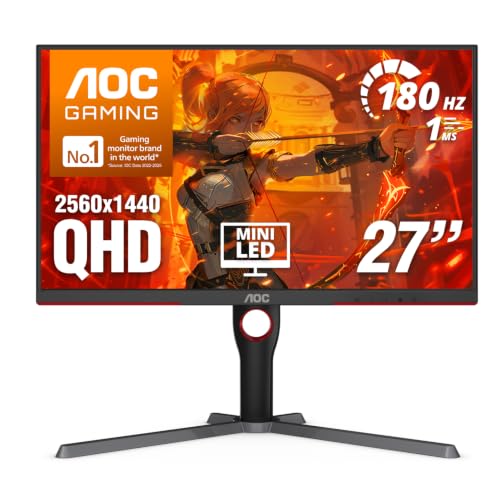
AOC 27-Inch Mini-LED 1440p Gaming Monitor
Best for: compact high-contrast gaming setups
- Screen Size
- 27 Inch
- Resolution
- 2560x1440
- Refresh Rate
- 180Hz
- Response Time
- 1ms GtG
- Sync Technology
- Adaptive-Sync
- Connectivity
- DP 1.4, HDMI 2.1, USB 3.2
View on Amazon: AOC 27-Inch Mini-LED 1440p Gaming Monitor Affiliate link
This 27-inch monitor uses a VA panel with Mini-LED backlighting and 336 dimming zones for high contrast. It delivers 1440p resolution and a 180Hz refresh rate for smooth motion. The 1ms response time and Adaptive-Sync support reduce tearing. It is a strong alternative to larger ultrawides if you prefer a compact desktop footprint with HDR1000 brightness.
Pros
- Mini-LED backlighting with 336 dimming zones
- 180Hz refresh rate via DisplayPort 1.4
- 1ms GtG response time
- VESA DisplayHDR 1000 certification
- 134% sRGB color gamut
Cons
- 27-inch size is smaller than 49-inch ultrawides
- VA panel may have slower pixel transitions than IPS
- No mention of USB hub connectivity
Good fit if
- You want high contrast and HDR without a massive desk footprint
- You prefer a 1440p resolution on a standard 27-inch screen
- You need a fast refresh rate for competitive gaming
Skip if
- You need a single-screen ultrawide experience
- You require an IPS panel for wider viewing angles
- You want a higher refresh rate than 180Hz
Verdict: AOC Q27G3XMN 27-inch Mini-LED delivers sharp 1440p visuals with excellent contrast for gamers who want a compact setup. It suits those who prioritize local dimming performance over screen width.

Alienware 27-Inch 360Hz QD-OLED Gaming Monitor
Best for: high refresh rate gaming on a compact OLED panel
- Screen Size
- 26.7-inch
- Resolution
- 2560x1440
- Refresh Rate
- 360Hz
- Panel Type
- QD-OLED
- Response Time
- 0.03 ms GTG
- Sync Technology
- AMD FreeSync Premium Pro, AdaptiveSync
View on Amazon: Alienware 27-Inch 360Hz QD-OLED Gaming Monitor Affiliate link
This 27-inch QD-OLED monitor delivers a 2560x1440 resolution with a 360Hz refresh rate and 0.03ms response time. It covers 99.3% of the DCI-P3 color gamut with Delta E<2 accuracy. The display features an infinite contrast ratio and VESA DisplayHDR True Black 400 certification. It supports AMD FreeSync Premium Pro and VESA AdaptiveSync for smooth visuals. This model suits gamers who prioritize high refresh rates and color fidelity on a compact screen.
Pros
- 360Hz refresh rate for high-speed motion clarity
- 0.03ms gray-to-gray response time
- 99.3% DCI-P3 color coverage with Delta E<2 accuracy
- Infinite contrast ratio and deep blacks
Cons
- 2560x1440 resolution is lower than the 49-inch 5K QHD option
- 27-inch screen size is smaller than the 34-inch alternatives
- Weight of 13.9 pounds may be heavy for some setups
Good fit if
- You want the highest refresh rate available on a 27-inch panel
- You value precise color accuracy for creative or gaming work
- You prefer a compact desk footprint with OLED contrast
Skip if
- You need a 49-inch ultrawide immersive experience
- You require a 4K resolution for sharp text
- You are looking for a budget-friendly 1440p option
Verdict: Alienware 27-inch QD-OLED 360Hz Monitor is ideal for competitive gamers who need speed and color accuracy on a smaller screen. It fits those who prioritize refresh rate and panel technology over screen size. It is not suitable for users seeking ultrawide immersion or higher resolution.
Specifications side by side
| Spec | Samsung 49-Inch Odyssey G9 1440p Monitor | Dell 34-Inch 120Hz USB-C Monitor | Samsung 32-Inch Odyssey Curved QHD Monitor | Dell 27-Inch 1440p USB-C Monitor | ASUS 27-Inch 240Hz Glossy OLED Gaming Monitor | AOC 27-Inch Mini-LED 1440p Gaming Monitor | Alienware 27-Inch 360Hz QD-OLED Gaming Monitor |
|---|---|---|---|---|---|---|---|
| Screen Size | 49" | 34" | 32" | 27-inch | 26.5 inch | 27 Inch | 26.7-inch |
| Resolution | not stated | WQHD | QHD | 2560x1440 | 2560 x 1440 | 2560x1440 | 2560x1440 |
| Refresh Rate | not stated | 120Hz | 165Hz | 75Hz | 240Hz | 180Hz | 360Hz |
| Panel Type | not stated | not stated | not stated | not stated | WOLED | not stated | QD-OLED |
| Response Time | not stated | 0.03ms | 1ms (MPRT) | 4Ms | 0.03ms GTG | 1ms GtG | 0.03 ms GTG |
| Sync Technology | not stated | AMD FreeSync Premium | AMD Radeon FreeSync | AMD FreeSync | ELMB Sync | Adaptive-Sync | AMD FreeSync Premium Pro, AdaptiveSync |
| Connectivity | not stated | USB-C | not stated | USB Type-C, USB 3.2 Gen 1 Type-A | not stated | DP 1.4, HDMI 2.1, USB 3.2 | HDMI, DP, USB 3.2 Gen1 |
| Size | not stated | S3425DW | 32 Inch | 27 Inch | 14.5" x 23.8" x 2.5" | 27" 180Hz Mini-LED | 27.0 OLED |
| Dimensions | 16.4 × 45.2 × 21.2 inches | 8.73 × 31.8 × 16.2 inches | 10.7 × 28 × 21 inches | 6.88 × 24.1 × 15.8 inches | 7.4 × 23.8 × 19.7 inches | 10.2 × 23.8 × 20.9 inches | 9.59 × 24 × 16 inches |
| Weight | 36.8 pounds | 20.7 pounds | 11.5 pounds | 11.9 pounds | 14.6 pounds | 15.6 pounds | 13.9 pounds |
| Color | Black | Ash White | Black | Platinum Silver | BLACK | Black | Black |
| Model | LC49G97TSSNXDC | S3425DW | LS32CG550ENXZA | S2722DC | XG27AQDMGR | Q27G3XMN | AW2725DF |
If your system build also requires compact storage, you can compare samsung pm9c1 256gb alternatives alongside your display options.
Frequently asked questions
What is the best ultrawide alternative to the Samsung 49-inch Odyssey G9?
The Dell 34-inch WQHD Curved Monitor is the top alternative for users seeking a balanced display. It features a VA panel with 120Hz refresh rate and USB-C connectivity. This model suits those who value color accuracy and single-cable convenience over the massive width of the G9.
Is there a smaller curved option instead of the 49-inch Samsung?
Yes, the Samsung 32-inch Odyssey G55C offers a curved QHD experience in a more manageable size. It delivers 165Hz speed for single-monitor gamers. This choice fits players who want large, curved immersion without the extreme width of ultrawide models.
Which monitor provides better color accuracy than the Samsung Odyssey G9?
The Dell 34-inch WQHD Curved Monitor is designed for users who prioritize color accuracy. It uses a VA panel and includes USB-C connectivity for streamlined setups. This makes it a practical choice for mixed work and casual gaming compared to the G9.
Can I get a high refresh rate on a 27-inch screen?
The ASUS ROG XG27AQDMGR offers a 240Hz refresh rate on a 27-inch OLED panel. It delivers fast response times and vivid colors for competitive gaming. This model suits players who value high refresh rates and OLED contrast in a standard form factor.
What is the fastest gaming monitor available in this list?
The Alienware 27-inch QD-OLED Monitor features a 360Hz refresh rate. It is ideal for competitive gamers needing speed and color accuracy on a compact panel. It prioritizes refresh rate and panel technology over screen size, unlike the ultrawide Samsung option.
Is there a Mini-LED alternative for better contrast?
The AOC Q27G3XMN is a 27-inch Mini-LED monitor that delivers sharp 1440p visuals with excellent contrast. It suits those who prioritize local dimming performance over screen width. This compact setup is ideal for gamers wanting high-contrast visuals without an ultrawide footprint.
Which ultrawide monitor supports USB-C for laptop users?
The Dell 34-inch WQHD Curved Monitor supports USB-C connectivity. It allows for a single-cable connection, making it practical for professionals and casual users. This feature provides ergonomic flexibility and clean desk setups, differing from the connectivity options on the Samsung 49-inch model.