Samsung ViewFinity 32-Inch 4K UHD Review: Who It Fits and Who Should Skip It
As an Amazon Associate we earn from qualifying purchases. Links on this page are affiliate links.
This samsung tu872 series 32 inch viewfinity review covers a professional display built for clarity and connection. The monitor features a 32-inch screen with 4K UHD resolution, delivering sharp text and detailed images for creative work. It pairs this visual fidelity with a 60Hz refresh rate, ensuring smooth motion for general computing tasks. The design includes an adjustable stand for ergonomic comfort and a slim bezel that fits neatly on any desk. You get robust connectivity options, including Thunderbolt 3 and built-in USB hubs, making it a practical choice for modern workstations.
What stands out
- 32-inch VA panel with 3840x2160 resolution for crisp 4K UHD visuals
- Thunderbolt 3 port with built-in USB hub and RJ45 ethernet support
- Fully adjustable stand offering tilt, swivel, height, and pivot adjustments
- Eye Saver Mode and Flicker Free technology to reduce eye strain
- 100x100 VESA mount compatibility for flexible wall or arm mounting
Who it fits
Good fit for
This monitor suits professionals who need sharp text and reliable connectivity. The 4K resolution and 32-inch size are ideal for designers, writers, and data analysts who spend long hours at their desks. The Thunderbolt 3 port and ethernet jack make it a strong candidate for users who want a clean cable setup with a single connection to power and data. The ergonomic stand helps those who need to adjust their viewing angle frequently without cluttering their workspace.
Who should skip it
Gamers looking for high frame rates should look elsewhere, as the 60Hz refresh rate is standard for office use. If you need ultrawide aspect ratios for multitasking, this 16:9 panel will not provide the horizontal space you require. Users who do not have a Thunderbolt 3 compatible computer may find the advanced connectivity less useful, as they will rely on standard HDMI or DisplayPort inputs. Those who prefer plug-and-play simplicity without driver or hub management might find the feature set overly complex.
Verdict: The Samsung ViewFinity 32-Inch 4K UHD Monitor is a solid choice for professionals prioritizing image clarity and connectivity. It delivers the sharpness and ergonomic flexibility needed for demanding office environments.
Key specs explained for this monitor
Resolution: 3840x2160
This 4K UHD resolution provides four times the pixel density of standard 1080p displays. You gain sharp text rendering and fine detail for photo editing or spreadsheet work. Unlike many ultrawide gaming monitors that prioritize speed over pixel count, this setup favors clarity. It ensures content looks crisp on a 32-inch screen without scaling issues.
Screen Size: 32"
A 32-inch panel offers ample desktop space for multitasking. You can comfortably fit multiple windows side by side. This size bridges the gap between standard 27-inch displays and larger ultrawide screens. It provides a substantial viewing area for professional applications while remaining manageable on most standard office desks.
Refresh Rate: 60Hz
The 60Hz refresh rate is standard for productivity monitors. It ensures smooth motion for general office tasks and video playback. While lower than the 144Hz or higher rates found in gaming ultrawides, it is sufficient for non-competitive work. You will not experience motion blur during typical daily computer usage.
Connectivity: Thunderbolt 3, DisplayPort, HDMI, RJ45
This monitor offers versatile connection options for various devices. Thunderbolt 3 allows for high-speed data transfer and video signals. The RJ45 port enables wired network connectivity through the monitor. This setup reduces cable clutter on your desk. You can connect laptops, desktops, and peripherals with minimal dongles.
Design and build overview
According to the listing, this Samsung ViewFinity monitor uses a black finish with a sleek, ultra-thin bezel. The physical dimensions are 28.2 inches wide, 24 inches high, and 8.9 inches deep. It weighs 22.3 pounds. The compact footprint fits neatly on most desks without overwhelming the workspace. The slim profile helps it blend into professional environments where clean lines matter.
The stand offers full ergonomic flexibility. You can adjust the tilt, swivel, height, and pivot. This range of motion allows you to position the screen for optimal viewing comfort during long work sessions. If you prefer a cleaner desk setup, the monitor supports 100x100 VESA mounting. This lets you attach it to a wall or a standard monitor arm for better cable management and space saving.
The rear layout includes a built-in USB hub with two USB 3.0 ports. An RJ45 ethernet port is also present, but only when using the Thunderbolt 3 input. This design choice simplifies connectivity for office setups. You can plug peripherals directly into the monitor while maintaining a wired network connection. The build prioritizes practical utility and stability over flashy aesthetics, making it a solid choice for stationary workstations.
Setup and everyday use
The Samsung ViewFinity 32-Inch 4K UHD Monitor offers straightforward connectivity for professional setups. You connect devices using Thunderbolt 3, DisplayPort, or HDMI inputs. The Thunderbolt 3 port supports daisy chaining, allowing you to link multiple monitors in a single chain. This reduces cable clutter on your desk significantly. The display also includes a built-in USB hub with two USB 3.0 ports. You can connect peripherals directly to the monitor without using extra ports on your computer.
For network needs, the monitor features a built-in RJ45 ethernet port. This allows you to connect to a wired LAN when using the Thunderbolt input. This is useful for stable internet access without relying on Wi-Fi. The monitor is fully adjustable. You can tilt, swivel, and adjust the height to find a comfortable viewing angle. It also supports pivot adjustment for vertical orientation. The stand includes 100x100 VESA mounting support. You can easily attach it to a wall mount or VESA arm if you prefer a cleaner look.
Daily use is supported by Eye Saver Mode and Flicker Free technology. These features help reduce eye strain during long work hours. The 60Hz refresh rate is sufficient for standard productivity tasks. The 32-inch 4K UHD screen provides clear text and detailed images. The monitor comes with a 3-Year Business warranty. Extended warranties are available for purchase. This setup is ideal for users who need reliable connectivity and ergonomic flexibility.
Before You Buy This Monitor
This monitor targets productivity, not high-speed gaming. You will need a Thunderbolt 3 cable or a standard HDMI cable to connect your device. If you use a laptop, ensure it supports Thunderbolt 3 daisy chaining to power peripherals and link screens efficiently. The built-in RJ45 port lets you connect to wired LAN directly, which is useful for stable network speeds without extra adapters. You should check that your desk can support the 22.3-pound weight or purchase a VESA mount. This unit differs from the 1 other gaming-focused options on this page. It lacks high refresh rates, so it suits static work like coding or design. Regularly clean the screen with a microfiber cloth. Avoid harsh chemicals to protect the VA panel coating. The adjustable stand allows tilt, swivel, height, and pivot changes, so you can customize your viewing angle for long sessions. This practical setup requires minimal maintenance and fits well in professional environments.
Check before you buy
- Verify your laptop supports Thunderbolt 3 daisy chaining
- Ensure your desk holds 22.3 pounds or buy a VESA mount
- Check if you need wired LAN via the RJ45 port
- Confirm HDMI or DisplayPort availability on your primary device
The product at a glance
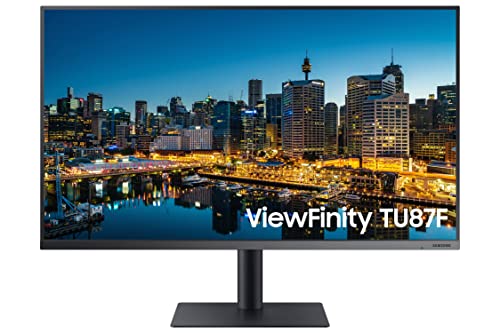
Samsung ViewFinity 32-Inch 4K UHD Monitor
Best for: Office work and creative tasks
- Screen Size
- 32"
- Resolution
- 3840x2160
- Refresh Rate
- 60Hz
- Connectivity
- Thunderbolt 3, DisplayPort, HDMI, RJ45
- Size
- 32 Inch
- Dimensions
- 28.2 × 8.9 × 24 inches
View on Amazon: Samsung ViewFinity 32-Inch 4K UHD Monitor Affiliate link
The Samsung Viewfinity 32-Inch 4K Monitor offers a 32-inch VA panel with 3840x2160 resolution and 60Hz refresh rate. It features a slim bezel design and a fully adjustable stand. Connectivity includes Thunderbolt 3, HDMI, DisplayPort, and an RJ45 port. Eye Saver Mode and Flicker Free technology help reduce eye strain. This monitor suits users needing high resolution and flexible connectivity for office or creative work.
Pros
- 32-inch 4K UHD VA panel for crisp images
- Thunderbolt 3 connectivity with built-in USB hub
- Fully adjustable stand with tilt, swivel, height, and pivot
- Eye Saver Mode and Flicker Free technology
Cons
- 60Hz refresh rate limits smooth motion for fast gaming
- No mention of HDR support in specifications
- No built-in speakers listed in features
Good fit if
- You need high-resolution 4K display for detailed work
- You require Thunderbolt 3 connectivity for daisy-chaining devices
- You value ergonomic adjustments like height and pivot
Skip if
- You require a high refresh rate for competitive gaming
- You need built-in speakers for audio output
- You want HDR support for enhanced color and contrast
Verdict: Samsung Viewfinity 32-Inch 4K Monitor fits professionals needing 4K clarity and versatile connectivity. It is less suitable for gamers seeking high refresh rates or users requiring built-in audio.
Specifications side by side
| Spec | Samsung ViewFinity 32-Inch 4K UHD Monitor |
|---|---|
| Screen Size | 32" |
| Resolution | 3840x2160 |
| Refresh Rate | 60Hz |
| Connectivity | Thunderbolt 3, DisplayPort, HDMI, RJ45 |
| Size | 32 Inch |
| Dimensions | 28.2 × 8.9 × 24 inches |
| Weight | 22.3 pounds |
| Color | Black |
| Model | LF32TU872VNXGO |
Frequently asked questions
Is the Samsung ViewFinity 32-Inch suitable for gaming?
This monitor is less suitable for gamers seeking high refresh rates. It features a 60Hz refresh rate, which is standard for professional displays but may feel sluggish in fast-paced competitive games. The 4K UHD resolution provides sharp visuals, making it better for creative tasks or slower-paced strategy games than for high-speed esports.
Does this monitor have built-in speakers?
The product data does not list built-in audio components for this model. The verdict explicitly notes it is less suitable for users requiring built-in audio. You will likely need to connect external speakers or headphones to the audio output jack on the back of the monitor for sound playback.
What is the physical size of the Samsung ViewFinity 32-Inch?
The monitor measures 28.2 inches wide, 24 inches high, and 8.9 inches deep. It weighs 22.3 pounds. These dimensions provide a substantial screen real estate for a 32-inch display. The compact footprint allows it to fit neatly on most desks without taking up excessive horizontal space compared to larger ultrawide alternatives.
What connectivity ports are available on this monitor?
The monitor offers HDMI connectivity as a primary input option. It also supports DisplayPort and Thunderbolt 3 connections for versatile device linking. The Thunderbolt 3 port allows for daisy chaining multiple monitors. This setup enables you to connect various peripherals and screens efficiently using a single cable from your laptop or desktop.
Who is this monitor best designed for?
This display is best for office work and creative tasks. It delivers 4K UHD clarity, which is ideal for photo editing and detailed spreadsheet work. Professionals needing sharp text rendering and versatile connectivity will find it suitable. It is not designed for users who prioritize high refresh rates for gaming or require integrated audio solutions.
Does the Samsung ViewFinity 32 support daisy chaining?
Yes, the monitor supports daisy chaining via its Thunderbolt 3 port. This feature allows you to link multiple monitors in a single chain. You can connect several screens and peripherals using one cable from your host device. This simplifies desk setup and reduces cable clutter for users with multi-monitor professional workflows.
What is the resolution of the Samsung ViewFinity 32?
The monitor features a 4K UHD resolution. This provides four times the pixel density of standard 1080p displays. You gain sharp text rendering and fine detail for photo editing or spreadsheet work. The high pixel density ensures that images and text appear crisp and clear, making it excellent for detailed creative work.