TCL 27” R94 Series 4K or TCL 27” C2A Series QD-Mini? Which TCL Model to Buy
As an Amazon Associate we earn from qualifying purchases. Links on this page are affiliate links.
When comparing the tcl 27 c2a series qd mini vs 27 r94 series 4k, you find two 27-inch 4K monitors using QD-Mini LED technology. Both models feature the Halo Control System for improved image quality and offer fast response times. The main difference lies in their refresh rates and connectivity options. The R94 Series offers a higher native refresh rate and broader sync compatibility, while the C2A Series includes a dual-mode feature for higher speeds in lower resolutions.
Key differences
| Aspect | TCL 27" 4K 165Hz QD-Mini LED | TCL 27-inch C2A QD-Mini LED 4K |
|---|---|---|
| Panel Type | HVA | HFS Shoot |
| Refresh Rate | 165Hz | 160Hz UHD, 320Hz FHD |
| Sync Technology | AMD FreeSync Premium, NVIDIA G-SYNC | AMD FreeSync Premium |
| HDR Brightness | HDR1400 | HDR1000 |
| Dimming Series | LD2304 | LD1196 |
| Color | Black and White | White |
Which one should you choose?
Choose TCL 27" 4K 165Hz QD-Mini LED if
- You want NVIDIA G-SYNC compatibility alongside AMD FreeSync
- You prefer a higher native refresh rate for 4K gaming
- You need higher peak HDR brightness for brighter scenes
Choose TCL 27-inch C2A QD-Mini LED 4K if
- You want to switch to 320Hz for competitive play in lower resolutions
- You prefer a monitor with a white color finish
- You want dual-mode flexibility for different gaming scenarios
Verdict: Choose the R94 Series if you prioritize higher native 4K refresh rates, NVIDIA G-SYNC support, and brighter HDR performance. Select the C2A Series if you value dual-mode switching to 320Hz in FHD or prefer a white aesthetic. Both monitors deliver sharp 4K visuals with QD-Mini LED technology.
TCL 27 R94 vs C2A Specs
Refresh Rate
The TCL 27 R94 Series offers a native 165Hz refresh rate, providing smooth motion for fast-paced gaming. The TCL 27 C2A Series provides a UHD refresh rate of 160Hz. However, the C2A includes a Dual Mode feature that allows you to switch to Full HD resolution for a 320Hz refresh rate. This gives the C2A a significant speed advantage for competitive titles where lower resolution is acceptable. If you need the highest possible frame rate in FHD, the C2A wins. If you prefer staying at 4K with a slightly higher native refresh rate, the R94 is the choice.
Brightness and HDR
Peak brightness is a key factor for HDR performance. The TCL 27 R94 Series is rated for HDR1400 brightness, delivering ultra-bright highlights and deep contrast. The TCL 27 C2A Series is rated for HDR1000 brightness. While both use QD-Mini LED technology for precise backlighting, the R94 offers 400 nits more peak brightness. This higher rating helps the R94 handle very bright scenes more effectively, especially in well-lit rooms. For viewers who prioritize maximum HDR impact and brightness, the R94 holds the edge over the C2A.
Sync Technology
Both monitors support AMD FreeSync Premium to prevent screen tearing and stuttering during gameplay. The TCL 27 R94 Series also lists NVIDIA G-SYNC compatibility in its key specifications. The TCL 27 C2A Series data does not explicitly mention NVIDIA G-SYNC support. If you use an NVIDIA graphics card, the R94 provides broader compatibility and assurance for smooth sync performance. AMD users will find both monitors suitable. For NVIDIA owners, the R94 offers a clear advantage in sync technology support.
Panel Type
The TCL 27 R94 Series uses a High Contrast HVA panel, which is known for its deep blacks and high native contrast ratios. The TCL 27 C2A Series uses a High Contrast HFS Shoot panel. Both are designed to work with the Halo Control System to reduce light bleeding and halos around bright objects. The R94 specifies HVA, a common high-contrast technology. The C2A specifies HFS, which is less commonly detailed in standard specs. Both aim for stunning halo-free images. Without direct contrast ratio numbers, it is a tie in claimed performance.
Physical Dimensions
Both monitors share the same height of 20.6 inches. However, their widths and depths differ. The TCL 27 R94 Series is wider at 25.2 inches and deeper at 11.5 inches. The TCL 27 C2A Series is narrower at 24.2 inches and shallower at 8.98 inches. The C2A has a more compact footprint, which may fit better on smaller desks. The R94 is slightly larger in width and depth. If desk space is limited, the C2A is the better choice. For those with ample space, the difference is minor.
Which TCL 27-inch Monitor Should You Buy
Competitive FPS players needing max speed
The TCL 27 C2A Series features Dual Mode, allowing you to switch from 4K at 160Hz to 1080p at 320Hz. This higher refresh rate in lower resolution provides faster motion clarity for competitive shooters. The 1ms response time ensures inputs are tracked instantly, giving you a timing advantage in fast-paced matches where every millisecond matters.
Visually immersive gamers wanting peak brightness
The TCL 27 R94 Series delivers HDR1400 brightness, which is higher than the C2A's HDR1000 rating. This allows for brighter highlights and deeper contrast in supported content. Combined with its native 165Hz refresh rate and 1ms GTG response time, it offers a balanced mix of visual fidelity and smooth motion for single-player adventures and cinematic experiences.
Users wanting broader sync compatibility
The TCL 27 R94 Series supports both AMD FreeSync Premium and NVIDIA G-SYNC. This dual compatibility ensures tear-free gaming regardless of your GPU brand. The C2A Series lists only AMD FreeSync Premium in its specifications. If you use an NVIDIA card, the R94 Series provides the necessary certified support for smooth, artifact-free gameplay.
The products compared
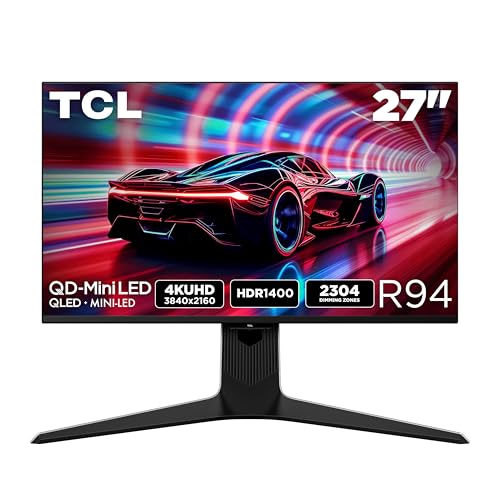
TCL 27" 4K 165Hz QD-Mini LED
Best for: Competitive gaming with high contrast and brightness
- Screen Size
- 27"
- Resolution
- 3840x2160
- Refresh Rate
- 165Hz
- Panel Type
- QD-Mini LED, HVA
- Response Time
- 1ms (GTG)
- Sync Technology
- AMD FreeSync Premium, NVIDIA G-SYNC
View on Amazon: TCL 27" 4K 165Hz QD-Mini LED Affiliate link
The TCL 27 R94 is a 27-inch 4K gaming monitor using QD-Mini LED technology. It features a 165Hz refresh rate and 1ms response time for smooth motion. HDR1400 brightness and the Halo Control System deliver deep blacks and bright highlights. AMD FreeSync Premium and NVIDIA G-SYNC support ensure tear-free gameplay. This model suits players seeking high contrast and crisp visuals in a compact 27-inch form factor.
Pros
- QD-Mini LED panel with HVA technology for high contrast
- 165Hz native refresh rate for fluid motion
- HDR1400 brightness for vivid highlights
- 1ms (GTG) response time for fast gameplay
- Halo Control System reduces backlight bleed
Cons
- 27-inch screen may feel small for 4K resolution
- No mention of USB-C connectivity
- Dimensions are bulky at 11.5 inches depth
Good fit if
- You want high contrast and bright HDR visuals
- You play fast-paced games needing 165Hz refresh
- You prefer a compact 27-inch display
Skip if
- You need a larger than 27-inch screen
- You require USB-C connectivity for single-cable setup
- You prioritize ultra-thin bezels or minimal depth
Verdict: TCL 27 R94 QD-Mini LED Monitor delivers sharp 4K visuals and high contrast for competitive gamers who value brightness and motion clarity on a 27-inch screen.

TCL 27-inch C2A QD-Mini LED 4K
Best for: 4K gaming with high refresh rates
- Screen Size
- 27"
- Resolution
- 3840x2160
- Refresh Rate
- 160Hz, 320Hz
- Response Time
- 1ms
- Sync Technology
- AMD FreeSync Premium
- Dimensions
- 8.98 × 24.2 × 20.6 inches
View on Amazon: TCL 27-inch C2A QD-Mini LED 4K Affiliate link
This 27-inch monitor delivers 4K UHD resolution with QD-Mini LED backlighting. It features a 160Hz refresh rate at 4K and a 320Hz mode at FHD. The panel supports HDR1000 brightness and AMD FreeSync Premium. You get precise dimming for better contrast. It is a strong option for gamers who want high detail and speed on a compact screen.
Pros
- 4K UHD (3840x2160) resolution for crisp visuals
- Dual mode: 160Hz at UHD or 320Hz at FHD
- HDR1000 brightness for vivid highlights
- Halo Control System reduces light bleed
Cons
- 27-inch screen may feel small for 4K immersion
- No mention of USB-C connectivity
- No mention of built-in speakers
Good fit if
- You want high refresh rates at 4K resolution
- You prefer a compact 27-inch desk setup
- You need HDR1000 brightness for bright rooms
Skip if
- You need a larger 32-inch display
- You require USB-C power delivery
- You want native 240Hz at 4K resolution
Verdict: TCL 27 C2A QD-Mini 4K 160Hz offers high resolution and speed for gamers who value detail and fast motion on a 27-inch screen.
Specifications side by side
| Spec | TCL 27" 4K 165Hz QD-Mini LED | TCL 27-inch C2A QD-Mini LED 4K |
|---|---|---|
| Screen Size | 27" | 27" |
| Resolution | 3840x2160 | 3840x2160 |
| Refresh Rate | 165Hz | 160Hz, 320Hz |
| Panel Type | QD-Mini LED, HVA | not stated |
| Response Time | 1ms (GTG) | 1ms |
| Sync Technology | AMD FreeSync Premium, NVIDIA G-SYNC | AMD FreeSync Premium |
| Dimensions | 11.5 × 25.2 × 20.6 inches | 8.98 × 24.2 × 20.6 inches |
| Color | Black and White | White |
| Model | 27R94 | 27C2A |
Frequently asked questions
Does the TCL 27 R94 support G-SYNC?
Yes, the TCL 27 R94 Series supports both FreeSync and G-SYNC technologies. This dual compatibility ensures smooth frame delivery across different GPU brands. You can use it with NVIDIA or AMD graphics cards without input lag issues. The C2A model only lists FreeSync support.
Which TCL monitor is better for competitive gaming?
The TCL 27 R94 Series is better for competitive gaming due to its higher brightness and contrast. It delivers sharp 4K visuals with high motion clarity. The C2A Series is also fast but is optimized for 4K gaming with high refresh rates rather than extreme contrast performance.
What is the difference in refresh rates between the two models?
The TCL 27 R94 Series runs at a native 165Hz refresh rate. The TCL 27 C2A Series operates at 160Hz. Both speeds are high enough for smooth gameplay, but the R94 offers a slight edge in native frame rate stability for fast-paced titles.
Can I switch to 1080p mode on these monitors?
The TCL 27 C2A Series features a Dual Mode feature. This allows you to switch from 4K at 160Hz to 1080p at 320Hz. The provided data does not mention this specific switching capability for the 27 R94 Series, so check its manual for similar options.
How wide are the TCL 27 inch monitors?
The TCL 27 R94 Series measures 25.2 inches in width. The TCL 27 C2A Series is slightly narrower at 24.2 inches wide. Both models have a similar height of 20.6 inches. The R94 is also deeper, measuring 11.5 inches compared to the C2A's 8.98 inches.
Which model has a white color option?
The TCL 27 C2A Series is available in white. The TCL 27 R94 Series is listed in black and white. If you prefer a white aesthetic, the C2A is a dedicated white option. Both models use QD-Mini LED technology for color accuracy and brightness.