ViewSonic 32-Inch 1080p IPS Monitor Review: Specs, Pros and Cons
As an Amazon Associate we earn from qualifying purchases. Links on this page are affiliate links.
This viewsonic va3209m 32 inch 1080p review focuses on a display that prioritizes size and color consistency over pixel density. It is a 32-inch monitor with a 1920 x 1080 resolution. The IPS panel ensures wide viewing angles and stable colors. You get a 75Hz refresh rate for smoother motion. This setup fits well in home offices or study spaces where screen real estate matters more than sharpness. The combination of a large screen and Full HD resolution creates a specific visual experience. It is designed for general use rather than high-end gaming or professional color work. The specs define its role as a versatile, large-format display for everyday tasks.
What stands out
- 32-inch IPS panel with 1920 x 1080 resolution for wide viewing angles.
- 75Hz refresh rate with VESA Adaptive Sync for smoother visuals.
- Flicker-Free technology and Blue Light Filter to reduce eye strain.
- HDMI and VGA inputs for broad device compatibility.
Who it fits
Good fit for
This monitor suits students, remote workers, and casual users who want a large screen for multitasking or media consumption. The 32-inch size makes text and spreadsheets easier to read from a distance. The IPS panel ensures colors remain consistent even if you view the screen from the side. The 75Hz refresh rate and Adaptive Sync help with casual gaming and video playback. If you prioritize screen size and color accuracy over pixel density, this display meets your needs. It works well with older PCs via VGA or modern laptops via HDMI.
Who should skip it
You should look elsewhere if you need sharp text or high pixel density. The 1080p resolution on a 32-inch screen results in visible pixelation for close-up work. Graphic designers and photo editors should avoid this model due to the lack of color accuracy data and lower resolution. Competitive gamers will find the 75Hz refresh rate limiting compared to higher-end options. If you require a 4K display for detailed work or a curved screen for immersion, this flat, Full HD panel is not the right choice. The VGA port is outdated for modern high-bandwidth setups.
Verdict: The ViewSonic VA3209M offers a large, comfortable viewing experience for general tasks, though its low pixel density limits its appeal for detail-oriented work.
Key specs explained
32" Screen Size
This large diagonal measurement gives you a spacious canvas for multitasking. While it fills your desk, it also lowers pixel density compared to smaller displays. You get more screen real estate for documents or media, but the image may appear less sharp than on a 27-inch 1440p model. This size suits users who prioritize workspace area over extreme pixel clarity.
1920 x 1080 Resolution
Known as Full HD, this resolution defines the total number of pixels on the screen. On a 32-inch panel, this results in a lower pixel density than smaller monitors. Text and images will not be as crisp as on higher-resolution displays. It is suitable for general office work and media consumption where extreme detail is not the primary requirement.
IPS Panel Type
In-Plane Switching technology provides wide viewing angles and consistent color reproduction. You can view the screen from the side without significant color shift or contrast loss. This makes it ideal for collaborative work or casual media viewing where you or others might not sit directly in front of the display. It offers better color accuracy than standard TN panels.
75Hz Refresh Rate
This setting determines how many times per second the screen updates the image. A 75Hz rate is smoother than the standard 60Hz found on many office monitors. It reduces motion blur in everyday tasks and casual gaming. While not as fast as high-end gaming displays, it provides a noticeable improvement in fluidity for scrolling and general desktop interaction.
HDMI, VGA Connectivity
These ports allow you to connect various devices to the monitor. HDMI is the standard for modern laptops and PCs, while VGA supports older hardware. This combination ensures broad compatibility with both new and legacy systems. You can easily switch between different computers or devices without needing additional adapters for most common setups.
Physical Design and Build Quality
According to the listing, the ViewSonic VA3209M features a black finish that complements most desk setups. The monitor measures 28.1 inches in width and 20.5 inches in height. Its depth is 9.1 inches, and it weighs 16.1 pounds. These dimensions indicate a substantial footprint. You will need adequate desk space to accommodate this 32-inch display comfortably. The weight suggests a sturdy base, though the listing does not specify the stand’s stability details.
The design prioritizes functional connectivity over elaborate aesthetics. It includes HDMI and VGA ports. This combination allows you to connect modern laptops and older PCs without adapters. The inclusion of VGA is practical for legacy hardware in office environments. The black casing likely helps reduce glare reflections, enhancing focus during long work sessions.
Controls and adjustments are not detailed in the provided specifications. You should check the physical unit for button layout if tilt or height adjustment is important to your workflow. The listing highlights ViewMode presets for software optimization rather than hardware ergonomics. This model suits users who value screen real estate and color consistency over premium build materials or extensive adjustability. It is a practical choice for fixed-position setups where space is available and connectivity needs are varied.
Setup and Daily Use Guide
Connecting the ViewSonic VA3209M is straightforward thanks to its versatile input options. You can link your setup using either the HDMI or VGA ports. This dual connectivity ensures compatibility with modern laptops, PCs, and Macs, as well as older legacy devices. The monitor’s black finish blends easily into most desk environments. Its physical footprint measures 28.1 inches wide and 20.5 inches high, requiring adequate desk space for this 32-inch display. The unit weighs 16.1 pounds, so you should ensure your stand or mount can support this mass securely. Once powered on, you can tailor the visual experience using the exclusive ViewMode presets. These include Game, Movie, Web, Text, and Mono modes. Each preset adjusts the gamma curve, contrast, and brightness to suit specific tasks. For example, the Text mode optimizes clarity for documents, while the Movie mode enhances media playback. The IPS panel provides consistent colors and wide viewing angles, making it easy to share content with others nearby. During extended work or study sessions, the integrated Flicker-Free technology and Blue Light Filter help reduce eye strain. The 75Hz refresh rate, supported by VESA Adaptive Sync, delivers fluid visuals for casual gaming and multimedia. This combination of features ensures a seamless experience without excessive screen tearing. You can switch between modes quickly to match your current activity, whether you are coding, watching videos, or browsing the web. The monitor prioritizes comfort and adaptability for everyday professional and home use.
Before you buy this monitor
This 32-inch 1080p display is a solid choice for general office work and casual media consumption. The IPS panel offers consistent colors, making it suitable for tasks where color accuracy matters slightly more than in TN panels. However, the 1920 x 1080 resolution on a 32-inch screen means lower pixel density. You may notice pixelation if you sit close to the monitor. The 75Hz refresh rate with VESA Adaptive Sync is adequate for non-competitive gaming and smooth scrolling. Since it lacks USB-C, you will need a separate cable for power delivery if your laptop relies on it. The HDMI and VGA ports ensure compatibility with most desktops and older PCs. Keep the screen clean with a microfiber cloth. This model fits well in guides focused on budget-friendly large screens, though it does not compete with high-refresh ultrawides for gaming performance. It is best for users prioritizing screen real estate over sharpness.
Check before you buy
- Check if your desk fits the 28.1-inch width.
- Verify you have HDMI or VGA cables ready.
- Accept lower pixel density on the 32-inch screen.
- Confirm 75Hz refresh rate meets your gaming needs.
The product at a glance
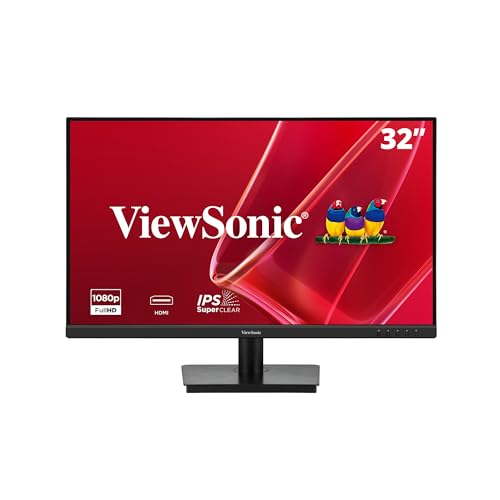
ViewSonic 32-Inch 1080p IPS Monitor
Best for: Large screen home office setups
- Screen Size
- 32"
- Resolution
- 1920 x 1080
- Refresh Rate
- 75Hz
- Panel Type
- IPS
- Sync Technology
- VESA Adaptive Sync
- Connectivity
- HDMI, VGA
View on Amazon: ViewSonic 32-Inch 1080p IPS Monitor Affiliate link
The ViewSonic VA3209M is a 32-inch monitor with a 1920 x 1080 IPS panel. It offers a 75Hz refresh rate with VESA Adaptive Sync for smoother visuals. The display includes Flicker-Free technology and a Blue Light Filter to reduce eye strain. You get HDMI and VGA connectivity for versatile setup options. This monitor suits users who need a large screen for home offices or casual gaming.
Pros
- 32-inch IPS panel provides wide viewing angles and consistent colors
- 75Hz refresh rate with VESA Adaptive Sync reduces screen tearing
- Flicker-Free technology and Blue Light Filter minimize eye fatigue
- Multiple ViewMode presets optimize settings for different tasks
Cons
- 1080p resolution on a 32-inch screen results in lower pixel density
- Only includes HDMI and VGA inputs, lacking USB-C or DisplayPort
- No mention of built-in speakers in the provided specifications
Good fit if
- You need a large screen for productivity or media consumption
- You prioritize wide viewing angles and color consistency
- You want eye-care features for long work sessions
Skip if
- You require high-resolution text clarity for detailed work
- You need modern connectivity like USB-C or DisplayPort
- You are looking for a high refresh rate for competitive gaming
Verdict: ViewSonic 32-Inch 1080p IPS Monitor is a solid choice for those who value screen size and viewing angles over pixel density. It fits users who want a comfortable display for general tasks and casual media use.
Specifications side by side
| Spec | ViewSonic 32-Inch 1080p IPS Monitor |
|---|---|
| Screen Size | 32" |
| Resolution | 1920 x 1080 |
| Refresh Rate | 75Hz |
| Panel Type | IPS |
| Sync Technology | VESA Adaptive Sync |
| Connectivity | HDMI, VGA |
| Size | 32 Inch |
| Dimensions | 9.1 × 28.1 × 20.5 inches |
| Weight | 16.1 pounds |
| Color | Black |
| Model | VA3209M |
Frequently asked questions
Is the ViewSonic VA3209M good for office work?
Yes, it is well-suited for general office tasks. The 32-inch screen provides ample space for multitasking with multiple windows. The IPS panel ensures stable colors and wide viewing angles, which helps during video calls. You get a comfortable display for documents and casual media use without straining your eyes.
What resolution does this 32-inch monitor have?
It has a 1080p resolution, which is 1920 x 1080 pixels. This is standard for Full HD displays. On a 32-inch screen, this results in lower pixel density than smaller monitors. The image remains clear for general use, though you may notice pixelation if you sit very close to the screen.
Does the ViewSonic VA3209M support VGA connections?
Yes, it supports both HDMI and VGA inputs. This dual connectivity allows you to connect modern laptops and older legacy devices. You can easily switch between sources depending on your computer setup. It ensures compatibility with a wide range of hardware without needing additional adapters for older systems.
How heavy is the ViewSonic VA3209M monitor?
The monitor weighs 16.1 pounds. It measures 28.1 inches in width and 20.5 inches in height. The depth is 9.1 inches. These dimensions make it a substantial piece of equipment for your desk. You should ensure your monitor arm or stand can support this weight comfortably.
Is the panel type IPS on this monitor?
Yes, it uses an IPS panel. This technology provides wide viewing angles and consistent color reproduction. You can view the screen from the side without significant color shift or contrast loss. This makes it ideal for collaborative work or shared viewing spaces where multiple people might look at the display.
Can I use this monitor for casual gaming?
It is suitable for casual gaming and general media use. The 32-inch size offers an immersive experience for slower-paced games. While the 75Hz refresh rate is not designed for competitive esports, it provides smooth motion for most everyday tasks. You get a solid display for relaxing with movies or light gaming sessions.