ViewSonic 34-Inch Curved 120Hz VA Review: Specs, Pros and Cons
As an Amazon Associate we earn from qualifying purchases. Links on this page are affiliate links.
This viewsonic vg3409c 34 inch 1440p review covers a curved ultrawide monitor designed for productivity and casual gaming. It features a 34-inch VA panel with a 1440p resolution, offering a 21:9 aspect ratio that provides more horizontal screen space than standard displays. The 120Hz refresh rate and 1ms MPRT response time aim to deliver smooth visuals. With a 1500R curvature, the screen wraps around your field of vision. This setup simplifies desk management through robust connectivity options. You get a single-cable solution for data, video, and power delivery.
What stands out
- 34-inch UWQHD (3440 x 1440p) VA panel with 1500R curvature
- 120Hz refresh rate and 1 ms (MPRT) response time
- 96W USB-C connectivity for video, data, and charging
- Fully adjustable stand with tilt, swivel, and 130 mm height adjustment
- Integrated USB hub with three Type-A ports plus HDMI 2.0 and DisplayPort
Who it fits
Good fit for
This monitor suits home office workers and content creators who need extra screen real estate for multitasking. The 21:9 aspect ratio helps you view multiple windows side by side. Gamers who prefer immersive experiences will appreciate the 1500R curve and 120Hz refresh rate. The 96W USB-C port is ideal for laptop users who want to connect peripherals and charge their device with a single cable. The ergonomic stand supports long work sessions by allowing height and tilt adjustments to reduce neck strain.
Who should skip it
You should look elsewhere if you require a high refresh rate for competitive esports. The 120Hz cap is lower than the 144Hz or 240Hz options available in many gaming monitors. If you need a flat screen for precise alignment in design work, the 1500R curve may be distracting. Users who do not have a USB-C laptop will find the high-power charging feature less useful, though the monitor still supports standard HDMI and DisplayPort connections. Those needing 4K resolution will find the 1440p UWQHD spec insufficient for sharp text at this size.
Verdict: The ViewSonic VG3409C offers a practical ultrawide experience with strong connectivity and ergonomic features. It is a solid choice for productivity-focused users and casual gamers.
Key Specs Explained
Resolution: 3440 x 1440p
This UWQHD resolution provides more horizontal pixels than standard 1080p displays. You gain extra screen real estate for multitasking without the density drop of 4K on a large panel. It balances sharpness and performance, making text readable and images clear for both work documents and gaming.
Aspect Ratio: 21:9
This ultrawide format offers a cinematic field of view. You see more of the game world or spreadsheet columns without switching windows. It replaces the need for dual monitors in many setups, reducing neck movement and cable clutter while keeping your workflow contained on one seamless screen.
Refresh Rate: 120Hz
A 120Hz rate updates the image 120 times per second. This ensures smoother motion during scrolling or gaming compared to standard 60Hz panels. You experience less tearing and stuttering, which is helpful for fast-paced titles or just navigating through long lists of data with greater fluidity.
Response Time: 1 ms (MPRT)
The 1 ms MPRT rating indicates how quickly pixels change color. This reduces motion blur in fast-moving scenes. You get crisper visuals during action sequences or rapid mouse movements, ensuring that speed is not compromised by ghosting artifacts that can obscure details in dynamic content.
Connectivity: USB-C, HDMI 2.0, DisplayPort
USB-C allows single-cable connection for video, data, and 96W power delivery. HDMI 2.0 and DisplayPort offer versatile input options for desktops or consoles. You simplify your desk setup by charging your laptop while using the monitor, reducing cable clutter and maintaining a clean, organized workspace environment.
Design and Build Overview
The ViewSonic VG3409C features a black finish and a 1500R curved VA panel. This curvature wraps around your field of vision, enhancing immersion for both work and gaming. The monitor measures 31.8 inches wide, 16.9 inches high, and 11 inches deep according to the listing. It weighs 18.5 pounds, indicating a sturdy base that requires a spacious desk surface. The substantial footprint supports the 34-inch screen size without excessive wobble during adjustments.
Ergonomics are handled by a fully adjustable stand. You can tilt, swivel, and raise the display up to 130 mm. This range allows you to find a comfortable viewing angle, reducing neck strain during long sessions. The layout prioritizes cable management through its connectivity options. A single USB-C cable transmits data, video, and 96W of power to your laptop. This simplifies your workspace by eliminating the need for a separate power adapter.
Connectivity includes three USB Type-A ports, HDMI 2.0, and DisplayPort inputs. These ports create a versatile hub for your peripherals. You can switch between devices seamlessly without unplugging cables. The design focuses on practical utility rather than flashy aesthetics. The matte black casing blends into most office environments. The build quality supports daily use, with the adjustable stand ensuring proper posture. This makes it suitable for users who value screen real estate and flexible positioning over compact form factors.
Setup And Everyday Use Guide
Setting up the ViewSonic VG3409C is straightforward thanks to its fully adjustable stand. You can tilt, swivel, and raise the screen by 130 mm. This range allows you to position the display at a comfortable height for long work sessions. The ergonomic adjustments help reduce neck strain during extended use. Connectivity is simplified by the USB-C port. It transmits video and data while delivering 96W of power to your laptop. You can connect your computer with a single cable, keeping your desk free of extra adapters. The monitor also includes HDMI 2.0 and DisplayPort inputs for desktops or other devices. An integrated USB hub with three Type-A ports lets you connect peripherals directly. This setup supports seamless switching between multiple devices. Daily use benefits from the 120Hz refresh rate and 1 ms MPRT response time. These specs ensure smooth visuals when scrolling through documents or editing multimedia. The 34-inch UWQHD screen provides ample horizontal space for multitasking. The 21:9 aspect ratio offers a cinematic view for work and gaming. The 1500R curvature wraps around your field of vision, enhancing immersion. You get a clear, fluid experience without blur. The VA panel delivers solid contrast for various tasks. Overall, the monitor supports a productive and efficient workflow for home office or gaming setups.
Before You Buy This Monitor
You should verify your laptop supports USB-C video output to use the single-cable solution. The 96W power delivery works for many devices, but check your specific charger requirements. Ensure your desk has enough depth for the 11-inch depth and 31.8-inch width. The 1500R curve suits most setups, but measure your viewing distance. This model fits well if you want a balance of productivity and casual gaming. It differs from higher refresh rate options by prioritizing screen real estate and connectivity over extreme speed. Keep the panel clean with a microfiber cloth. Avoid harsh chemicals. The adjustable stand helps reduce neck strain, but ensure your desk can support the 18.5-pound weight. This monitor is ideal for users who value a large, curved workspace without the need for top-tier competitive gaming specs. It complements other ultrawide options by offering a complete hub in one package.
Check before you buy
- Check if your laptop supports USB-C video and charging.
- Measure your desk depth for the 11-inch footprint.
- Confirm your workspace fits the 31.8-inch width.
- Verify 96W power delivery matches your device needs.
The product at a glance
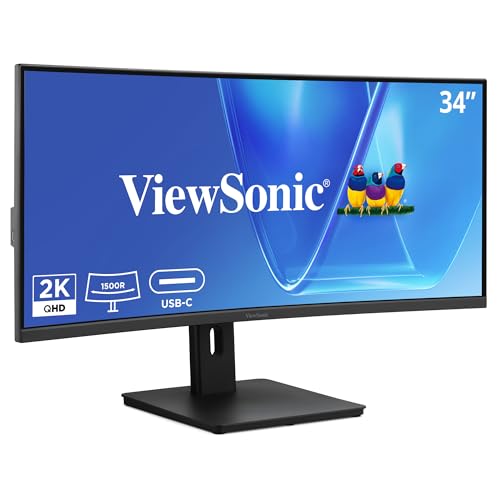
ViewSonic 34-Inch Curved 120Hz VA Ultrawide
Best for: Home office users needing ergonomic height adjustment
- Screen Size
- 34"
- Resolution
- 3440 x 1440
- Refresh Rate
- 120Hz
- Aspect Ratio
- 21:9
- Response Time
- 3.5ms
- Connectivity
- USB-C, RJ45, HDMI 2.1, DisplayPort
View on Amazon: ViewSonic 34-Inch Curved 120Hz VA Ultrawide Affiliate link
This ViewSonic monitor gives you a 34-inch curved VA panel with 3440 x 1440p resolution. It runs at 120Hz with a 1ms MPRT response time for smooth visuals. The 1500R curve wraps around your view. A 96W USB-C port charges your laptop while sending video. The stand tilts, swivels, and lifts 130mm for better posture during long work sessions.
Pros
- 3440 x 1440p UWQHD resolution on a 21:9 screen
- 96W USB-C power delivery and data transfer
- 120Hz refresh rate with 1ms MPRT response
- 1500R curved VA panel for immersion
- Height adjustable stand with tilt and swivel
Cons
- HDMI 2.0 limits bandwidth compared to newer standards
- 18.5 pounds weight requires sturdy desk support
- 1ms response time is MPRT, not GTG
Good fit if
- You want a single cable for video and charging
- You need height adjustment for ergonomic comfort
- You prefer a curved screen for immersion
Skip if
- You need HDMI 2.1 for 4K at high refresh rates
- You require a flat screen design
- You prefer IPS panel technology
Verdict: ViewSonic 34" 120Hz VA Ultrawide offers a solid 1440p ultrawide experience with convenient USB-C charging. It suits home office users who value ergonomic adjustments and immersive curved displays.
Specifications side by side
| Spec | ViewSonic 34-Inch Curved 120Hz VA Ultrawide |
|---|---|
| Screen Size | 34" |
| Resolution | 3440 x 1440 |
| Refresh Rate | 120Hz |
| Aspect Ratio | 21:9 |
| Response Time | 3.5ms |
| Connectivity | USB-C, RJ45, HDMI 2.1, DisplayPort |
| Panel Type | VA |
| Dimensions | 11 × 31.8 × 16.9 inches |
| Weight | 18.5 pounds |
| Size | 14.3" x 31.8" x 4.7" |
| Color | Black |
| Model | VS20781 |
Frequently asked questions
Is the ViewSonic VG3409C good for gaming?
Yes, it offers a solid experience for casual gaming. The 120Hz refresh rate provides smoother motion than standard 60Hz displays. The 1440p resolution ensures clear visuals. While it uses a VA panel, which is suitable for most genres, it lacks the extreme speed of high-end esports monitors. It balances performance and immersion well.
Does this monitor support USB-C connectivity?
Yes, the ViewSonic VG3409C includes USB-C connectivity. This allows you to connect a single cable to compatible laptops. It delivers video output and provides up to 96W of power delivery. This simplifies your desk setup by reducing cable clutter. You just need to verify your laptop supports USB-C video output to use this feature fully.
What is the screen resolution of this ultrawide?
The screen resolution is 1440p, specifically 3440 x 1440 pixels. This UWQHD resolution offers more horizontal pixels than standard 1080p displays. It provides extra screen real estate for multitasking. The pixel density is balanced, making text readable without the performance drop often seen with 4K on large panels. It fits the 21:9 aspect ratio perfectly.
How adjustable is the stand on this monitor?
The stand is fully adjustable to suit your ergonomic needs. You can tilt, swivel, and raise the screen by 130 mm. This range allows you to position the display at a comfortable height for long work sessions. It is particularly useful for home office users who need to adjust their view for better posture and reduced neck strain.
What is the panel type and curvature?
It features a VA panel with a 1500R curvature. This curve wraps around your field of vision, enhancing immersion for both work and gaming. The VA technology typically offers good contrast ratios. The 1500R radius is moderate, providing a noticeable wrap without being overly aggressive. It creates a more engaging visual experience compared to flat displays.
What are the physical dimensions of the monitor?
The monitor measures 31.8 inches wide, 16.9 inches high, and 11 inches deep. It weighs 18.5 pounds. The black finish gives it a sleek look. Ensure your desk has enough depth for the 11-inch depth and 31.8-inch width. These dimensions make it a substantial ultrawide display that requires adequate space for optimal viewing distance.