ZZA vs KTC: Ultrawide Monitors Compared by Specs
As an Amazon Associate we earn from qualifying purchases. Links on this page are affiliate links.
When you compare the ZZA vs KTC ultrawide monitor options, you face a choice between two very different form factors. The ZZA model offers a 34-inch curved screen with WQHD resolution, designed for immersive productivity and cinematic gaming. In contrast, the KTC unit is a 24-inch Fast IPS display focused on speed and competitive play. Both provide essential connectivity and VESA mounting, but their target audiences diverge significantly based on size and refresh rate priorities.
Key differences
| Aspect | ZZA 34-Inch Curved Ultrawide Monitor | KTC 24-Inch Fast IPS 144Hz Gaming Monitor |
|---|---|---|
| Screen Size | 34 inches | 24 inches |
| Resolution | 3440 x 1440 (WQHD) | 1920 x 1080 (FHD) |
| Refresh Rate | 100Hz | 165Hz |
| Panel Type | Curved (3800R) | Fast IPS |
| Sync Technology | not listed | FreeSync Premium, G-Sync |
| Connectivity | HDMI, DisplayPort | 2x HDMI 2.0, 2x DP 1.4 |
Which one should you choose?
Choose ZZA 34-Inch Curved Ultrawide Monitor if
- You need a wider field of view for multitasking or immersive single-player games.
- You prefer a higher pixel count for sharper text and detailed visuals.
- You want built-in speakers for casual audio output.
Choose KTC 24-Inch Fast IPS 144Hz Gaming Monitor if
- You prioritize high refresh rates for competitive esports and fast motion.
- You require adaptive sync technologies like FreeSync Premium or G-Sync.
- You need more display ports for connecting multiple devices simultaneously.
Verdict: Choose the ZZA if you value screen real estate and resolution for productivity or cinematic experiences. Pick the KTC if your priority is rapid refresh rates and adaptive sync for competitive gaming. Your decision rests on whether you need width or speed.
ZZA vs KTC Monitor Specs
Screen Size and Resolution
The ZZA 34-inch ultrawide monitor provides a significantly larger canvas with a 3440x1440 WQHD resolution and a 21:9 aspect ratio. This format is ideal for immersive gaming and multitasking, offering expansive horizontal space. The KTC 24-inch monitor uses a standard 1920x1080 Full HD resolution on a 16:9 panel. While the KTC offers a compact footprint, the ZZA delivers superior pixel density and visual immersion for users who prioritize screen real estate and detailed imagery over portability.
Refresh Rate and Motion
For fast-paced gaming, the KTC monitor holds a clear advantage with a 165Hz refresh rate and 1ms MPRT response time. This specification ensures smoother motion and reduced ghosting, which is critical for competitive shooters. The ZZA monitor operates at a 100Hz refresh rate. While this provides fluid motion for most games, it falls short of the high-speed performance offered by the KTC. If you prioritize competitive responsiveness, the higher refresh rate on the KTC is the more suitable choice.
Panel Technology
The KTC utilizes a Fast IPS panel, which typically offers faster pixel response times and good color consistency compared to older technologies. The ZZA monitor description highlights a curved display with 3800R curvature but does not explicitly state the panel type, such as IPS or VA. However, it does specify 100% sRGB color gamut coverage, indicating accurate color reproduction for content creation. Without explicit panel type data for the ZZA, the KTC's Fast IPS specification provides a known advantage in speed and viewing angles.
Connectivity Options
Connectivity differs notably between the two units. The KTC monitor offers four ports in total: two HDMI 2.0 inputs and two DisplayPort 1.4 inputs. This abundance of connections allows you to link multiple devices, such as a PC and a console, simultaneously. The ZZA monitor lists HDMI and DisplayPort inputs but does not specify the quantity of each port. The KTC provides more flexible connection options for users with multiple source devices.
Sync Technology Compatibility
The KTC monitor supports both FreeSync Premium and G-Sync compatible technologies. This dual support ensures smooth gameplay without screen tearing across both AMD and NVIDIA graphics cards. The ZZA monitor data does not mention any adaptive sync technology like FreeSync or G-Sync. For gamers using variable refresh rate features to maintain consistent frame pacing, the KTC offers explicit compatibility that the ZZA lacks in the provided specifications.
Which monitor suits your needs
Ultrawide fans wanting immersion
You need the 34-inch WQHD canvas for expansive multitasking and cinematic gaming. The 3800R curvature wraps around your field of view, enhancing focus. The 100Hz refresh rate provides smooth motion, while the 100% sRGB coverage ensures accurate colors for creative work or media consumption.
Competitive gamers seeking speed
You prioritize reaction time and fluid motion in fast-paced titles. This 24-inch monitor delivers a 165Hz refresh rate and 1ms MPRT response time to eliminate ghosting. It supports both FreeSync Premium and G-Sync for tear-free gameplay, giving you a competitive edge in esports.
Users wanting versatile connectivity
You need multiple input options for various devices. This model includes two HDMI 2.0 and two DisplayPort 1.4 ports, allowing you to connect a PC and console simultaneously. The borderless design also facilitates easy multi-monitor setups with a wider 178-degree viewing angle.
The products compared

ZZA 34-Inch Curved Ultrawide Monitor
Best for: immersive productivity and casual gaming
- Screen Size
- 34"
- Resolution
- 3440 x 1440
- Refresh Rate
- 100Hz
- Aspect Ratio
- 21:9
- Connectivity
- HDMI, DisplayPort
- Dimensions
- 8 × 31.5 × 17 inches
View on Amazon: ZZA 34-Inch Curved Ultrawide Monitor Affiliate link
The ZZA 34-inch ultrawide monitor features a 3800R curve and WQHD resolution for an expansive viewing area. It offers a 100Hz refresh rate and 100% sRGB color coverage, making it suitable for mixed gaming and productivity tasks. Built-in speakers and VESA mount compatibility add convenience. This display prioritizes immersive visuals and color accuracy over high-speed competitive performance.
Pros
- 34-inch WQHD (3440x1440) ultrawide resolution
- 100% sRGB color gamut coverage
- Built-in integrated speakers
- 3800R curved screen design
Cons
- 100Hz refresh rate limits high-speed gaming
- No mention of HDR support or local dimming
- No DisplayPort version or HDMI version specified
Good fit if
- You want an immersive ultrawide experience for productivity
- You prioritize color accuracy for content creation
- You prefer built-in audio to save desk space
Skip if
- You need 144Hz or higher for competitive gaming
- You require HDR certification for media consumption
- You need 4K resolution for sharp text
Verdict: ZZA 34-inch Curved Ultrawide Monitor suits users who value immersive visuals and color accuracy over high refresh rates. It is a practical choice for mixed gaming and productivity workflows.
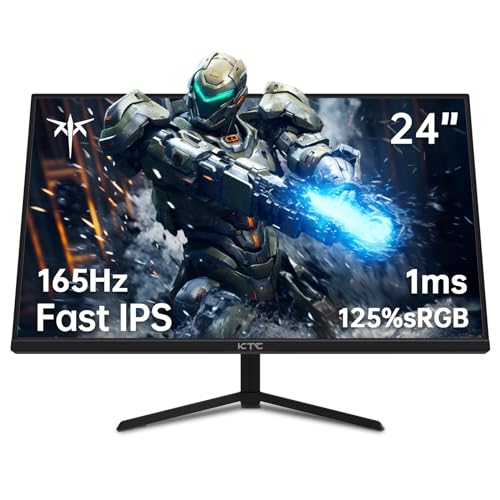
KTC 24-Inch Fast IPS 144Hz Gaming Monitor
Best for: compact competitive gaming setups
- Screen Size
- 24.1 Inch
- Resolution
- 1080p
- Refresh Rate
- 165Hz
- Panel Type
- Fast IPS
- Response Time
- 1ms MPRT
- Sync Technology
- FreeSync Premium & G-Sync
View on Amazon: KTC 24-Inch Fast IPS 144Hz Gaming Monitor Affiliate link
The KTC 24-inch monitor uses a Fast IPS panel for 1080p resolution and 165Hz refresh rate. It includes 1ms MPRT response time and FreeSync Premium with G-Sync compatibility. The three-sided borderless design offers a 178-degree viewing angle. You get flicker-free and low blue light features for eye care. This setup suits gamers needing smooth motion on a compact desktop.
Pros
- Fast IPS panel with 165Hz refresh rate
- 1ms MPRT response time for reduced ghosting
- Supports FreeSync Premium and G-Sync
- Three-sided borderless design for wider viewing angles
- Flicker-free and low blue light technology
Cons
- 1080p resolution on a 24-inch screen limits pixel density
- Only HDMI 2.0 and DP 1.4 ports available
- No mention of built-in speakers or USB hub
Good fit if
- You want a high refresh rate for competitive gaming
- You need a compact monitor for limited desk space
- You prefer a borderless design for multi-monitor setups
Skip if
- You require 4K resolution for detailed work
- You need built-in speakers for audio
- You want a larger screen size for immersion
Verdict: KTC 24 Inch Fast IPS 165Hz Monitor delivers smooth performance for competitive gamers who prioritize speed over resolution. It fits users who need a compact, borderless display for tight desk spaces.
Specifications side by side
| Spec | ZZA 34-Inch Curved Ultrawide Monitor | KTC 24-Inch Fast IPS 144Hz Gaming Monitor |
|---|---|---|
| Screen Size | 34" | 24.1 Inch |
| Resolution | 3440 x 1440 | 1080p |
| Refresh Rate | 100Hz | 165Hz |
| Panel Type | not stated | Fast IPS |
| Aspect Ratio | 21:9 | not stated |
| Response Time | not stated | 1ms MPRT |
| Sync Technology | not stated | FreeSync Premium & G-Sync |
| Connectivity | HDMI, DisplayPort | HDMI 2.0, DP 1.4 |
| Dimensions | 8 × 31.5 × 17 inches | 4.53 × 24.4 × 18.7 inches |
| Weight | 15 pounds | 6.17 pounds |
| Size | 34 inch-1 | 24.1 Inch |
| Color | black | Black |
| Model | Z34A | H24T09P |
Frequently asked questions
Is the ZZA monitor suitable for competitive gaming?
The ZZA 34-inch model is not optimized for high-speed competitive play. It features a 100Hz refresh rate and 1440p resolution, prioritizing color accuracy and immersion over speed. This makes it better for casual gaming and productivity tasks rather than fast-paced esports where higher frame rates are essential.
Does the KTC monitor support ultrawide resolutions?
No, the KTC 24-inch Fast IPS monitor does not offer an ultrawide aspect ratio. It provides a standard 16:10 format with 1080p resolution. This design focuses on compactness and speed for tight desk spaces, differing significantly from the 21:9 aspect ratio found in dedicated ultrawide displays.
What connectivity ports are available on the ZZA display?
The ZZA 34-inch Curved Ultrawide Monitor includes DisplayPort and HDMI connectivity options. These standard interfaces allow you to connect various devices, including PCs and consoles, ensuring compatibility with most modern setups without requiring additional adapters or specialized cables.
How heavy is the KTC 24-inch monitor?
The KTC 24-inch Fast IPS Gaming Monitor weighs 6.17 pounds. This lightweight design contributes to its suitability for compact setups, making it easier to mount or position on smaller desks compared to larger, heavier ultrawide alternatives that typically exceed fifteen pounds.
Does the KTC monitor support adaptive sync technologies?
Yes, the KTC 24-inch monitor supports both FreeSync and G-SYNC technologies. This compatibility helps reduce screen tearing and stuttering during gameplay, providing a smoother visual experience for users who prioritize responsive performance in competitive gaming environments over high-resolution output.
What is the primary use case for the ZZA monitor?
The ZZA 34-inch monitor is best for immersive productivity and casual gaming. Its 34-inch curved screen and 1440p resolution offer expansive horizontal space for multitasking. The 100Hz refresh rate ensures smooth motion for non-competitive titles, making it a practical choice for mixed workflows.
Is the KTC monitor a good fit for multitasking?
The KTC 24-inch monitor is less ideal for heavy multitasking due to its smaller 24-inch size and 1080p resolution. It is designed for users who need a compact, borderless display for tight desk spaces. If you require significant screen real estate for multiple windows, an ultrawide option would be more suitable.