Best LG 165Hz Ultrawide Monitors in 2026: 7 Picks
As an Amazon Associate we earn from qualifying purchases. Links on this page are affiliate links.
Finding the best LG 165Hz ultrawide monitors requires looking at specific display metrics. We compared 7 options based on the specifications published on the listings. The LG 45-Inch 5K2K Curved OLED Gaming Monitor leads this group. It offers a 5120 x 2160 resolution that supports high-resolution ultrawide gaming and productive multitasking. This guide helps you decide which screen size and panel type fits your desk space and visual needs.
Quick picks
The best fit for you
- You want the best overall ultrawide experience LG 45-Inch 5K2K Curved OLED Gaming Monitor The 45-inch OLED panel offers 5120 x 2160 resolution for sharp visuals.
- You need dual-mode 4K and high refresh rates LG 39-inch UltraGear 5K2K Curved OLED This 39-inch model switches between 5K2K at 165Hz and 330Hz at Wide Full HD.
- You prefer a standard 16:9 1440p screen LG 27-Inch QHD Nano IPS Gaming Monitor The 27-inch Nano IPS panel delivers 1440p resolution with 165Hz refresh speed.
- You want a compact 32-inch 4K option LG 32-Inch 4K Dual-Mode OLED Gaming Monitor This 32-inch OLED monitor provides 4K UHD clarity with 165Hz refresh rate.
- You seek a budget-friendly large curved display LG UltraGear 37-Inch 165Hz Curved 4K Monitor The 37-inch curved panel offers 4K UHD resolution and 165Hz refresh speed.
Our 7 picks

LG 45-Inch 5K2K Curved OLED Gaming Monitor
Best for: high-resolution ultrawide gaming and productive multitasking
- Refresh Rate
- 165Hz (what this guide is about)
- Screen Size
- 45"
- Resolution
- 5120 x 2160
- Panel Type
- OLED
- Aspect Ratio
- 21:9
- Response Time
- 0.03ms (GtG)
This 45-inch curved display pairs a 5120 x 2160 resolution with an OLED panel and a 165Hz native refresh rate. You also get a dual-mode feature that lets you toggle to Wide Full HD at 330Hz for faster gameplay. With DisplayPort 2.1, 90W USB-C power delivery, and a 0.03ms response time, it suits you if you want expansive desk coverage alongside sharp pixel density for both detailed work and high-frame gaming.
Pros
- 5120 x 2160 WUHD resolution with 125 PPI pixel density
- Dual-mode switching between 5K2K 165Hz and WFHD 330Hz
- 0.03ms GtG response time on an OLED panel
- DisplayPort 2.1, two HDMI 2.1 ports, and USB-C with 90W power delivery
Cons
- Heavy 30.9-pound total weight requires sturdy desk support
- Large 39-inch width and 13.5-inch depth demand significant desk space
Good fit if
- You want a high-resolution 5120 x 2160 OLED display for gaming and productivity.
- You need high refresh rate flexibility up to 330Hz via dual-mode switching.
- You plan to charge and connect a laptop using 90W USB-C power delivery.
Skip if
- You have a shallow or narrow desk that cannot fit a 39-inch wide stand.
- You prefer a flat screen instead of a curved ultrawide panel.
Verdict: LG 45-Inch 5K2K OLED Curved Gaming Monitor delivers expansive screen real estate with sharp 5120 x 2160 visuals and flexible refresh rates up to 330Hz. It stands as a capable centerpiece for setups that can handle its 39-inch footprint.

LG 32-Inch 4K Dual-Mode OLED Gaming Monitor
Best for: dual-resolution 4K and high-framerate gaming
- Refresh Rate
- 165Hz (what this guide is about)
- Screen Size
- 32"
- Resolution
- 3840 x 2160
- Panel Type
- OLED
- Response Time
- 0.03ms GTG
- Sync Technology
- G-SYNC Compatible, FreeSync Premium Pro
This 32-inch gaming display features a 4K UHD OLED panel with a dual-mode refresh setup, delivering 165Hz at native 3840 x 2160 or 330Hz at 1080p. It includes a 0.03ms response time, Micro Lens Array+ technology with 275 nits typical brightness, and G-SYNC and FreeSync compatibility. It suits you if you need ultra-fast pixel response and the flexibility to switch between sharp 4K visuals and high-framerate competitive speeds.
Pros
- Dual-mode support: 4K at 165Hz or Full HD at 330Hz
- 0.03ms GtG response time
- VESA DisplayHDR True Black 400 with 98.5% DCI-P3 coverage
- NVIDIA G-SYNC Compatible and AMD FreeSync Premium Pro
Cons
- Standard 16:9 aspect ratio rather than ultrawide
- 275 nits typical brightness
- No USB-C connectivity or internal speakers listed
Good fit if
- You switch between 4K visual titles and fast competitive shooters.
- You want an OLED panel with near-instant 0.03ms response times.
Skip if
- You specifically require a 21:9 ultrawide field of view.
- You need a monitor with single-cable USB-C power delivery.
Verdict: LG 32-Inch 4K OLED Gaming Monitor delivers versatile dual-refresh flexibility alongside deep OLED contrast and rapid 0.03ms pixel response. It is a capable choice for gamers who prioritize pixel speed and 4K clarity over an ultrawide form factor.

LG 39-inch UltraGear 5K2K Curved OLED
Best for: high-resolution ultrawide gaming and dual-mode flexibility
- Refresh Rate
- 165Hz (what this guide is about)
- Screen Size
- 39"
- Resolution
- 5120x2160
- Panel Type
- OLED
- Aspect Ratio
- 21:9
- Response Time
- 0.03ms (GtG)
This display is a 39-inch curved OLED monitor designed for high-resolution ultrawide gaming. It pairs a 5120x2160 5K2K resolution with a 165Hz refresh rate and a 0.03ms response time. The 21:9 panel features a 1500R curve and 143 PPI pixel density for sharp text and expansive visuals. It suits you if you want sharp pixel clarity and fast motion handling for immersive titles and high-framerate competitive gaming.
Pros
- 5120x2160 5K2K resolution at 143 PPI pixel density
- Dual-mode support for 5K2K 165Hz or WFHD 330Hz
- Fast 0.03ms GtG response time on an OLED panel
- G-SYNC Compatible and FreeSync Premium Pro support
Cons
- 335 nits typical brightness level
- Fixed 1500R curve may not suit flat display setups
- Weighs 23.6 pounds
Good fit if
- You want 5K2K resolution with high pixel density on an ultrawide OLED panel.
- You want the flexibility to switch between 165Hz detailed play and 330Hz competitive play.
- You need 0.03ms response times with adaptive sync support.
Skip if
- You prefer a flat monitor over a curved 1500R screen.
- You require higher typical SDR brightness than 335 nits.
Verdict: LG 39-Inch 5K2K Curved OLED Gaming Monitor pairs high-density 5120x2160 visuals with 165Hz motion for detailed ultrawide gaming. Its dual-mode functionality allows you to switch to 330Hz at Wide Full HD when you prioritize maximum frame rate.

LG UltraGear 37-Inch 165Hz Curved 4K Monitor
Best for: large-format 4K 165Hz curved desktop gaming
- Refresh Rate
- 165Hz (what this guide is about)
- Screen Size
- 37"
- Resolution
- 3840 x 2160
- Response Time
- 1ms GTG
- Sync Technology
- AMD FreeSync Premium Pro
- Connectivity
- HDMI 2.1, DP 1.4, USB Type-C, USB
View on Amazon: LG UltraGear 37-Inch 165Hz Curved 4K Monitor
This 37-inch curved display pairs a 3840 x 2160 4K UHD resolution with a 165Hz refresh rate and a 1ms response time. You get AMD FreeSync Premium Pro support alongside DisplayHDR 600 certification and 95 percent DCI-P3 color coverage. Connectivity options include HDMI 2.1, DisplayPort 1.4, and USB-C. It suits you if you want high-density 4K visuals, fast competitive motion, and versatile desktop connectivity.
Pros
- Native 3840 x 2160 4K UHD resolution at 165Hz
- 1ms GtG response time with AMD FreeSync Premium Pro
- VESA DisplayHDR 600 with up to 95% DCI-P3 coverage
- HDMI 2.1, DisplayPort 1.4, and USB-C video connectivity
Cons
- Heavy total weight of 30.3 pounds
- Deep 11.3-inch stand footprint requires substantial desk space
Good fit if
- You want sharp 4K UHD resolution with a fast 165Hz refresh rate.
- You need modern connectivity featuring HDMI 2.1, DisplayPort 1.4, and USB-C.
- You play fast titles requiring a 1ms response time and AMD FreeSync Premium Pro.
Skip if
- You have a shallow workspace unable to fit an 11.3-inch stand depth.
- You require a lightweight panel under 30 pounds for your monitor mount.
Verdict: LG 37-Inch 4K 165Hz Curved Gaming Monitor combines sharp 3840 x 2160 clarity with fluid 165Hz refresh rates. It delivers balanced motion handling and comprehensive video connectivity for desktop gaming.

LG 27-Inch QHD Nano IPS Gaming Monitor
Best for: competitive 1440p gaming on a compact screen
- Refresh Rate
- 165Hz (what this guide is about)
- Screen Size
- 27"
- Resolution
- 2560 x 1440
- Panel Type
- Nano IPS
- Aspect Ratio
- 16:9
- Response Time
- 1ms GTG
This display is a 27-inch gaming monitor with a 2560 x 1440 QHD resolution and a 165Hz refresh rate. It uses a Nano IPS panel that delivers a 1ms response time along with G-SYNC compatibility and FreeSync Premium support. It suits you if you want high-speed 1440p gaming performance on a standard 16:9 panel with full stand adjustments including tilt, height, and pivot.
Pros
- 165Hz native refresh rate with 1ms GTG response time
- Nano IPS panel with 2560 x 1440 QHD resolution
- NVIDIA G-SYNC Compatible and FreeSync Premium support
- Ergonomic stand with height, tilt, and pivot adjustments
Cons
- Standard 16:9 aspect ratio rather than an ultrawide format
- HDR capability limited to VESA DisplayHDR 400
Good fit if
- You want a 27-inch 1440p display with a 165Hz refresh rate and 1ms GTG response.
- You need an adjustable stand with height, tilt, and pivot capabilities.
- You use NVIDIA G-SYNC or AMD FreeSync graphics cards for variable refresh rates.
Skip if
- You want an ultrawide 21:9 or 32:9 aspect ratio.
- You require higher resolution than 2560 x 1440 QHD.
Verdict: LG 27-Inch QHD Nano IPS Gaming Monitor offers fast 165Hz motion handling and 1ms response times on a traditional 16:9 screen. It provides flexible stand adjustments and reliable adaptive sync support for standard desktop setups.
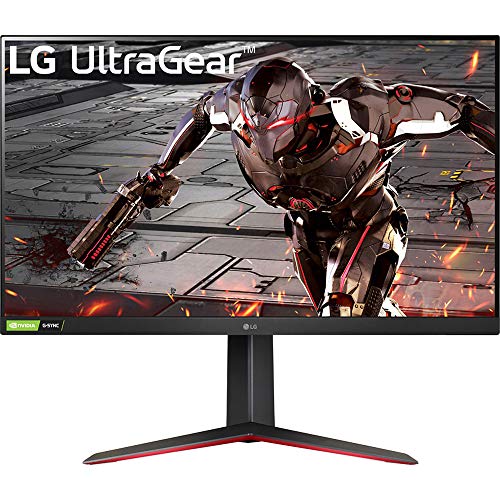
LG 32-Inch FHD 165Hz Gaming Monitor
Best for: large-screen 1080p gaming at 165Hz
- Refresh Rate
- 165Hz (what this guide is about)
- Screen Size
- 32"
- Resolution
- 1920 x 1080
- Response Time
- 1ms MBR
- Sync Technology
- NVIDIA G-SYNC, AMD FreeSync Premium
- Panel Type
- VA
This is a 32-inch gaming monitor with a VA panel and a 165Hz refresh rate. It pairs a 1920 x 1080 Full HD resolution with a 1ms Motion Blur Reduction response time. You get compatibility with both NVIDIA G-SYNC and AMD FreeSync Premium to reduce screen tearing. The included stand adjusts for incline, height, and shaft pivot. It fits you if you want high-refresh 1080p gaming on a large display.
Pros
- 165Hz refresh rate with 1ms MBR response time
- Compatible with both NVIDIA G-SYNC and AMD FreeSync Premium
- Three-way adjustable stand supports incline, height, and shaft pivot
- Three-sided virtually rimless design
Cons
- 1920 x 1080 resolution results in lower pixel density at 32 inches
- Color coverage is limited to 95% sRGB with basic HDR10
Good fit if
- You want a 32-inch VA display with a 165Hz refresh rate.
- You need adaptive sync support for both NVIDIA and AMD graphics cards.
- You need a stand with height, incline, and pivot adjustment.
Skip if
- You want a sharper 1440p or 4K resolution on a 32-inch screen.
- You require wider color gamut coverage than 95% sRGB.
Verdict: LG 32-Inch FHD 165Hz VA Gaming Monitor delivers fast refresh speeds and versatile stand adjustments for 1080p setups. It suits you if you prioritize 165Hz motion over high pixel density on a large screen.
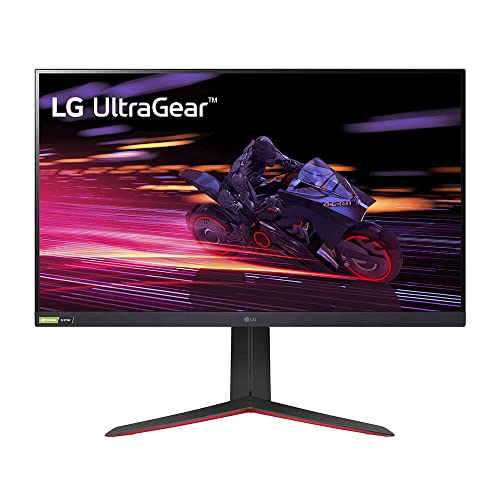
LG 32-Inch QHD 165Hz IPS Gaming Monitor
Best for: standard 16:9 high-refresh 1440p gaming setups
- Refresh Rate
- 165Hz (what this guide is about)
- Screen Size
- 32"
- Resolution
- 2560 x 1440
- Panel Type
- IPS
- Aspect Ratio
- 16:9
- Response Time
- 1ms GTG
This 32-inch gaming display pairs a 2560 x 1440 QHD resolution with a native 165Hz refresh rate and a 1ms GtG IPS panel. It features AMD FreeSync Premium and NVIDIA G-SYNC compatibility to reduce tearing during fast gameplay. While built in a standard 16:9 aspect ratio rather than ultrawide, it suits you if you prioritize fast refresh rates, wide 178-degree viewing angles, and full stand ergonomics for competitive gaming.
Pros
- Native 165Hz refresh rate with 1ms GtG response time
- Dual VRR support with NVIDIA G-SYNC and AMD FreeSync Premium
- Ergonomic stand with height, tilt, and pivot adjustments
- IPS panel with 99% sRGB color coverage and 178-degree viewing angles
Cons
- Standard 16:9 aspect ratio instead of a 21:9 ultrawide format
- Modest contrast ratio rated at 700:1 typical and 1000:1 minimum
- Entry-level HDR capabilities limited to VESA DisplayHDR 400
Good fit if
- You want a flat 1440p 165Hz IPS screen with full pivot and height adjustments.
- You need certified support for both AMD FreeSync Premium and NVIDIA G-SYNC.
Skip if
- You want a true 21:9 ultrawide or curved display layout.
- You require deep contrast ratios beyond standard IPS levels.
Verdict: LG 32-Inch QHD 165Hz IPS Gaming Monitor delivers reliable 165Hz motion clarity and broad adaptive sync support on a flat 16:9 IPS panel. It provides flexible stand adjustments and sharp 1440p visuals if you do not require an ultrawide screen.
Specifications side by side
| Spec | LG 45-Inch 5K2K Curved OLED Gaming Monitor | LG 32-Inch 4K Dual-Mode OLED Gaming Monitor | LG 39-inch UltraGear 5K2K Curved OLED | LG UltraGear 37-Inch 165Hz Curved 4K Monitor | LG 27-Inch QHD Nano IPS Gaming Monitor | LG 32-Inch FHD 165Hz Gaming Monitor | LG 32-Inch QHD 165Hz IPS Gaming Monitor |
|---|---|---|---|---|---|---|---|
| Screen Size | 45" | 32" | 39" | 37" | 27" | 32" | 32" |
| Resolution | 5120 x 2160 | 3840 x 2160 | 5120x2160 | 3840 x 2160 | 2560 x 1440 | 1920 x 1080 | 2560 x 1440 |
| Refresh Rate | 165Hz, 330Hz | 165Hz / 330Hz | 165Hz | 165Hz | 165Hz | 165Hz | 165Hz |
| Panel Type | OLED | OLED | OLED | not specified | Nano IPS | not specified | IPS |
| Aspect Ratio | 21:9 | not specified | 21:9 | not specified | 16:9 | not specified | 16:9 |
| Response Time | 0.03ms (GtG) | 0.03ms GTG | 0.03ms (GtG) | 1ms GTG | 1ms GTG | 1ms MBR | 1ms GTG |
| Sync Technology | FreeSync Premium Pro, G-SYNC Compatible | G-SYNC Compatible, FreeSync Premium Pro | G-SYNC Compatible, FreeSync Premium Pro | AMD FreeSync Premium Pro | G-SYNC Compatible, FreeSync Premium | NVIDIA G-SYNC, AMD FreeSync Premium | G-SYNC Compatible, FreeSync Premium |
| Connectivity | DisplayPort 2.1, HDMI 2.1, USB Type-C | HDMI, DP | not specified | HDMI 2.1, DP 1.4, USB Type-C, USB | not specified | not specified | not specified |
| Size | 45 Inch | not specified | not specified | not specified | 14.4"x24.2"x2" | 32" | 31.5" |
| Dimensions | 13.5 × 39 × 26.2 inches | 9.8 × 28.1 × 24.4 inches | 12.7 × 36.3 × 23.8 inches | 11.3 × 32.1 × 25.3 inches | 11.5 × 24.2 × 22.7 inches | 4.53 × 11.1 × 9.29 inches | 11.5 × 28.1 × 23.6 inches |
| Weight | 30.9 pounds | 20.1 pounds | 23.6 pounds | 30.3 pounds | 13.9 pounds | not specified | 16.1 pounds |
| Color | Black | Black | Black | Black | Black | Black | Black |
| Model | 45GX950A-B.AUS | 32GX850A-B.AUS | 39GX950B-B.AUS | 37G800A-B.AUSQ | 27GP850-B | 32GN550-B | 32GP750-B.AUS |
How to choose the right one
-
Match resolution to desk space
Screen size dictates pixel density and immersion. The 45-inch LG 5K2K OLED offers 5120 x 2160 pixels, requiring significant desk depth for comfortable viewing. If your space is tighter, the 39-inch 5K2K model provides similar sharpness in a smaller footprint. For standard ultrawide needs, the 37-inch 4K model delivers 3840 x 2160 clarity. Choose the largest size your desk can physically accommodate to maximize the ultrawide advantage without straining your neck.
-
Select the right panel type
Panel technology defines contrast and color accuracy. OLED panels, found in the 45-inch, 39-inch, and 32-inch models, provide infinite contrast and deep blacks because each pixel emits its own light. This results in superior image quality for dark scenes. In contrast, the 32-inch QHD model uses an IPS panel, which offers wider viewing angles but lower contrast. The 32-inch FHD model uses VA technology, which typically delivers higher contrast than IPS but slower pixel response times. Pick OLED for the best image fidelity.
-
Check sync technology compatibility
Adaptive sync prevents screen tearing between your GPU and monitor. Most listed LG monitors support both FreeSync and G-SYNC, ensuring compatibility with both AMD and NVIDIA graphics cards. The 37-inch 4K model supports FreeSync, which is sufficient for most AMD users but may limit NVIDIA G-SYNC compatibility. Verify your graphics card brand before purchasing. Matching your GPU to the monitor's sync technology ensures smooth gameplay without visual artifacts, regardless of frame rate fluctuations.
-
Evaluate connectivity options
Connection ports determine how you link devices. The 45-inch 5K2K OLED includes USB-C connectivity, allowing for single-cable video, data, and power delivery. The 37-inch 4K model also offers USB-C, DisplayPort, and HDMI. Other models rely on DisplayPort and HDMI. If you use a laptop or a console that benefits from USB-C, prioritize the models that list this feature. Ensure your source device has the matching output port to utilize the monitor's full capabilities without needing multiple cables.
-
Consider dual-mode flexibility
Dual-mode allows switching between resolutions and refresh rates. The 39-inch 5K2K OLED can switch to 330Hz at Wide Full HD for competitive gaming, while maintaining 5K2K at 165Hz for productivity. This flexibility suits gamers who need high frame rates in shooters but high resolution in other titles. The 45-inch model also supports flexible refresh rates up to 330Hz. If you play both fast-paced and visually demanding games, a dual-mode capable monitor offers the best of both worlds without buying two screens.
Frequently asked questions
Which LG ultrawide monitor offers the highest resolution for gaming?
The LG 45-Inch 5K2K Curved OLED Gaming Monitor provides the highest resolution at 5120 x 2160 pixels. This 5K2K panel delivers sharp visuals ideal for multitasking and detailed gaming. It also supports refresh rates up to 330Hz in dual-mode settings, offering flexibility for different performance needs.
Does the LG 39-inch 5K2K OLED support variable refresh rates?
Yes, the LG 39-inch 5K2K Curved OLED supports variable refresh rates. It features dual-mode functionality that allows you to switch between 165Hz at 5K2K resolution and 330Hz at Wide Full HD. This setup ensures smooth motion handling whether you prioritize image clarity or maximum frame rates.
Is there an LG 165Hz ultrawide monitor with FreeSync and G-SYNC compatibility?
The LG 45-Inch 5K2K Curved OLED Gaming Monitor includes both FreeSync and G-SYNC support. This compatibility helps reduce screen tearing and stuttering during gameplay. You get reliable adaptive sync performance alongside its expansive 5120 x 2160 display and OLED panel technology for deep contrast.
What is the smallest ultrawide LG monitor in this list?
The LG 39-inch 5K2K Curved OLED is the smallest ultrawide option listed. It measures 36.3 inches in width and 23.8 inches in height. This model offers a 5120 x 2160 resolution on a curved OLED panel, providing high pixel density without the larger footprint of the 45-inch model.
Does the LG 37-inch 4K monitor use a curved screen?
Yes, the LG UltraGear 37-Inch 165Hz Curved 4K Monitor features a curved design. It combines a 3840 x 2160 resolution with 165Hz refresh rates on this curved surface. The monitor also includes DisplayPort, HDMI, and USB-C connectivity, along with FreeSync support for smooth gaming performance.
Which LG monitor has the fastest pixel response time?
The LG 32-Inch 4K Dual-Mode OLED Gaming Monitor features a 0.03ms pixel response time. This rapid speed minimizes motion blur, making it excellent for fast-paced gaming. It also delivers deep OLED contrast and supports both 4K and high-framerate modes for versatile gaming setups.