LG 27-Inch 240Hz IPS Gaming Review: Who It Fits and Who Should Skip It
As an Amazon Associate we earn from qualifying purchases. Links on this page are affiliate links.
This lg 27 inch 240hz ips gaming review focuses on the LG 27GP750-B, a 27-inch monitor built for speed and color accuracy. It combines a 1920 x 1080 FHD resolution with a 240Hz refresh rate. The IPS panel delivers vibrant colors and wide viewing angles, while the 1ms response time ensures quick pixel transitions. You get official NVIDIA G-SYNC compatibility and AMD FreeSync Premium support to reduce screen tearing. This setup is designed for players who need high frame rates without sacrificing image quality. It offers a balanced mix of performance and visual clarity for competitive gaming.
What stands out
- 240Hz refresh rate for ultra-smooth motion
- IPS panel with 1ms response time
- NVIDIA G-SYNC Compatible and AMD FreeSync Premium
- Ergonomic stand with height, tilt, and pivot adjustments
- HDR10 support for enhanced contrast and color
Who it fits
Good fit for
This monitor suits competitive FPS players who prioritize high refresh rates over pixel density. If you play at 1080p and want smooth gameplay with minimal input lag, this is a strong option. The IPS panel is ideal for those who value color accuracy and wide viewing angles. Gamers using NVIDIA or AMD GPUs will benefit from the adaptive sync technologies. The ergonomic stand allows for comfortable positioning during long sessions. It is a solid choice for budget-conscious gamers seeking performance.
Who should skip it
You should look elsewhere if you need high resolution for creative work or media consumption. The 1920 x 1080 resolution on a 27-inch screen results in lower pixel density, which may appear pixelated for text-heavy tasks. If you require a 4K display for detailed editing or sharp images, this monitor is not suitable. Users who prefer curved screens for immersion will find the 16:9 flat panel less engaging. Those needing built-in speakers or USB hubs will also find this model lacking those features.
Verdict: The LG 27GP750-B is a capable 1080p gaming monitor for players who need speed and color accuracy. It delivers a smooth experience for competitive titles without breaking the bank on resolution.
LG 27GP750-B Key Specs Explained
Refresh Rate: 240Hz
This monitor updates the image 240 times per second. You see smoother motion with less blur during fast scenes. This matters most for competitive shooters where split-second reactions count. Higher refresh rates reduce the gap between your input and what appears on screen. Compare this to standard 60Hz displays, which look choppy in action games. You get fluid visuals that help you track enemies more easily.
Response Time: 1ms
The panel changes pixel colors in one millisecond. This minimizes ghosting or trailing behind moving objects. You notice this during rapid camera turns or high-speed gameplay. It ensures the image stays sharp instead of smearing. Look for this spec when buying gaming monitors, as slower panels cause visual artifacts. A 1ms rating helps maintain clarity, letting you react to on-screen events without distraction or delayed visuals.
Panel Type: IPS
In-Plane Switching technology provides accurate colors and wide viewing angles. You see consistent image quality even when sitting off-center. This is ideal for shared spaces or when you adjust your chair. IPS panels typically offer better color reproduction than TN screens. Compare this to VA panels, which may have deeper blacks but poorer side viewing. You get reliable color fidelity for both gaming and content creation tasks.
Resolution: 1920 x 1080
This Full HD resolution offers 2.07 million pixels on a 27-inch screen. You get a standard aspect ratio suitable for most games. Note that pixel density is lower than 4K displays, so images may appear less sharp. Compare this to ultrawide monitors, which often have higher pixel counts. You should sit closer to enjoy the clarity. This resolution remains popular for competitive gaming where high frame rates are prioritized over extreme detail.
Sync Technology: G-SYNC Compatible, FreeSync Premium
Adaptive sync prevents screen tearing and stuttering by matching the refresh rate to your GPU output. You enjoy smoother gameplay without visual artifacts. G-SYNC compatibility works with NVIDIA cards, while FreeSync Premium supports AMD hardware. Compare this to fixed refresh rates, which cause tearing. You benefit from stable frame pacing, ensuring every frame displays correctly. This technology is essential for maintaining a consistent visual experience during intense gaming sessions.
Design and Build Quality
According to the listing, the LG 27GP750-B measures 24.2 inches wide, 22.7 inches high, and 11.5 inches deep. It weighs 13.2 pounds. The monitor features a black finish. These dimensions suggest it fits standard desk setups. The weight indicates a solid base that resists tipping. You can place it on most surfaces without worrying about stability. The compact footprint saves space in tight gaming areas.
The stand offers ergonomic adjustments. You can raise, lower, tilt, and pivot the screen. This flexibility lets you find a comfortable viewing angle. A press-and-click mechanism makes adjustments quick. You can switch from landscape to portrait mode easily. This is useful for coding or streaming. The design prioritizes user comfort during long sessions.
The monitor’s build supports its performance goals. The sturdy frame holds the IPS panel securely. This helps maintain image quality over time. The black color blends with most gaming setups. It does not draw attention away from the screen. The ergonomic stand allows you to customize your battle station. You can adjust the height to match your chair. Tilt and pivot options help reduce neck strain. The design focuses on function. It supports the 240Hz speed with a reliable structure. You get a monitor that is both fast and adaptable.
Setup and Everyday Use
The LG 27GP750-B includes an ergonomic stand that supports multiple adjustments. You can raise, lower, tilt, and pivot the screen. This flexibility allows you to customize your viewing angle for comfort. The stand design aims to save space while adapting to your environment. A press-and-click mechanism simplifies these changes, making it easy to shift positions without tools. This feature is useful if you share your desk or switch between sitting and standing workflows.
For connectivity and performance, the monitor supports NVIDIA G-SYNC Compatible technology. It also includes AMD FreeSync Premium. These sync technologies work with your graphics card to reduce screen tearing and stuttering. This results in smoother visuals during fast-paced games. The 1ms response time ensures that pixel changes happen quickly, which helps maintain clarity in action scenes. You do not need to worry about ghosting or trailing images during rapid movements.
The IPS panel provides wide viewing angles and consistent colors from different positions. This means you can sit slightly off-center without losing image quality. The 240Hz refresh rate keeps motion smooth, which is beneficial for competitive gaming. HDR10 support enhances contrast and color for compatible content. You will notice better detail in dark and bright areas. Overall, the setup is straightforward, and the features support a responsive daily gaming experience. The monitor fits well into standard desk setups, offering both performance and adjustability for various users.
Before You Buy This Monitor
You need a PC or console capable of pushing near 240 frames per second at 1080p to use this display fully. Check that your GPU supports NVIDIA G-SYNC Compatible or AMD FreeSync Premium. The listing confirms both sync technologies are built-in, which helps reduce screen tearing and stutter. You should also verify your desk has enough depth. The stand allows tilt, height, and pivot adjustments, but it still requires physical space. Keep the screen clean with a microfiber cloth and mild cleaner. Avoid harsh chemicals. This monitor sits in the high-refresh, standard-resolution category. If you prefer larger screens or higher pixel density, look at the other 1 options on the page. This model suits competitive gamers who prioritize speed over image sharpness. It does not offer ultrawide viewing areas. Ensure your current setup matches these requirements before adding it to your cart. The ergonomic stand helps with long sessions, but proper positioning is still your responsibility.
Check before you buy
- Verify your GPU supports G-SYNC Compatible or FreeSync Premium
- Confirm your system can reach high frame rates at 1080p
- Check desk depth for the adjustable stand base
- Ensure you prefer 16:9 aspect ratio over ultrawide
The product at a glance
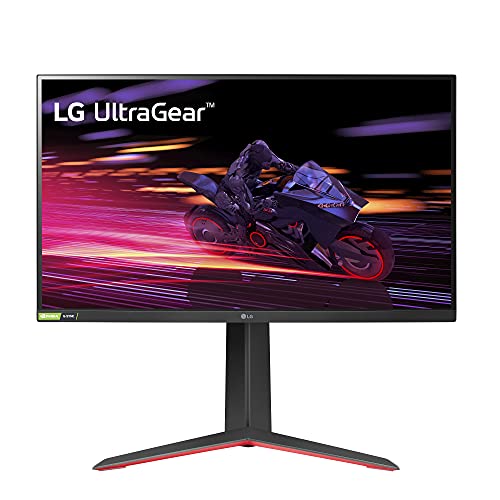
LG 27-Inch 240Hz IPS Gaming Monitor
Best for: Competitive FPS gaming at 1080p
- Screen Size
- 27"
- Resolution
- 1920 x 1080
- Refresh Rate
- 240Hz
- Panel Type
- IPS
- Aspect Ratio
- 16:9
- Response Time
- 1ms
View on Amazon: LG 27-Inch 240Hz IPS Gaming Monitor Affiliate link
The LG 27GP750-B is a 27-inch FHD IPS monitor designed for speed. It features a 240Hz refresh rate and a 1ms response time to keep motion smooth. NVIDIA G-SYNC Compatible and AMD FreeSync Premium support reduce screen tearing. The stand allows height, tilt, and pivot adjustments. HDR10 enhances color and brightness for gaming and video.
Pros
- 240Hz refresh rate for high-speed gaming
- 1ms response time on IPS panel
- Ergonomic stand with height and pivot adjustment
- NVIDIA G-SYNC Compatible and AMD FreeSync Premium
Cons
- 1080p resolution on a 27-inch screen
- Limited to 16:9 aspect ratio
- No mention of USB hub connectivity
Good fit if
- You prioritize high refresh rates over pixel density
- You play competitive shooters requiring fast response times
- You need an ergonomic stand with height adjustment
Skip if
- You require 4K resolution for sharp text
- You want an ultrawide 21:9 or 32:9 display
- You need built-in USB hub connectivity
Verdict: LG 27-inch 240Hz IPS Gaming Monitor fits competitive gamers who value speed over screen real estate. It suits those who prefer FHD clarity on a standard 16:9 display.
Specifications side by side
| Spec | LG 27-Inch 240Hz IPS Gaming Monitor |
|---|---|
| Screen Size | 27" |
| Resolution | 1920 x 1080 |
| Refresh Rate | 240Hz |
| Panel Type | IPS |
| Aspect Ratio | 16:9 |
| Response Time | 1ms |
| Sync Technology | G-SYNC Compatible, FreeSync Premium |
| Dimensions | 11.5 × 24.2 × 22.7 inches |
| Weight | 13.2 pounds |
| Color | Black |
| Model | 27GP750-B |
Frequently asked questions
Is this monitor good for competitive FPS gaming?
Yes. It is best for competitive FPS gaming at 1080p. The 240Hz refresh rate provides smooth motion. This helps you track fast enemies. The IPS panel offers wide viewing angles. You get accurate colors for clear visibility. This setup suits those who prioritize speed over screen size.
Does it support both FreeSync and G-Sync?
Yes. The LG 27GP750-B includes FreeSync and G-SYNC compatibility. This dual support works with AMD and NVIDIA graphics cards. You can eliminate screen tearing without extra cost. Check your GPU to ensure it matches these standards. This flexibility makes it a versatile choice for different PC builds.
What resolution does the LG 27GP750-B use?
It uses 1920 x 1080 FHD resolution. This is standard for a 27-inch display. You get clear images at a manageable pixel density. The 16:9 aspect ratio fits most games. It is not ultra-wide. You should choose this if you prefer FHD clarity on a standard screen.
Can I adjust the screen height and tilt?
Yes. The monitor features an ergonomic stand with multiple adjustments. You can raise, lower, tilt, and pivot the screen. This allows you to customize your viewing angle for comfort. The design aims to save desk space. You can find a comfortable position for long gaming sessions.
How heavy is the LG 27-inch monitor?
It weighs 13.2 pounds. The dimensions are 24.2 inches wide, 22.7 inches high, and 11.5 inches deep. This weight indicates a solid build. It fits standard desk setups without issue. The black finish adds a sleek look. You can mount it if you prefer a wall setup.
Who should skip this monitor?
You should skip it if you need more screen real estate. It is not for those who prefer ultra-wide displays. Also, avoid it if your PC cannot push near 240 frames per second at 1080p. You will not get full value. It is ideal for those who value speed over size.