LG 27-Inch QHD 144Hz IPS vs LG 32-Inch UltraFine 4K UHD (2026): Key Differences
As an Amazon Associate we earn from qualifying purchases. Links on this page are affiliate links.
The lg 27 inch qhd 144hz ips vs 32 inch ultrafine 4k UHD comparison highlights two distinct LG monitors. Both models offer adjustable stands and essential connectivity ports like HDMI and DisplayPort. They share gaming-focused features such as Black Stabilizer for low-light visibility. The primary difference lies in their target use cases. One prioritizes speed and sharpness for competitive play, while the other emphasizes pixel density and color range for content creation and media consumption.
Key differences
| Aspect | LG 27-Inch QHD 144Hz IPS Monitor | LG 32-Inch UltraFine 4K UHD Monitor |
|---|---|---|
| Screen Size | 27-Inch | 32-Inch |
| Resolution | 2560 x 1440 (QHD) | 3840 x 2160 (4K UHD) |
| Refresh Rate | 144Hz | 60Hz |
| Sync Technology | NVIDIA G-SYNC, FreeSync Premium | Not listed |
| Color Gamut | 99% sRGB | 90% DCI-P3 |
| Weight | 20.3 pounds | 15.4 pounds |
Which one should you choose?
Choose LG 27-Inch QHD 144Hz IPS Monitor if
- You play fast-paced competitive games and need high refresh rates for smoother motion.
- You require NVIDIA G-SYNC compatibility to eliminate screen tearing in supported titles.
- You prefer a smaller footprint that fits easily on standard desks without taking up excessive space.
Choose LG 32-Inch UltraFine 4K UHD Monitor if
- You work with creative software that benefits from the higher pixel density of 4K resolution.
- You watch HDR content and want access to a wider color gamut for more vibrant visuals.
- You need a larger screen real estate for multitasking or immersive media viewing.
Verdict: The 27-inch QHD model is the better choice for gamers who prioritize speed, responsiveness, and synchronization technologies. The 32-inch 4K model suits users who value higher resolution, wider color coverage, and a larger display for work or media. Your decision should depend on whether you prioritize frame rate or pixel clarity.
Size and Resolution Comparison
Screen size
The LG 27-Inch QHD 144Hz IPS Monitor measures 27 inches diagonally, offering a compact footprint that fits easily on most desks. In contrast, the LG 32-Inch UltraFine 4K UHD Monitor provides a larger 32-inch display. This extra screen real estate allows for more workspace and better immersion when viewing content. The physical dimensions also differ, with the 32-inch model being wider and taller. You should choose the 27-inch version if desk space is limited, or the 32-inch version if you prefer a more expansive viewing area for multitasking or media consumption.
Resolution
Image clarity differs significantly between these two models. The LG 27-Inch QHD 144Hz IPS Monitor features a QHD resolution of 2560 x 1440 pixels. This sharpness is ideal for gaming and general use on a smaller screen. The LG 32-Inch UltraFine 4K UHD Monitor steps up to 4K UHD resolution, delivering 3840 x 2160 pixels. This higher pixel count results in much finer detail and smoother text rendering. If you need crisp visuals for photo editing or high-definition video, the 4K panel offers superior definition compared to the QHD display.
Refresh rate
Motion smoothness is a key differentiator for gamers. The LG 27-Inch QHD 144Hz IPS Monitor supports a refresh rate of 144Hz. This high frame rate reduces motion blur and provides smoother gameplay in fast-paced titles. The LG 32-Inch UltraFine 4K UHD Monitor operates at a standard 60Hz refresh rate. While sufficient for everyday tasks and casual gaming, it cannot match the fluidity of the 144Hz panel. If you prioritize competitive gaming performance, the higher refresh rate on the 27-inch model is a clear advantage.
Sync technology
Screen tearing and stuttering are managed differently by each monitor. The LG 27-Inch QHD 144Hz IPS Monitor includes NVIDIA G-SYNC and FreeSync Premium compatibility. These technologies synchronize the display refresh rate with the graphics card output to ensure seamless visuals. The LG 32-Inch UltraFine 4K UHD Monitor does not list specific adaptive sync certifications in its published specifications. While it may support basic FreeSync, the explicit G-SYNC and FreeSync Premium support on the 27-inch model offers more guaranteed compatibility and smoother performance for supported systems.
Panel type
Both monitors utilize IPS panel technology, which is known for accurate colors and wide viewing angles. The LG 27-Inch QHD 144Hz IPS Monitor highlights up to 99% sRGB color coverage, ensuring vivid and accurate colors for gaming and content creation. The LG 32-Inch UltraFine 4K UHD Monitor also features an IPS panel and supports HDR10, covering up to 90% of the DCI-P3 color space. While both offer excellent color reproduction, the 32-inch model’s DCI-P3 coverage is beneficial for professional video work, whereas the 27-inch model focuses on sRGB accuracy for standard gaming.
Choose your ideal LG monitor
Competitive gamers needing high refresh rates
The LG 27GL83A-B delivers a 144Hz refresh rate and a 1ms response time, ensuring smooth motion in fast-paced titles. It supports both NVIDIA G-SYNC and AMD FreeSync Premium to eliminate screen tearing. This combination provides the speed and fluidity required for competitive play.
Users prioritizing sharp 4K detail and color
The LG 32UR550K-B offers 4K UHD resolution for crisp text and detailed visuals. It covers 90% of the DCI-P3 color space and includes HDR10 support for better contrast. This setup is ideal for content creation, media consumption, and tasks where image fidelity matters most.
Multi-taskers wanting screen flexibility and apps
This model includes the Switch App, allowing you to split the screen into six sections for efficient multitasking. The larger 32-inch display provides ample space for multiple windows. You can customize layouts easily to manage work, streaming, and communication simultaneously without clutter.
The products compared

LG 27-Inch QHD 144Hz IPS Monitor
Best for: Competitive gaming on a 27-inch IPS display
- Screen Size
- 27-Inch
- Resolution
- 2560 x 1440
- Refresh Rate
- 144Hz
- Panel Type
- IPS
- Response Time
- 1ms (GtG)
- Sync Technology
- NVIDIA G-SYNC, FreeSync Premium
View on Amazon: LG 27-Inch QHD 144Hz IPS Monitor Affiliate link
This LG 27-inch monitor uses an IPS panel to deliver 2560 x 1440 resolution and 144Hz refresh rates. It supports NVIDIA G-SYNC and FreeSync Premium to reduce screen tearing. The 1ms response time helps with fast-paced gaming. You get vivid colors and wide viewing angles. It suits players who want smooth visuals without the 4K resolution of larger competitors.
Pros
- IPS panel covers up to 99% of sRGB for accurate colors
- 144Hz refresh rate with 1ms GtG response time
- Officially NVIDIA G-SYNC Compatible and FreeSync Premium certified
Cons
- 27-inch screen is smaller than the 32-inch 4K alternative
- 1440p resolution offers less pixel density than 4K UHD
- Base only adjusts tilt, height, and pivot, lacking swivel
Good fit if
- You prefer a smaller 27-inch display for closer viewing
- You prioritize high refresh rates and color accuracy over 4K resolution
- You play fast-paced games and need G-SYNC compatibility
Skip if
- You require 4K UHD resolution for sharper text and images
- You want a larger 32-inch screen for immersive viewing
- You need swivel adjustment for the monitor stand
Verdict: LG 27-Inch QHD 144Hz IPS is a solid choice for gamers who value speed and color fidelity on a compact 27-inch screen. It fits players who do not need the higher pixel density of 4K.
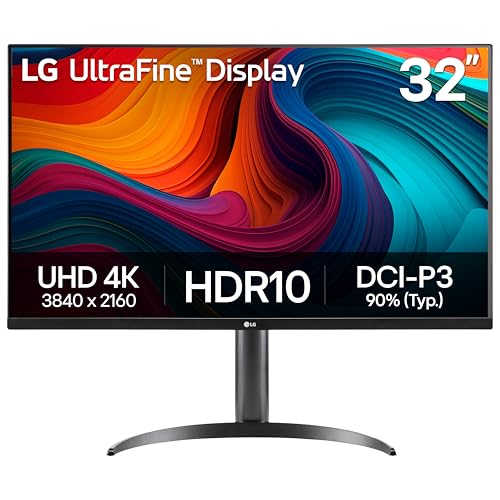
LG 32-Inch UltraFine 4K UHD Monitor
Best for: 4K productivity and media consumption
- Screen Size
- 32"
- Resolution
- 3840 x 2160
- Refresh Rate
- 60Hz
- Connectivity
- HDMI, DisplayPort
- Dimensions
- 9.4 × 28.1 × 23.5 inches
- Weight
- 15.4 pounds
View on Amazon: LG 32-Inch UltraFine 4K UHD Monitor Affiliate link
This LG 32-inch monitor delivers 4K UHD resolution for sharp text and detailed visuals. It supports HDR10 and covers 90% of the DCI-P3 color space. The 60Hz refresh rate suits general use rather than high-speed gaming. You get height, tilt, and pivot adjustments for ergonomic comfort. Dynamic Action Sync reduces input lag for tactical gameplay.
Pros
- 3840 x 2160 4K UHD resolution
- 90% DCI-P3 color gamut coverage
- Height, tilt, and pivot stand adjustments
- Dynamic Action Sync for reduced input lag
Cons
- 60Hz refresh rate limits competitive gaming
- No mention of USB-C connectivity
- No mention of built-in speakers
Good fit if
- You prioritize sharp 4K detail for work or media
- You need ergonomic stand adjustments for comfort
- You want HDR10 support for richer visuals
Skip if
- You require a high refresh rate for fast-paced gaming
- You need USB-C for single-cable connectivity
- You prefer a smaller 27-inch footprint
Verdict: LG 32-Inch 4K 60Hz Monitor is best for users who value high-resolution clarity and ergonomic flexibility over high-speed performance. It fits those who edit content or multitask rather than compete in fast shooters.
Specifications side by side
| Spec | LG 27-Inch QHD 144Hz IPS Monitor | LG 32-Inch UltraFine 4K UHD Monitor |
|---|---|---|
| Screen Size | 27-Inch | 32" |
| Resolution | 2560 x 1440 | 3840 x 2160 |
| Refresh Rate | 144Hz | 60Hz |
| Panel Type | IPS | not stated |
| Response Time | 1ms (GtG) | not stated |
| Sync Technology | NVIDIA G-SYNC, FreeSync Premium | not stated |
| Connectivity | HDMI, DisplayPort | HDMI, DisplayPort |
| Size | 27 Inch | 32UR550K-B |
| Dimensions | 8.2 × 29.2 × 20.6 inches | 9.4 × 28.1 × 23.5 inches |
| Weight | 20.3 pounds | 15.4 pounds |
| Color | Black | Black |
| Model | 27GL83A-B | 32UR550K-B.AUS |
Frequently asked questions
Which LG monitor is better for competitive gaming?
The LG 27-Inch QHD 144Hz IPS is the superior choice for competitive gaming. It features a 144Hz refresh rate and supports both FreeSync and G-SYNC technologies. This combination ensures smooth motion and eliminates screen tearing. The 27-inch size also offers a comfortable viewing distance for fast-paced titles without requiring excessive desk space.
What is the resolution difference between the two models?
The LG 27-Inch model displays at 1440p QHD resolution. The LG 32-Inch UltraFine model offers 4K UHD resolution. The higher pixel density of the 32-inch screen provides sharper text and more detailed images. This makes the 4K monitor ideal for productivity tasks and media consumption where clarity is paramount.
Does the 32-inch LG monitor support high refresh rates?
No, the LG 32-Inch UltraFine 4K UHD Monitor operates at a 60Hz refresh rate. It is not designed for high-speed gaming performance. Instead, it focuses on delivering high-resolution clarity for content creation and multitasking. Gamers seeking faster frame rates should look to the 27-inch model which supports 144Hz.
How do the physical dimensions compare between the two monitors?
The 27-inch monitor is slightly wider at 29.2 inches but taller at 20.6 inches. The 32-inch monitor is narrower at 28.1 inches but significantly taller at 23.5 inches. The 27-inch unit also weighs more at 20.3 pounds compared to the 15.4-pound 32-inch model. These differences affect desk footprint and stand stability.
Can both monitors connect to modern gaming consoles and PCs?
Yes, both monitors include essential connectivity options like HDMI and DisplayPort. This allows you to connect them to PCs, laptops, and gaming consoles. The 27-inch model supports adaptive sync technologies like FreeSync and G-SYNC for smoother gameplay. The 32-inch model provides the necessary ports for 4K video output from compatible devices.
Which monitor is better for video editing and productivity?
The LG 32-Inch UltraFine 4K UHD Monitor is better for productivity. Its 4K resolution provides more screen real estate and sharper text rendering. This is ideal for multitasking, coding, and video editing. The 27-inch QHD monitor is less suitable for these tasks due to its lower pixel density and smaller physical screen size.