LG 27-Inch QHD 144Hz IPS or LG 32-Inch UltraGear Curved QHD? Which LG Model to Buy
As an Amazon Associate we earn from qualifying purchases. Links on this page are affiliate links.
This comparison of lg 27 inch qhd 144hz ips vs 32 inch ultragear curved qhd helps you choose between two distinct LG gaming monitors. Both models deliver QHD resolution and fast response times for smooth gameplay. The primary difference lies in the display format and size. One offers a flat 27-inch panel with higher certified sync compatibility, while the other provides a larger 32-inch curved screen with a faster refresh rate. You need to decide which form factor best fits your desk and visual preferences.
Key differences
| Aspect | LG 27-Inch QHD 144Hz IPS Monitor | LG 32-Inch UltraGear Curved QHD Gaming Monitor |
|---|---|---|
| Screen Size | 27 inches | 32 inches |
| Panel Shape | Flat | Curved (1000R) |
| Refresh Rate | 144Hz | 180Hz |
| Sync Technology | NVIDIA G-SYNC, FreeSync Premium | AMD FreeSync |
| HDR Support | not listed | HDR10 |
| Weight | 20.3 pounds | 14.8 pounds |
Which one should you choose?
Choose LG 27-Inch QHD 144Hz IPS Monitor if
- You use an NVIDIA graphics card and want officially verified G-SYNC compatibility to eliminate screen tearing.
- You prefer a standard flat display that fits better on smaller desks or in tighter spaces.
- You prioritize wide viewing angles and color accuracy from an IPS panel over screen curvature.
Choose LG 32-Inch UltraGear Curved QHD Gaming Monitor if
- You want a larger 32-inch screen that provides more real estate for gaming or multitasking.
- You prefer an immersive curved display that expands your field of view with a 1000R curve.
- You want the highest refresh rate available at 180Hz for smoother motion in fast-paced games.
Verdict: Choose the 27-inch model if you need G-SYNC compatibility and a compact flat screen. Select the 32-inch curved model if you want a larger, more immersive display with a higher refresh rate and HDR10 support.
27-inch Flat vs 32-inch Curved
Screen size and curvature
The LG 27-Inch QHD 144Hz IPS Monitor features a flat 27-inch panel. This size offers a compact footprint that fits well on standard desks without requiring excessive depth. In contrast, the LG 32-Inch UltraGear Curved QHD Gaming Monitor provides a larger 32-inch display with a 1000R curvature. This curve wraps around your field of view, creating a more immersive experience for gaming and media. The 32-inch model also occupies more physical space, measuring 27.7 inches in width compared to the 27-inch model's 29.2 inches, though the depth varies significantly due to the stand design. You must decide if you prefer the neutrality of a flat screen or the enveloping nature of a curved display.
Refresh rate performance
Speed is a key differentiator between these two monitors. The LG 32-Inch UltraGear Curved QHD Gaming Monitor supports a refresh rate of 180Hz. This higher rate allows for smoother frame transitions and reduces motion blur during fast-paced action. The LG 27-Inch QHD 144Hz IPS Monitor is rated at 144Hz. While 144Hz is still very fast and suitable for most competitive games, the 180Hz panel on the 32-inch model offers a noticeable advantage in fluidity. If you play fast shooters or racing games where every millisecond counts, the higher refresh rate on the larger screen provides a tangible benefit for tracking moving objects.
Panel type and colors
The LG 27-Inch QHD 144Hz IPS Monitor uses an IPS panel, which is known for accurate color reproduction and wide viewing angles. It covers up to 99% of the sRGB gamut, ensuring vivid and true-to-life colors from various positions. The LG 32-Inch UltraGear Curved QHD Gaming Monitor also covers up to 99% sRGB and includes HDR10 support for enhanced contrast and brightness in compatible content. However, the specific panel technology for the 32-inch model is not explicitly stated in the provided data. Both monitors deliver strong color performance, but the IPS designation on the 27-inch model guarantees consistent viewing angles, which may be less critical on a curved screen due to the fixed viewing position.
Sync technology compatibility
Both monitors feature Adaptive Sync to prevent screen tearing. The LG 32-Inch UltraGear Curved QHD Gaming Monitor supports AMD FreeSync, which works with AMD GPUs and some NVIDIA cards. The LG 27-Inch QHD 144Hz IPS Monitor offers broader compatibility, supporting both NVIDIA G-SYNC and AMD FreeSync Premium. This means the 27-inch model is officially verified for G-SYNC compatibility, providing a smoother experience for NVIDIA users out of the box. If you use an NVIDIA graphics card, the 27-inch monitor offers a more robust sync solution. AMD users will find both monitors suitable, though the 32-inch model relies on FreeSync.
Physical dimensions and weight
The physical build of each monitor affects desk space and ergonomics. The LG 27-Inch QHD 144Hz IPS Monitor weighs 20.3 pounds and has a height of 20.6 inches. The LG 32-Inch UltraGear Curved QHD Gaming Monitor is lighter at 14.8 pounds but stands taller at 22 inches. The 32-inch model is also wider at 27.7 inches compared to the 27-inch model's 29.2 inches width, likely due to different stand designs. Both monitors offer adjustable stands with height, tilt, and swivel controls. The 27-inch model allows pivot adjustment as well. You should consider your desk depth and height preferences when choosing between the heavier, pivot-capable 27-inch unit and the lighter, taller 32-inch option.
Which LG monitor fits your needs
Competitive shooter player needing low input lag
This 32-inch curved model features Dynamic Action Sync to minimize input lag for faster reactions. Its 180Hz refresh rate ensures smoother frame transitions with less stutter. The 1000R curvature expands your field of view for deeper immersion during fast-paced combat scenarios.
User wanting certified G-SYNC compatibility
The 27-inch flat IPS monitor is officially NVIDIA G-SYNC Compatible certified. This eliminates screen tearing and minimizes stutter for a smoother experience. It also supports FreeSync Premium. The 1ms response time on this IPS panel provides crisp visuals comparable to TN speed.
Gamer preferring wider screen real estate
The 32-inch display offers more screen space for gaming, multitasking, or streaming. Its curved design pulls you into the action with a 1000R radius. You get vivid colors with HDR10 support and up to 99% sRGB coverage for bold, impactful visuals.
Desk owner with limited space
This 27-inch monitor has a compact footprint that fits well on standard desks. It weighs 20.3 pounds and includes an adjustable stand for tilt, height, and pivot. The 3-side virtually borderless design keeps the visual profile clean without taking up excessive depth.
The products compared

LG 27-Inch QHD 144Hz IPS Monitor
Best for: Competitive gamers wanting 27-inch IPS precision
- Screen Size
- 27-Inch
- Resolution
- 2560 x 1440
- Refresh Rate
- 144Hz
- Panel Type
- IPS
- Response Time
- 1ms (GtG)
- Sync Technology
- NVIDIA G-SYNC, FreeSync Premium
View on Amazon: LG 27-Inch QHD 144Hz IPS Monitor Affiliate link
This 27-inch monitor delivers QHD resolution on an IPS panel with 144Hz refresh and 1ms response time. It features NVIDIA G-SYNC and FreeSync Premium support to reduce screen tearing. The stand allows tilt, height, and pivot adjustments. You get vivid colors and wide viewing angles. This model suits gamers who prefer a smaller screen size with high color accuracy and smooth motion.
Pros
- IPS panel with 99% sRGB coverage for accurate colors
- NVIDIA G-SYNC Compatible and FreeSync Premium certified
- 1ms (GtG) response time for fast motion
- Adjustable stand with tilt, height, and pivot functions
Cons
- 27-inch screen is smaller than the 32-inch alternative
- No mention of built-in speakers
- Limited to HDMI and DisplayPort connectivity
Good fit if
- You want a compact 27-inch display for your desk
- You prioritize color accuracy and viewing angles
- You need G-SYNC compatibility for NVIDIA graphics cards
Skip if
- You prefer a larger 32-inch screen for immersion
- You require curved display for wider field of view
- You need USB-C connectivity for single-cable docking
Verdict: LG 27-Inch QHD 144Hz IPS Gaming Monitor offers precise color and smooth performance for competitive gamers who value a smaller footprint. It fits users who need G-SYNC support and adjustable ergonomics in a 27-inch frame.
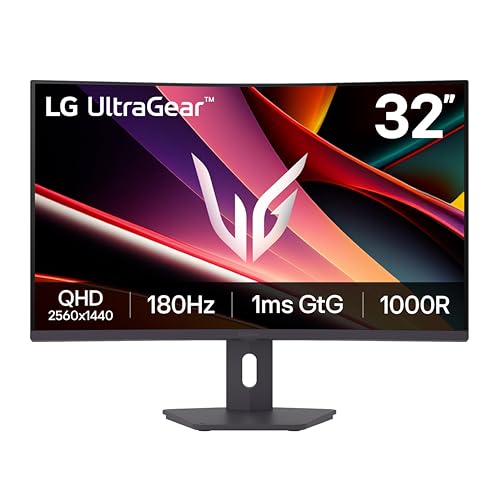
LG 32-Inch UltraGear Curved QHD Gaming Monitor
Best for: immersive curved gaming on larger screens
- Screen Size
- 32"
- Resolution
- 2560 x 1440
- Refresh Rate
- 180Hz
- Response Time
- 1ms GtG
- Sync Technology
- AMD FreeSync
- Connectivity
- HDMI, DisplayPort
View on Amazon: LG 32-Inch UltraGear Curved QHD Gaming Monitor Affiliate link
The LG 32G600A-B is a 32-inch curved QHD gaming monitor with a 180Hz refresh rate. It features a 1000R curve and 1ms response time. AMD FreeSync and HDR10 support are included. This model offers more screen space than the 27-inch LG 27GL83A-B. It suits players who prefer immersion and larger visuals over flat panel precision.
Pros
- 32-inch QHD 2560x1440 curved display
- 180Hz refresh rate for smooth motion
- 1000R curvature for field of view
- 1ms GtG response time
- AMD FreeSync and HDR10 support
Cons
- Curved 1000R screen may distort straight lines
- Only lists HDMI and DisplayPort connectivity
- No mention of USB hub or KVM switch
Good fit if
- You want a larger 32-inch screen
- You prefer curved immersion for gaming
- You need 180Hz refresh rate
Skip if
- You need a flat IPS panel
- You prefer a 27-inch size
- You require USB-C connectivity
Verdict: LG 32-Inch QHD 180Hz Curved fits gamers who prioritize screen real estate and curved immersion over the flat precision of smaller 27-inch models.
Specifications side by side
| Spec | LG 27-Inch QHD 144Hz IPS Monitor | LG 32-Inch UltraGear Curved QHD Gaming Monitor |
|---|---|---|
| Screen Size | 27-Inch | 32" |
| Resolution | 2560 x 1440 | 2560 x 1440 |
| Refresh Rate | 144Hz | 180Hz |
| Panel Type | IPS | not stated |
| Response Time | 1ms (GtG) | 1ms GtG |
| Sync Technology | NVIDIA G-SYNC, FreeSync Premium | AMD FreeSync |
| Connectivity | HDMI, DisplayPort | HDMI, DisplayPort |
| Size | 27 Inch | not stated |
| Dimensions | 8.2 × 29.2 × 20.6 inches | 10.2 × 27.7 × 22 inches |
| Weight | 20.3 pounds | 14.8 pounds |
| Color | Black | Black |
| Model | 27GL83A-B | 32G600A-B.AUSQ |
Frequently asked questions
Does the LG 27-inch model support G-SYNC?
Yes, the LG 27-Inch QHD 144Hz IPS Monitor supports both FreeSync and G-SYNC technologies. This dual compatibility ensures smooth frame delivery regardless of whether you use an AMD or NVIDIA graphics card. It helps reduce screen tearing and stuttering for a more consistent visual experience during fast-paced gameplay.
What is the refresh rate of the 32-inch curved monitor?
The LG 32-Inch UltraGear Curved QHD Gaming Monitor operates at an 180Hz refresh rate. This higher speed compared to the 27-inch model allows for smoother motion rendering. It is particularly beneficial for competitive gaming where rapid frame transitions help maintain clarity and responsiveness.
Which monitor is better for competitive shooters?
The LG 27-Inch QHD 144Hz IPS Monitor is ideal for competitive gamers who value precision and a smaller footprint. Its IPS panel delivers accurate colors and wide viewing angles. The inclusion of G-SYNC support further enhances performance for users who need reliable synchronization with their GPU.
Is the 32-inch screen curved or flat?
The LG 32-Inch UltraGear Curved QHD Gaming Monitor features a curved display. This design expands your field of view and creates a more immersive gaming environment. The curvature helps keep edges at a consistent distance from your eyes, reducing strain during long sessions.
Do both monitors support FreeSync?
Yes, both models support FreeSync technology. The 27-inch LG monitor also adds G-SYNC compatibility. The 32-inch curved model relies on FreeSync for adaptive sync. This feature helps match the monitor’s refresh rate to your graphics card’s output to minimize tearing.
What connectivity options do these LG monitors have?
Both monitors include DisplayPort and HDMI connectivity. These ports allow you to connect various devices, including gaming consoles and PCs. The presence of both standards ensures flexibility in how you link your hardware to the display without needing additional adapters.
Which model is lighter in weight?
The LG 32-Inch UltraGear Curved QHD Gaming Monitor weighs 14.8 pounds. In comparison, the 27-inch IPS model weighs 20.3 pounds. The lighter weight of the 32-inch unit may make it easier to mount or reposition on your desk setup.
Does the 27-inch monitor have adjustable ergonomics?
The LG 27-Inch QHD 144Hz IPS Monitor is described as offering adjustable ergonomics. This feature allows you to customize the height, tilt, or swivel of the screen. It helps you find a comfortable viewing position that reduces neck strain during extended use.