LG 27-Inch QHD 144Hz IPS vs LG 34-Inch UltraGear Curved 160Hz: Spec Comparison
As an Amazon Associate we earn from qualifying purchases. Links on this page are affiliate links.
This guide compares the lg 27 inch qhd 144hz ips vs 34 inch ultragear curved 160hz monitors. Both are LG Ultragear displays designed for gaming, featuring fast response times and adaptive sync technologies to reduce screen tearing. They share IPS panel technology for wide viewing angles and accurate color reproduction. The main difference lies in their physical dimensions and aspect ratios. One offers a standard 16:9 format, while the other provides a wider, curved ultrawide experience. You need to decide which screen shape and size best fits your desk space and gaming preferences.
Key differences
| Aspect | LG 27-Inch QHD 144Hz IPS Monitor | LG 34-Inch UltraGear Curved 160Hz Monitor |
|---|---|---|
| Screen Size | 27 inches | 34 inches |
| Resolution | 2560 x 1440 | 3440 x 1440 |
| Panel Shape | Flat | Curved (1800R) |
| Refresh Rate | 144Hz | 160Hz |
| Sync Technology | G-SYNC Compatible, FreeSync Premium | AMD FreeSync Premium |
| Response Time | 1ms (GtG) | 1ms MBR |
Which one should you choose?
Choose LG 27-Inch QHD 144Hz IPS Monitor if
- You prefer a compact 27-inch screen that fits smaller desks
- You use an NVIDIA graphics card and want G-SYNC compatibility
- You want a standard 16:9 aspect ratio for traditional gaming
Choose LG 34-Inch UltraGear Curved 160Hz Monitor if
- You want a wider 34-inch ultrawide display for immersion
- You need a higher 160Hz refresh rate for smoother motion
- You prefer a curved screen that wraps around your view
Verdict: Choose the 27-inch model if you prioritize a compact footprint, NVIDIA G-SYNC support, and a standard aspect ratio. Select the 34-inch ultrawide if you want a larger, curved screen with a higher refresh rate and wider field of view. Both monitors deliver fast performance suitable for competitive gaming.
Spec Comparison: 27 Inch vs 34 Inch
Screen Size and Immersion
The LG 34-Inch UltraGear Curved 160Hz Monitor offers a significantly larger canvas for your games. At 34 inches, it provides an ultra-wide viewing area that expands your field of view. This extra width helps with immersion, letting you see more of the battlefield or environment without turning your head. The 1800R curvature also wraps around your vision, pulling you deeper into the action. In contrast, the LG 27-Inch QHD 144Hz IPS Monitor is a standard 27-inch display. While it delivers crisp visuals, the smaller footprint means less peripheral visibility. You will need to move your eyes more to track fast-moving objects across the screen. The larger screen gives you more physical space to game or multitask.
Resolution and Clarity
Resolution defines the number of pixels on the screen, affecting sharpness and detail. The LG 34-Inch UltraGear Curved 160Hz Monitor features a WQHD resolution of 3440 x 1440 pixels. This ultra-wide resolution provides more horizontal space, which is beneficial for both gaming and productivity tasks. The higher pixel count allows for finer details in textures and text. The LG 27-Inch QHD 144Hz IPS Monitor uses a standard QHD resolution of 2560 x 1440 pixels. While this is still a high-definition format, it has fewer total pixels than the 34-inch model. For competitive shooters, the standard resolution might be easier to fill with enemies. However, for immersive single-player games, the wider resolution of the 34-inch monitor offers a more expansive visual experience.
Refresh Rate and Motion
Refresh rate measures how many times per second the screen updates, influencing motion smoothness. The LG 34-Inch UltraGear Curved 160Hz Monitor supports a 160Hz refresh rate. This higher rate allows for smoother frame transitions, reducing screen stutter and motion blur during fast-paced gameplay. It gives you a slight edge in competitive scenarios where fluidity matters. The LG 27-Inch QHD 144Hz IPS Monitor operates at 144Hz. This is still a very fast rate that minimizes tearing and provides a fluid experience. The difference between 144Hz and 160Hz is noticeable but subtle. Both monitors aim to keep your gameplay sharp, with the 34-inch model offering a marginally higher update frequency for those who prioritize maximum smoothness.
Panel Type and Viewing Angles
Panel type determines color accuracy and viewing angles. The LG 27-Inch QHD 144Hz IPS Monitor utilizes an IPS panel. IPS technology is known for wide viewing angles and accurate color reproduction, covering up to 99% of the sRGB gamut. This ensures that colors remain consistent even when you view the screen from the side. The LG 34-Inch UltraGear Curved 160Hz Monitor also delivers up to 99% sRGB coverage for vibrant colors. However, the product data does not explicitly specify the panel type for the 34-inch model. If it uses a similar IPS or VA panel, it will offer good color performance. The 27-inch model explicitly confirms its IPS construction, guaranteeing wide viewing angles for shared screens or casual seating positions.
Sync Technology Compatibility
Sync technology prevents screen tearing and stuttering by synchronizing the monitor's refresh rate with your graphics card. The LG 27-Inch QHD 144Hz IPS Monitor is NVIDIA G-SYNC Compatible and supports AMD FreeSync Premium. This dual compatibility ensures smooth performance regardless of whether you use an NVIDIA or AMD graphics card. The official G-SYNC certification provides verified reliability for NVIDIA users. The LG 34-Inch UltraGear Curved 160Hz Monitor supports AMD FreeSync Premium and HDR10. It does not list NVIDIA G-SYNC compatibility in the provided data. If you use an NVIDIA GPU, the 27-inch monitor offers a more versatile sync solution. AMD users will find both monitors compatible, but the 27-inch model provides broader support across different GPU brands.
Which LG Monitor Suits Your Needs
Competitive FPS players wanting low input lag
The LG 34G600A-B features Dynamic Action Sync to minimize input lag, allowing faster reactions to on-screen events. Its 160Hz refresh rate ensures smoother frame transitions compared to the 144Hz option. The 1ms Motion Blur Reduction keeps fast-paced gameplay sharp, giving you a technical edge in competitive shooters where split-second decisions matter.
Users needing official NVIDIA G-SYNC compatibility
The LG 27GL83A-B is officially NVIDIA-tested and verified for G-SYNC compatibility. This certification eliminates screen tearing and minimizes stutter for a smoother experience. If you use an NVIDIA graphics card and require this specific certified synchronization technology for your gaming setup, this 27-inch IPS display is the compatible choice over the FreeSync-only alternative.
Gamers seeking wider immersion and multitasking space
The 34-inch UltraGear provides a 3440 x 1440 WQHD resolution on a curved 1800R display. This ultra-wide format expands your field of view for deeper immersion. The extra screen real estate allows you to game, multitask, or stream with ease, offering significantly more horizontal space than the standard 2560 x 1440 resolution of the 27-inch model.
Viewers prioritizing HDR support and pivot adjustability
The 27-inch model allows the base to pivot, changing the orientation for vertical use. While the 34-inch supports HDR10, the 27-inch offers flexible positioning options. If you need to adjust the monitor height, tilt, and pivot for ergonomic comfort or specific desk layouts, this stand flexibility combined with its crisp 1440p clarity suits your workspace needs.
The products compared

LG 27-Inch QHD 144Hz IPS Monitor
Best for: Competitive gamers needing color accuracy
- Screen Size
- 27-Inch
- Resolution
- 2560 x 1440
- Refresh Rate
- 144Hz
- Panel Type
- IPS
- Response Time
- 1ms (GtG)
- Sync Technology
- NVIDIA G-SYNC, FreeSync Premium
View on Amazon: LG 27-Inch QHD 144Hz IPS Monitor Affiliate link
This 27-inch IPS monitor delivers 2560 x 1440 resolution with a 144Hz refresh rate and 1ms response time. It supports both NVIDIA G-SYNC and AMD FreeSync Premium for smooth gameplay. The panel covers 99% of sRGB for accurate colors. You get a height-adjustable stand and a borderless design. It suits gamers who prefer a compact screen with high color fidelity and fast response times over a larger curved display.
Pros
- 2560 x 1440 QHD resolution on a 27-inch IPS panel
- 144Hz refresh rate with 1ms (GtG) response time
- NVIDIA G-SYNC Compatible and AMD FreeSync Premium certified
- 99% sRGB color gamut for vivid and accurate colors
- Height, tilt, and pivot adjustable stand
Cons
- Smaller 27-inch screen compared to 34-inch ultrawide alternatives
- Flat panel design rather than a curved immersive experience
- No mention of HDR support in the specifications
Good fit if
- You want a compact 27-inch screen with high color accuracy
- You need a flat panel for precise pixel alignment
- You prioritize a 1ms response time for competitive gaming
Skip if
- You require a 34-inch ultrawide curved display
- You want a native 160Hz refresh rate
- You prefer a larger immersive viewing area
Verdict: LG 27-Inch QHD 144Hz IPS is a sharp, color-accurate choice for competitive gamers who prefer a standard 16:9 aspect ratio over ultrawide formats. It fits users who value precise pixel density and fast response times on a manageable 27-inch footprint.
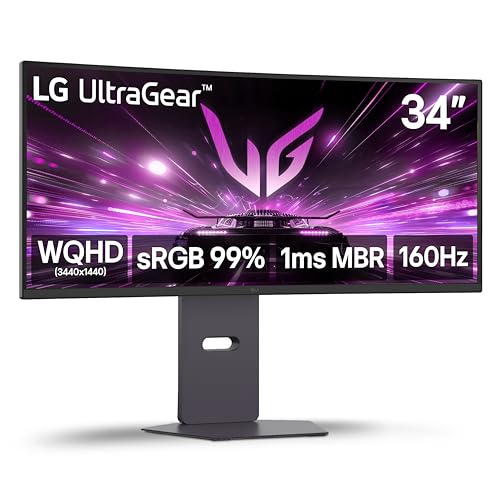
LG 34-Inch UltraGear Curved 160Hz Monitor
Best for: immersive ultrawide gaming and multitasking
- Screen Size
- 34-inch
- Resolution
- 3440 x 1440
- Refresh Rate
- 160Hz
- Response Time
- 1ms MBR
- Sync Technology
- AMD FreeSync Premium
- Connectivity
- HDMI 2.1, DisplayPort
View on Amazon: LG 34-Inch UltraGear Curved 160Hz Monitor Affiliate link
This LG UltraGear monitor features a 34-inch curved WQHD display with a 160Hz refresh rate and 1ms Motion Blur Reduction. It supports AMD FreeSync Premium for tear-free gameplay and HDR10 for enhanced contrast. The 1800R curvature expands your field of view, making it ideal for immersive gaming or multitasking on a wider canvas than standard 16:9 panels.
Pros
- 34-inch WQHD (3440 x 1440) resolution
- 160Hz refresh rate with 1ms MBR
- 1800R curved screen for immersion
- AMD FreeSync Premium technology
Cons
- Limited to 99% sRGB color coverage
- No mention of hardware calibration
- Heavier build at 22 pounds
Good fit if
- You want a wider field of view for gaming
- You need smooth motion with 160Hz refresh
- You prefer curved displays for immersion
Skip if
- You require DCI-P3 color accuracy
- You need a flat screen for design work
- You prefer lighter monitors under 15 pounds
Verdict: LG 34-inch Curved WQHD 160Hz suits players who prioritize screen real estate and fluid motion over color precision. It delivers a solid ultrawide experience for those who value immersion and high refresh rates.
Specifications side by side
| Spec | LG 27-Inch QHD 144Hz IPS Monitor | LG 34-Inch UltraGear Curved 160Hz Monitor |
|---|---|---|
| Screen Size | 27-Inch | 34-inch |
| Resolution | 2560 x 1440 | 3440 x 1440 |
| Refresh Rate | 144Hz | 160Hz |
| Panel Type | IPS | not stated |
| Response Time | 1ms (GtG) | 1ms MBR |
| Sync Technology | NVIDIA G-SYNC, FreeSync Premium | AMD FreeSync Premium |
| Connectivity | HDMI, DisplayPort | HDMI 2.1, DisplayPort |
| Size | 27 Inch | not stated |
| Dimensions | 8.2 × 29.2 × 20.6 inches | 9.8 × 31.9 × 18.5 inches |
| Weight | 20.3 pounds | 22 pounds |
| Color | Black | Black |
| Model | 27GL83A-B | 34G600A-B.AUS |
Frequently asked questions
Is the 27-inch LG monitor better for color accuracy?
Yes, the LG 27-Inch QHD 144Hz IPS Monitor is designed for color accuracy. It uses an IPS panel to deliver precise color reproduction. This makes it a sharp choice for competitive gamers who value visual fidelity. The 1440p resolution on a 27-inch screen provides high pixel density for clear details.
Does the 34-inch model support G-SYNC?
The LG 34-Inch UltraGear Curved 160Hz Monitor supports FreeSync technology. The product data lists FreeSync but does not mention G-SYNC compatibility. You should check your specific graphics card requirements if G-SYNC is essential for your setup. The 27-inch model, however, lists both FreeSync and G-SYNC support.
Which monitor is lighter to mount on a wall?
The LG 27-Inch QHD 144Hz IPS Monitor is lighter. It weighs 20.3 pounds. The LG 34-Inch UltraGear Curved 160Hz Monitor weighs 22 pounds. The difference is small, but the 27-inch model is slightly easier to handle. Both monitors have a standard black finish and similar depth dimensions for mounting.
What is the resolution difference between the two displays?
The 27-inch monitor has a QHD resolution of 1440p. The 34-inch monitor has a WQHD resolution of 3440 x 1440. The 34-inch display has nearly double the horizontal pixels. This provides more screen real estate for immersive gaming and multitasking on the ultrawide model.
Can I connect both monitors with HDMI?
Yes, both monitors support HDMI connectivity. The LG 27-Inch QHD 144Hz IPS Monitor includes DisplayPort and HDMI ports. The LG 34-Inch UltraGear Curved 160Hz Monitor also features DisplayPort and HDMI connections. You can use standard HDMI cables to connect these displays to your PC or console.
Is the 34-inch screen curved for immersion?
Yes, the LG 34-Inch UltraGear Curved 160Hz Monitor is curved. This design enhances immersion by wrapping the view around your field of vision. It suits players who prioritize screen real estate and fluid motion. The curve helps reduce eye strain during long gaming sessions by keeping edges at a consistent distance.
Which monitor has a higher refresh rate?
The LG 34-Inch UltraGear Curved 160Hz Monitor has a higher refresh rate. It operates at 160Hz. The LG 27-Inch QHD 144Hz IPS Monitor runs at 144Hz. The 16Hz difference allows for smoother frame transitions on the 34-inch model. This can benefit fast-paced competitive gaming.