LG 27-Inch QHD 144Hz IPS vs LG 34-Inch UltraWide 1080p IPS (2026): Key Differences
As an Amazon Associate we earn from qualifying purchases. Links on this page are affiliate links.
You are comparing the lg 27 inch qhd 144hz ips vs 34 inch ultrawide 1080p ips. Both monitors use IPS panels for wide viewing angles and accurate colors. They share HDMI and DisplayPort connections. The main difference lies in their physical dimensions and pixel density. One offers a compact QHD display for sharp detail. The other provides a wide 21:9 screen for multitasking. You must choose based on your primary use case.
Key differences
| Aspect | LG 27-Inch QHD 144Hz IPS Monitor | LG 34-Inch UltraWide 1080p IPS Monitor |
|---|---|---|
| Screen Size | 27-inch | 34-inch |
| Resolution | 2560 x 1440 (QHD) | 2560 x 1080 (WFHD) |
| Refresh Rate | 144Hz | 100Hz |
| Sync Technology | NVIDIA G-SYNC, FreeSync Premium | Not listed |
| Connectivity | HDMI, DisplayPort | HDMI, DisplayPort, USB Type-C |
| HDR | Not listed | VESA DisplayHDR 400 |
Which one should you choose?
Choose LG 27-Inch QHD 144Hz IPS Monitor if
- You play fast-paced games and need G-SYNC compatibility.
- You prefer a higher pixel density for sharper text and images.
- You want a smaller footprint that fits standard desks easily.
Choose LG 34-Inch UltraWide 1080p IPS Monitor if
- You need extra horizontal space for multitasking or spreadsheets.
- You connect a laptop and want single-cable USB-C charging.
- You prefer built-in speakers and HDR brightness for media.
Verdict: The 27-inch model suits gamers who prioritize high refresh rates and crisp QHD visuals. The 34-inch UltraWide is better for productivity and media consumption due to its width and USB-C convenience. Choose the one that matches your primary screen usage.
27 Inch QHD vs 34 Inch UW
Resolution and pixel density
The LG 27-Inch QHD 144Hz IPS Monitor delivers a 2560 x 1440 resolution on a 27-inch screen. This creates a sharp, dense pixel image ideal for crisp text and detailed gaming. In contrast, the LG 34-Inch UltraWide 1080p IPS Monitor uses a 2560 x 1080 resolution across its wider 34-inch panel. While the total pixel count is lower, the 21:9 aspect ratio provides more horizontal space. You will notice a significant difference in sharpness between the two. The 27-inch model offers higher pixel density, making it the better choice if you prioritize image clarity and fine detail over sheer screen width.
Refresh rate and motion
Motion smoothness differs between these two monitors. The LG 27-Inch QHD 144Hz IPS Monitor supports a 144Hz refresh rate. This higher frame rate reduces motion blur and provides a competitive advantage in fast-paced games. The LG 34-Inch UltraWide 1080p IPS Monitor operates at a 100Hz refresh rate. While 100Hz is smoother than standard 60Hz displays, it falls short of the 144Hz capability of the 27-inch model. If you play competitive shooters or fast action games, the higher refresh rate on the 27-inch screen will feel noticeably more fluid. For general desktop use, both rates are smooth, but the 27-inch model has the technical edge.
Sync technology compatibility
Both monitors support adaptive sync to prevent screen tearing, but the specific technologies differ. The LG 27-Inch QHD 144Hz IPS Monitor is NVIDIA G-SYNC Compatible and supports AMD FreeSync Premium. This dual compatibility ensures smooth performance across both major GPU brands. The LG 34-Inch UltraWide 1080p IPS Monitor lists HDMI and DisplayPort connectivity but does not explicitly list G-SYNC or FreeSync certification in its key specs. It focuses on smooth visuals through its 100Hz rate. If you use an NVIDIA or AMD graphics card and want certified tear-free gaming, the 27-inch monitor provides verified support that the 34-inch model lacks in its published specifications.
Connectivity options
Connection versatility varies between the two models. The LG 34-Inch UltraWide 1080p IPS Monitor includes USB Type-C connectivity alongside HDMI and DisplayPort. This allows you to connect a laptop with a single cable for both video output and data transfer. The LG 27-Inch QHD 144Hz IPS Monitor offers HDMI and DisplayPort connections but does not list USB Type-C in its specifications. If you use a modern laptop or device that relies on USB-C for video, the 34-inch monitor provides a more convenient and clutter-free setup. The 27-inch model requires traditional video cables for connection.
Physical size and workspace
The physical footprint and viewing area are the primary differentiators. The LG 34-Inch UltraWide 1080p IPS Monitor features a 21:9 aspect ratio, providing significantly more horizontal screen real estate. This is ideal for multitasking, allowing you to keep multiple windows open side-by-side. The LG 27-Inch QHD 144Hz IPS Monitor has a standard 16:9 aspect ratio with a smaller 27-inch diagonal. While it offers a larger vertical space than the UW model, it cannot match the horizontal breadth of the 34-inch screen. If your workflow involves spreadsheets, coding, or browsing multiple tabs, the 34-inch monitor provides a wider, more immersive workspace.
Which LG monitor fits your needs
Competitive gamers seeking high frame rates
The LG 27GL83A-B offers a 144Hz refresh rate and 1ms response time, which reduces motion blur in fast-paced titles. It supports both NVIDIA G-SYNC and AMD FreeSync Premium to eliminate screen tearing. The QHD resolution provides sharper visuals than standard HD, making it ideal for players who prioritize smoothness and clarity.
Professionals needing multitasking and connectivity
The 34U530A-W features a 21:9 UltraWide aspect ratio, allowing you to view multiple windows side by side without switching. It includes USB Type-C for single-cable data and display transfer. The 100Hz refresh rate ensures smooth scrolling, while the wider screen real estate significantly boosts productivity for office work and content creation.
Users wanting built-in audio and HDR
This model includes built-in stereo speakers with Waves MaxxAudio, so you do not need external audio devices. It also supports VESA DisplayHDR 400 for enhanced brightness and contrast. The IPS panel covers up to 99% of sRGB, ensuring accurate colors for media consumption and casual gaming without the clutter of extra hardware.
The products compared

LG 27-Inch QHD 144Hz IPS Monitor
Best for: Competitive gaming on standard 16:9 screens
- Screen Size
- 27-Inch
- Resolution
- 2560 x 1440
- Refresh Rate
- 144Hz
- Panel Type
- IPS
- Response Time
- 1ms (GtG)
- Sync Technology
- NVIDIA G-SYNC, FreeSync Premium
View on Amazon: LG 27-Inch QHD 144Hz IPS Monitor Affiliate link
This LG 27-inch monitor uses an IPS panel with 2560 x 1440 resolution and a 144Hz refresh rate. It features a 1ms response time and supports both NVIDIA G-SYNC and AMD FreeSync Premium. The stand allows tilt, height, and pivot adjustments. It suits players who prefer a standard 16:9 aspect ratio with high clarity and smooth motion over the wider field of view found on ultrawide displays.
Pros
- IPS panel covers 99% of sRGB for accurate colors
- 144Hz refresh rate with 1ms GtG response time
- Officially NVIDIA G-SYNC Compatible and FreeSync Premium certified
- Stand adjusts for tilt, height, and pivot
- Three-side virtually borderless design
Cons
- 27-inch size is smaller than the 34-inch ultrawide alternative
- Standard 16:9 aspect ratio offers less horizontal space than 21:9
- No mention of USB hub connectivity in specifications
Good fit if
- You want high pixel density and sharp text on a 27-inch screen
- You prefer the familiar 16:9 aspect ratio for games and media
- You need official G-SYNC compatibility for smoother gameplay
Skip if
- You require an ultrawide 21:9 aspect ratio for immersive gaming
- You need a screen larger than 27 inches for desk space
- You prioritize 4K resolution over high refresh rates
Verdict: LG 27-Inch QHD 144Hz IPS Monitor delivers crisp 1440p visuals and smooth 144Hz performance for competitive gamers who prefer a standard 16:9 screen. It fits players who value color accuracy and vertical space over the horizontal immersion of ultrawide displays.
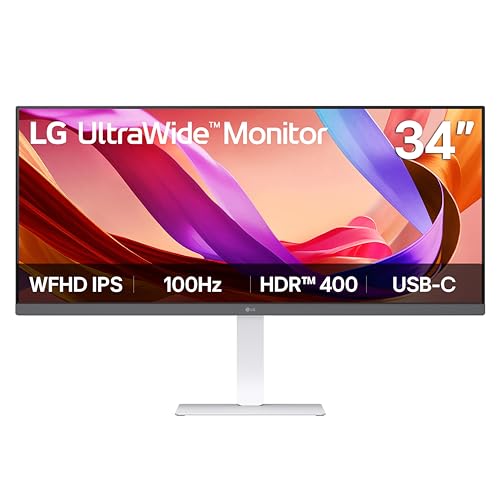
LG 34-Inch UltraWide 1080p IPS Monitor
Best for: multitasking and office productivity
- Screen Size
- 34"
- Resolution
- 2560 x 1080
- Refresh Rate
- 100Hz
- Panel Type
- IPS
- Aspect Ratio
- 21:9
- Connectivity
- HDMI, DisplayPort, USB Type-C
View on Amazon: LG 34-Inch UltraWide 1080p IPS Monitor Affiliate link
This 34-inch 21:9 monitor offers a 2560 x 1080 resolution with a 100Hz refresh rate. The IPS panel provides wide viewing angles and 99% sRGB coverage. USB Type-C connectivity simplifies connections. It is ideal for multitasking and office work. The wide screen lets you keep multiple windows open. This setup suits users who prioritize horizontal space over high pixel density.
Pros
- 21:9 aspect ratio for wide multitasking
- 100Hz refresh rate for smooth motion
- USB Type-C for single-cable connection
- VESA DisplayHDR 400 certification
- Built-in Waves MaxxAudio speakers
Cons
- 1080p resolution on a 34-inch screen
- 100Hz refresh rate limits gaming
- No built-in stand adjustment mentioned
Good fit if
- You need extra horizontal screen space for spreadsheets
- You prefer a single-cable USB-C setup
- You want a wide display for media consumption
Skip if
- You require sharp 4K or QHD detail
- You play fast-paced competitive games
- You need a high refresh rate above 100Hz
Verdict: LG 34-Inch UltraWide 1080p IPS is a practical multitasking screen for office work. It fits users who value wide horizontal space over pixel density.
Specifications side by side
| Spec | LG 27-Inch QHD 144Hz IPS Monitor | LG 34-Inch UltraWide 1080p IPS Monitor |
|---|---|---|
| Screen Size | 27-Inch | 34" |
| Resolution | 2560 x 1440 | 2560 x 1080 |
| Refresh Rate | 144Hz | 100Hz |
| Panel Type | IPS | IPS |
| Aspect Ratio | not stated | 21:9 |
| Response Time | 1ms (GtG) | not stated |
| Sync Technology | NVIDIA G-SYNC, FreeSync Premium | not stated |
| Connectivity | HDMI, DisplayPort | HDMI, DisplayPort, USB Type-C |
| Size | 27 Inch | not stated |
| Dimensions | 8.2 × 29.2 × 20.6 inches | 9.1 × 32.1 × 21 inches |
| Weight | 20.3 pounds | 19.4 pounds |
| Color | Black | White |
| Model | 27GL83A-B | 34U530A-W.AUS |
Frequently asked questions
Is the 27-inch QHD monitor better for gaming than the 34-inch ultrawide?
Yes, if you prioritize competitive performance. The LG 27-inch model features a 144Hz refresh rate and supports both FreeSync and G-SYNC technologies. This combination ensures smooth visuals and reduces screen tearing in fast-paced titles. The 34-inch alternative offers only a 100Hz refresh rate, making it less ideal for high-speed gaming scenarios.
Which screen provides sharper text for office work?
The 27-inch QHD display delivers sharper text due to its higher pixel density. It uses a 2560 x 1440 resolution on a smaller 27-inch panel. The 34-inch ultrawide monitor uses a 2560 x 1080 resolution across a much wider area, resulting in lower pixel density and less crisp text rendering for reading documents.
Does the 34-inch ultrawide monitor include USB-C connectivity?
Yes, the LG 34-inch model includes USB-C connectivity alongside DisplayPort and HDMI ports. This allows for versatile connection options and potential power delivery. The 27-inch QHD monitor relies on standard DisplayPort and HDMI connections, offering fewer modern interface options for peripheral or laptop connections.
Which monitor is more suitable for multitasking with multiple windows?
The 34-inch ultrawide monitor is better for multitasking. Its 2560 x 1080 resolution provides a wide 21:9 aspect ratio, allowing you to place side-by-side windows comfortably. The 27-inch 16:9 screen offers more vertical space but less horizontal real estate, making it less effective for managing multiple applications simultaneously.
What is the difference in physical size between these two monitors?
The 34-inch monitor is significantly wider, measuring 32.1 inches in width compared to the 27-inch model's 29.2 inches. The 27-inch unit is taller at 20.6 inches, while the 34-inch version is 21 inches tall. The ultrawide model is slightly lighter at 19.4 pounds versus the 27-inch model's 20.3 pounds.
Do both monitors use IPS panel technology?
Yes, both screens utilize IPS panel technology. This ensures wide viewing angles and consistent color accuracy regardless of your viewing position. IPS panels are generally preferred for their ability to maintain image quality when viewed from the side, making them suitable for both gaming and professional content creation tasks.