LG 32-Inch FHD 165Hz Gaming Review: Who It Fits and Who Should Skip It
As an Amazon Associate we earn from qualifying purchases. Links on this page are affiliate links.
This lg 32gn550 b 32 inch ultragear review covers a monitor that pairs a 32-inch screen with Full HD resolution. It delivers a 165Hz refresh rate for smooth motion. The VA panel offers deep blacks and a 1ms response time. You get adjustable ergonomics and compatibility with both NVIDIA G-SYNC and AMD FreeSync Premium. This setup targets gamers who want speed on a large canvas without paying for higher pixel density. It is a practical choice for specific desktop environments.
What stands out
- 165Hz refresh rate for smooth gameplay
- 32-inch VA panel with 1920 x 1080 resolution
- 1ms MBR response time
- Height, incline, and shaft adjustable stand
- Support for NVIDIA G-SYNC and AMD FreeSync Premium
Who it fits
Good fit for
This monitor suits players who prioritize high refresh rates and low input lag over sharp image detail. It works well for competitive shooters where motion clarity matters more than pixel density. The adjustable stand helps users find a comfortable viewing angle during long sessions. Gamers with NVIDIA or AMD graphics cards will appreciate the sync technology support. It is a solid option for those who want a large screen without the premium cost of 4K panels.
Who should skip it
Users who need crisp text or detailed visuals for productivity should look elsewhere. The 1080p resolution on a 32-inch screen results in visible pixelation at normal viewing distances. Professionals requiring color accuracy for photo editing may find the sRGB coverage limiting. If you play single-player RPGs or strategy games where visual fidelity is key, this display may feel too coarse. Those who prefer smaller screens for tighter desk setups will also find it too large.
Verdict: The LG 32GN550-B is a capable gaming monitor for those who value speed and size over resolution. It delivers solid performance for competitive titles but falls short for detail-oriented tasks.
Key specs explained
32" Screen Size
This diagonal measurement defines the physical viewing area. A 32-inch panel provides a large canvas for gaming and media consumption. You should consider pixel density when comparing this to smaller screens, as lower density can make individual pixels visible at close range. This size suits users who want an immersive field of view without moving their eyes as much as they would on a larger display.
1920 x 1080 Resolution
This is the Full HD pixel count. On a 32-inch screen, this results in a pixel density of approximately 69 PPI. Text and images will appear less sharp than on a 27-inch 1080p monitor or a 4K display. You should expect visible pixelation if you sit very close. This spec is common in budget gaming monitors where speed is prioritized over image clarity.
165Hz Refresh Rate
The screen updates 165 times per second. This high rate reduces motion blur and makes fast-paced action feel smoother. You benefit from this in competitive shooters or racing games where quick reactions matter. Compare this to standard 60Hz monitors; the difference is significant for fluidity. Higher refresh rates require a powerful GPU to drive enough frames to utilize the full potential of the panel.
1ms MBR Response Time
MBR stands for Motion Blur Reduction. This spec indicates how quickly pixels can change color to reduce ghosting. A 1ms rating aims to minimize trailing artifacts behind moving objects. You will notice clearer motion in fast scenes. This technology often works by strobing the backlight. Check if your GPU can output high frame rates to match this response capability for the best visual result.
NVIDIA G-SYNC, AMD FreeSync Premium
These are adaptive sync technologies that synchronize the monitor refresh rate with the GPU frame rate. This prevents screen tearing and stuttering. You get smoother gameplay regardless of frame fluctuations. G-SYNC compatibility works with NVIDIA cards, while FreeSync Premium supports AMD GPUs and often includes low framerate compensation. This dual support ensures broad compatibility with both major graphics card manufacturers.
Design and Build Overview
According to the listing, the LG 32GN550-B features a black finish with a 32-inch display area. The unit measures 11.1 inches in width, 9.29 inches in height, and 4.53 inches in depth when including the stand. The bezel design is described as virtually rimless on three sides. This layout creates a more immersive visual field by reducing the distraction of frame edges. You get a larger continuous screen area relative to the overall footprint of the device.
The monitor includes an incline, height, and shaft adjustable stand. These controls allow you to position the screen at a comfortable viewing angle and distance. Height adjustment is particularly useful for matching the display to your desk setup or chair position. The shaft adjustment helps tilt the panel back or forth to reduce glare or improve neck posture. This ergonomic range suggests the monitor is built for extended sessions where physical comfort matters.
The VA panel type contributes to the visual experience by providing deep black levels. This characteristic is beneficial for dark room environments or games with high contrast scenes. The 1ms response time specification indicates the panel can change pixel colors quickly. This speed helps reduce motion blur during fast-paced gaming. The combination of these physical and display traits defines the monitor's practical utility for your specific desk space and usage habits.
Setup and everyday use
Setting up the LG 32GN550-B begins with the stand. The listing specifies an incline, height, and shaft adjustable base. You can position the 32-inch panel at your preferred viewing distance. The physical dimensions are 11.1 inches wide, 9.29 inches high, and 4.53 inches deep. This adjustability helps you align the screen with your desk setup. The virtually rimless design on three sides may simplify cable management or aesthetic integration into a multi-monitor array.
Connectivity and compatibility are straightforward. The monitor supports NVIDIA G-SYNC and AMD FreeSync Premium. These technologies synchronize the refresh rate with your graphics card to reduce screen tearing. You need a compatible GPU to utilize these features. The 165Hz refresh rate and 1ms MBR response time work together to minimize motion blur. This configuration is suitable for fast-paced gaming where clarity matters.
Daily use involves navigating the 1920 x 1080 resolution on a large canvas. The VA panel provides deep blacks, which enhances contrast in dark scenes. The sRGB color gamut covers 95% of the spectrum, ensuring accurate colors for general tasks. HDR10 support is included, though the listing does not detail peak brightness levels. You should check your content source for HDR compatibility. The black finish blends with most desk environments. The adjustable stand allows you to tilt the screen for optimal viewing angles. This setup requires minimal effort to get started.
Before you buy this LG
You need a PC or console that supports 165Hz. Check your GPU drivers for G-SYNC compatibility. AMD users should verify FreeSync Premium support. The 32-inch screen at 1080p has low pixel density. Text may look blurry if you sit close. You should sit back for gaming. This monitor is not an ultrawide. It lacks the field of view for simulation games. It fits best for fast-paced shooters. You need a sturdy desk. The stand adjusts height and tilt. Clean the VA panel gently. Use microfiber only. Avoid harsh chemicals. This model sits below ultrawide options in immersion. It is a budget-friendly choice for high refresh rates. You get smooth motion without the cost of higher resolutions. It is a solid secondary display. Primary users might want sharper text. Consider your desk space. The width is over 11 inches. Ensure your setup has room. This is a practical pick for casual gamers.
Check before you buy
- Verify your GPU supports 165Hz and G-SYNC or FreeSync.
- Check if your desk has enough width for the stand.
- Ensure you sit far enough away for 1080p clarity.
- Confirm your console supports 1080p at 120Hz or higher.
The product at a glance
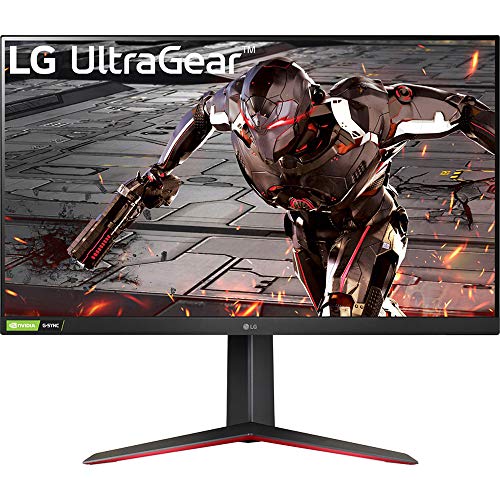
LG 32-Inch FHD 165Hz Gaming Monitor
Best for: Fast-paced gaming with ergonomic adjustments
- Screen Size
- 32"
- Resolution
- 1920 x 1080
- Refresh Rate
- 165Hz
- Response Time
- 1ms MBR
- Sync Technology
- NVIDIA G-SYNC, AMD FreeSync Premium
- Panel Type
- VA
View on Amazon: LG 32-Inch FHD 165Hz Gaming Monitor Affiliate link
This LG monitor pairs a 32-inch screen with a 1920 x 1080 resolution. It delivers a 165Hz refresh rate and 1ms response time for smooth motion. The VA panel covers 95% of the sRGB gamut and supports HDR10. You get height, incline, and shaft adjustments. It works with NVIDIA G-SYNC and AMD FreeSync Premium. This setup suits players who prioritize speed and color accuracy over pixel density.
Pros
- 165Hz refresh rate for smooth gameplay
- 1ms MBR response time reduces motion blur
- Height, incline, and shaft adjustable stand
- 95% sRGB color gamut coverage
- Compatible with NVIDIA G-SYNC and AMD FreeSync Premium
Cons
- 1080p resolution on a 32-inch screen results in low pixel density
- VA panel may exhibit slower pixel transitions than IPS
- HDR10 support is basic without local dimming
Good fit if
- You want a large screen for immersive gaming
- You prioritize high refresh rates and low response times
- You need ergonomic stand adjustments for comfort
Skip if
- You require sharp image clarity on a large display
- You need high-end HDR performance with local dimming
- You prefer IPS panel technology for wider viewing angles
Verdict: LG 32-Inch 165Hz FHD Gaming Monitor offers speed and ergonomics for fast-paced gaming. It fits players who value refresh rate and adjustability over sharpness on a large screen.
Specifications side by side
| Spec | LG 32-Inch FHD 165Hz Gaming Monitor |
|---|---|
| Screen Size | 32" |
| Resolution | 1920 x 1080 |
| Refresh Rate | 165Hz |
| Response Time | 1ms MBR |
| Sync Technology | NVIDIA G-SYNC, AMD FreeSync Premium |
| Panel Type | VA |
| Dimensions | 4.53 × 11.1 × 9.29 inches |
| Size | 32" |
| Color | Black |
| Model | 32GN550-B |
Frequently asked questions
Is the LG 32GN550-B good for competitive shooters?
Yes, it supports fast-paced gaming. The 165Hz refresh rate reduces motion blur during quick movements. You also get FreeSync and G-SYNC compatibility. This sync technology prevents screen tearing. The VA panel provides deep blacks, which helps in dark scenes. It fits players who prioritize speed and adjustability over extreme sharpness.
Does this monitor have a high pixel density?
No, it does not. You are pairing a 32-inch screen with Full HD resolution. This combination results in low pixel density. Individual pixels may become visible if you sit close to the display. Text might appear blurry at typical desk distances. You should sit further back for a cleaner image.
Can I adjust the height of the LG 32GN550-B?
Yes, the stand offers ergonomic adjustments. You can change the incline, height, and shaft position. This allows you to find a comfortable viewing angle. The physical dimensions are 11.1 inches wide and 9.29 inches high. These features help you position the monitor correctly for long gaming sessions.
What panel type does the LG 32GN550-B use?
It uses a VA panel. This technology is known for high contrast ratios and deep black levels. The listing also notes a 1ms response time. This helps reduce ghosting in fast-moving games. The VA panel is suitable for gaming in dimly lit rooms where contrast matters.
Is the LG 32GN550-B compatible with NVIDIA G-SYNC?
Yes, it supports both FreeSync and G-SYNC. This dual compatibility ensures smooth gameplay on both AMD and NVIDIA systems. You should check your GPU drivers for G-SYNC support. This sync technology matches the refresh rate to your frame rate. It eliminates screen tearing without input lag.
What are the physical dimensions of the LG 32GN550-B?
The monitor measures 11.1 inches in width, 9.29 inches in height, and 4.53 inches in depth. These measurements include the stand. The black finish gives it a standard gaming aesthetic. You should ensure your desk has enough space for these dimensions before purchasing.
Who should skip this monitor?
You should skip it if you need sharp text. The 32-inch screen at 1080p has low pixel density. Text may look blurry if you sit close. It also fits players who value sharpness over refresh rate. If you want crisp images for productivity, look for a higher resolution or smaller screen size.