LG 32" Curved 100Hz FHD vs LG UltraGear 27-Inch 1080p Gaming: Spec Comparison
As an Amazon Associate we earn from qualifying purchases. Links on this page are affiliate links.
This guide compares the lg 32mr50c b curved monitor 32 inch vs 27g414b b 27 inch ultragear ips. Both monitors offer Full HD resolution and AMD FreeSync support for smoother visuals. The main difference lies in the display technology and refresh rate. The 32-inch model uses a VA panel with a 100Hz refresh rate. The 27-inch UltraGear model features an IPS panel, a 144Hz refresh rate, and NVIDIA G-SYNC compatibility. You need to weigh screen size against performance specs.
Key differences
| Aspect | LG 32" Curved 100Hz FHD Monitor | LG UltraGear 27-Inch 1080p Gaming Monitor |
|---|---|---|
| Screen Size | 32 inches | 27 inches |
| Panel Type | VA | IPS |
| Refresh Rate | 100Hz | 144Hz |
| Sync Technology | AMD FreeSync | NVIDIA G-SYNC Compatible, AMD FreeSync |
| Response Time | not listed | 1ms MBR |
Which one should you choose?
Choose LG 32" Curved 100Hz FHD Monitor if
- You prefer a larger 32-inch display for immersive media consumption.
- You are on a budget and prioritize screen real estate over high refresh rates.
- You play slower-paced games where 100Hz is sufficient for smooth motion.
Choose LG UltraGear 27-Inch 1080p Gaming Monitor if
- You need faster 144Hz refresh rates for competitive gaming.
- You use an NVIDIA graphics card and want G-SYNC compatibility.
- You prefer IPS panel accuracy and wider viewing angles over VA contrast.
Verdict: Choose the 32-inch VA model if you want a larger screen for general use and media. Pick the 27-inch IPS UltraGear if you prioritize faster refresh rates and broader sync technology support for gaming.
Screen Size and Panel Tech Comparison
Screen size and curvature
The LG 32MR50C-B offers a 32-inch display with a curved design, creating a more immersive field of view for media and casual gaming. In contrast, the LG 27G414B-B features a 27-inch flat IPS panel. The larger screen on the 32-inch model provides more real estate for multitasking or wider game views, while the 27-inch option remains more compact for smaller desks. You should choose the 32-inch model if you prefer a bigger, enveloping image, or the 27-inch model for a standard desktop footprint.
Refresh rate performance
Refresh rate determines how many times per second the image updates. The LG 27G414B-B boasts a 144Hz refresh rate, which is significantly higher than the 100Hz rate found on the LG 32MR50C-B. A higher refresh rate reduces motion blur and makes fast-paced action appear smoother. For competitive gaming where frame-to-frame clarity matters, the 144Hz panel provides a tangible advantage. The 100Hz display is sufficient for casual play but offers less fluidity during rapid movements.
Panel type and color
Panel technology affects viewing angles and color accuracy. The LG 27G414B-B uses an IPS panel, known for consistent colors and wide viewing angles, supporting up to 99% sRGB coverage and HDR10. The LG 32MR50C-B uses a VA panel, which typically offers deeper blacks and higher contrast ratios but narrower viewing angles. If you value color vibrancy and accurate hues from different positions, the IPS panel is superior. If you prefer higher contrast for dark room viewing, the VA panel may be preferable.
Sync technology compatibility
Both monitors support AMD FreeSync to reduce screen tearing. However, the LG 27G414B-B adds NVIDIA G-SYNC compatibility, offering broader support for NVIDIA graphics cards. The LG 32MR50C-B relies solely on AMD FreeSync. If you use an NVIDIA GPU, the 27-inch model ensures smoother synchronization without tearing. AMD users will find both monitors equally capable in this regard. The additional G-SYNC support on the 27-inch model makes it more versatile for different PC configurations.
Physical dimensions and weight
Size and weight impact desk space and stand stability. The LG 32MR50C-B measures 27.9 inches wide and weighs 11.3 pounds, making it a larger and heavier unit. The LG 27G414B-B is more compact at 24.1 inches wide and lighter at 9.5 pounds. The smaller footprint of the 27-inch model saves desk space and is easier to reposition. The 32-inch model requires more room and may need a sturdier surface to support its weight comfortably.
Which monitor fits your needs
Competitive gamers needing speed
The LG UltraGear 27G414B-B features a 144Hz refresh rate and 1ms Motion Blur Reduction. This combination minimizes ghosting in fast-paced titles. It also supports both NVIDIA G-SYNC Compatible and AMD FreeSync technologies. These sync features reduce screen tearing and input lag, ensuring your actions translate to the screen instantly without visual artifacts.
Users wanting a large immersive view
The LG 32MR50C-B provides a 32-inch curved screen. This larger diagonal size fills more of your peripheral vision for a more engaging experience. The curvature helps maintain consistent viewing angles across the display. This design is ideal if you prefer a wider field of view for media consumption or casual gaming sessions.
Viewers prioritizing color accuracy
The LG 27G414B-B uses an IPS panel with up to 99% sRGB color gamut coverage. IPS technology typically offers better color consistency and wider viewing angles than VA panels. If accurate color reproduction is important for your work or gaming visuals, this panel type delivers richer and more reliable tones compared to standard VA displays.
Budget-conscious casual players
The LG 32MR50C-B offers a 100Hz refresh rate and AMD FreeSync support. This setup reduces stuttering during streaming and casual gameplay. It includes Black Stabilizer to brighten dark scenes and Reader Mode to reduce eye strain. This monitor provides essential gaming features and comfort adjustments without the higher performance specs of premium gaming displays.
The products compared
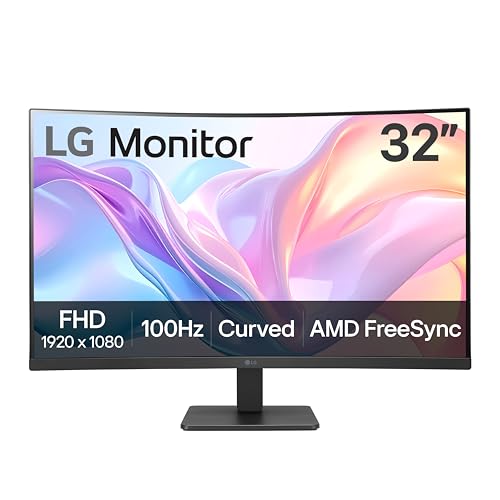
LG 32" Curved 100Hz FHD Monitor
Best for: Casual gaming and media on a large screen
- Screen Size
- 32-Inch
- Resolution
- 1920x1080
- Refresh Rate
- 100Hz
- Sync Technology
- AMD FreeSync
- Connectivity
- HDMI
- Dimensions
- 9.2 × 27.9 × 20.2 inches
View on Amazon: LG 32" Curved 100Hz FHD Monitor Affiliate link
This LG monitor gives you a 32-inch curved screen with 1920x1080 resolution. The 100Hz refresh rate and AMD FreeSync help keep motion smooth during casual gaming or streaming. It includes Black Stabilizer to brighten dark scenes and Reader Mode to reduce blue light. The stand allows tilt adjustment for comfortable viewing angles. It is a practical option if you want a larger display area for productivity or media consumption.
Pros
- 32-inch curved VA panel for immersive viewing
- 100Hz refresh rate reduces motion blur
- AMD FreeSync prevents screen tearing
- Black Stabilizer enhances visibility in dark scenes
- Tilt-adjustable stand for ergonomic positioning
Cons
- 1080p resolution on a 32-inch screen lowers pixel density
- Only HDMI connectivity available
- 100Hz refresh rate is lower than 144Hz competitors
Good fit if
- You want a larger screen for multitasking or media
- You prioritize immersion over high refresh rates
- You play casual games where smooth motion matters
Skip if
- You need high pixel density for sharp text
- You require multiple display inputs
- You play competitive games needing 144Hz or higher
Verdict: LG 32-Inch 100Hz Curved FHD Monitor suits users who prefer a large, immersive display for casual gaming and media over sharp pixel density. It is not ideal for competitive gamers needing high refresh rates.

LG UltraGear 27-Inch 1080p Gaming Monitor
Best for: Competitive 1080p gaming on IPS panels
- Screen Size
- 27"
- Resolution
- 1920 x 1080
- Refresh Rate
- 144Hz
- Panel Type
- IPS
- Response Time
- 1ms MBR
- Sync Technology
- G-SYNC Compatible, AMD FreeSync
View on Amazon: LG UltraGear 27-Inch 1080p Gaming Monitor Affiliate link
This 27-inch LG UltraGear monitor uses an IPS panel for 1080p resolution and 144Hz refresh rates. It features 1ms MBR response time and supports both G-SYNC Compatible and FreeSync. The display offers 99% sRGB coverage and HDR10 support. You get a slim design with Dynamic Action Sync and Black Stabilizer. It suits competitive gamers who prioritize speed and color accuracy on a standard 16:9 screen.
Pros
- 144Hz refresh rate for smooth motion
- IPS panel with 99% sRGB coverage
- G-SYNC Compatible and FreeSync support
- 1ms MBR reduces motion blur
- HDR10 support for vivid colors
Cons
- 1080p resolution on 27 inches yields lower pixel density
- No mention of height-adjustable stand
- No built-in speakers listed
Good fit if
- You play fast-paced shooters and need high refresh rates
- You prefer IPS color accuracy over VA contrast
- You want G-SYNC or FreeSync compatibility
Skip if
- You need 4K resolution for sharp text
- You require a curved screen for immersion
- You want a larger 32-inch viewing area
Verdict: LG 27G414B-B 27-Inch 1080p 144Hz IPS delivers competitive speed and reliable color for 1080p gamers. It fits players who value frame rate and sync tech over screen real estate.
Specifications side by side
| Spec | LG 32" Curved 100Hz FHD Monitor | LG UltraGear 27-Inch 1080p Gaming Monitor |
|---|---|---|
| Screen Size | 32-Inch | 27" |
| Resolution | 1920x1080 | 1920 x 1080 |
| Refresh Rate | 100Hz | 144Hz |
| Panel Type | not stated | IPS |
| Response Time | not stated | 1ms MBR |
| Sync Technology | AMD FreeSync | G-SYNC Compatible, AMD FreeSync |
| Connectivity | HDMI | HDMI, DisplayPort |
| Size | not stated | 27 Inch |
| Dimensions | 9.2 × 27.9 × 20.2 inches | 8.7 × 24.1 × 18.4 inches |
| Weight | 11.3 pounds | 9.5 pounds |
| Color | Black | Black |
| Model | 32MR50C-B.AUSQ | 27G414B-B.AUS |
Frequently asked questions
Is the LG 32MR50C-B curved monitor suitable for competitive gaming?
No, it is not ideal for competitive play. This model features a 100Hz refresh rate, which limits frame output compared to faster displays. It also lacks high-end sync technologies like G-SYNC. The 32-inch screen size reduces pixel density at 1080p resolution. This makes it better suited for casual gaming and media consumption rather than fast-paced esports titles.
Does the LG 27G414B-B support NVIDIA G-SYNC?
Yes, the LG UltraGear 27G414B-B supports NVIDIA G-SYNC Compatible technology. This sync feature helps reduce screen tearing and stuttering when paired with compatible NVIDIA graphics cards. It also includes AMD FreeSync support. This combination ensures smooth visuals across different GPU brands for a consistent gaming experience.
Which monitor has a higher refresh rate?
The LG UltraGear 27G414B-B has the higher refresh rate at 144Hz. The LG 32MR50C-B operates at 100Hz. The 144Hz rate on the 27-inch model allows for smoother motion and faster frame updates. This is beneficial for reducing motion blur in action-heavy games compared to the slower 100Hz panel.
What panel type does the LG 27G414B-B use?
The LG 27G414B-B uses an IPS panel. IPS technology typically offers better color accuracy and wider viewing angles than VA or TN panels. This makes it reliable for both gaming and general media use. The 32MR50C-B does not specify its panel type in the provided data, but it focuses on immersion through curvature.
How do the dimensions compare between the two monitors?
The LG 32MR50C-B is physically larger, measuring 27.9 inches in width and 20.2 inches in height. The LG 27G414B-B is more compact at 24.1 inches wide and 18.4 inches high. The 32-inch model also weighs more at 11.3 pounds compared to the 9.5-pound 27-inch unit. Consider your desk space when choosing between these sizes.
Is the LG 32MR50C-B curved display better for immersion?
Yes, the curved design of the 32MR50C-B enhances immersion for media and casual gaming. The curvature wraps the screen around your field of view. This contrasts with the flat 27-inch IPS panel of the 27G414B-B. The larger 32-inch screen also provides more screen real estate, which is helpful for multitasking or watching movies.
Does the LG 27G414B-B have Motion Blur Reduction?
Yes, the LG 27G414B-B features 1ms Motion Blur Reduction. This technology helps minimize ghosting during fast movements in games. It works in conjunction with the 144Hz refresh rate. This combination is designed to keep visuals clear and responsive, which is critical for competitive gamers who need precise visual feedback.