LG 32" Curved 100Hz FHD vs LG UltraGear 27-Inch 180Hz QHD (2026): Key Differences
As an Amazon Associate we earn from qualifying purchases. Links on this page are affiliate links.
This comparison looks at the lg 32mr50c b curved monitor 32 inch vs 27gs75q b 27 inch ultragear qhd. Both are LG displays with AMD FreeSync support and ergonomic stands. They share black color options and HDMI connectivity. The main difference lies in their target use cases. The 32-inch model prioritizes screen real estate and a curved viewing experience for general tasks. The 27-inch model focuses on high refresh rates and sharp QHD resolution for competitive gaming.
Key differences
| Aspect | LG 32" Curved 100Hz FHD Monitor | LG UltraGear 27-Inch 180Hz QHD Monitor |
|---|---|---|
| Screen Size | 32 inches | 27 inches |
| Resolution | 1920x1080 (FHD) | 2560x1440 (QHD) |
| Panel Type | VA | IPS |
| Refresh Rate | 100Hz | 180Hz (overclockable to 200Hz) |
| Sync Technology | AMD FreeSync | NVIDIA G-SYNC Compatible and AMD FreeSync |
| Connectivity | HDMI | HDMI and DisplayPort |
Which one should you choose?
Choose LG 32" Curved 100Hz FHD Monitor if
- You want a larger 32-inch screen for multitasking or immersive media viewing.
- You prefer a curved VA panel for deeper contrast in dark scenes.
- Your PC setup relies primarily on HDMI connections without needing DisplayPort.
Choose LG UltraGear 27-Inch 180Hz QHD Monitor if
- You need higher sharpness with QHD resolution on a 27-inch display.
- You play fast-paced games and benefit from 180Hz or 200Hz refresh rates.
- You use an NVIDIA graphics card and want G-SYNC Compatible certification.
Verdict: The LG 32-inch monitor suits users who prioritize screen size and contrast for general productivity and casual gaming. The LG UltraGear 27-inch is better for gamers who need higher resolution, faster refresh rates, and broader sync compatibility. Choose based on whether you value physical screen space or performance speed.
LG 32 Curved vs 27 QHD
Screen size
The LG 32MR50C-B features a 32-inch display, offering a larger canvas for multitasking and media consumption. Its curved design helps maintain consistent viewing distance across the wider screen. In contrast, the LG 27GS75Q-B uses a 27-inch panel. While smaller, this size is often preferred for gaming setups where you sit closer to the monitor. The 32-inch model provides more physical space for your workspace, while the 27-inch unit saves desk depth. You should choose based on whether you prioritize immersive width or compact precision.
Resolution
Resolution defines the clarity and detail of your images. The LG 32MR50C-B operates at Full HD (1920x1080). On a 32-inch screen, this results in a lower pixel density, which may make text or fine details appear less sharp. The LG 27GS75Q-B delivers QHD resolution (2560x1440) on a 27-inch panel. This combination offers significantly higher pixel density, resulting in sharper text and crisper game graphics. If visual fidelity and sharpness are your priority, the higher resolution of the 27GS75Q-B provides a clear advantage for both work and gaming tasks.
Refresh rate
Refresh rate determines how many times per second the image updates. The LG 32MR50C-B runs at 100Hz. This is smooth for everyday use and casual gaming, reducing motion blur compared to standard 60Hz panels. The LG 27GS75Q-B offers a much faster 180Hz refresh rate, with an overclocked option of 200Hz. This higher speed is critical for competitive gaming, allowing for faster response to in-game action. For casual viewing, 100Hz is sufficient, but the 200Hz capability of the 27GS75Q-B provides superior fluidity for fast-paced titles.
Panel type
Panel technology affects color accuracy and viewing angles. The specifications for the LG 32MR50C-B do not explicitly list the panel type, though it is often VA in this category, known for contrast. The LG 27GS75Q-B explicitly uses an IPS panel. IPS panels are renowned for accurate colors and wide viewing angles, ensuring the image looks consistent even when viewed from the side. It also supports 99% sRGB color gamut coverage. If you value color precision and wide viewing angles for creative work or multiplayer gaming, the IPS technology in the 27GS75Q-B is the stronger choice.
Connectivity
Connectivity options determine how you link your devices. The LG 32MR50C-B lists HDMI as its primary connectivity method. This is standard for most consoles and PCs. The LG 27GS75Q-B includes both HDMI and DisplayPort inputs. DisplayPort is essential for PC gamers who want to utilize the full refresh rate and adaptive sync features without limitations. The inclusion of DisplayPort on the 27GS75Q-B makes it more versatile for PC setups. If you rely on a PC for high-performance gaming, the additional DisplayPort on the 27-inch model provides necessary flexibility.
Which LG monitor fits your needs
Competitive FPS and esports players
The LG 27GS75Q-B offers a 180Hz refresh rate with overdrive to 200Hz, ensuring smoother motion for fast-paced titles. Its IPS panel delivers 1ms GtG response time and supports both NVIDIA G-SYNC Compatible and AMD FreeSync. This combination reduces screen tearing and input lag, giving you a competitive edge in high-speed gaming scenarios.
Users seeking immersive media viewing
The LG 32MR50C-B provides a larger 32-inch curved screen with Full HD resolution. This size creates a wider field of view, keeping edges closer to your line of sight. The curve enhances immersion for movies and casual gaming. It also includes Reader Mode to reduce blue light, making it easier on your eyes during long viewing sessions.
Desk space conscious gamers
The LG 27GS75Q-B has a smaller 27-inch footprint with a virtually borderless design. This compact form factor optimizes space on smaller desks while still delivering QHD clarity. The stand adjusts for height, tilt, and pivot. It fits well in setups where monitor real estate is limited but high refresh rates and sharp resolution remain priorities.
The products compared
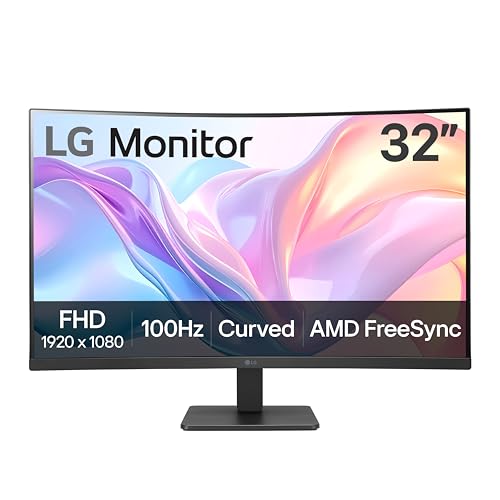
LG 32" Curved 100Hz FHD Monitor
Best for: Casual gaming and office work on a large screen
- Screen Size
- 32-Inch
- Resolution
- 1920x1080
- Refresh Rate
- 100Hz
- Sync Technology
- AMD FreeSync
- Connectivity
- HDMI
- Dimensions
- 9.2 × 27.9 × 20.2 inches
View on Amazon: LG 32" Curved 100Hz FHD Monitor Affiliate link
The LG 32MR50C-B is a 32-inch curved monitor with a 1920x1080 resolution and 100Hz refresh rate. It uses AMD FreeSync for smoother visuals. The stand allows tilt adjustment. Reader Mode reduces blue light. Black Stabilizer brightens dark scenes. This screen suits casual gamers and office users who want a larger display area without the cost of higher resolutions.
Pros
- 32-inch curved VA panel
- 100Hz refresh rate
- AMD FreeSync support
- Tilt-adjustable ergonomic stand
- Black Stabilizer feature
Cons
- 1920x1080 resolution on a large screen
- Limited to HDMI connectivity
- No USB-C or DisplayPort listed
Good fit if
- You need a large screen for multitasking
- You play casual games at 100Hz
- You prefer curved displays for immersion
Skip if
- You require QHD or 4K clarity
- You need high refresh rates over 100Hz
- You require multiple input ports
Verdict: The LG 32MR50C-B 32-Inch FHD Curved Monitor offers a spacious 32-inch view with 100Hz refresh for casual use. It fits users who prioritize screen size over pixel density.

LG UltraGear 27-Inch 180Hz QHD Monitor
Best for: Competitive gamers needing speed and clarity
- Screen Size
- 27"
- Resolution
- 2560x1440
- Refresh Rate
- 180Hz (O/C 200Hz)
- Panel Type
- IPS
- Response Time
- 1ms GtG
- Sync Technology
- NVIDIA G-SYNC Compatible, AMD FreeSync
View on Amazon: LG UltraGear 27-Inch 180Hz QHD Monitor Affiliate link
This 27-inch IPS monitor delivers QHD resolution for sharp visuals and 180Hz refresh rates, overclockable to 200Hz. It includes 1ms response times and G-SYNC Compatible support for smooth gameplay. The stand offers height, tilt, and pivot adjustments. It suits gamers who want a balance of speed and clarity without the bulk of a larger screen.
Pros
- QHD 2560x1440 resolution on a 27-inch IPS panel
- 180Hz refresh rate, overclockable to 200Hz
- 1ms GtG response time with Dynamic Action Sync
- Height, tilt, and pivot adjustable stand
Cons
- Smaller 27-inch screen compared to 32-inch alternatives
- Limited to 99% sRGB color gamut
- No USB hub or headphone jack listed in specs
Good fit if
- You prefer a compact 27-inch display for your desk
- You want high refresh rates for competitive gaming
- You need adjustable stand ergonomics
Skip if
- You require a 32-inch or larger screen
- You need HDR10 certification for color accuracy
- You want a curved display surface
Verdict: LG 27GS75Q-B 27-inch 180Hz QHD is a solid pick for competitive gamers who prioritize speed and crisp resolution on a manageable 27-inch frame. It fits those who value adjustable ergonomics and high refresh rates over sheer screen size.
Specifications side by side
| Spec | LG 32" Curved 100Hz FHD Monitor | LG UltraGear 27-Inch 180Hz QHD Monitor |
|---|---|---|
| Screen Size | 32-Inch | 27" |
| Resolution | 1920x1080 | 2560x1440 |
| Refresh Rate | 100Hz | 180Hz (O/C 200Hz) |
| Panel Type | not stated | IPS |
| Response Time | not stated | 1ms GtG |
| Sync Technology | AMD FreeSync | NVIDIA G-SYNC Compatible, AMD FreeSync |
| Connectivity | HDMI | HDMI, DisplayPort |
| Size | not stated | 27 Inch |
| Dimensions | 9.2 × 27.9 × 20.2 inches | 10 × 24.2 × 22.7 inches |
| Weight | 11.3 pounds | 13.2 pounds |
| Color | Black | Black |
| Model | 32MR50C-B.AUSQ | 27GS75Q-B.AUS |
Frequently asked questions
Is the LG 32MR50C-B curved monitor good for gaming?
It works well for casual gaming and office tasks. The 100Hz refresh rate and FreeSync support help reduce screen tearing during slower-paced titles. However, it lacks the high speed needed for competitive esports. You should choose this model if you prioritize a large 32-inch screen over rapid motion clarity.
Does the LG 27GS75Q-B support NVIDIA G-SYNC?
Yes, this monitor supports both AMD FreeSync and NVIDIA G-SYNC Compatible technology. This dual-sync capability ensures smooth gameplay regardless of your graphics card brand. It pairs the 180Hz refresh rate with adaptive sync to minimize stuttering and tearing in supported games.
What is the resolution difference between the two LG monitors?
The LG 32MR50C-B uses a Full HD (FHD) resolution, while the LG 27GS75Q-B offers QHD clarity. The 27-inch QHD panel provides significantly sharper images and more screen real estate for detailed work. The 32-inch FHD model has lower pixel density, which may appear less crisp at that larger size.
Can I connect both monitors using DisplayPort?
Only the LG 27GS75Q-B includes DisplayPort connectivity. The LG 32MR50C-B relies solely on HDMI for video input. If your graphics card requires DisplayPort for high refresh rates or specific sync features, the 27-inch QHD model is the necessary choice for that connection type.
Which LG monitor is lighter and easier to desk mount?
The LG 32MR50C-B is lighter at 11.3 pounds. The LG 27GS75Q-B weighs 13.2 pounds. Both monitors feature standard VESA mounting compatibility on their stands, allowing you to attach them to most monitor arms or wall mounts. The curved model is also slightly more compact in width.
Is the LG 27GS75Q-B IPS panel better for colors?
Yes, the LG 27GS75Q-B uses an IPS panel type. IPS technology generally offers better color accuracy and wider viewing angles compared to other panel types. This makes it suitable for both gaming and content creation where color fidelity matters. The 32-inch model does not specify its panel type in the provided data.
Does the 32-inch LG monitor have a curved screen?
Yes, the LG 32MR50C-B features a curved display design. This curvature helps maintain a consistent viewing distance from your eyes to all parts of the screen. The LG 27GS75Q-B uses a flat panel. The curved design on the larger 32-inch model can enhance immersion for media consumption.
Which monitor is better for competitive FPS gaming?
The LG 27GS75Q-B is the better choice for competitive FPS gaming. It offers a 180Hz refresh rate and supports overdrive to 200Hz for faster motion response. Its QHD resolution and IPS panel also provide clearer visuals. The 32-inch FHD model’s 100Hz refresh rate is too slow for high-level competitive play.