LG 32" Curved 100Hz FHD or LG 27-inch QHD 100Hz IPS? Which LG Model to Buy
As an Amazon Associate we earn from qualifying purchases. Links on this page are affiliate links.
This comparison covers the lg 32mr50c b curved monitor 32 inch vs 27u631a b 27 inch qhd. Both monitors share a 100Hz refresh rate and AMD FreeSync support for smooth motion. The main difference lies in their display technology and connectivity. The 32-inch model uses a curved VA panel with FHD resolution and HDMI only. The 27-inch model features a flat IPS panel with QHD resolution and includes USB Type-C. You need to decide between larger screen real estate and higher image clarity.
Key differences
| Aspect | LG 32" Curved 100Hz FHD Monitor | LG 27-inch QHD 100Hz IPS Monitor |
|---|---|---|
| Screen Size | 32 inches | 27 inches |
| Resolution | 1920x1080 (FHD) | 2560x1440 (QHD) |
| Panel Type | VA (Curved) | IPS (Flat) |
| Connectivity | HDMI | HDMI, USB Type-C |
| Response Time | not listed | 5ms (GTG) |
Which one should you choose?
Choose LG 32" Curved 100Hz FHD Monitor if
- You prefer a larger 32-inch screen for immersive media consumption.
- You want a curved display for better peripheral viewing angles.
- You only use HDMI connections and do not need USB-C.
Choose LG 27-inch QHD 100Hz IPS Monitor if
- You need higher QHD resolution for sharper text and detailed images.
- You want an IPS panel for wider viewing angles and consistent colors.
- You require USB Type-C connectivity for laptop charging and video.
Verdict: Choose the LG 32MR50C-B if you prioritize screen size and a curved design for casual use. Select the LG 27U631A-B if you value sharper QHD resolution, IPS color accuracy, and modern USB-C connectivity. The 27-inch model offers more versatility for productivity and mixed tasks.
32-Inch vs 27-Inch LG Specs
Screen size and resolution
The LG 32" Curved 100Hz FHD Monitor offers a larger 32-inch display, but it runs at a standard 1920x1080 resolution. This means you get more physical screen real estate, but the pixel density is lower. The LG 27-inch QHD 100Hz IPS Monitor features a smaller 27-inch panel, yet it delivers a significantly sharper 2560x1440 QHD resolution. For tasks requiring text clarity or detailed image work, the higher pixel count on the 27-inch model provides much better sharpness. If you prioritize a massive canvas for media consumption over pixel precision, the 32-inch option wins. For crisp visuals, the 27-inch QHD model is the better choice.
Panel technology
Display technology affects how colors and images look from different angles. The LG 27-inch QHD 100Hz IPS Monitor utilizes IPS panel technology. This ensures vivid and vibrant visuals even when you view the screen from wider angles. Colors remain consistent across the panel. The LG 32" Curved 100Hz FHD Monitor does not explicitly list its panel type in the provided data, though it is often VA in this category. Without that confirmation, we cannot verify its viewing angles. The IPS panel on the 27-inch model guarantees reliable color accuracy and wide viewing angles for you, making it the superior option for varied seating positions.
Connectivity options
Connection variety matters for linking multiple devices. The LG 27-inch QHD 100Hz IPS Monitor includes both HDMI and USB Type-C ports. The USB-C port allows you to connect devices and charge a laptop with up to 15W power delivery through a single cable. This simplifies desk setups for laptop users. The LG 32" Curved 100Hz FHD Monitor lists HDMI connectivity in its specifications. It does not mention USB Type-C support in the provided data. If you need to charge a device or use a single-cable solution, the 27-inch model offers more flexibility and modern connectivity standards.
Refresh rate and motion
Both monitors share the same 100Hz refresh rate, which helps reduce stuttering during streaming and casual gaming. The LG 32" Curved 100Hz FHD Monitor supports AMD FreeSync to keep motion fluid. The LG 27-inch QHD 100Hz IPS Monitor also supports AMD FreeSync and adds a 5ms GTG response time. This response time helps render on-screen visuals clearly for ultra-smooth motion. While both handle motion well, the explicit 5ms response time on the 27-inch model provides a technical edge for fast-paced action. The 32-inch model relies on FreeSync alone for motion smoothing without a listed response time.
Smart features and software
Software integration can enhance your workflow. The LG 27-inch QHD 100Hz IPS Monitor includes a Switch App that transforms the screen into a multitasking hub. You can split the screen into up to 6 sections and switch between PC and the built-in webOS streaming platform with shortcuts. The LG 32" Curved 100Hz FHD Monitor offers OnScreen Control for customizing the workspace and adjusting basic options via mouse clicks. It does not mention a built-in streaming platform or the advanced Switch App. For users who want integrated streaming and advanced screen splitting, the 27-inch model provides more robust software features.
Physical dimensions and weight
Desk space and monitor weight are practical considerations. The LG 32" Curved 100Hz FHD Monitor is larger, measuring 27.9 inches in width and 20.2 inches in height. It weighs 11.3 pounds. The LG 27-inch QHD 100Hz IPS Monitor is more compact at 24.1 inches wide and 17.9 inches high. It also weighs less at 9.7 pounds. If you have a smaller desk or need a lighter monitor for easier mounting, the 27-inch model is easier to fit and handle. The 32-inch model requires more physical space and a sturdier mount due to its size and weight.
Choose based on size or clarity
You want a large, immersive screen for casual use
This 32-inch curved display gives you more physical space for multitasking or watching media. It runs at 1920x1080 resolution, which is standard for Full HD. The VA panel delivers vivid colors and strong contrast. AMD FreeSync ensures smooth motion for casual gaming. The ergonomic stand allows you to adjust the tilt for comfortable viewing over long periods.
You need sharper text and better connectivity for work
This 27-inch model uses an IPS panel with QHD resolution for significantly sharper images. The higher pixel density makes text crisp for productivity. It includes USB Type-C connectivity with 15W power delivery, allowing you to connect and charge a laptop with one cable. The 5ms response time supports fluid visuals, and the Switch app helps manage multiple windows efficiently.
You prioritize color accuracy and wide viewing angles
The IPS technology on this 27-inch monitor provides consistent color and brightness from wide viewing angles. It covers up to 99% of the sRGB color gamut, ensuring accurate visuals for creative work or gaming. HDR10 support enhances picture quality. The Flicker Safe feature and Reader Mode reduce eye strain during extended sessions, making it a comfortable choice for daily use.
The products compared
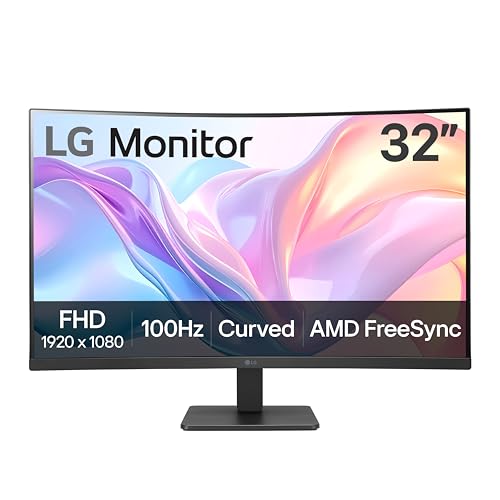
LG 32" Curved 100Hz FHD Monitor
Best for: Casual gaming and media on a large screen
- Screen Size
- 32-Inch
- Resolution
- 1920x1080
- Refresh Rate
- 100Hz
- Sync Technology
- AMD FreeSync
- Connectivity
- HDMI
- Dimensions
- 9.2 × 27.9 × 20.2 inches
View on Amazon: LG 32" Curved 100Hz FHD Monitor Affiliate link
This 32-inch curved monitor offers a 1920x1080 resolution and a 100Hz refresh rate. It uses an IPS panel for color accuracy and includes AMD FreeSync for smoother gameplay. The stand allows for tilt adjustments to improve viewing comfort. Reader Mode reduces blue light for longer sessions. You get a large screen with basic connectivity options. It suits casual users who prioritize screen size and smooth motion over high pixel density.
Pros
- 32-inch curved display for immersive viewing
- 100Hz refresh rate reduces motion blur
- AMD FreeSync for fluid gaming
- Reader Mode for eye comfort
- Tilt-adjustable ergonomic stand
Cons
- 1920x1080 resolution on a 32-inch screen results in lower pixel density
- Only HDMI connectivity available
- No USB-C or DisplayPort listed
Good fit if
- You want a large screen for casual gaming or media
- You prefer a curved display for immersion
- You need a monitor with a tilt-adjustable stand
Skip if
- You require high pixel density for detailed work
- You need multiple connection types like USB-C
- You are looking for a 4K resolution
Verdict: LG 32-inch Curved 100Hz FHD Monitor provides a spacious and smooth visual experience for casual use. It fits buyers who value screen real estate and motion clarity over sharpness and connectivity variety.

LG 27-inch QHD 100Hz IPS Monitor
Best for: Sharp 1440p visuals and USB-C connectivity
- Screen Size
- 27-inch
- Resolution
- 2560 x 1440
- Refresh Rate
- 100Hz
- Panel Type
- IPS
- Response Time
- 5ms (GTG)
- Connectivity
- HDMI, USB Type-C
View on Amazon: LG 27-inch QHD 100Hz IPS Monitor Affiliate link
This LG monitor offers a 27-inch QHD (2560 x 1440) IPS display with a 100Hz refresh rate. It provides sharp visuals and smooth motion for gaming and work. The panel covers up to 99% of the sRGB color gamut and supports HDR10. You get USB Type-C connectivity with 15W power delivery. Reader Mode and Flicker Safe features help reduce eye strain during long sessions.
Pros
- 27-inch QHD (2560 x 1440) IPS panel
- 100Hz refresh rate with 5ms response time
- 99% sRGB color gamut and HDR10 support
- USB Type-C with 15W power delivery
Cons
- 5ms response time is slower than high-end gaming monitors
- 15W USB-C power delivery is low for laptops
- No built-in speakers listed in specifications
Good fit if
- You want higher resolution than FHD for productivity
- You need USB-C connectivity for a single-cable setup
- You prefer IPS color accuracy for creative work
Skip if
- You require a 144Hz or higher refresh rate
- You need a 32-inch or larger screen
- You want a curved display for immersion
Verdict: LG 27-inch QHD 100Hz IPS Monitor is ideal for users who prioritize sharp 1440p visuals and color accuracy over high refresh rates. It suits those who need USB-C connectivity for simplified desk setups.
Specifications side by side
| Spec | LG 32" Curved 100Hz FHD Monitor | LG 27-inch QHD 100Hz IPS Monitor |
|---|---|---|
| Screen Size | 32-Inch | 27-inch |
| Resolution | 1920x1080 | 2560 x 1440 |
| Refresh Rate | 100Hz | 100Hz |
| Panel Type | not stated | IPS |
| Response Time | not stated | 5ms (GTG) |
| Sync Technology | AMD FreeSync | not stated |
| Connectivity | HDMI | HDMI, USB Type-C |
| Dimensions | 9.2 × 27.9 × 20.2 inches | 8.46 × 24.1 × 17.9 inches |
| Weight | 11.3 pounds | 9.7 pounds |
| Color | Black | Black |
| Model | 32MR50C-B.AUSQ | 27U631A-B.AUSQ |
Frequently asked questions
Is the LG 32-inch monitor curved or flat?
The LG 32-inch Curved 100Hz FHD Monitor features a curved display. This design wraps slightly around your field of view, which can enhance immersion for casual gaming and media consumption. It is not a flat panel, so you get that specific ergonomic benefit if you prioritize screen real estate.
Does the LG 27-inch model have USB-C connectivity?
Yes, the LG 27-inch QHD 100Hz IPS Monitor includes USB-C connectivity. This port allows you to connect devices with a single cable, simplifying your desk setup by potentially handling data and power delivery alongside the video signal. The 32-inch model only lists HDMI ports.
Which monitor offers better resolution for sharp text?
The LG 27-inch QHD 100Hz IPS Monitor offers better resolution for sharp text. It displays at 1440p, providing higher pixel density than the 32-inch model. The 32-inch version runs at 1920x1080 (FHD), which results in lower pixel density due to its larger physical size.
Do both monitors support FreeSync technology?
Both monitors support AMD FreeSync technology. This feature helps reduce screen tearing and stuttering by synchronizing the monitor's refresh rate with the graphics card's frame output. You get smooth motion on both the 32-inch FHD and the 27-inch QHD models during gameplay.
Which monitor is lighter and easier to mount?
The LG 27-inch QHD 100Hz IPS Monitor is lighter at 9.7 pounds. The 32-inch Curved model weighs 11.3 pounds. If you plan to use a VESA mount or move the display frequently, the smaller 27-inch unit requires less robust mounting hardware due to its lower weight.
Is the 32-inch monitor suitable for competitive gaming?
The 32-inch monitor is best for casual gaming rather than high-level competitive play. It offers a 100Hz refresh rate and FreeSync, but its FHD resolution on a large screen may lack the pixel clarity some pros prefer. The 27-inch QHD option provides sharper visuals for fast-paced titles.
What panel type does the 27-inch LG monitor use?
The LG 27-inch QHD 100Hz IPS Monitor uses an IPS panel type. IPS technology generally offers better color accuracy and wider viewing angles compared to other panel types. This makes it ideal for users who prioritize visual fidelity and color reproduction in their workflow or media consumption.