LG or AOC? Ultrawide Monitors Compared in 2026
As an Amazon Associate we earn from qualifying purchases. Links on this page are affiliate links.
This LG vs AOC ultrawide monitor comparison highlights two distinct approaches to display technology. Both units offer high refresh rates for smooth motion, but they target different workflows. The LG focuses on color accuracy and multitasking with an IPS panel, while the AOC prioritizes contrast and gaming performance using Mini-LED. You need to decide if you value precise color reproduction or deep blacks and higher resolution. The specs below break down the practical differences between these two monitors.
Key differences
| Aspect | LG 24-Inch 120Hz IPS Monitor | AOC 27-Inch Mini-LED 1440p Gaming Monitor |
|---|---|---|
| Screen Size | 24" | 27" |
| Resolution | 1920 x 1080 | 2560 x 1440 |
| Panel Type | IPS | VA with Mini-LED |
| Refresh Rate | 120Hz | 180Hz |
| Connectivity | HDMI | DP 1.4 |
| Sync Technology | Dynamic Action Sync | Adaptive-Sync |
Which one should you choose?
Choose LG 24-Inch 120Hz IPS Monitor if
- You need a compact 24-inch display for limited desk space.
- You prioritize wide viewing angles and accurate color for creative work.
- You want a monitor that supports multitasking layouts via software.
Choose AOC 27-Inch Mini-LED 1440p Gaming Monitor if
- You prefer higher resolution and sharper image detail.
- You want deeper blacks and higher contrast for gaming or media.
- You need a faster refresh rate for competitive gaming.
Verdict: The LG 24U411A-B is the better choice for productivity and general use due to its IPS panel and compact size. The AOC Q27G3XMN suits gamers who want higher resolution, contrast, and speed. Your decision depends on whether you value color accuracy and space or visual impact and performance.
LG vs AOC Monitor Specs
Screen size
The AOC Q27G3XMN features a 27-inch display, providing a larger canvas for your content. In contrast, the LG 24U411A-B offers a 24-inch screen. The 27-inch panel on the AOC allows for more screen real estate, which can be beneficial for gaming immersion or fitting more windows on your desktop. The LG’s 24-inch size is more compact, which may suit smaller desks or users who prefer a closer viewing distance. You should choose the AOC if you want maximum visibility, or the LG if space is limited.
Resolution
Resolution determines image sharpness and clarity. The AOC monitor delivers a QHD resolution of 2560x1440 pixels. The LG model sticks to Full HD with 1920x1080 pixels. The higher pixel count on the AOC results in a sharper image with finer details, especially noticeable on a larger 27-inch panel. The LG’s lower resolution is adequate for standard tasks but will appear less crisp compared to the AOC. If you prioritize text clarity and detailed graphics, the AOC’s 1440p output is the superior choice over the LG’s 1080p display.
Refresh rate
Both monitors support high refresh rates for smoother motion. The AOC Q27G3XMN operates at 180Hz, achieved via overclocking through DisplayPort 1.4. The LG 24U411A-B runs at a solid 120Hz. The AOC’s 180Hz rate provides faster frame transitions, which is advantageous for competitive gaming where every millisecond counts. The LG’s 120Hz is still smooth for general use and casual gaming. You will notice a difference in fluidity with the AOC, making it the better option for high-speed action.
Panel type
Panel technology affects color accuracy and viewing angles. The LG uses an IPS panel, known for consistent colors and wide viewing angles. The AOC utilizes a VA panel with Mini-LED backlighting. VA panels typically offer higher contrast ratios, producing deeper blacks and brighter whites, enhanced here by 336 dimming zones. The LG’s IPS panel is ideal if you need accurate colors from various angles. The AOC’s Mini-LED VA panel is better for dark room viewing and high contrast imagery.
Connectivity
Connection options vary between the two units. The LG 24U411A-B lists HDMI as its primary connectivity feature. The AOC Q27G3XMN includes DisplayPort 1.4 to support its 180Hz overclocked refresh rate. If you are connecting a console or a PC with limited DisplayPort outputs, the LG’s HDMI port is convenient. However, for a PC setup requiring the highest bandwidth for high refresh rates, the AOC’s DisplayPort 1.4 is necessary. You must check your source device’s output ports to ensure compatibility.
Which ultrawide monitor fits you best
Competitive gamers needing speed
The AOC Q27G3XMN delivers a 180Hz refresh rate and 1ms GtG response time. This combination ensures fluid motion and minimal ghosting during fast-paced gameplay. The Mini-LED backlight with 336 dimming zones provides true blacks and bright whites, enhancing visual clarity in dark scenes for a competitive edge.
Office workers valuing multitasking
The LG 24U411A-B includes a Switch app that splits the screen into up to six sections. This feature helps you manage multiple windows efficiently. The 120Hz refresh rate reduces motion blur for smoother scrolling, while the 99% sRGB coverage ensures accurate colors for documents and web browsing tasks.
Content creators seeking color accuracy
The AOC Q27G3XMN offers a 134% sRGB color gamut and VESA DisplayHDR 1000 certification. These specs allow for vivid, rich imagery with diverse contrast. The QHD resolution provides sharp details, making it suitable for editing photos or videos where precise color reproduction and high dynamic range are essential.
Users with limited desk space
The LG 24U411A-B is smaller and lighter, measuring 21.2 inches wide and weighing 7.1 pounds. Its ultra-slim bezels and floating stand design create a clean look. This compact footprint fits easily on smaller desks, while the tilt-adjustable stand allows for comfortable viewing angles without taking up much room.
The products compared

LG 24-Inch 120Hz IPS Monitor
Best for: Compact 24-inch setups needing 120Hz speed
- Screen Size
- 24"
- Resolution
- 1920 x 1080
- Refresh Rate
- 120Hz
- Panel Type
- IPS
- Response Time
- 1ms MBR
- Connectivity
- HDMI
View on Amazon: LG 24-Inch 120Hz IPS Monitor Affiliate link
The LG 24U411A-B is a 24-inch Full HD IPS monitor designed for clarity and speed. It features a 120Hz refresh rate and 1ms Motion Blur Reduction for smooth visuals. HDR10 support and 99% sRGB coverage ensure accurate colors. The 3-side borderless design fits well in dual setups. This monitor suits users who prioritize a clean workspace and responsive performance over high resolution.
Pros
- 120Hz refresh rate for fluid motion
- 1ms Motion Blur Reduction for crisp gameplay
- 99% sRGB color gamut coverage
- 3-side virtually borderless design
Cons
- Full HD resolution limits detail on larger screens
- Only HDMI connectivity available
- Tilt-only stand adjustment
Good fit if
- You need a compact monitor for a tight desk space
- You want a borderless look for a dual-monitor setup
- You prefer 120Hz smoothness over 4K resolution
Skip if
- You require 4K resolution for detailed work
- You need USB-C or DisplayPort connectivity
- You want height or swivel stand adjustments
Verdict: LG 24U411A-B 24-inch 120Hz IPS Monitor delivers solid speed and color for its size. It fits users who value a clean, borderless design and 120Hz responsiveness in a compact 24-inch form factor.
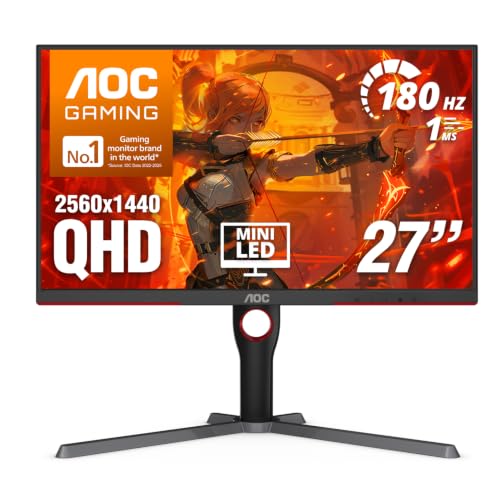
AOC 27-Inch Mini-LED 1440p Gaming Monitor
Best for: Fast-paced gaming with high contrast and HDR
- Screen Size
- 27 Inch
- Resolution
- 2560x1440
- Refresh Rate
- 180Hz
- Response Time
- 1ms GtG
- Sync Technology
- Adaptive-Sync
- Connectivity
- DP 1.4, HDMI 2.1, USB 3.2
View on Amazon: AOC 27-Inch Mini-LED 1440p Gaming Monitor Affiliate link
This AOC monitor features a 27-inch VA panel with 2560x1440 resolution and 180Hz refresh rate. It uses Mini-LED backlighting with 336 dimming zones for high contrast and VESA DisplayHDR 1000 certification. The 1ms GtG response time and Adaptive-Sync support smooth gaming. It suits players who want sharp visuals and fast motion handling in a compact 27-inch frame.
Pros
- 2560x1440 QHD resolution on a 27-inch screen
- 180Hz refresh rate via DisplayPort 1.4
- 336 Mini-LED dimming zones for deep blacks
- VESA DisplayHDR 1000 certification
- 1ms GtG response time
Cons
- VA panel may show slower pixel response in dark scenes compared to IPS
- No mention of USB hub connectivity
- Heavier build at 15.6 pounds
Good fit if
- You want high contrast and HDR performance in a 27-inch size
- You prioritize fast refresh rates and low input lag
- You play fast-paced games requiring precise tracking
Skip if
- You need a larger 32-inch or ultrawide display
- You prefer IPS panels for wider viewing angles
- You require built-in USB connectivity for peripherals
Verdict: AOC 27-inch 180Hz Mini-LED delivers sharp QHD visuals and high contrast for gamers who value speed and HDR performance in a compact form factor.
Specifications side by side
| Spec | LG 24-Inch 120Hz IPS Monitor | AOC 27-Inch Mini-LED 1440p Gaming Monitor |
|---|---|---|
| Screen Size | 24" | 27 Inch |
| Resolution | 1920 x 1080 | 2560x1440 |
| Refresh Rate | 120Hz | 180Hz |
| Panel Type | IPS | not stated |
| Response Time | 1ms MBR | 1ms GtG |
| Sync Technology | not stated | Adaptive-Sync |
| Connectivity | HDMI | DP 1.4, HDMI 2.1, USB 3.2 |
| Size | 24 Inch | 27" 180Hz Mini-LED |
| Dimensions | 8.7 × 21.2 × 16.4 inches | 10.2 × 23.8 × 20.9 inches |
| Weight | 7.1 pounds | 15.6 pounds |
| Color | Black | Black |
| Model | 24U411A-B.AUSQ | Q27G3XMN |
Frequently asked questions
Which monitor is better for gaming, the LG or the AOC?
The AOC Q27G3XMN is the better choice for gaming. It features a 180Hz refresh rate and Mini-LED backlighting. This setup delivers high contrast and sharp QHD visuals. The LG 24U411A-B focuses on general use with a 120Hz IPS panel. Gamers who need speed and HDR performance will prefer the AOC model.
Does the LG ultrawide monitor support high refresh rates?
Yes, the LG 24U411A-B supports a 120Hz refresh rate. This provides smooth motion for everyday tasks and lighter gaming. It uses an IPS panel for consistent color viewing angles. While not as fast as the AOC, 120Hz is sufficient for users who prioritize a clean design and solid responsiveness in a compact size.
How does the screen size compare between these two brands?
The AOC offers a larger 27-inch display, while the LG provides a 24-inch screen. The 27-inch AOC panel gives you more space for multitasking and immersive gaming. The 24-inch LG is more compact, fitting easily into smaller desk setups. Your choice depends on whether you need extra screen real estate or a smaller footprint.
What panel type does the LG monitor use?
The LG 24U411A-B uses an IPS panel. IPS technology is known for accurate colors and wide viewing angles. This makes it suitable for content creation and general productivity. The AOC Q27G3XMN uses Mini-LED technology, which prioritizes contrast and brightness over the color consistency typical of standard IPS panels.
Is the AOC monitor suitable for fast-paced games?
Yes, the AOC Q27G3XMN is designed for fast-paced gaming. It features a 180Hz refresh rate to ensure fluid motion. The Mini-LED backlight enhances visual clarity in dark scenes. These specs help reduce ghosting and provide a competitive edge. If you play shooters or racing games, this model offers the speed and clarity you need.
Which monitor has better connectivity options?
The LG 24U411A-B explicitly lists HDMI connectivity. This standard port connects easily to most computers and consoles. The AOC Q27G3XMN data does not specify its port types in the provided attributes. You should check the AOC manual for specific port details if connectivity is a primary concern for your setup.
Can I use the LG monitor for compact setups?
Yes, the LG 24U411A-B is ideal for compact setups. It measures 21.2 inches in width and weighs only 7.1 pounds. Its small form factor fits well on smaller desks. The borderless design also contributes to a clean look. If space is limited, this LG model offers the speed and features you need without taking up much room.