Sceptre 32-Inch QHD 210Hz USB-C Alternatives: 6 Similar Picks Compared
As an Amazon Associate we earn from qualifying purchases. Links on this page are affiliate links.
You are looking for Sceptre 32 inch 2k qhd 2560 alternatives that match the core specifications of the Sceptre E325B-QW200D. This monitor delivers a 2560 x 1440 resolution on a 32-inch VA panel with a 210Hz refresh rate and 1ms blur reduction. It includes USB-C connectivity for versatile device linking and offers 115% sRGB color coverage. The built-in speakers and AMD FreeSync Premium support add practical value for gaming and daily use.
However, you might prefer a different panel type, a curved design, or a different resolution. Some buyers prioritize higher pixel density for productivity, while others seek faster refresh rates for competitive gaming. Others may need USB-C for laptop docking without the high refresh rate. We selected these 6 alternatives because their specs overlap with the original. Each option shares the 32-inch size but varies in resolution, panel technology, or connectivity. This list helps you compare the exact features that matter to your setup.
Our top pick: Sceptre 32-Inch QHD 210Hz USB-C Monitor.
Comparing Similar 32-Inch QHD Alternatives
Samsung 32-Inch ViewFinity QHD Monitor
The Samsung ViewFinity S6 keeps the 32-inch QHD size but drops the refresh rate to 100Hz. You trade the 210Hz speed of the Sceptre for a panel designed for productivity rather than fast gaming. It retains USB-C connectivity and adds KVM switching for multi-device setups. This model is heavier and taller, measuring 23 inches in height. If you prioritize screen real estate and cable management over high frame rates, this display fits your workflow. It lacks the gaming-focused blur reduction and color gamut specs found in the Sceptre, making it less ideal for competitive titles.
Samsung Odyssey G5 32-Inch Curved Monitor
The Samsung Odyssey G5 32-inch offers a curved QHD panel with a 165Hz refresh rate. You lose the USB-C port and the 210Hz top speed of the Sceptre, gaining immersion instead. The curve enhances the viewing experience for gaming but changes the geometry of your desk setup. It uses AMD FreeSync for tear-free performance. This monitor is slightly narrower and deeper due to the curve. It is a strong choice if you prefer curved screens and do not need USB-C connectivity. The lower refresh rate may feel less responsive for high-speed shooters compared to the 210Hz Sceptre.
KTC 32-Inch 240Hz Curved Gaming Monitor
The KTC 32-inch monitor jumps to a 240Hz refresh rate but drops the resolution to 1080p. You gain speed for fast-paced gaming but lose the sharpness of the Sceptre’s 2560 x 1440 panel. The curved design adds immersion, and the lower resolution allows for higher frame rates. This model lacks USB-C connectivity. It is heavier and wider, measuring 31.5 inches in length. Pick this option if you prioritize maximum frame rates and smooth motion over pixel density. The FHD resolution on a 32-inch screen will appear less detailed than the QHD Sceptre.
LG 32-Inch 4K IPS Monitor with USB-C
The LG 32-inch 4K IPS Monitor provides a significant resolution jump to 4K UHD. You sacrifice the 210Hz refresh rate for a standard 60Hz panel, making it unsuitable for high-speed gaming. The IPS panel offers different color characteristics compared to the Sceptre’s VA panel. It retains USB-C connectivity for convenient device linking. This monitor is taller and heavier, weighing 18.3 pounds. It is ideal for content creation and productivity tasks where sharpness matters more than speed. The lower refresh rate makes it a poor choice for competitive gaming compared to the Sceptre.
ViewSonic 32-Inch Curved 1440p Gaming Monitor
The ViewSonic 32-inch 1440p monitor matches the Sceptre’s QHD resolution but offers a 180Hz refresh rate. You lose the USB-C port and the 210Hz top speed, gaining a curved panel for immersion. It uses AMD FreeSync for smooth visuals. This model is slightly lighter and narrower than the Sceptre. It lacks the specific color gamut specs and blue-light shift technology mentioned for the Sceptre. It is a solid alternative for gamers who want QHD clarity and good speed without USB-C. The 180Hz rate is close to the Sceptre but falls short for those seeking the maximum refresh rate.
LG 32-Inch 4K IPS Monitor with USB-C
The LG 32UP83A-W is another 4K IPS option with USB-C connectivity. Like the other LG model, it drops to 60Hz, making it a productivity-focused display rather than a gaming monitor. You gain 4K sharpness but lose the high refresh rate and VA panel contrast of the Sceptre. The color accuracy is likely superior for creative work, but the low refresh rate hinders gaming performance. It is tall and heavy, weighing 18.3 pounds. This monitor suits users who need 4K clarity and USB-C convenience but do not require high frame rates. It is not a direct gaming alternative to the Sceptre.
Quick picks
Our 7 picks

Sceptre 32-Inch QHD 210Hz USB-C Monitor
Best for: High refresh rate gaming with USB-C connectivity
- Screen Size
- 32"
- Resolution
- 2560 x 1440
- Refresh Rate
- 210Hz
- Response Time
- 1ms BR
- Sync Technology
- AMD FreeSync Premium
- Connectivity
- HDMI, DisplayPort, USB Type-C
View on Amazon: Sceptre 32-Inch QHD 210Hz USB-C Monitor Affiliate link
This 32-inch monitor delivers 2560 x 1440 resolution with a 210Hz refresh rate and 1ms blur reduction response time. It features a VA panel covering 115% of the sRGB color gamut and includes USB-C connectivity. You get built-in speakers and AMD FreeSync Premium for smooth gameplay. The design includes a minimal bezel and VESA mounting support. It suits users needing high refresh rates and color accuracy in a compact form.
Pros
- 210Hz refresh rate via USB-C for smooth motion
- 115% sRGB color gamut for vibrant visuals
- Built-in speakers reduce desk clutter
- USB-C connectivity supports video and power
Cons
- VA panel may show slower ghosting than IPS
- HDMI ports limited to 144Hz max
- No HDR certification listed in specifications
Good fit if
- You need high refresh rates for competitive gaming
- You want USB-C connectivity for single-cable setups
- You prefer built-in audio to save desk space
Skip if
- You require native 4K resolution for detailed work
- You need IPS panel technology for wider viewing angles
- You rely on certified HDR performance for media
Verdict: Sceptre 32-inch QHD 210Hz USB-C Monitor offers a high refresh rate and color accuracy for gamers who value connectivity. It fits users who want a versatile display for both work and play without external speakers.
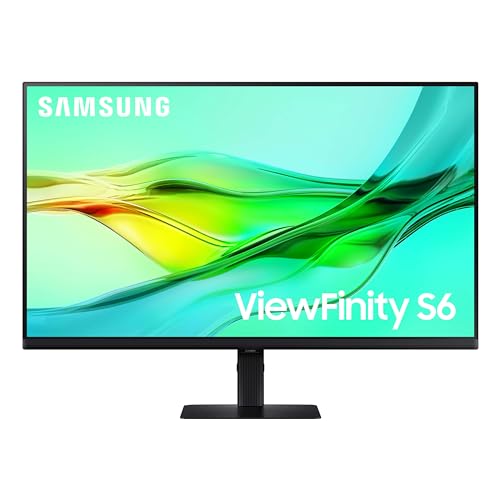
Samsung 32-Inch ViewFinity QHD Monitor
Best for: Productivity and multi-device connectivity
- Screen Size
- 32"
- Resolution
- 2560x1440
- Refresh Rate
- 100Hz
- Connectivity
- USB-C, LAN
- Size
- 32 Inch
- Dimensions
- 8.66 × 28.1 × 23 inches
View on Amazon: Samsung 32-Inch ViewFinity QHD Monitor Affiliate link
The Samsung ViewFinity S6 is a 32-inch QHD monitor with a 100Hz refresh rate. It features USB-C connectivity with 90W charging and a built-in LAN port. The display supports HDR10 and includes a KVM switch for managing two sources. This model suits users who need a versatile productivity screen with high resolution and flexible connectivity options for their workstation setup.
Pros
- 32-inch QHD (2560x1440) resolution
- USB-C port with 90W charging
- Built-in KVM switch for dual sources
- Tool-free Easy Setup Stand
- Height-adjustable and pivot-capable stand
Cons
- 100Hz refresh rate is lower than gaming-focused alternatives
- No mention of built-in speakers
- No mention of HDR10+ or higher dynamic range support
Good fit if
- You need a high-resolution display for detailed work
- You want to connect a laptop via a single USB-C cable
- You manage two computers and need a KVM switch
Skip if
- You require a 144Hz or higher refresh rate for competitive gaming
- You need a curved screen for immersive viewing
- You prefer a monitor with built-in speakers
Verdict: Samsung ViewFinity S6 32-inch QHD is a solid choice for professionals who prioritize resolution and connectivity over high refresh rates. It fits users who need a clear, detailed display with convenient USB-C and KVM features for a multi-device setup.

Samsung Odyssey G5 32-Inch Curved Monitor
Best for: Curved 1440p gaming at 165Hz
- Screen Size
- 32"
- Resolution
- 2560 x 1440
- Refresh Rate
- 165Hz
- Response Time
- 1ms MPRT
- Sync Technology
- AMD FreeSync
- Connectivity
- DisplayPort, HDMI
View on Amazon: Samsung Odyssey G5 32-Inch Curved Monitor Affiliate link
The Samsung Odyssey G5 32-Inch Curved QHD Monitor provides a 2560 x 1440 resolution paired with a 165Hz refresh rate. Its tight 1000R curvature wraps the display around your field of view, while AMD FreeSync and a 1ms MPRT response time keep fast scenes smooth. You get DisplayPort and HDMI inputs, making it well suited for PC gaming.
Pros
- 2560 x 1440 QHD resolution on a 32-inch panel
- 165Hz refresh rate with AMD FreeSync support
- Aggressive 1000R curvature matches peripheral vision
- 1ms MPRT response time reduces motion blur
Cons
- 165Hz refresh rate is lower than several 180Hz to 240Hz alternatives on the list
- Response time specification is 1ms MPRT rather than standard GtG
Good fit if
- You want a deep 1000R curved screen for gaming
- You run games at 1440p resolution up to 165Hz with AMD FreeSync
Skip if
- You want higher refresh rates exceeding 165Hz
- You prefer a flat display instead of a pronounced curve
Verdict: Samsung Odyssey G5 32-Inch Curved QHD Monitor gives you 1440p visuals and a deep 1000R curve at 165Hz for PC gaming setups. It suits players who prioritize tight curvature and smooth sync over higher 240Hz frame rates.

KTC 32-Inch 240Hz Curved Gaming Monitor
Best for: high-refresh 1080p competitive gaming
- Screen Size
- 32 Inch
- Resolution
- 1920x1080
- Refresh Rate
- 240Hz
- Panel Type
- HVA
- Response Time
- 1ms
- Sync Technology
- FreeSync, G-Sync Compatible
View on Amazon: KTC 32-Inch 240Hz Curved Gaming Monitor Affiliate link
This 32-inch curved display pairs a 240Hz refresh rate with a 1500R curvature and a 1920x1080 resolution. Its HVA panel delivers a 3500:1 contrast ratio along with 1ms response times and FreeSync support. If you prioritize maximum frame rates over fine pixel density, this monitor gives you rapid motion handling on an expansive screen.
Pros
- Fast 240Hz refresh rate and 1ms response time
- High 3500:1 contrast ratio on an HVA panel
- Immersive 1500R curve with 125% sRGB volume
- Supports both FreeSync and G-Sync compatibility
Cons
- Lower 1080p resolution provides coarse pixel density across 32 inches
- Stand adjustment is limited to tilt without height or swivel options
Good fit if
- You prioritize a 240Hz refresh rate for fast-paced competitive gaming.
- You prefer a curved 1500R screen with deep contrast for dark scenes.
Skip if
- You require 1440p or 4K resolution for sharp text and fine detail.
- You need height adjustment without mounting to a separate VESA arm.
Verdict: KTC 32-Inch 240Hz Curved Gaming Monitor suits competitive gamers who trade 1440p resolution for higher frame rates and deep contrast.

LG 32-Inch 4K IPS Monitor with USB-C
Best for: 4K productivity and media consumption
- Screen Size
- 32"
- Resolution
- 3840 x 2160
- Refresh Rate
- 60Hz
- Panel Type
- IPS
- Connectivity
- HDMI, DisplayPort, USB-C
- Size
- 32 Inch
View on Amazon: LG 32-Inch 4K IPS Monitor with USB-C Affiliate link
The LG 32UP83AK-W offers 4K UHD resolution on a 32-inch IPS panel. It runs at 60Hz with HDR10 support. USB-C connectivity provides display output and 60W charging. The stand adjusts height, tilt, and pivot. This monitor suits users prioritizing image clarity and color accuracy over high refresh rates for gaming.
Pros
- 4K UHD resolution for high detail
- IPS panel with wide viewing angles
- USB-C with 60W charging
- Ergonomic stand with height adjustment
- HDR10 support for dynamic visuals
Cons
- 60Hz refresh rate limits fast gaming
- No mention of FreeSync or G-Sync
- Heavier build at 18.3 pounds
Good fit if
- You need 4K clarity for work
- You want USB-C charging
- You prefer IPS color accuracy
Skip if
- You require high refresh rates
- You need a curved screen
- You want a lighter monitor
Verdict: LG 32-inch 4K 60Hz IPS Monitor delivers sharp 4K visuals and versatile connectivity. It fits users who value color accuracy and USB-C convenience over high-speed gaming performance.

ViewSonic 32-Inch Curved 1440p Gaming Monitor
Best for: 1440p high-refresh-rate curved PC gaming
- Screen Size
- 32 Inch
- Resolution
- 2560 x 1440
- Refresh Rate
- 180Hz
- Response Time
- 1ms (MPRT)
- Sync Technology
- AMD FreeSync Premium
- Connectivity
- HDMI, DisplayPort
View on Amazon: ViewSonic 32-Inch Curved 1440p Gaming Monitor Affiliate link
This 32-inch curved display pairs a 2560 x 1440 Quad HD resolution with a 180Hz refresh rate and a 1500R curvature. It features AMD FreeSync Premium to reduce screen tearing and a 1ms MPRT response time for fast transitions. You get DisplayPort and HDMI inputs alongside built-in eye care modes, making it suited for smooth, high-frame-rate PC gaming.
Pros
- 180Hz refresh rate with AMD FreeSync Premium
- 2560 x 1440 QHD resolution across a 32-inch panel
- 1500R curved screen for immersive viewing
- 1ms MPRT response time reduces motion blur
Cons
- 180Hz refresh rate is lower than 210Hz and 240Hz alternatives
- 1500R curve provides a shallower bend than 1000R displays
Good fit if
- You want a 1440p 180Hz refresh rate paired with AMD FreeSync Premium.
- You prefer a moderate 1500R curved screen for everyday gaming.
- You need dedicated visual presets for FPS, RTS, and MOBA titles.
Skip if
- You require higher refresh rates like 210Hz or 240Hz for competitive play.
- You prefer a tighter 1000R curvature for deeper wrap-around immersion.
Verdict: ViewSonic 32-Inch 1440p 180Hz Curved Monitor suits PC gamers seeking fluid 180Hz motion and 1440p detail on a moderate 1500R curved screen. It provides tear-free frame synchronization and versatile gaming presets for daily desktop play.
LG 32-Inch 4K IPS Monitor with USB-C
Best for: 4K content creation and color-accurate work
- Screen Size
- 32-inch
- Resolution
- 3840 x 2160
- Refresh Rate
- 60Hz
- Panel Type
- IPS
- Sync Technology
- AMD FreeSync
- Connectivity
- USB Type-C, HDMI, DisplayPort
View on Amazon: LG 32-Inch 4K IPS Monitor with USB-C Affiliate link
This LG monitor delivers 4K UHD resolution on a 32-inch IPS panel. It supports HDR10 and covers 95% of the DCI-P3 color gamut for vivid visuals. A USB-C port provides 60W power delivery alongside video and data. While it includes AMD FreeSync, the 60Hz refresh rate limits high-speed gaming. It suits professionals needing color accuracy and a clean desktop setup.
Pros
- 4K UHD (3840 x 2160) resolution
- IPS panel with 95% DCI-P3 color gamut
- USB-C with 60W power delivery
- HDR10 support for dynamic visuals
- AMD FreeSync reduces screen tearing
Cons
- 60Hz refresh rate limits fast gaming
- No mention of VESA DisplayHDR certification
- No USB-C upstream data port mentioned
Good fit if
- You need 4K resolution for detailed work
- You want USB-C connectivity for one-cable setups
- You prioritize color accuracy over high refresh rates
Skip if
- You require a high refresh rate for competitive gaming
- You need a curved display for immersion
- You want a budget-friendly 2K option
Verdict: LG 32UP83A-W 32-inch 4K IPS Monitor is ideal for creators who need precise colors and 4K clarity. It fits users who value USB-C convenience and do not need high frame rates for gaming.
Specifications side by side
| Spec | Sceptre 32-Inch QHD 210Hz USB-C Monitor | Samsung 32-Inch ViewFinity QHD Monitor | Samsung Odyssey G5 32-Inch Curved Monitor | KTC 32-Inch 240Hz Curved Gaming Monitor | LG 32-Inch 4K IPS Monitor with USB-C | ViewSonic 32-Inch Curved 1440p Gaming Monitor | LG 32-Inch 4K IPS Monitor with USB-C |
|---|---|---|---|---|---|---|---|
| Screen Size | 32" | 32" | 32" | 32 Inch | 32" | 32 Inch | 32-inch |
| Resolution | 2560 x 1440 | 2560x1440 | 2560 x 1440 | 1920x1080 | 3840 x 2160 | 2560 x 1440 | 3840 x 2160 |
| Refresh Rate | 210Hz | 100Hz | 165Hz | 240Hz | 60Hz | 180Hz | 60Hz |
| Panel Type | not stated | not stated | not stated | HVA | IPS | not stated | IPS |
| Response Time | 1ms BR | not stated | 1ms MPRT | 1ms | not stated | 1ms (MPRT) | not stated |
| Sync Technology | AMD FreeSync Premium | not stated | AMD FreeSync | FreeSync, G-Sync Compatible | not stated | AMD FreeSync Premium | AMD FreeSync |
| Connectivity | HDMI, DisplayPort, USB Type-C | USB-C, LAN | DisplayPort, HDMI | HDMI 2.0 x 2, DisplayPort 1.4, USB 2.0 | HDMI, DisplayPort, USB-C | HDMI, DisplayPort | USB Type-C, HDMI, DisplayPort |
| Size | 32 Inch | 32 Inch | 32" | 32 Inch | 32 Inch | 32 Inch | 32 Inch |
| Dimensions | 8.32 × 28.2 × 19.5 inches | 8.66 × 28.1 × 23 inches | 10.7 × 27.9 × 21 inches | 31.5 × 17.7 × 4.72 inches | 9.4 × 28.1 × 23.5 inches | 9 × 27.9 × 20.2 inches | 28.1 × 9.4 × 19.2 inches |
| Weight | 10.1 pounds | 15.9 pounds | not stated | 18.1 pounds | 18.3 pounds | 10.6 pounds | 18.3 pounds |
| Color | Machine Black | Black | Black | Black | White | Black | White/Silver |
| Model | E325B-QW200D | LS32D606UANXGO | LS32CG554ENXZA | H32S17F | 32UP83AK-W.AUS | VX3218C-2K | 32UP83A-W |
For those interested in smaller displays, see the prechen 27 inch 2k qhd alternatives for more options.
Frequently asked questions
Which alternative offers the highest refresh rate for fast-paced gaming?
The KTC 32-Inch 240Hz Curved Gaming Monitor provides the highest speed with a 240Hz refresh rate. It pairs this with FreeSync technology to reduce screen tearing. Note that this model uses a 1080p resolution, which is lower than the 1440p standard of the Sceptre. You get smoother motion but less pixel density.
Can I find a 32-inch QHD monitor with USB-C connectivity?
Yes, several options include USB-C ports for convenient device connection. The Samsung ViewFinity S6 and the LG 32UP83A-W both offer USB-C connectivity alongside DisplayPort and HDMI. The Samsung ViewFinity also features a KVM switch for multi-device setups. These models prioritize productivity and clean desk setups over high refresh rates.
Is there a curved QHD option similar to the Sceptre?
The ViewSonic VX3218C-2K is a curved 32-inch monitor with 1440p resolution. It delivers a 180Hz refresh rate and supports FreeSync for smooth gameplay. Unlike the Sceptre, it lacks USB-C connectivity. This model is designed for gamers who want immersion and speed without the need for laptop docking features.
Which monitor is best for 4K productivity and color accuracy?
The LG 32UP83A-W is ideal for work that requires precise colors and sharp text. It features a 4K UHD IPS panel with USB-C connectivity. The refresh rate is 60Hz, which is lower than gaming monitors. This setup suits creators and professionals who value resolution and color fidelity over high frame rates.
What is the difference between the Samsung ViewFinity and the Sceptre?
The Samsung ViewFinity S6 uses a 100Hz refresh rate, while the Sceptre runs at 210Hz. Both share a 32-inch QHD size and USB-C connectivity. The Samsung model includes a KVM switch for easier device switching. You choose the Sceptre for faster gaming or the Samsung for enhanced office productivity features.
Does the Samsung Odyssey G5 support variable refresh rates?
Yes, the Samsung Odyssey G5 supports AMD FreeSync technology. It features a 165Hz refresh rate on a curved 1440p panel. This monitor does not include USB-C connectivity. It is designed for players who prioritize an immersive curved screen and smooth motion over the connectivity options found in the Sceptre.
Are there white-colored options available for 32-inch monitors?
Yes, LG offers white-colored options in this size range. The LG 32UP83AK-W and the 32UP83A-W both come in a white finish. These are 4K IPS monitors with USB-C connectivity. They are suited for users who prefer a lighter aesthetic for their workspace while maintaining high resolution and color accuracy.