6 Best Alternatives to the Sceptre 32-Inch QHD 144Hz IPS (2026)
As an Amazon Associate we earn from qualifying purchases. Links on this page are affiliate links.
You might be looking for sceptre 32 inch qhd ips alternatives if the original Sceptre model does not fit your exact needs. That monitor offers a 32-inch QHD IPS panel with a 144Hz refresh rate and 1ms response time. It also includes height adjustment and 120% sRGB color coverage. These specs deliver sharp visuals and smooth motion for gaming. However, you may prefer a smaller screen, a higher refresh rate, or a different brand. Some users find the single high-speed port limiting or want certified adaptive sync technology.
We selected 6 alternatives that share key specifications with the original. All listed monitors use IPS panels and offer QHD resolution. They range from 27 to 32 inches, covering various size preferences. Some options provide higher refresh rates like 260Hz or 180Hz for faster gaming. Others focus on ergonomic stands or specific connectivity features like G-SYNC compatibility. Each choice overlaps with the original in panel type and clarity, ensuring you maintain image quality while adjusting other specs. This list helps you find a monitor that matches your specific requirements for size, speed, or features.
Our top pick: Sceptre 32-Inch QHD 144Hz IPS Monitor.
Comparing Alternatives to Sceptre
SANSUI 27-Inch 1440p 260Hz Fast IPS Monitor
The SANSUI 27-inch model replaces the 32-inch screen with a more compact 27-inch Fast IPS panel. It significantly increases the refresh rate to 260Hz, offering much higher frame throughput than the Sceptre’s 144Hz. You gain FreeSync support for smoother variable refresh rate performance. However, you give up the large display area and the height-adjustable stand found on the Sceptre. This monitor is lighter and has a smaller footprint. It suits players who prioritize extreme speed and color accuracy over screen real estate. If you sit closer to your desk, this 27-inch size may feel more natural than the wider 32-inch format.
LG 27-Inch QHD 144Hz IPS Monitor
The LG 27-inch monitor keeps the 144Hz refresh rate but downsizes the screen to 27 inches. It adds certified G-SYNC compatibility alongside FreeSync, providing robust sync technology that the Sceptre lacks. You get an ergonomic stand with tilt, swivel, and height adjustments similar to the Sceptre. The trade-off is the smaller viewing area. This model is heavier and slightly wider. It is ideal for competitive gamers who need certified smoothness and precise color accuracy. If you prefer a smaller, more manageable screen with top-tier sync features, this LG option is a strong upgrade over the Sceptre’s basic connectivity.
ViewSonic 32-Inch 1440p IPS Monitor
The ViewSonic 32-inch model maintains the large 32-inch form factor but drops the refresh rate to 75Hz. It retains the IPS panel and 1440p resolution. You lose the high-speed gaming capabilities of the Sceptre’s 144Hz refresh rate. This monitor is lighter and has a different stand design. It is designed for office productivity and casual media viewing rather than fast-paced gaming. If you do not need high frame rates and want a large canvas for spreadsheets or video playback, this ViewSonic is a suitable alternative. It sacrifices gaming performance for a focus on general desktop tasks and wide color coverage.
ASUS TUF 27-Inch 1440p 170Hz IPS Gaming Monitor
The ASUS TUF 27-inch monitor offers a 170Hz refresh rate, which is higher than the Sceptre’s 144Hz. It uses a 27-inch IPS panel with 1440p resolution. You gain G-SYNC compatibility for smoother gameplay. The trade-off is the smaller screen size and the lack of height adjustment on the stand. This monitor is significantly lighter and more compact. It fits users who want a balance of speed and accuracy without a large footprint. If you prefer a 27-inch display with enhanced sync technology and a slightly higher refresh rate, this ASUS model is a practical choice for competitive gaming.
LG 32-Inch UltraGear Curved QHD Gaming Monitor
The LG UltraGear 32-inch monitor increases the refresh rate to 180Hz, surpassing the Sceptre’s 144Hz. It features a curved QHD IPS panel instead of a flat one. You gain a more immersive viewing experience and higher frame rates. However, you lose the flat aesthetic and the height-adjustable stand of the Sceptre. This model is lighter and has a different stand design. It includes FreeSync support. It is best for gamers who value immersion and high refresh rates on a large screen. If you want a curved display with superior speed for action games, this LG option offers a distinct advantage over the flat Sceptre.
MSI 27-Inch 144Hz QHD IPS Monitor
The MSI 27-inch monitor matches the Sceptre’s 144Hz refresh rate and 1440p resolution on an IPS panel. It downsizes the screen to 27 inches. You gain DisplayPort and HDMI connectivity similar to the Sceptre. The trade-off is the smaller viewing area and the lack of height adjustment. This monitor is lighter and more compact. It is designed for eye comfort and standard gaming performance. It is ideal for users who prefer a 27-inch footprint with reliable specs. If you want a straightforward QHD gaming monitor without the large size or ergonomic adjustments of the Sceptre, this MSI model is a solid, streamlined alternative.
Quick picks
Our 7 picks

Sceptre 32-Inch QHD 144Hz IPS Monitor
Best for: Large screen gamers needing height adjustment
- Screen Size
- 32 inch
- Resolution
- 2560x1440
- Refresh Rate
- 144Hz
- Panel Type
- IPS
- Response Time
- 1ms
- Connectivity
- DisplayPort, HDMI
View on Amazon: Sceptre 32-Inch QHD 144Hz IPS Monitor Affiliate link
This 32-inch IPS monitor delivers QHD resolution with a 144Hz refresh rate and 1ms response time. It covers 120% of the sRGB gamut and supports HDR400 for improved contrast. The stand offers height adjustment for ergonomic positioning. You get two HDMI ports and one DisplayPort for connectivity. It is a solid choice for gamers who want a larger screen with smooth motion.
Pros
- 144Hz refresh rate for smooth motion
- 120% sRGB color gamut coverage
- Height-adjustable stand
- HDR400 support
- 1ms response time
Cons
- Only one HDMI port supports 144Hz
- Heavier build at 19.4 pounds
- No USB hub listed
Good fit if
- You want a 32-inch screen for immersive gaming
- You need height adjustment for your desk setup
- You prioritize color accuracy with 120% sRGB
Skip if
- You need more than one high-refresh HDMI port
- You prefer a lighter monitor under 15 pounds
- You require a USB hub for peripherals
Verdict: Sceptre 32" QHD 144Hz IPS Monitor fits users who want a large, adjustable display with strong color performance. It suits those who can manage the single high-speed HDMI port and do not need extra connectivity features.

SANSUI 27-Inch 1440p 260Hz Fast IPS Monitor
Best for: High refresh rate gaming on a 27-inch screen
- Screen Size
- 27"
- Resolution
- 2560 x 1440P
- Refresh Rate
- 260Hz
- Panel Type
- Fast IPS
- Response Time
- MPRT 1ms
- Sync Technology
- FreeSync Premium
View on Amazon: SANSUI 27-Inch 1440p 260Hz Fast IPS Monitor Affiliate link
This 27-inch Fast IPS monitor delivers a 2560x1440 resolution at up to 260Hz. It features a 1ms MPRT response time and FreeSync Premium support for smooth gameplay. The panel covers 98% DCI-P3 and 130% sRGB for accurate colors. You get two DisplayPort 1.4 and two HDMI 2.0 inputs. This setup suits gamers who prioritize high refresh rates and color depth on a standard 27-inch screen.
Pros
- 260Hz refresh rate on a Fast IPS panel
- 98% DCI-P3 and 130% sRGB color coverage
- 1ms MPRT response time with FreeSync Premium
- Four video inputs: two DisplayPort 1.4 and two HDMI 2.0
Cons
- 27-inch size is smaller than the 32-inch options in this list
- Brightness is limited to 320 nits, lacking HDR performance
- Stand only offers tilt adjustment, not height or swivel
Good fit if
- You want the highest possible refresh rate for competitive gaming
- You prefer a 27-inch screen over larger 32-inch displays
- You need wide color gamut coverage for creative work
Skip if
- You require a 32-inch display for better immersion
- You need HDR brightness levels above 320 nits
- You want a stand with full ergonomic adjustments
Verdict: SANSUI 27-Inch 260Hz WQHD Gaming Monitor is a high-speed option for players who value refresh rate over screen size. It fits those who want a compact 27-inch panel with strong color accuracy and minimal motion blur.

LG 27-Inch QHD 144Hz IPS Monitor
Best for: G-SYNC users wanting 27-inch QHD accuracy
- Screen Size
- 27-Inch
- Resolution
- 2560 x 1440
- Refresh Rate
- 144Hz
- Panel Type
- IPS
- Response Time
- 1ms (GtG)
- Sync Technology
- NVIDIA G-SYNC, FreeSync Premium
View on Amazon: LG 27-Inch QHD 144Hz IPS Monitor Affiliate link
The LG 27GL83A-B is a 27-inch QHD IPS gaming monitor with a 144Hz refresh rate. It features 1ms gray-to-gray response time and NVIDIA G-SYNC compatibility. The panel covers 99% of the sRGB color gamut. You get an adjustable stand for tilt, height, and pivot. This model suits gamers who prioritize smooth visuals and color accuracy over ultra-high refresh rates.
Pros
- NVIDIA G-SYNC Compatible certification
- 1ms (GtG) response time
- 99% sRGB color coverage
- Height, tilt, and pivot adjustable stand
Cons
- 144Hz refresh rate is lower than 200Hz+ alternatives
- 27-inch size is smaller than 32-inch options
- No built-in speakers listed in specifications
Good fit if
- You want verified G-SYNC compatibility
- You prefer a 27-inch screen size
- You need height and pivot adjustment
Skip if
- You require a 32-inch display
- You need refresh rates above 144Hz
- You want built-in speakers
Verdict: LG 27 Inch 144Hz QHD G-SYNC Monitor delivers certified smoothness and accurate colors for competitive gamers who value a 27-inch form factor and ergonomic stand adjustments.

ViewSonic 32-Inch 1440p IPS Monitor
Best for: everyday office productivity and casual media viewing
- Screen Size
- 32 Inch
- Resolution
- 2560 x 1440
- Refresh Rate
- 75Hz
- Panel Type
- SuperClear VA
- Response Time
- 4ms
- Sync Technology
- Variable Refresh Rate
View on Amazon: ViewSonic 32-Inch 1440p IPS Monitor Affiliate link
This 32-inch monitor provides a 2560 x 1440 QHD resolution on a SuperClear IPS panel running at a 75Hz refresh rate with AMD FreeSync. It delivers 1.07 billion colors, HDR10 decoding, and 250 nits of brightness. If you need 32-inch screen space for productivity and everyday multimedia rather than high-frame-rate gaming, this display offers dual HDMI 1.4 ports, DisplayPort, and built-in speakers.
Pros
- SuperClear IPS panel with 1.07 billion colors
- AMD FreeSync variable refresh rate up to 75Hz
- Dual integrated 2.5W speakers and audio out
- Standard 100 x 100 mm VESA mount pattern
Cons
- 75Hz refresh rate is lower than faster gaming displays
- Maximum brightness reaches 250 nits
- HDMI ports use the older 1.4 standard
Good fit if
- You prioritize a 32-inch 1440p workspace over high gaming frame rates.
- You want built-in stereo audio for study, calls, or video playback.
- You work with content that benefits from 1.07 billion colors.
Skip if
- You play fast-paced games requiring 144Hz or higher.
- You use your setup in bright ambient light requiring more than 250 nits.
Verdict: ViewSonic 32-Inch QHD 75Hz IPS Monitor pairs 1440p clarity with wide 1.07-billion-color coverage for general desktop tasks. It suits users who want a large work canvas and basic media playback without high-speed gaming specs.

ASUS TUF 27-Inch 1440p 170Hz IPS Gaming Monitor
Best for: NVIDIA gamers wanting 170Hz on 27 inches
- Screen Size
- 27"
- Resolution
- 2560 x 1440
- Refresh Rate
- 170Hz
- Panel Type
- IPS
- Response Time
- 1ms
- Sync Technology
- G-SYNC Compatible
View on Amazon: ASUS TUF 27-Inch 1440p 170Hz IPS Gaming Monitor Affiliate link
This 27-inch QHD monitor uses an IPS panel for 2560 x 1440 resolution. It supports a 170Hz refresh rate and 1ms response time. G-SYNC Compatible sync technology reduces screen tearing. The display includes ASUS ELMB to minimize motion blur. It offers HDMI 2.0 and DisplayPort 1.2 connections. This model suits gamers who want smooth visuals in a standard 27-inch form factor.
Pros
- 170Hz refresh rate for smooth motion
- IPS panel with 2560 x 1440 resolution
- G-SYNC Compatible for tear-free gameplay
- ASUS ELMB reduces ghosting and blur
- TÜV Rheinland-certified flicker-free and low blue light
Cons
- 27-inch screen is smaller than the 32-inch Sceptre alternative
- Only supports HDMI 2.0 and DisplayPort 1.2
- No height adjustment stand included in this specific model
Good fit if
- You prefer a 27-inch display over a larger 32-inch one
- You need G-SYNC Compatible sync technology for NVIDIA cards
- You want a 170Hz refresh rate for competitive gaming
Skip if
- You require a 32-inch screen size
- You need a monitor with a height-adjustable stand
- You are looking for a 240Hz or higher refresh rate
Verdict: ASUS TUF VG27AQ1A 27" 170Hz IPS delivers sharp 1440p visuals with fast 170Hz performance. It fits players who want G-SYNC compatibility and a compact 27-inch footprint.
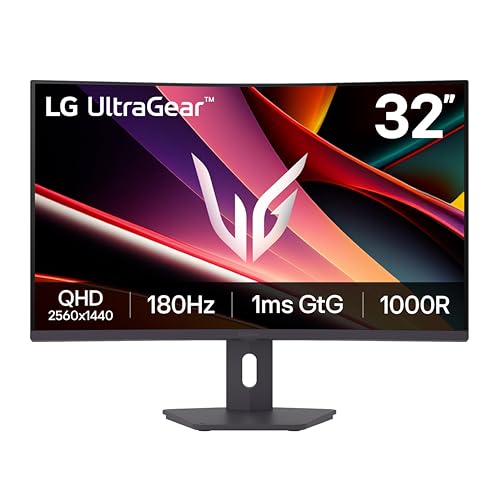
LG 32-Inch UltraGear Curved QHD Gaming Monitor
Best for: Gamers wanting large curved QHD screens
- Screen Size
- 32"
- Resolution
- 2560 x 1440
- Refresh Rate
- 180Hz
- Response Time
- 1ms GtG
- Sync Technology
- AMD FreeSync
- Connectivity
- HDMI, DisplayPort
View on Amazon: LG 32-Inch UltraGear Curved QHD Gaming Monitor Affiliate link
The LG 32G600A-B is a 32-inch QHD curved gaming monitor with an 180Hz refresh rate and 1ms response time. It features AMD FreeSync for tear-free gameplay and HDR10 support. The 1000R curvature and narrow bezels enhance immersion. This model suits you if you want a larger screen with high refresh rates and adjustable stand options for your battlestation.
Pros
- 180Hz refresh rate for smooth motion
- 32-inch QHD curved display
- 1ms GtG response time
- AMD FreeSync technology
- Height, tilt, and swivel adjustability
Cons
- Curved panel may not suit all desk setups
- No mention of USB hub connectivity
- Only HDR10 support, not higher HDR standards
Good fit if
- You prefer a larger 32-inch screen for gaming
- You want high refresh rates for competitive play
- You need ergonomic stand adjustments
Skip if
- You require a flat panel design
- You need USB-C connectivity
- You prefer 4K resolution over QHD
Verdict: LG 32G600A 32-inch 180Hz Curved delivers strong gaming performance with its high refresh rate and curved QHD display. It fits gamers who value immersion and ergonomic flexibility over flat panel aesthetics.

MSI 27-Inch 144Hz QHD IPS Monitor
Best for: Eye comfort and smooth QHD gaming
- Screen Size
- 27-inch
- Resolution
- 2560 x 1440
- Refresh Rate
- 144Hz
- Panel Type
- IPS
- Response Time
- 1ms
- Sync Technology
- Adaptive-Sync
View on Amazon: MSI 27-Inch 144Hz QHD IPS Monitor Affiliate link
The MSI PRO MP273QP E14 is a 27-inch QHD monitor with a 144Hz refresh rate and IPS panel. It includes Adaptive-Sync for smoother visuals and a 1ms response time. The display features TÜV certification and MSI EyesErgo technology to reduce eye strain. It connects via HDMI and DisplayPort. This monitor suits users seeking a balance of productivity clarity and casual gaming performance.
Pros
- 144Hz refresh rate for smoother motion
- IPS panel for accurate color reproduction
- TÜV certified display for eye health
- Adaptive-Sync technology reduces screen tearing
- Height-adjustable stand for ergonomic positioning
Cons
- Lower 75Hz option available in variations, but this model is 144Hz
- No mention of HDR support in specifications
- 27-inch size may be small for some ultrawide seekers
Good fit if
- You want a QHD display with a high refresh rate
- You need eye-care features like flicker-free technology
- You prefer a standard 16:9 aspect ratio
Skip if
- You require HDR certification for media consumption
- You need an ultrawide 21:9 aspect ratio
- You want a larger 32-inch screen size
Verdict: MSI PRO 27-inch 144Hz QHD IPS Monitor delivers solid QHD clarity and smooth motion for users who prioritize eye comfort and standard gaming performance over HDR or ultrawide formats.
Specifications side by side
| Spec | Sceptre 32-Inch QHD 144Hz IPS Monitor | SANSUI 27-Inch 1440p 260Hz Fast IPS Monitor | LG 27-Inch QHD 144Hz IPS Monitor | ViewSonic 32-Inch 1440p IPS Monitor | ASUS TUF 27-Inch 1440p 170Hz IPS Gaming Monitor | LG 32-Inch UltraGear Curved QHD Gaming Monitor | MSI 27-Inch 144Hz QHD IPS Monitor |
|---|---|---|---|---|---|---|---|
| Screen Size | 32 inch | 27" | 27-Inch | 32 Inch | 27" | 32" | 27-inch |
| Resolution | 2560x1440 | 2560 x 1440P | 2560 x 1440 | 2560 x 1440 | 2560 x 1440 | 2560 x 1440 | 2560 x 1440 |
| Refresh Rate | 144Hz | 260Hz | 144Hz | 75Hz | 170Hz | 180Hz | 144Hz |
| Panel Type | IPS | Fast IPS | IPS | SuperClear VA | IPS | not stated | IPS |
| Response Time | 1ms | MPRT 1ms | 1ms (GtG) | 4ms | 1ms | 1ms GtG | 1ms |
| Sync Technology | not stated | FreeSync Premium | NVIDIA G-SYNC, FreeSync Premium | Variable Refresh Rate | G-SYNC Compatible | AMD FreeSync | Adaptive-Sync |
| Connectivity | DisplayPort, HDMI | 2 x Display Port 1.4, 2 x HDMI 2.0 | HDMI, DisplayPort | HDMI 1.4, DisplayPort, audio out | HDMI 2.0 x2, DisplayPort 1.2 | HDMI, DisplayPort | HDMI, DisplayPort |
| Size | 32" IPS QHD | 27.01 | 27 Inch | 32 Inch | not stated | not stated | not stated |
| Dimensions | 9.75 × 28.3 × 23.7 inches | 5.63 × 27 × 19.3 inches | 8.2 × 29.2 × 20.6 inches | 30.3 × 4.92 × 20.1 inches | 17.9 × 24.2 × 8.43 inches | 10.2 × 27.7 × 22 inches | 8.93 × 24.2 × 16.3 inches |
| Weight | 19.4 pounds | 11.2 pounds | 20.3 pounds | 15 pounds | 11.9 pounds | 14.8 pounds | not stated |
| Color | Black | Black | Black | Black | BLACK | Black | Black |
| Model | E325B-QPN168 | ESA-G27F6Q PRO | 27GL83A-B | VS3225-2K | VG27AQ1A | 32G600A-B.AUSQ | PRO MP273QP E14 |
You can also look at outvue 32 inch wood burning alternatives for other options.
Frequently asked questions
Which alternative offers the highest refresh rate for fast-paced gaming?
The SANSUI 27-Inch model provides the highest refresh rate in this group. It features a 260Hz panel, which is significantly faster than the Sceptre’s 144Hz. This high speed helps reduce motion blur for competitive players. It also includes FreeSync support to keep frames synchronized with your graphics card.
Can I find a 32-inch IPS monitor with a higher refresh rate than the Sceptre?
Yes, the LG 32-Inch UltraGear Curved model offers a higher refresh rate. It delivers 180Hz on a 32-inch QHD curved display. This setup provides smoother motion than the standard 144Hz Sceptre. It also includes FreeSync technology to prevent screen tearing during intense gaming sessions.
Is there a better option for NVIDIA G-SYNC users?
The LG 27-Inch QHD model is certified for G-SYNC compatibility. It offers 144Hz refresh and accurate colors on a 27-inch IPS panel. This makes it ideal for NVIDIA users who want certified smoothness. It also includes both DisplayPort and HDMI connections for flexible setup options.
Which monitor is best if I want a compact 27-inch screen?
The ASUS TUF 27-Inch model is designed for a smaller footprint. It features a 170Hz refresh rate and 1440p resolution on an IPS panel. This compact size fits well on smaller desks. It also supports G-SYNC compatibility for smooth gameplay without the bulk of a larger 32-inch display.
Do any alternatives offer ergonomic stand adjustments like the Sceptre?
The LG 27-Inch QHD model is noted for its ergonomic stand adjustments. It allows you to customize the viewing angle and height. This feature helps reduce neck strain during long sessions. The monitor also maintains the 144Hz refresh rate and QHD clarity found in the Sceptre.
Is there a non-gaming option with a large screen?
The ViewSonic 32-Inch model is suitable for general desktop tasks. It features a 75Hz refresh rate and 1440p resolution. This monitor covers 1.07 billion colors for accurate media viewing. It is ideal for productivity and casual use rather than high-speed gaming.
Which monitor prioritizes eye comfort for long work sessions?
The MSI 27-Inch QHD IPS Monitor focuses on eye comfort. It delivers 144Hz performance with solid QHD clarity. The panel type helps reduce eye strain during extended use. It includes both DisplayPort and HDMI ports for versatile connectivity without the complexity of ultrawide formats.